
1. Per iniziare
1.1 Contenuto della confezione
Verifica che tutti gli articoli elencati di seguito siano inclusi nel tuo pacchetto:
- ANRAN G1 4G LTE Outdoor Security Camera
- Pannello solare
- Staffa di fissaggio
- Cavo di ricarica USB
- Viti di installazione e tasselli
- Pre-installed 4G SIM Card (with 100MB trial data)
- Scheda Micro SD da 32 GB (preinstallata)
- Strumento di espulsione della SIM

Image: The complete package contents for the ANRAN G1 camera.
1.2 Prodotto finitoview
The ANRAN G1 is a 4G LTE outdoor security camera designed for areas without Wi-Fi access. It features 2K QHD resolution, 360-degree pan/tilt functionality, color night vision, PIR human detection, two-way audio, and is powered by a solar panel with a built-in battery. The camera is IP66 weatherproof for outdoor use.

Immagine: Un generale view of the ANRAN G1 4G LTE Outdoor Security Camera, showcasingrazie al suo design e alle doppie antenne.
2. Impostazione
2.1 Carica iniziale
Before first use, fully charge the camera using a 5V1A or 5V2A power adapter. The camera only supports 5V power charging.
2.2 Installazione della scheda SIM e della scheda SD
The camera comes with a pre-installed 4G SIM card and a 32GB Micro SD card. To access the slots, gently open the protective cover at the bottom of the camera. Ensure the SIM card is correctly inserted and activated for cellular connectivity. The SD card can be upgraded to a maximum of 128GB.

Immagine: un primo piano view of the camera's SIM and SD card slots, indicating support for a 4G SIM card and a 32GB SD card (expandable up to 128GB).
2.3 Download dell'app e associazione del dispositivo
Download the official ANRAN app from your smartphone's app store. Follow the in-app instructions to add your camera. This typically involves pressing and holding the device power button to start the device, ensuring the SIM card is inserted and activated, and then scanning a QR code on the camera using the app. The camera's red and blue lights will flash during connection, and a tone will be heard upon successful scanning.
3. Linee guida per l'installazione
3.1 Montaggio della telecamera
Install the camera in a location that provides the desired monitoring view. Use the included mounting bracket and screws to securely attach the camera to a wall or tree. Ensure the camera is positioned to capture the area of interest effectively.

Image: The ANRAN G1 camera shown mounted on a tree, highlighting its solar panel for continuous power and wireless 4G connectivity.
3.2 Posizionamento dei pannelli solari
For optimal charging, install the solar panel in a sunny location where it receives direct sunlight for several hours each day. The solar panel provides continuous power to the camera's battery.
3.3 Considerazioni importanti
- Avoid facing the camera lens directly towards the sun to prevent overexposure and image quality issues.
- Avoid installing the camera in overly crowded or high-traffic areas if you wish to minimize frequent motion alerts.
- The camera operates on 3G/4G cellular networks, making it suitable for locations without Wi-Fi, such as farms, ranches, and construction sites.

Image: Illustrates the camera's versatility, showing it can be installed in various locations without Wi-Fi, such as construction sites, farms, ranches, and stables, using 3G/4G cellular connection.
4. Utilizzo della fotocamera
4.1 Vivere View e controllo PTZ
Access the live video feed through the ANRAN app. Use the pan (355°) and tilt (90°) controls within the app to adjust the camera's viewing angle remotely, providing a 360-degree panoramic view senza punti ciechi.

Image: Demonstrates the camera's 360-degree pan and tilt capabilities, providing a wide field of view per una sorveglianza completa.
4.2 Rilevamento del movimento e avvisi
The camera features PIR (Passive Infrared) human detection, which accurately identifies human movement and sends instant alerts to your smartphone. This minimizes false alarms caused by animals, insects, or environmental factors. You can also set up to 6 activity zones to monitor specific areas and reduce unwanted notifications.

Image: Shows the camera's PIR human detection feature, which focuses on human movement to reduce false alarms from animals or other non-human objects.

Image: Depicts instant notifications sent to a smartphone when motion is detected, allowing real-time monitoring.
4.3 Audio bidirezionale
The integrated microphone and speaker enable two-way audio communication. You can listen to the environment around the camera and speak through the camera using the app.
4.4 Visione notturna
The ANRAN G1 provides 2K QHD color night vision, enhanced by 4 spotlights, allowing for clear and detailed images even in complete darkness up to 15 meters.
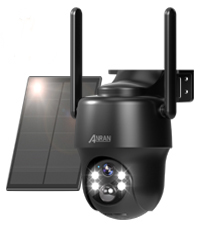
Image: Illustrates the camera's 4-spotlight color night vision, providing clear, full-color images even in low-light conditions up to 15 meters.
4.5 Registrazione e archiviazione
Motion-triggered events are recorded and saved to the pre-installed 32GB Micro SD card (expandable to 128GB). Cloud storage options are also available through the ANRAN app for additional backup and access.
4.6 Accesso multiutente
The camera supports multi-user sharing, allowing up to 5 users to view the live feed and receive alerts simultaneously. This feature enables family members or trusted individuals to monitor the property together.

Image: Illustrates the multi-user access feature, allowing up to 5 users to view the camera feed simultaneously and receive alerts.
5. Manutenzione
5.1 Resistenza alle intemperie
The ANRAN G1 camera is rated IP66, ensuring it is resistant to dust and water jets. This allows for reliable operation in various outdoor weather conditions, including rain and snow.

Image: Shows the camera operating effectively in various weather conditions like rain and snow, demonstrating its IP66 weather resistance.
5.2 Pulizia
Per mantenere prestazioni ottimali, pulire periodicamente l'obiettivo della fotocamera e il pannello solare con un panno morbido e asciutto.amp panno. Evitare l'uso di prodotti chimici aggressivi o materiali abrasivi che potrebbero danneggiare le superfici.
6. Risoluzione Dei Problemi
6.1 Problemi comuni
- Nessuna connessione: Ensure the SIM card is correctly inserted and activated, and that there is 4G LTE coverage in the installation area. Check the camera's power status.
- Scarsa qualità video: Verify the camera lens is clean and free from obstructions. Ensure adequate lighting for optimal image clarity.
- Falsi allarmi frequenti: Adjust the PIR detection sensitivity settings in the app. Consider setting activity zones to focus monitoring on critical areas.
- Batteria non in carica: Ensure the solar panel is installed in a location with sufficient direct sunlight. Check the connection between the solar panel and the camera.
6.2 Ripristino del dispositivo
If you encounter persistent issues, you may perform a factory reset. Locate the reset button (often near the SIM/SD card slot) and press it with the SIM ejector tool for approximately 5-10 seconds until you hear a confirmation sound or see the indicator lights change. This will restore the camera to its default settings.
7. Specifiche
| Marca | ANRAN |
| Nome del modello | G1 |
| Tecnologia di connettività | Cellulare (3G/4G LTE) |
| Risoluzione di acquisizione video | 2K (3MP) |
| Caratteristica speciale | Waterproof (IP66), Color Night Vision, PTZ, PIR Motion Detection, Two-Way Audio, Solar Powered |
| Fonte di alimentazione | Alimentato ad energia solare |
| Tipo di montaggio | Montaggio a parete |
| Magazzinaggio | Scheda Micro SD (fino a 128 GB), archiviazione cloud |
| Colore | Nero |
| Peso | 1.14 chilogrammi |
8. Garanzia e supporto
For warranty information, technical support, or any questions regarding your ANRAN G1 camera, please contact ANRAN customer service. Refer to the contact details provided on the product packaging or the official ANRAN websito.