
DATOUBOSS DN-03-2000W24V
Manuale utente dell'inverter di potenza a onda sinusoidale pura DATOUBOSS da 24 V a 230 V
Modello: DN-03-2000W24V
1. Introduzione
This manual provides detailed instructions for the safe and efficient operation of your DATOUBOSS 24V to 230V Pure Sine Wave Power Inverter. This device converts 24V DC power from batteries or vehicles into stable 230V AC power, suitable for a wide range of household and outdoor appliances. Please read this manual thoroughly before use and retain it for future reference.
2. Istruzioni di sicurezza
ATTENZIONE: la mancata osservanza di queste istruzioni di sicurezza può provocare scosse elettriche, incendi, lesioni gravi o morte.
- Ensure the inverter is connected to a 24V DC power source only. Connecting to an incorrect voltagpotrebbe danneggiare l'unità e i dispositivi collegati.
- Non esporre l'inverter ad acqua, pioggia, neve o spruzzi.
- Non utilizzare l'inverter se è caduto o è danneggiato.
- Assicurare una ventilazione adeguata attorno all'inverter. Non ostruire le prese d'aria di raffreddamento.
- Tenere i bambini lontani dall'inverter.
- Non aprire l'inverter casing. All'interno non ci sono parti riparabili dall'utente.
- Always connect the ground wire properly before operation.
- Scollegare l'inverter dalla fonte di alimentazione prima di eseguire qualsiasi operazione di manutenzione o pulizia.
The inverter is equipped with multiple protection functions for your safety and equipment protection:
- Basso volumetage Protezione
- Alto volumetage Protezione
- Protezione da cortocircuito
- Protezione contro il surriscaldamento
- Protezione da sovraccarico
- Protezione della connessione inversa
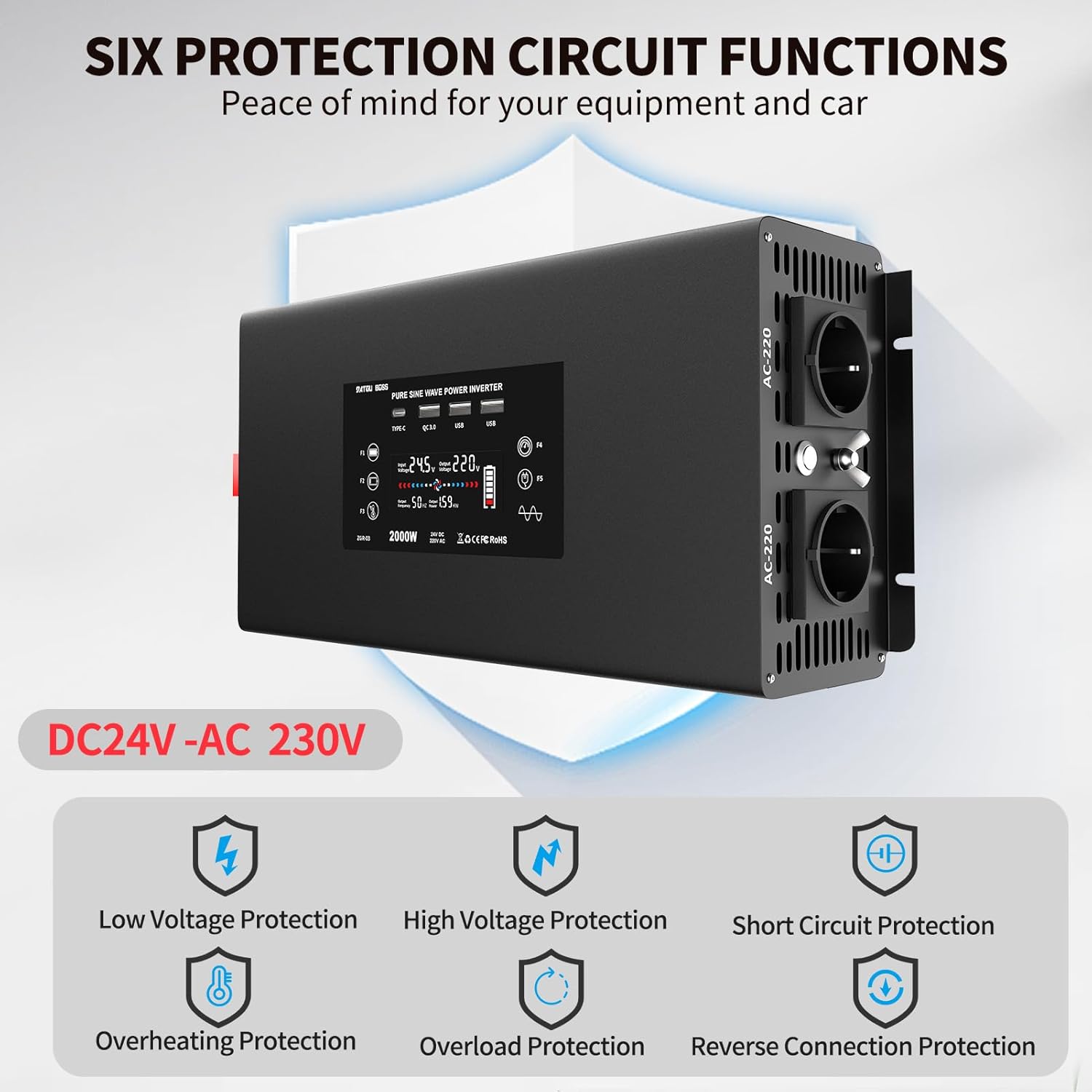
Figure 2.1: Visual representation of the six protection circuit functions.
3. Cosa c'è nella scatola
All'apertura della confezione, verificare che tutti i componenti siano presenti e integri:
- 1 inverter a onda sinusoidale pura da 2000 W
- 2 x Connection Cables (Red for Positive, Black for Negative)
- 1 x telecomando
- 1 x Manuale utente (questo documento)

Figure 3.1: The DATOUBOSS Pure Sine Wave Power Inverter and its included accessories.
4. Prodotto finitoview
The DATOUBOSS Pure Sine Wave Power Inverter is designed for efficient and stable power conversion. Key features include:
- Uscita onda sinusoidale pura: Fornisce un'alimentazione CA pulita e stabile, adatta per dispositivi elettronici sensibili.
- Uscita ad alta potenza: Converts 24V DC to 230V AC with a continuous output of 2000W and a peak power of 4000W.
- Porte di uscita multiple: Equipped with 2 EU AC outlets, 2 USB 5V/2.1A ports, 1 QC3.0 fast charging port, and 1 Type-C port.
- Sistema di raffreddamento intelligente: Features two intelligent fans that activate based on temperature and load, ensuring efficient heat dissipation and improved performance.
- Telecomando: Bluetooth-enabled remote control for convenient operation from a distance.
- Protezione completa: Built-in safeguards against overload, short circuit, high temperature, low voltage, alto volumetage, e collegamento inverso.
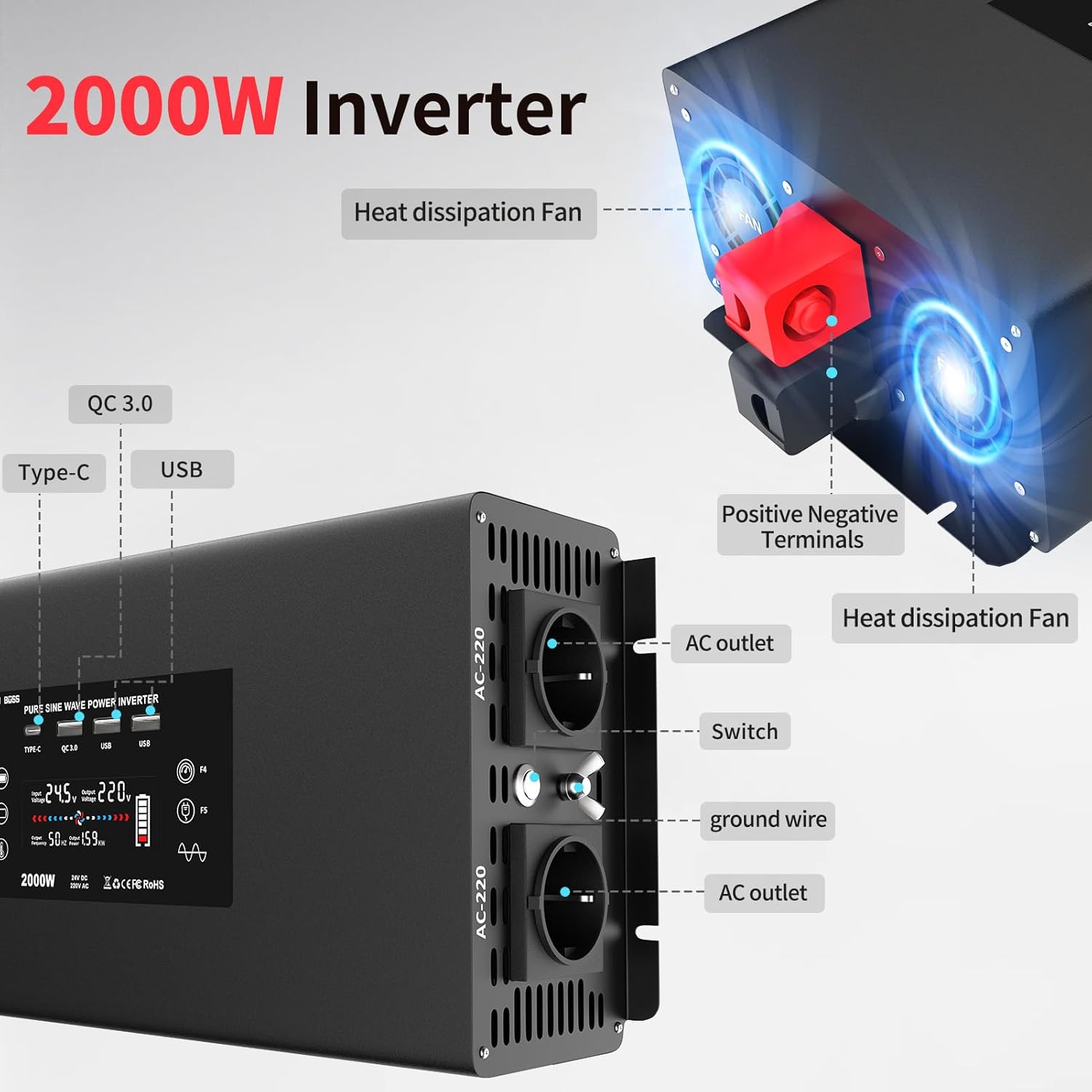
Figura 4.1: Frontale e laterale view highlighting AC outlets, USB ports, and cooling fans.

Figure 4.2: Illustration of the efficient heat dissipation system with dual fans.
The inverter's display provides real-time information on input voltage, volume di uscitatage, power consumption, and battery status.
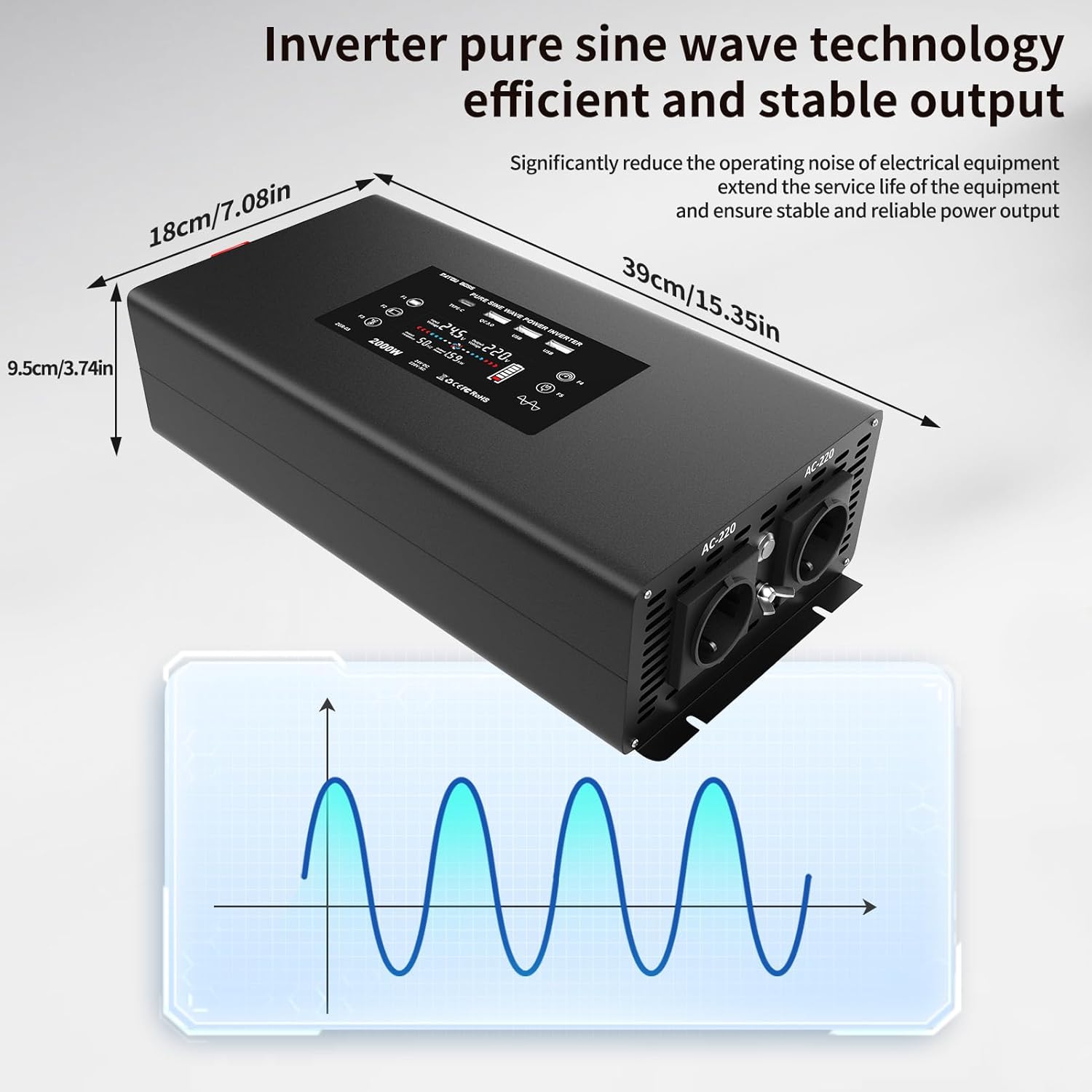
Figure 4.3: Inverter dimensions and a visual representation of pure sine wave output.
5. Configurazione e connessione
Follow these steps to properly set up and connect your DATOUBOSS Power Inverter:
- Preparare l'inverter: Posizionare l'inverter su una superficie stabile e piana, in un'area ben ventilata, lontano dalla luce solare diretta, da fonti di calore e dall'umidità.
- Connect DC Cables to Inverter:
- Unscrew the nuts on the positive (+) and negative (-) terminals of the inverter.
- Connect the red cable lug to the positive (+) terminal and the black cable lug to the negative (-) terminal.
- Tighten the nuts securely with a wrench to ensure a firm connection.
Video 5.1: Demonstration of connecting the DC cables to the inverter terminals.
- Connect DC Cables to Battery:
- Ensure the battery is a 24V DC battery.
- Connect the other end of the red cable to the positive (+) terminal of the battery.
- Connect the other end of the black cable to the negative (-) terminal of the battery.
- Stringere saldamente i collegamenti.
It is crucial to connect the positive to positive and negative to negative terminals correctly to avoid damage to the inverter and battery.
- Accensione: Once all connections are secure, press the power button on the inverter or use the remote control to turn on the unit. The display will illuminate, showing the current status.
Video 5.2: Oltreview of the inverter's internal components and connection process.
6. Istruzioni per l'uso
The DATOUBOSS inverter is designed for ease of use. Here’s how to operate it:
- Collegamento degli elettrodomestici CA:
- Plug your 230V AC appliances into the EU outlets on the inverter.
- Ensure the total power consumption of all connected appliances does not exceed the inverter's continuous output power (2000W).

Figura 6.1: Esamples of devices compatible with the inverter, including laptops, coffee machines, and more.
- Utilizzo delle porte USB e Type-C:
- Connect your USB-powered devices (e.g., smartphones, tablets) to the USB 5V/2.1A ports or the QC3.0 fast charging port.
- For devices supporting Type-C charging, use the dedicated Type-C port.
Video 6.2: Demonstration of charging a smartphone using the inverter's USB port and powering a heater.
- Funzionamento del telecomando:
- The included remote control allows you to turn the inverter ON and OFF from a distance.
- Press the "ON" button to activate the inverter.
- Press the "OFF" button to deactivate the inverter.
The Bluetooth protocol of the remote control offers better range and penetration compared to infrared remotes.
7. Manutenzione
Per garantire la longevità e le prestazioni ottimali del tuo inverter, segui queste linee guida per la manutenzione:
- Pulizia: Pulire regolarmente l'esterno dell'inverter con un panno asciutto e morbido. Non utilizzare detergenti liquidi o solventi.
- Ventilazione: Keep the cooling vents clear of dust and debris. Periodically check for any obstructions.
- Connessioni: Periodically check all electrical connections (DC cables to inverter and battery) to ensure they are tight and free from corrosion.
- Magazzinaggio: Se si conserva l'inverter per un periodo prolungato, scollegarlo dalla batteria e conservarlo in un luogo fresco e asciutto.
8. Risoluzione Dei Problemi
Se riscontri problemi con l'inverter, fai riferimento ai seguenti problemi comuni e alle relative soluzioni:
| Problema | Possibile causa | Soluzione |
|---|---|---|
| L'inverter non si accende. |
|
|
| Nessuna uscita CA. |
|
|
| Inverter beeps or shows error code. |
|
|
Se il problema persiste dopo aver provato queste soluzioni, contattare l'assistenza clienti DATOUBOSS.
9. Specifiche
| Caratteristica | Dettaglio |
|---|---|
| Numero di modello | DN-03-2000W24V |
| Ingresso volumetage | 24V CC |
| Volume di uscitatage | 230 V CA |
| Potenza continua | 2000 Watt |
| Potenza di picco | 4000 Watt |
| Forma d'onda di uscita | Onda sinusoidale pura |
| Uscita USB | 2x 5V/2.1A, 1x QC3.0 |
| Uscita di tipo C | 1x Type-C Port |
| Dimensioni del prodotto | Dimensioni: 39 x 18 x 9.5 cm |
| Peso | 3.89 chilogrammi |
| Applicazioni consigliate | Vehicle, Office, Home |
10. Garanzia e supporto
DATOUBOSS is committed to providing high-quality products and excellent customer service.
- Garanzia: Questo prodotto viene fornito con una garanzia di 24 mesi dalla data di acquisto.
- Resi: Approfitta della garanzia di reso incondizionata di 30 giorni.
- Assistenza clienti: For any questions, technical assistance, or warranty claims, please contact our 24/7 customer support.
For further information or support, please visit the official DATOUBOSS store or contact your retailer.
Ask a question about this manual
Ask about setup, troubleshooting, compatibility, parts, safety, or missing instructions. Manuals+ will review the question and use this page’s manual context to help answer it.