
Café CTD90DP4NW2
Manuale utente del forno a convezione da incasso intelligente Café™ Professional Series da 30"
Model: CTD90DP4NW2
Introduzione
This manual provides essential information for the safe and efficient operation, installation, and maintenance of your Café™ Professional Series 30" Smart Built-In Convection Double Wall Oven. Please read this manual thoroughly before using the appliance and retain it for future reference.

Figura 1: Fronte view of the Café Professional Series 30" Smart Built-In Convection Double Wall Oven.
Informazioni sulla sicurezza
Always adhere to local codes and ordinances. Ensure proper grounding and ventilation. Disconnect power before servicing. Refer to the installation instructions for detailed electrical requirements.
- Non conservare materiali infiammabili dentro o vicino al forno.
- Use oven mitts when handling hot items.
- Sorvegliare i bambini nelle vicinanze dell'apparecchio.
- Do not use water on grease fires; smother the fire or use a dry chemical/foam extinguisher.
Configurazione e installazione
This oven is designed for built-in installation. Ensure your cabinet cutout meets the specified dimensions for a proper fit. The oven is electric and requires appropriate electrical supply as per local codes.
Controlli pre-installazione
- Verify electrical supply matches oven requirements.
- Ensure cabinet opening dimensions are accurate.
- Confirm all packing materials are removed from the oven cavity.
SmartHQ App Connection
To utilize smart features, download the SmartHQ App on your smartphone. Follow the in-app instructions to connect your oven to your home Wi-Fi network. This enables remote control, software updates, and access to personalized features.

Figure 2: Oven installed in a kitchen cabinet, demonstrating its built-in design.
Istruzioni per l'uso
Your Café™ Double Wall Oven offers advanced cooking technologies for versatile meal preparation.
Pannello di controllo e display
The oven features a full-color display for easy navigation of settings and cooking modes. Use the touch interface to select desired functions.

Figure 3: Oven control panel display showing menu options.
Modalità di cottura
- Vera convezione europea con aria diretta: Utilizes a third heating element and a reversing fan for even heat distribution and superior cooking results.
- Nessuna frittura ad aria preriscaldata: Cook crispy foods without preheating, a basket, or a special tray.
- Modalità di cottura di precisione: Automatically track progress and adjust time/temperature for optimal results.
- Food Dehydrator: A dedicated setting for dehydrating fruits, vegetables, and making jerky.
- In-Oven Broiling: A flexible broiling element covers the full width of the drawer for even broiling.
Utilizzo della sonda di temperatura
Insert the precision temperature probe into the thickest part of the food. Connect the probe to the designated port inside the oven. The oven will monitor the internal temperature and alert you when the desired doneness is reached.
Telecamera da forno
Monitor your food's progress from your smartphone using the built-in in-oven camera. Access the live stream via the SmartHQ App without opening the oven door.
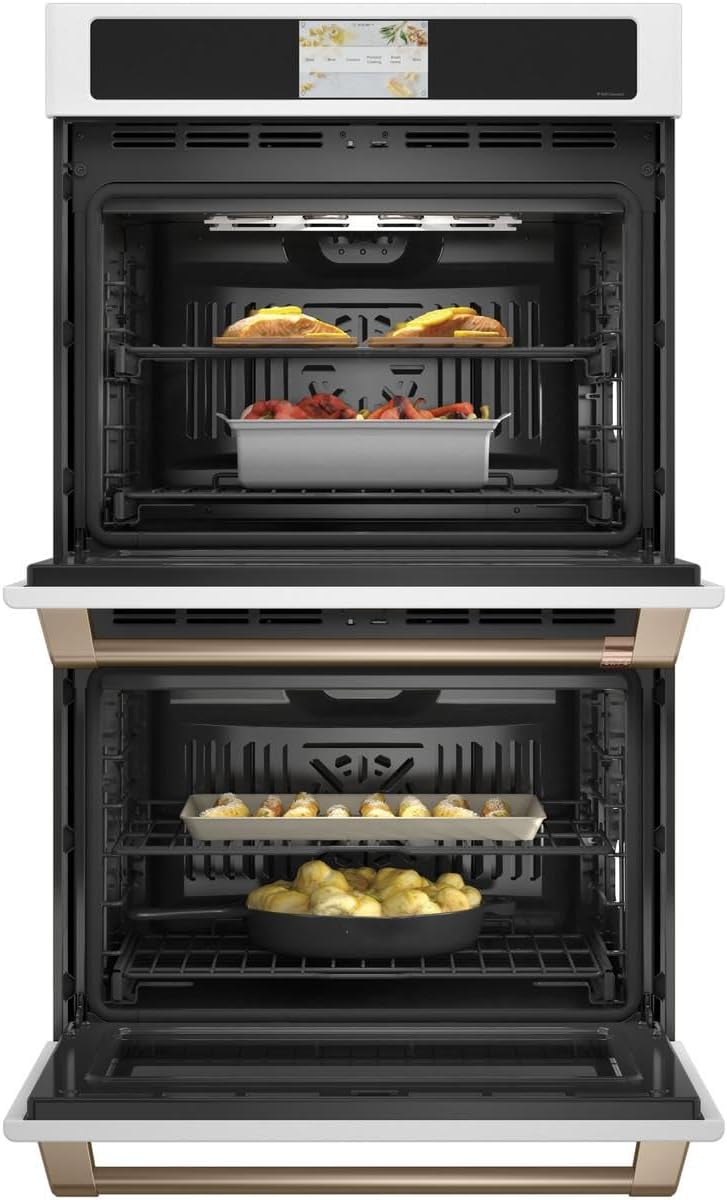
Figure 4: Oven interior with food, demonstrating cooking space.
Manutenzione e pulizia
Una pulizia e una manutenzione regolari garantiranno la longevità e le prestazioni ottimali del tuo forno.
Ciclo autopulente
The oven features a self-clean cycle that uses high temperatures to burn off food soils. Ensure all racks are removed unless they are specifically designed to remain during self-clean. The easy-glide, never-scrub racks can be left in during this cycle.

Figure 5: Empty oven interior, showing racks ready for cleaning or use.
Opzione di pulizia a vapore
For light soils, the steam clean option provides a quick and low-odor cleaning method. Follow the instructions on the display for initiating a steam clean cycle.
Pulizia esterna
Clean the exterior surfaces with a soft cloth and mild soap. Avoid abrasive cleaners that can damage the finish. For Matte White finish, use non-abrasive cleaners specifically designed for matte surfaces.
Risoluzione dei problemi
Prima di contattare l'assistenza, riview i seguenti problemi comuni e le relative soluzioni.
| Problema | Possibile causa | Soluzione |
|---|---|---|
| Forno non riscaldante | Nessuna alimentazione; l'interruttore automatico è scattato. | Controllare il collegamento del cavo di alimentazione; ripristinare l'interruttore automatico. |
| Cottura irregolare | Improper rack position; overloaded oven; dirty convection fan. | Refer to cooking guide for rack positions; avoid overcrowding; clean oven interior. |
| Il display non risponde | Problema software temporaneo; interruzione di corrente. | Turn off power at the circuit breaker for 5 minutes, then restore. |
| Problemi di connettività Wi-Fi | Password Wi-Fi errata; router troppo lontano; interferenza di rete. | Verify password; move router closer or use extender; check for other devices on network. |
Specifiche
Key specifications for the Café™ Professional Series 30" Smart Built-In Convection Double Wall Oven.
| Caratteristica | Dettaglio |
|---|---|
| Marca | Café™ |
| Numero di modello | CTD90DP4NW2 |
| Capacità | 10 piedi cubi (totale) |
| Tipo di installazione | Built-In, Wall Mount |
| Tipo di carburante | Elettrico |
| Modalità di cottura del forno | Convezione |
| Colore | Bianco opaco |
| Peso dell'articolo | 260 libbre |
| Caratteristiche speciali | Double Wall, Wi-Fi, In-Oven Camera, No Preheat Air Fry, Precision Cooking Modes, Food Dehydrator, Self-Clean, Steam Clean, Temperature Probe, Soft-Close Door |
Garanzia e supporto
For warranty information, please refer to the warranty card included with your appliance or visit the official Café Appliances website. For technical support or service, contact Café customer service.
Al momento non sono disponibili video ufficiali del prodotto per questo modello.
Documenti correlati - CTD90DP4NW2
 |
Café Minimal Series 30" Smart Built-In Twin Flex Single Wall Oven | CTS92DM2NS5 Explore the Café Minimal Series 30-inch Smart Built-In Twin Flex Single Wall Oven (CTS92DM2NS5) featuring True European Convection, dual oven capacity, WiFi connectivity, and a 7" touchscreen display. Learn about its features, specifications, and installation requirements. |
 |
Café Professional Series 30" Built-In Convection French Door Double Wall Oven | CTD90FP4NW2 Explore the features, specifications, and installation details for the Café™ Professional Series 30" Built-In Convection French Door Double Wall Oven (CTD90FP4NW2, CTD90FP3ND1, CTD90FP2NS1). Features true convection, smart connectivity, and customizable design. |
 |
Forno combinato Café™ da 30" a doppia parete con tecnologia a convezione e Advantium - CTC912P2NS1 Scopri il versatile forno combinato a doppia parete Café™ da 30" (CTC912P2NS1) con tecnologia Advantium®. Questo forno elettrico da incasso offre diverse modalità di cottura, tra cui convezione, microonde e cottura rapida, ed è progettato per preparare pasti veloci, sani e risultati perfetti. Include specifiche dettagliate e dimensioni di installazione. |
 |
Manuale d'uso del forno elettrico da incasso Café Direct Air Convection This owner's manual provides comprehensive instructions for the Café Direct Air Convection Built-In Electric Wall Oven, covering safety information, oven controls, cooking modes, care and cleaning, troubleshooting, and warranty details. Learn how to operate your Café oven efficiently and safely. |
 |
Cafe CTS90DM, CTS90DP, CTD90DM, CTD90DP Owner's Manual: Direct Air Convection Built-In Electric Wall Oven This owner's manual provides comprehensive instructions and safety information for the Cafe CTS90DM, CTS90DP, CTD90DM, and CTD90DP Direct Air Convection Built-In Electric Wall Ovens, covering operation, cleaning, and troubleshooting. |
 |
Café Built-in Convection Microwave Oven Owner's Manual | CWB713 Access the official owner's manual for the Café Built-in Convection Microwave Oven (Model CWB713). Learn about installation, safety, operation, and maintenance. |
Ask a question about this manual
Ask about setup, troubleshooting, compatibility, parts, safety, or missing instructions. Manuals+ will review the question and use this page’s manual context to help answer it.