
1. Introduzione
This manual provides detailed instructions for the setup, operation, and maintenance of your BolyGuard BG310-M 4G Wireless Trail Camera. This device is designed for wildlife monitoring and outdoor surveillance, featuring 4G cellular connectivity for remote access to images and videos.
Contenuto della confezione
Prima di iniziare, verifica che tutti gli articoli elencati di seguito siano presenti nel tuo pacco:
- BolyGuard BG310-M Trail Camera
- Antenna
- Cavo USB
- Cinghia di montaggio
- Manuale d'uso
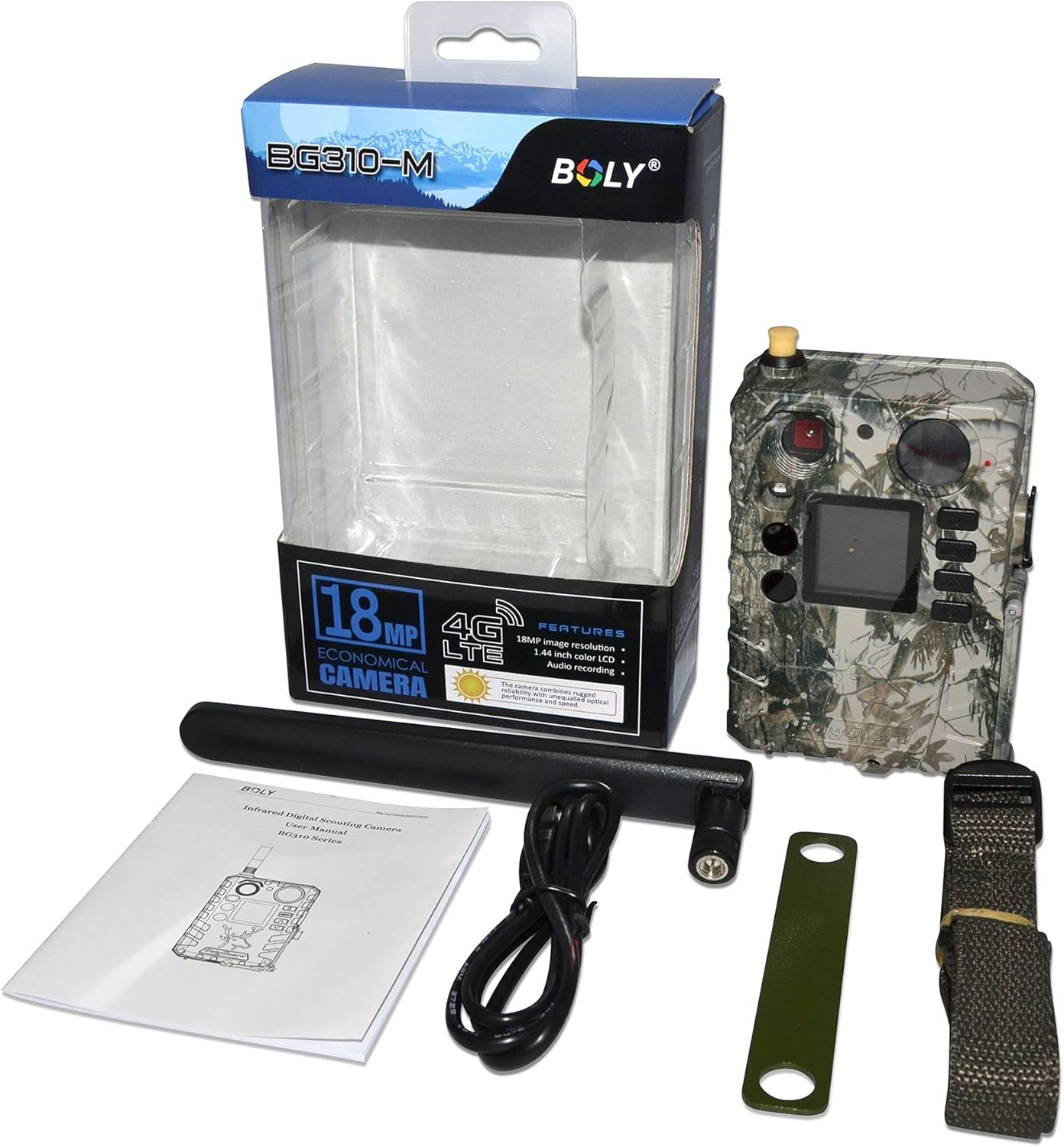
Figura 1.1: Contenuto della confezione. Displays all items included in the product package, ensuring users can verify they have received everything necessary for setup.
2. Informazioni sulla sicurezza
Please read and understand all safety precautions before using this product. Failure to follow these instructions may result in injury or damage to the device.
- Do not immerse the camera in water beyond its IP65 rating.
- Use only recommended batteries and power sources.
- Keep the camera away from extreme temperatures and direct sunlight for prolonged periods.
- Non tentare di smontare o modificare la fotocamera.
- Smaltire le batterie correttamente secondo le normative locali.
3. Componenti del prodotto
Familiarize yourself with the various parts of your BolyGuard BG310-M camera:
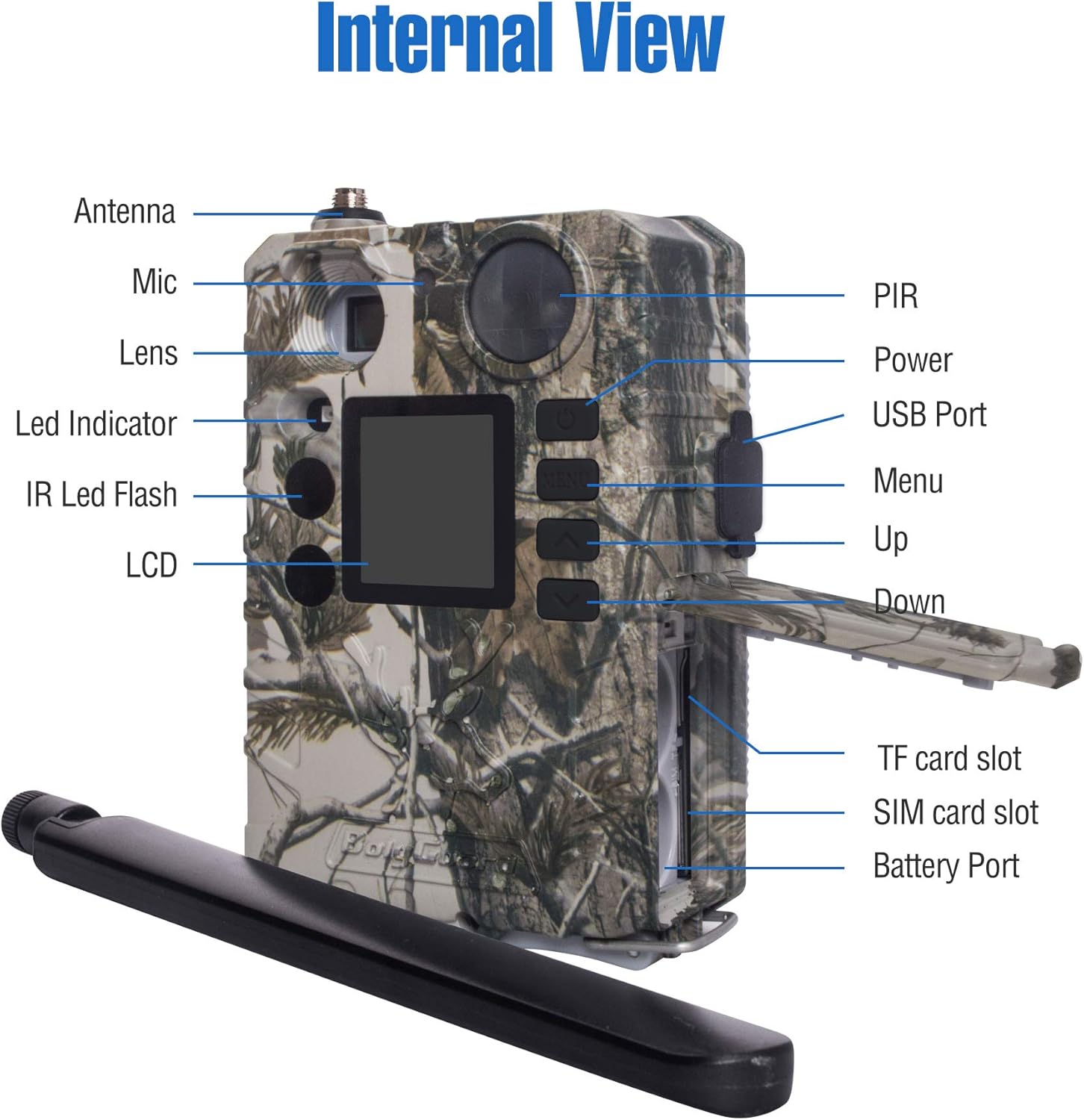
Figure 3.1: Internal and External View. A detailed diagram identifying the key components and ports of the BG310-M camera, essential for setup and operation.
- Antenna: Per la comunicazione cellulare 4G.
- Lente: Cattura immagini e video.
- Sensore PIR: Sensore a infrarossi passivi per il rilevamento del movimento.
- IR LED Flash: 940nm no-glow infrared LEDs for night vision.
- Schermo LCD: 1.44-inch TFT screen for menu navigation and viewmedia.
- Pulsanti di controllo: Menu, Up, Down, OK buttons for navigation.
- Porta USB: Per la connessione a un computer.
- Slot per schede TF: For inserting a MicroSD card (storage).
- Slot per scheda SIM: For inserting a 4G SIM card (cellular data).
- Porta batteria: Per l'installazione della batteria.
4. Guida all'installazione
Per preparare la fotocamera all'uso, segui questi passaggi:
4.1. Installare le batterie
- Aprire il vano batteria.
- Inserire il numero richiesto di batterie AA, garantendo la corretta polarità.
- Chiudere bene il vano batterie.
4.2. Inserisci la carta di TF
- Individuare lo slot per la scheda TF.
- Insert a formatted MicroSD card (up to 32GB, Class 10 or higher recommended) into the slot until it clicks.
4.3. Inserisci la scheda SIM
The BG310-M supports 4G LTE connectivity. A compatible SIM card (e.g., AT&T or Verizon) is required for cellular functions.
- Individua lo slot della scheda SIM.
- Insert an activated 4G SIM card into the slot.
4.4. Collegare l'antenna
- Screw the provided antenna onto the antenna port at the top of the camera.
- Assicurarsi che sia fissato saldamente, ma non stringere eccessivamente.

Figure 4.1: Camera with Antenna. Davanti view of the BolyGuard BG310-M 4G Wireless Trail Camera, showcasing il suo camuffamento casing and attached antenna.
4.5. Initial Power On & Network Configuration
- Switch the camera to 'SETUP' mode.
- The camera will power on and display the main menu.
- Navigate to the 'Network' settings to configure your cellular connection. This may involve selecting your carrier and setting up APN details if not automatically detected.
- Download the Molnus Cloud App on your smartphone or access the web portal to link your camera for remote control and viewing.
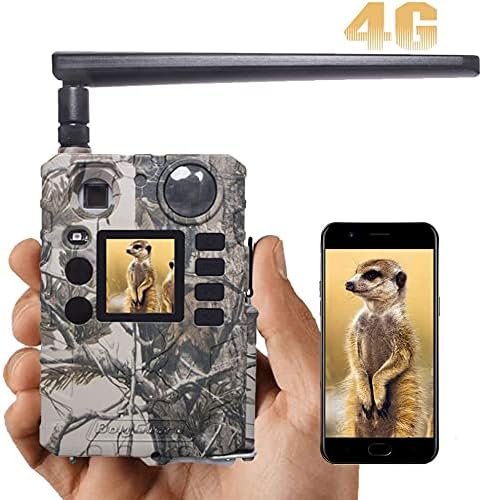
Figure 4.2: App Connectivity. This image illustrates the camera's cellular capability, showing a captured image on both the camera's screen and a connected smartphone via the Molnus app.
5. Istruzioni per l'uso
5.1. Modalità della fotocamera
The BG310-M typically operates in three modes:
- OFF: La fotocamera è spenta.
- IMPOSTARE: Allows access to menu settings, viewing photos/videos, and manual testing.
- SOPRA: Camera is active and will capture photos/videos based on its settings and motion detection.
5.2. Navigazione nel menu
Use the control buttons (MENU, UP, DOWN, OK) to navigate through the camera's settings. Common settings include:
- Modalità: Seleziona Foto, Video o Foto+Video.
- Dimensioni dell'immagine: Set photo resolution (e.g., 18MP, 12MP).
- Dimensioni video: Set video resolution (e.g., 720P).
- Intervallo di attivazione: Ritardo temporale tra i rilevamenti.
- Sensibilità: Adjust PIR sensor sensitivity.
- Intervallo di tempo: Abilita la fotografia time-lapse.

Figure 5.1: Image Resolution. Demonstrates the superior clarity of 18MP images compared to 12MP, highlighting the camera's high-resolution capture capability.
5.3. Cattura di immagini e video
Once configured and switched to 'ON' mode, the camera will automatically capture images or videos when motion is detected within its 100ft detection range. The 0.7-second trigger speed ensures minimal delay.

Figure 5.2: Fast Trigger Speed. This image emphasizes the camera's fast 0.7-second trigger speed, capable of capturing quick movements.
5.4. Visione notturna
The camera utilizes 940nm no-glow IR LEDs for discreet night vision, allowing it to capture clear images and videos in low-light conditions without disturbing wildlife.

Figure 5.3: 940nm No-Glow IR. Illustrates the effectiveness of 940nm no-glow infrared LEDs for discreet night vision, showing clear images of wildlife in both day and night conditions.
Video 5.1: Clear Night Video. This video showcases the BolyGuard BG310-M trail camera's night vision performance, capturing clear footage of a skunk in a backyard setting during nighttime.
5.5. Remote Monitoring (Molnus App/Web Portale)
Utilize the Molnus Cloud App or web portal to remotely view captured media, change camera settings, and receive real-time alerts. Ensure your camera has a strong 4G signal for optimal performance.
6. Manutenzione
Una corretta manutenzione garantisce la longevità e le prestazioni ottimali della tua fotocamera da pista.
- Pulizia: Gently wipe the lens and PIR sensor with a soft, dry cloth to remove dirt or smudges. Do not use abrasive cleaners.
- Sostituzione della batteria: Sostituire le batterie quando compare l'indicatore di batteria scarica o quando le prestazioni diminuiscono. Sostituire sempre tutte le batterie contemporaneamente con batterie nuove dello stesso tipo.
- Gestione delle carte TF: Regularly format the TF card to prevent data corruption and ensure sufficient storage space. Back up important files prima della formattazione.
- Protezione dalle intemperie: While the camera is IP65 waterproof, ensure all compartments (battery, SIM/TF card) are securely closed to maintain its water resistance, especially in harsh weather conditions.

Figura 6.1: Impermeabilità IP65. Shows the camera's IP65 waterproof design, ensuring reliable operation in various weather conditions like rain and snow.
7. Risoluzione Dei Problemi
Se riscontri problemi con la tua fotocamera, fai riferimento ai seguenti problemi comuni e alle relative soluzioni:
| Problema | Possibile causa | Soluzione |
|---|---|---|
| La fotocamera non si accende | Batterie scariche o esaurite; polarità della batteria errata. | Replace batteries with fresh ones, ensuring correct orientation. |
| Nessuna immagine/video catturato | TF card full or not inserted correctly; PIR sensor blocked; camera in 'OFF' or 'SETUP' mode. | Check TF card, ensure it's formatted; clear sensor path; switch to 'ON' mode. |
| Scarsa qualità dell'immagine/video | Lente sporca; condizioni di scarsa illuminazione; impostazioni di risoluzione errate. | Clean the lens; ensure adequate lighting or proper night vision settings; adjust resolution. |
| Nessuna connessione cellulare | SIM card not activated or incorrectly inserted; poor signal strength; incorrect APN settings. | Verify SIM card activation; reinsert SIM; check signal; configure APN settings manually if needed. |
| Camera not responding to app | No cellular connection; camera not linked to Molnus account; app issues. | Ensure cellular connection; verify camera is linked in Molnus; restart app/camera. |
8. Specifiche tecniche
| Caratteristica | Specificazione |
|---|---|
| Modello | BG310-M |
| Risoluzione dell'immagine | 18 MP (Effective Still Resolution) |
| Risoluzione video | 720p, 1080p (Video Capture Resolution) |
| Connettività | 4G LTE Cellular, Wi-Fi (Wireless Communication Technology) |
| Visione notturna | 940nm No-Glow IR LEDs, 100 Feet Range |
| Trigger Speed | Meno di 0.7 secondi |
| Campo di rilevamento | 100 piedi |
| Campo di View | 57 gradi |
| Display | 1.44" TFT display |
| Grado di impermeabilità | IP65 (grado di protezione internazionale) |
| Fonte di alimentazione | Alimentato a batteria (batterie richieste: sì) |
| Dimensioni (L x P x A) | 4.99 x 2 x 2 pollici |
| Peso dell'articolo | 1 libbra |
| Uso consigliato | Game & Trail, Outdoor |
9. Garanzia e supporto
9.1. Garanzia del prodotto
BolyGuard offers a 2-Year Hassle-Free Guarantee for this product, exceeding the standard 1-year market warranty. This includes support and potential free replacements for manufacturing defects.
9.2. Assistenza clienti
For technical assistance, troubleshooting, or warranty claims, please contact BolyGuard customer service. Refer to the contact information provided on the product packaging or the official BolyGuard websito per i dettagli di supporto più aggiornati.