
NS-RC01G-09, NS-RC06A-11, NS-32L430A11
Manuale utente del telecomando sostitutivo
For Insignia TV Models: NS-RC01G-09, NS-RC06A-11, NS-32L430A11
1. Introduzione
This manual provides essential information for the setup, operation, and maintenance of your new replacement remote control. This remote is designed to function with various Insignia TV models, including NS-RC01G-09, NS-RC06A-11, and NS-32L430A11. Please note that as a replacement unit, some advanced functions of your original remote may not be supported.
The remote control is made of durable ABS material, designed for comfortable handling and long-lasting use. It operates using infrared (IR) technology.
2. Impostazione
2.1 Installazione della batteria
To begin using your remote control, you will need to install two (2) AAA batteries. Ensure correct polarity (+/-) when inserting the batteries into the battery compartment located on the back of the remote.

Figura 1: Fronte view of the replacement remote control. This image displays the layout of the buttons, including the power button at the top, the numerical keypad, navigation arrows, volume and channel controls, and various function buttons.
2.2 Configurazione iniziale
This replacement remote control requires no programming or complex setup. Once the batteries are correctly installed, the remote is ready for immediate use with compatible Insignia TV models.
3. Istruzioni per l'uso
Puntare il telecomando direttamente verso il ricevitore a infrarossi del televisore. Assicurarsi che non vi siano ostacoli tra il telecomando e il televisore.
3.1 Funzioni di base
- Pulsante di accensione: Located at the top, typically red, to turn the TV on or off.
- Tastierino numerico (0-9): Per l'ingresso diretto del canale.
- Volume su/giù (VOL +/-): Regola il volume dell'audio.
- Canale su/giù (CH +/-): Cambia il canale televisivo.
- Disattiva audio: Disattiva l'audio della TV.
- Ingresso: Scorre le sorgenti di input disponibili (HDMI, AV, ecc.).
- Menu: Accede al menu principale del televisore.
- Pulsanti di navigazione (Su, Giù, Sinistra, Destra, Invio): Utilizzato per navigare nei menu e confermare le selezioni.
- Uscita: Esce dal menu o dalla schermata corrente.
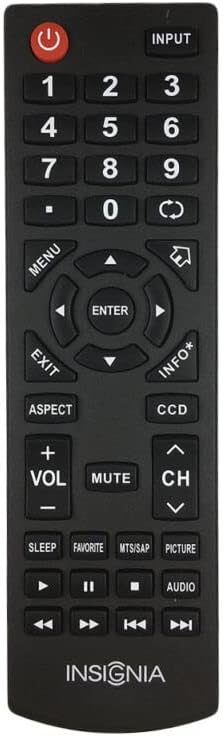
Figura 2: Dall'alto verso il basso view of the replacement remote control. This perspective provides a clear view of the button arrangement and the remote's ergonomic design.
3.2 Nota di compatibilità
As a replacement remote control, some specific or advanced functions present on your original equipment manufacturer (OEM) remote may not be fully functional or available. This is not indicative of a defect but rather a characteristic of a universal or replacement remote. If a particular function does not work, it may be due to this compatibility difference.
4. Manutenzione
4.1 Cura della batteria
- Sostituire le batterie quando la reattività del telecomando diminuisce.
- Sostituire sempre entrambe le batterie contemporaneamente con batterie nuove dello stesso tipo (AAA).
- Non mischiare batterie vecchie e nuove o diversi tipi di batterie.
- Se il telecomando non verrà utilizzato per un periodo prolungato, rimuovere le batterie per evitare perdite e potenziali danni al telecomando.
4.2 Pulizia
Per pulire il telecomando, strofinare delicatamente la superficie con un panno morbido e asciutto. Per lo sporco ostinato, utilizzare un panno leggermenteamp cloth can be used, followed immediately by a dry cloth. Avoid using harsh chemicals, abrasive cleaners, or excessive moisture, as these can damage the remote's finish or internal components.
5. Risoluzione Dei Problemi
- Il telecomando non risponde:
- Controllare che le batterie siano installate correttamente, rispettando la polarità corretta.
- Sostituisci le vecchie batterie con nuove batterie AAA.
- Ensure there is a clear line of sight between the remote's infrared emitter and the TV's IR receiver. Remove any obstructions.
- Verificare che il telecomando sia puntato direttamente verso la TV.
- Alcune funzioni non funzionano:
- As a replacement remote, certain advanced or specific functions of your original TV remote may not be supported. This is normal for replacement units and does not indicate a defect.
- Refer to your TV's original manual for specific functions if this remote does not provide them.
6. Specifiche
| Marca | Generico |
| Produttore | e-telecomando |
| Dispositivi compatibili | Television, Set Top Box, Stereo System, DVD/Blu-ray Player, Home Theater |
| Tecnologia di connettività | Infrarossi (IR) |
| Batterie richieste | 2 x AAA (non incluso) |
| Colore | Nero o bianco (inviato casualmente) |
| Numero massimo di dispositivi supportati | 1 |
7. Garanzia e supporto
Specific warranty information for this replacement remote control is not provided in this manual. For details regarding warranty coverage, returns, or technical support, please contact the seller or retailer from whom you purchased the product. It is recommended to retain your proof of purchase for any warranty claims.