
1. Prodotto finitoview
L'Ourlife 4K Action Camera is designed for capturing high-quality video and photos in various environments, including underwater. It features 4K video recording, 16MP photos, Wi-Fi connectivity, and a durable waterproof casing.

Figure 1: Key Features of the Ourlife 4K Action Camera.
- Acquisizione ad alta risoluzione: Records 4K/30FPS, 2.7K/30FPS, and 1080P/30FPS video, and captures 16MP still images.
- Regolabile View Angolo: Offers 170°, 140°, 110°, and 70° field of view opzioni.
- Connettività wireless: Built-in Wi-Fi for connecting to the XDV App on your smartphone or tablet, allowing for remote control and media sharing.
- Capacità impermeabile: Submersible up to 40 meters (131 feet) with the included waterproof case.
- Schermo IPS da 2 pollici: Provides a clear display for previewfootage navigazione nei menu.
- Funzioni versatili: Includes 4X zoom, time-lapse, loop recording, slow motion, and anti-shake features.
2. Cosa c'è nella scatola
Il tuo Ourlife 4K Action Camera package includes the following components:

Figure 2: Complete set of accessories.
- 1x Ourlife 4K Action Camera
- Caso impermeabile 1x
- 3 batterie ricaricabili da 1350 mAh
- 1x Protective Door
- 1x Black Frame
- 2x Flat Adhesive Pads with Screw
- 1x supporto per bicicletta
- 1x supporto a gancio a J
- 1x Supporto di ricarica
- 1x Increase Mount
- 1x Graffa
- 1x vite a testa zigrinata lunga
- 1x vite a testa zigrinata corta
- 1x Crowbar (for opening battery/SD card slot)
- 1x supporto di estensione
- 1 vite rotante a 360°
- Cavo 1x Micro USB
- 1x Insurance Tether Strap
- 2x Release Buckles
- 1x Mirror Cloth
- 2x cinturino da polso
- 2x Benda
- 1x telecomando
- 2 cuscinetti adesivi
3. Per iniziare
3.1 Installazione e ricarica della batteria
To install a battery, gently open the battery compartment cover, often located at the bottom or side of the camera. A small crowbar tool might be provided to assist in opening tight covers. Insert a charged battery with the correct orientation.

Figure 3: Opening the battery compartment.
Before first use, fully charge the included batteries. Insert the batteries into the charging stand and connect the stand to a USB power source using the Micro USB cable. The indicator light on the charger will show charging status.
3.2 Inserimento di una scheda Micro SD
A Micro SD card (not included, Class 10 or higher recommended, up to 64GB) is required for recording. Locate the Micro SD card slot on the side of the camera. Gently insert the card with the gold contacts facing the back of the camera until it clicks into place.

Figure 4: Inserting the Micro SD Card.
Importante: Format the Micro SD card in the camera's settings menu before initial use to ensure proper functionality and avoid data corruption.
3.3 Utilizzo della custodia impermeabile
For underwater activities or protection against dust and impact, place the camera inside the waterproof case. Ensure the case is securely latched and the rubber seal is clean and free of debris before submerging.

Figure 5: Camera in waterproof case during underwater use.
4. Funzionamento di base
4.1 Accensione/Spegnimento
- To power on, press and hold the Power/Mode button on the front of the camera until the screen illuminates.
- Per spegnere, tenere premuto nuovamente il pulsante Accensione/Modalità finché lo schermo non si spegne.
4.2 Modalità di commutazione
Press the Power/Mode button repeatedly to cycle through different modes: Video Recording, Photo Mode, Playback Mode, and Settings Mode. The current mode icon will be displayed on the screen.
4.3 Registrazione di video e scatto di foto
- In Video Recording mode, press the OK button (top button) to start recording. Press it again to stop.
- In modalità Foto, premere il pulsante OK per scattare una foto.
4.4 Wi-Fi Connection and XDV App
The camera features built-in Wi-Fi for remote control and file transfer via the XDV app. Download the XDV app from your smartphone's app store.
- Turn on the camera's Wi-Fi: In Video or Photo mode, press the Up button (side button) to activate Wi-Fi. The Wi-Fi icon will appear on the screen.
- On your smartphone, go to Wi-Fi settings and connect to the camera's Wi-Fi network (e.g., "Ourlife_XXXXXX"). The default password is "1234567890".
- Open the XDV app. You can now control the camera, preview pippotage, e scarica files sul tuo dispositivo.
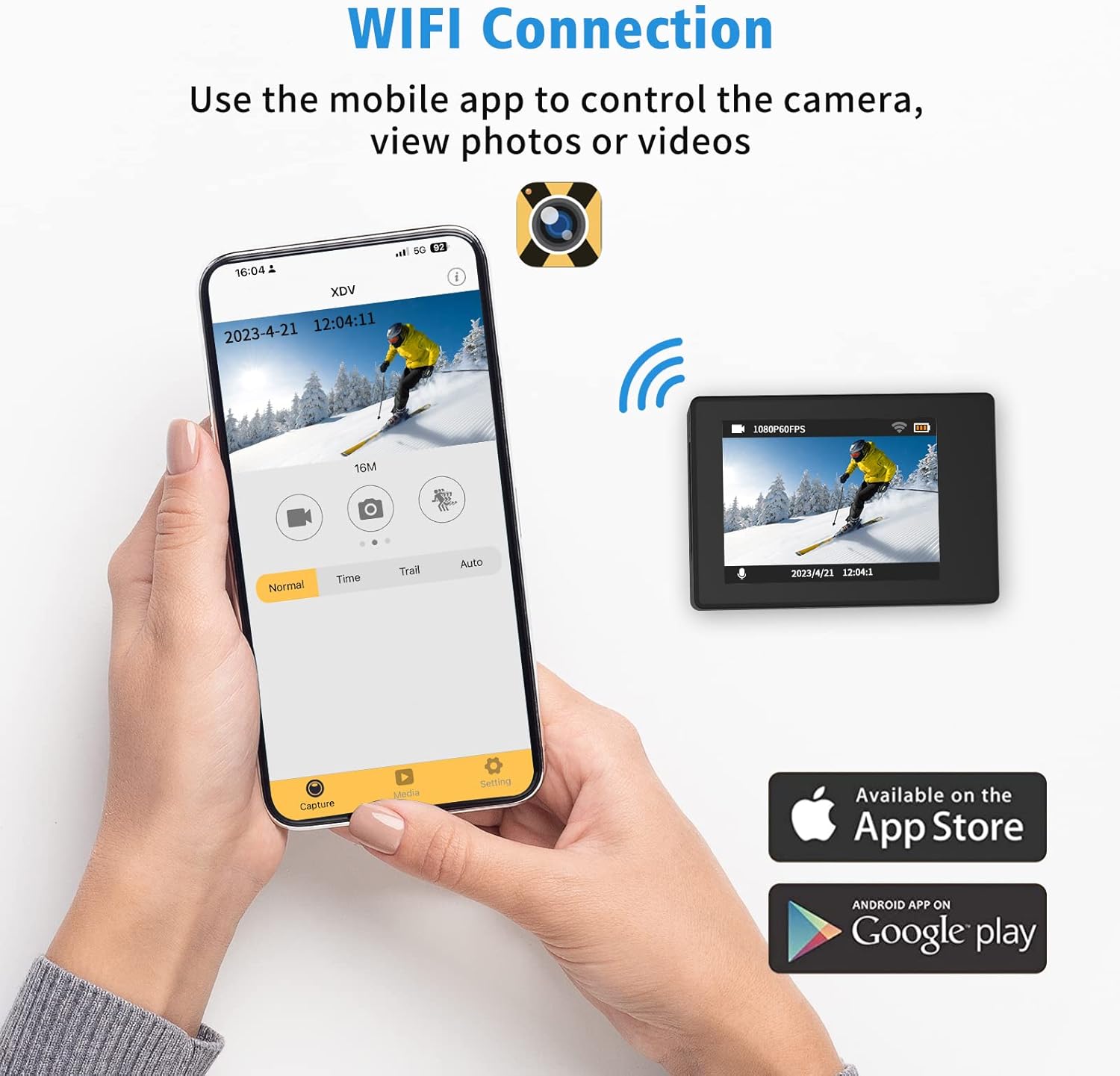
Figure 6: Connecting to the XDV App via Wi-Fi.
4.5 Utilizzo del telecomando
The included wrist remote control allows for convenient photo and video capture from a distance.
- Assicurarsi che la batteria del telecomando sia installata.
- Premere il pulsante video sul telecomando per avviare/interrompere la registrazione video.
- Premere il pulsante foto sul telecomando per scattare una foto.
5. Manutenzione e cura
- Pulizia: Use the provided mirror cloth or a soft, lint-free cloth to clean the camera lens and screen. For the waterproof case, rinse with fresh water after saltwater use and allow to air dry.
- Cura della batteria: Store batteries in a cool, dry place. Do not expose to extreme temperatures. Recharge regularly, even if not in use, to maintain battery health.
- Magazzinaggio: Quando non vengono utilizzati, conservare la fotocamera e gli accessori in una custodia protettiva per evitare danni.
- Waterproof Case Seal: Regularly inspect the rubber seal of the waterproof case for any dirt, hair, or damage. A compromised seal can lead to water leakage.
6. Risoluzione Dei Problemi
| Problema | Possibile causa | Soluzione |
|---|---|---|
| La fotocamera non si accende. | Batteria scarica o assente. | Ensure batteries are fully charged. Try a different charged battery. |
| Cannot record or take photos. | Nessuna scheda Micro SD, scheda piena o errore della scheda. | Inserisci una scheda Micro SD. Elimina le informazioni non necessarie files or replace the card. Format the card in camera settings. |
| La connessione Wi-Fi non funziona. | Password errata, fuori portata o problema con l'app. | Ensure correct password (1234567890). Move closer to the camera. Restart camera and app. |
| Scarsa qualità delle immagini/video. | Lente sporca, scarsa illuminazione o impostazioni errate. | Clean the lens. Ensure adequate lighting. Check resolution settings (e.g., 4K, 16MP). |
| Perdita d'acqua nella custodia impermeabile. | Seal compromised or case not properly closed. | Inspect the rubber seal for debris or damage. Ensure all latches are securely fastened. |
7. Specifiche
| Caratteristica | Dettaglio |
|---|---|
| Marca | Ourlse |
| Numero di modello | AT-30R |
| Risoluzione video | 4K/30FPS, 2.7K/30FPS, 1080P/30FPS |
| Risoluzione della foto | 16MP |
| Profondità impermeabile | Up to 40 meters (131 feet) with case |
| Dimensioni dello schermo | IPS da 2 pollici |
| View Angolo | 170°, 140°, 110°, 70° (Adjustable) |
| Connettività | Wifi |
| Magazzinaggio | Micro SD (fino a 64 GB, classe 10+) |
| Batterie | 3x 1350mAh Lithium Ion (included) |
| Caratteristiche speciali | 4X Zoom, Time-lapse, Loop Recording, Slow Motion, Anti-shake |
8. Garanzia e supporto
Ourlife products are manufactured to high quality standards. For warranty information, technical support, or service inquiries, please refer to the contact information provided on the product packaging or visit the official Ourlse websito.
Si prega di conservare la prova d'acquisto per eventuali reclami in garanzia.