
Introduzione
This manual provides comprehensive instructions for the assembly, operation, and maintenance of your Devoko Electric Sit-Stand Desk, Model 0077. Designed for ergonomic use, this adjustable height desk offers a versatile workspace for various activities.
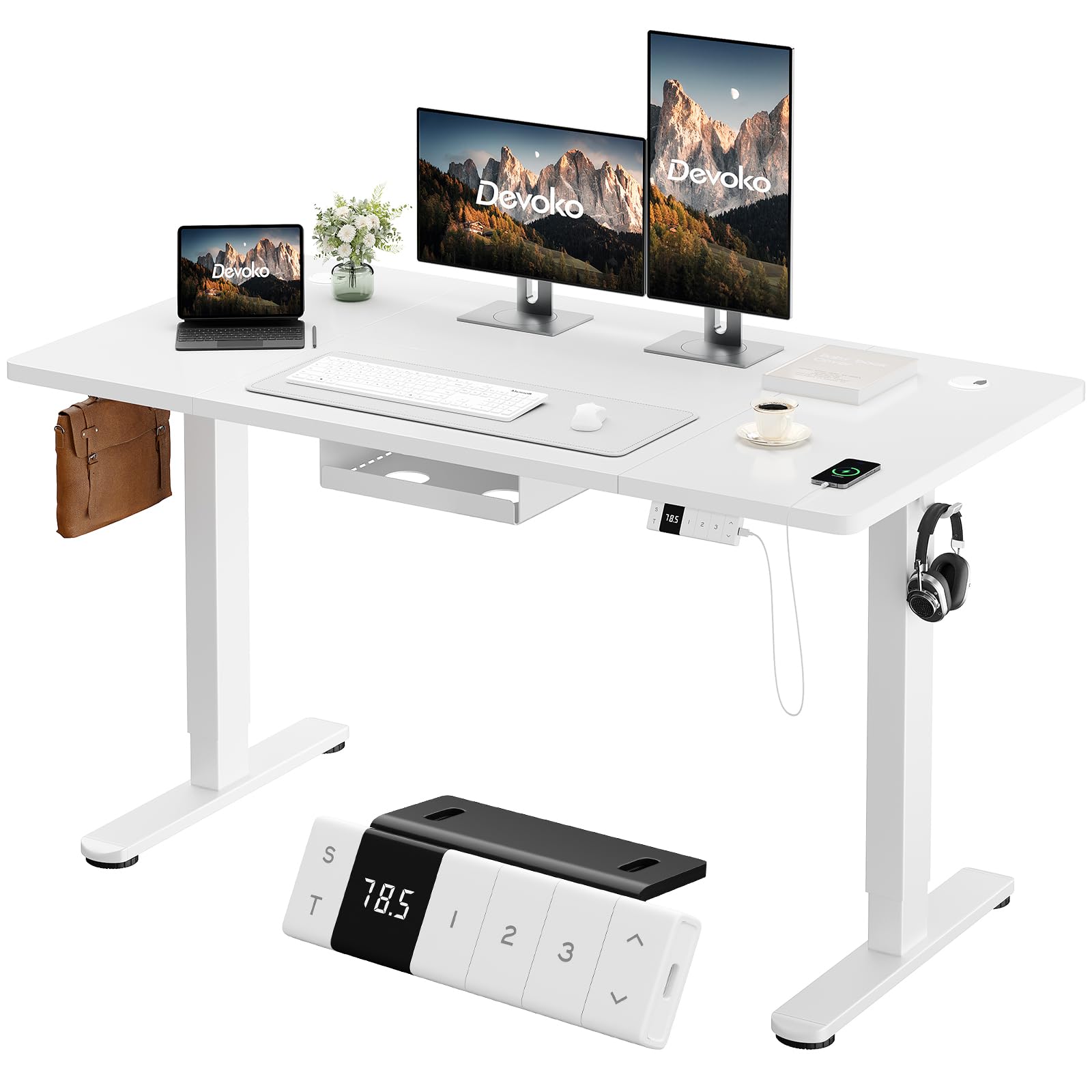
Image: Devoko Electric Sit-Stand Desk in white, 160x80cm.
Caratteristiche principali
- Altezza regolabile: Seamlessly switch between sitting and standing positions with a height range of 72 cm to 118 cm.
- Pannello di controllo intelligente: Features an LED display, 3 programmable memory presets for preferred heights, and up/down adjustment buttons.
- Integrated Type-C Charger: Ricarica comodamente i tuoi dispositivi direttamente dalla scrivania.
- Sistema di gestione dei cavi: Includes a cable storage box and two hooks to keep your workspace tidy and organized.
- Stabilità robusta: T-shaped legs support up to 70 kg, ensuring a stable and durable work surface.
- Caratteristiche di sicurezza: Equipped with anti-collision technology and overheating protection for secure operation.
- Funzionamento silenzioso: Motor operates at less than 50dB, allowing for a focused work environment.
Informazioni sulla sicurezza
Please read and understand all safety instructions before operating the desk to prevent injury or damage.
- Use the desk responsibly and do not exceed the maximum load capacity of 70 kg.
- Ensure the desk is placed on a stable and level surface.
- Tenere bambini e animali domestici lontani dalla scrivania durante la regolazione dell'altezza.
- Non mettere le mani o altri oggetti nel percorso delle parti in movimento durante il funzionamento.
- In case of malfunction or unusual noise, immediately unplug the desk and contact customer support.
- The anti-collision feature is designed to prevent damage, but always exercise caution.
Contenuto della confezione
Verify that all components are present before beginning assembly. If any parts are missing or damaged, please contact Devoko customer support.

Image: Illustration of desk components for assembly.
Elenco dei componenti:
- Gamba del tavolo destra (x1)
- Gamba del tavolo sinistra (x1)
- Base gamba (x2)
- Pannello di controllo (x1)
- Piastra laterale (x2)
- Traversa sinistra (x1)
- Traversa destra (x1)
- Asta di trasmissione (x1)
- Connettore (x1)
- Tabletop Sections (x4)
- Cable Management Tray (x1)
- Gancio per cuffie (x1)
- Cable Hole Covers (x2)
- Tabletop Connectors (J & M types)
- Wood Tips (for tabletop alignment)
- Various Screws (M6x11mm, M6x35mm, M8x12mm, M5x15mm)
Note: All mounting tools are not included. Please prepare a screwdriver for assembly.
Istruzioni di montaggio
Follow these steps carefully to assemble your Devoko Electric Sit-Stand Desk. It is recommended to have a second person assist with certain steps.
Video: Step-by-step assembly guide for the Devoko Electric Sit-Stand Desk. (Note: This is a placeholder video URL as no specific M3U8 video was provided in the product data.)
Guida passo passo:
- Attach Right Crossbar: Secure the Right Crossbar (9) to the Right Table Leg (1) using M6x11mm screws (A).
- Install Side Plate (Right): Attach one Side Plate (7) to the assembled right leg and crossbar using M8x12mm screws (C).
- Attach Left Crossbar: Secure the Left Crossbar (8) to the Left Table Leg (2) using M6x11mm screws (A).
- Install Side Plate (Left): Attach the second Side Plate (7) to the assembled left leg and crossbar using M8x12mm screws (C).
- Collega le gambe: Use the Connector (10) to join the two leg assemblies, securing it with M6x11mm screws (A).
- Assemblaggio del piano del tavolo: Join the tabletop sections (11, 12, 13, 14) using the provided Wood Tips (F) for alignment.
- Secure Tabletop Connectors: Attach the J and M Tabletop Connectors to the underside of the assembled tabletop using M5x15mm screws (E).
- Fissare le gambe al piano del tavolo: Carefully place the assembled leg frame onto the underside of the tabletop. Secure the legs to the tabletop using M5x15mm screws (E). Ensure the motor and control panel wiring are accessible.
- Installare la barra di trasmissione: Insert the Transmission Rod (4) to connect the motor mechanism between the two legs.
- Mount Cable Management Tray: Attach the Cable Management Tray (15) to the underside of the desk using M5x12mm screws (D).
- Fissare le basi delle gambe: Secure the Leg Bases (3) to the bottom of each table leg using M6x35mm screws (B).
- Installa il Pannello di controllo: Mount the Control Panel (5) to the front edge of the desk, typically on the right side, using M5x15mm screws (E). Connect the necessary cables from the motor and power supply.
- Attach Headphone Hanger: Install the Headphone Hanger (K) to the desired location on the underside of the desk using M5x15mm screws (E).

Image: Cable management tray, headphone hooks, and adjustable feet.
Istruzioni per l'uso
Your Devoko Electric Sit-Stand Desk is designed for intuitive operation. Familiarize yourself with the control panel functions.
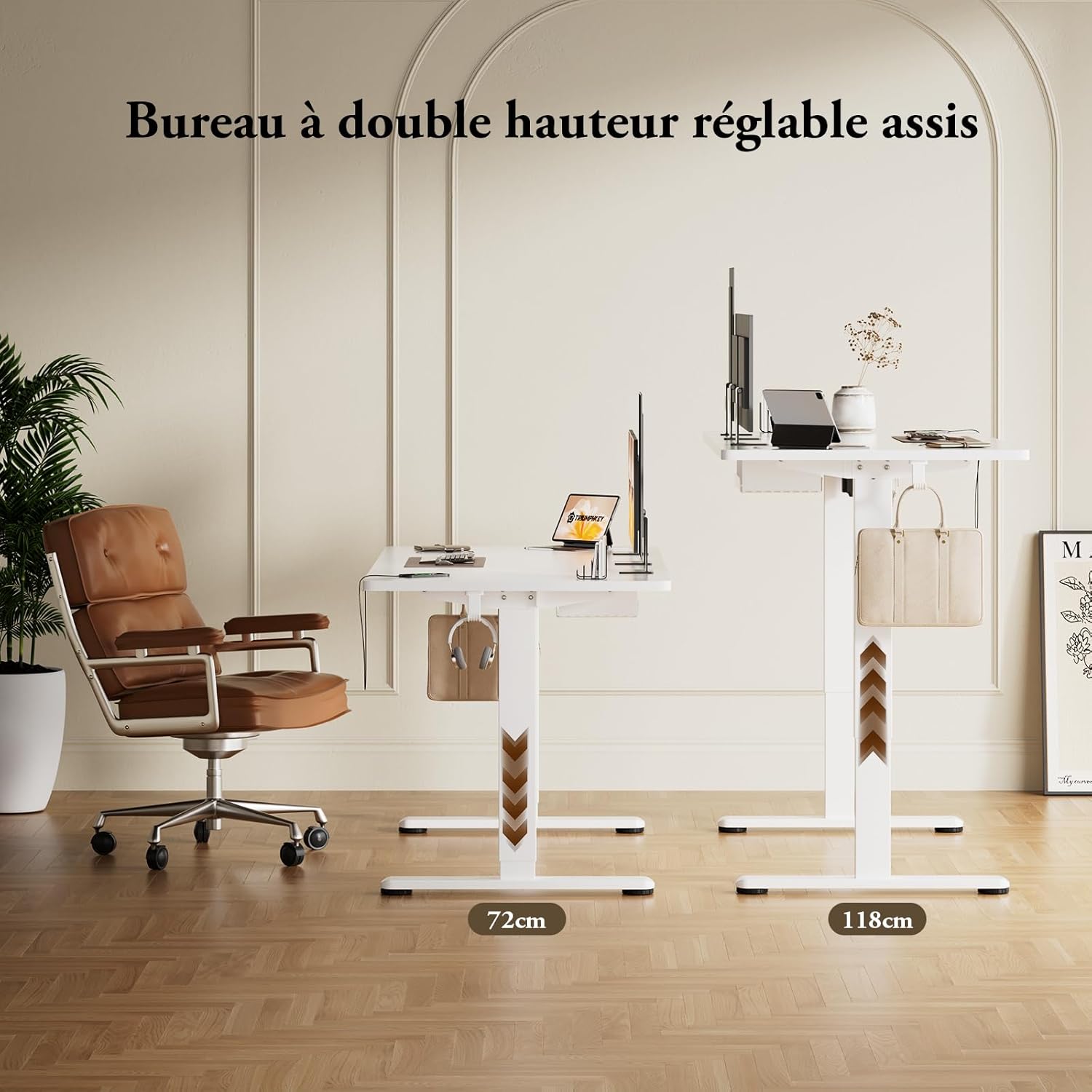
Image: Control panel with height display, memory buttons, and USB-C port.
Regolazione dell'altezza:
- Pulsanti su/giù: Press and hold the up (▲) or down (▼) arrow buttons on the control panel to adjust the desk height. Release the button when the desired height is reached. The current height will be displayed on the LED screen.
Preimpostazioni di memoria:
- Setting a Memory Position: Adjust the desk to your desired height. Press the 'S' button, then press one of the numbered memory buttons (1, 2, or 3) within 3 seconds. The height is now saved to that preset.
- Richiamare una posizione di memoria: Press the corresponding numbered memory button (1, 2, or 3) to automatically move the desk to the saved height.
Ricarica USB-C:
- Plug your compatible device into the Type-C port on the control panel to charge it.
Sistema anticollisione:
- La scrivania è dotata di un sistema anticollisione. Se incontra un ostacolo durante la regolazione, si ferma automaticamente e inverte leggermente la direzione per evitare danni.
Manutenzione
Una manutenzione regolare garantisce la longevità e le prestazioni ottimali della tua scrivania.
- Pulizia: Pulisci la superficie e la struttura della scrivania con un panno morbido e asciutto.amp panno. Evitare detergenti abrasivi o prodotti chimici aggressivi.
- Ispezione: Controllare periodicamente tutte le viti e i collegamenti per assicurarsi che siano ben serrati. Serrare nuovamente se necessario.
- Gestione dei cavi: Ensure cables are neatly organized within the cable management tray to prevent snagging or damage during height adjustments.
- Cura del motore: The motor is designed for durability. Avoid overloading the desk beyond its 70 kg capacity.
Risoluzione dei problemi
If you encounter any issues with your Devoko Electric Sit-Stand Desk, refer to the following common problems and solutions.
| Problema | Possibile causa | Soluzione |
|---|---|---|
| La scrivania non si muove | Cavo di alimentazione scollegato; sovraccarico; surriscaldamento del motore. | Check power connection; Reduce weight on desk; Allow motor to cool down. |
| Regolazione dell'altezza non uniforme | Ostruzione; Carico sbilanciato. | Remove any obstructions; Redistribute weight evenly on the desk. |
| Anti-collision system frequently triggers | Sensitive setting; Obstacles nearby. | Ensure no objects are near the desk's path; Refer to the full manual for sensitivity adjustment if available. |
| Le preimpostazioni di memoria non funzionano | I preset non sono stati salvati correttamente. | Re-save the memory positions following the operating instructions. |
Se il problema persiste dopo aver provato queste soluzioni, contattare l'assistenza clienti Devoko per ulteriore assistenza.
Specifiche
| Caratteristica | Dettaglio |
|---|---|
| Marca | Devoko |
| Numero di modello | 0077 |
| Progettazione della scrivania | Scrivania in piedi |
| Dimensioni (P x L x A) | 80P x 160l x 72H cm (Min Height) |
| Intervallo di altezza regolabile | da 72 cm a 118 cm |
| Colore | Bianco |
| Materiale del tavolo | Legna |
| Materiale del telaio | Metallo (acciaio legato) |
| Caratteristiche speciali | Ergonomic, Height Adjustable, Integrated USB-C Port, Electric |
| Numero di posizioni in altezza | 3 (Preimpostazioni di memoria) |
| Peso dell'articolo | 29 chilogrammi |
| Carico massimo consigliato | 70 chilogrammi |
| Tipo di montaggio | Libera installazione |
| Componenti inclusi | Headphone hook, Cable management tray, Integrated USB port |
Garanzia e supporto
Your Devoko Electric Sit-Stand Desk comes with a lifetime warranty, ensuring peace of mind regarding its quality and durability. For any questions, technical support, or warranty claims, please contact Devoko customer service.
- Politica di ritorno: 30-day returns.
- Tipo di garanzia: Tutta la vita.
- Assistenza clienti: Refer to your purchase documentation or the Devoko brand store on Amazon for contact information.