
1. Introduzione
This manual provides detailed instructions for the installation, operation, and maintenance of your Flylin DC 6-60V 30A PWM DC Motor Speed Controller. This device is designed to precisely control the speed of DC brush motors within a voltage range of 6V to 60V, with a maximum current of 30A. It features a digital display for speed percentage, a momentary start/stop switch, and a speed control potentiometer for stepless adjustment.
2. Informazioni sulla sicurezza
- Assicurare il volume di inputtage is within the specified range of DC 6V-60V. Exceeding this range can damage the device.
- Always disconnect power before making any wiring connections or disconnections.
- Observe correct polarity for power input and motor connections. Incorrect wiring can lead to malfunction or damage.
- This controller is designed for DC brush motors. Do not use it with AC motors or other motor types.
- Avoid short circuits on the output terminals.
- Install the controller in a well-ventilated area to prevent overheating, especially during prolonged high-current operation.
- Keep the device away from moisture, dust, and corrosive substances.
3. Prodotto finitoview
The Flylin DC Motor Speed Controller integrates a digital display, a speed adjustment potentiometer, and a start/stop switch for convenient motor speed management.


Componenti chiave:
- Unità di controllo principale: Houses the circuit board and LED digital display.
- Display digitale a LED: Mostra la velocità del motore in percentualetage (0-100%).
- Speed Control Potentiometer: Rotary knob for adjusting motor speed.
- Interruttore di avvio/arresto: Momentary push-button to start or stop the motor.
- Terminali a vite: For secure power input and motor output connections.


4. Specifiche
Refer to the table below for detailed technical specifications of the Flylin DC Motor Speed Controller.
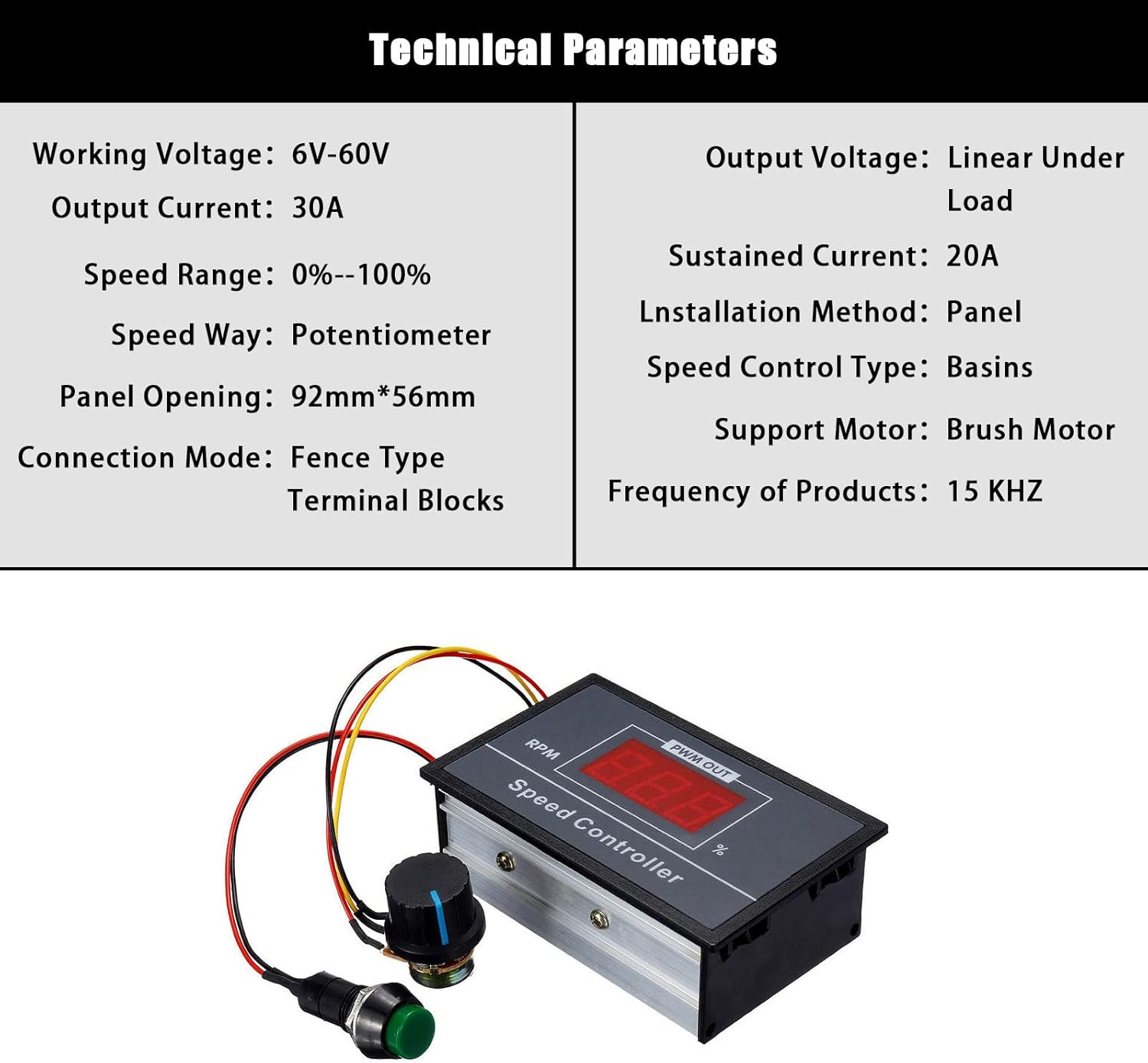
| Parametro | Valore |
|---|---|
| Volume di lavorotage | CC 6V-60V |
| Corrente di uscita | Da 0A a 30A |
| Sustained Current | 20A |
| Gamma di velocità | 0% - 100% |
| Tipo di controllo della velocità | potenziometro |
| Support Motor | DC Brush Motor |
| Frequenza PWM | 15KHz |
| Metodo di installazione | Montaggio a pannello |
| Panel Opening Size | 92 mm x 56 mm |
| Modalità di connessione | Fence Type Terminal Blocks |
| Materiale | Rame (componenti interni) |
| Peso dell'articolo | 1.41 once (circa 0.04 kg) |
| Dimensioni | 9.5 cm x 6 cm x 3.2 cm (circa 3.74 pollici x 2.36 pollici x 1.25 pollici) |

5. Configurazione e cablaggio
Proper wiring is crucial for the safe and correct operation of the speed controller. Follow these steps carefully.
Schema elettrico:


Passaggi di connessione:
- Potenza in ingresso: Connect your DC power supply (6V-60V) to the terminals labeled 'Power+' and 'Power-'. Ensure correct polarity.
- Uscita motore: Connect your DC brush motor to the terminals labeled 'Motor+' and 'Motor-'. The motor's rotation direction can be reversed by swapping these connections if needed.
- Potentiometer and Switch: The speed control potentiometer and start/stop switch are pre-wired to the main control unit. Ensure these connections are secure.

Use appropriate gauge wires for your application to handle the maximum current of 30A. Secure all connections firmly using the screw terminals.
6. Funzionamento
Once properly wired, operating the speed controller is straightforward.
- Accensione: Apply power to the controller. The LED digital display will illuminate, showing the current speed percentage (initially 0% if the motor is stopped).
- Avviamento del motore: Press the green momentary start/stop button to start the motor. The display will show the current speed setting.
- Regola la velocità: Rotate the potentiometer knob clockwise to increase motor speed and counter-clockwise to decrease it. The LED display will update in real-time to show the new speed percentage.
- Arresto motore: Press the green momentary start/stop button again to stop the motor. The display will show 0%.
The speed can be adjusted steplessly from 0% to 100% of the motor's maximum speed at the given input voltage.
7. Manutenzione
The Flylin DC Motor Speed Controller is designed for durability and requires minimal maintenance.
- Pulizia: Periodically clean the exterior of the controller with a dry, soft cloth. Do not use liquid cleaners or solvents.
- Connessioni: Regularly check all wiring connections to ensure they remain tight and secure. Loose connections can lead to intermittent operation or overheating.
- Ventilazione: Ensure that the controller's housing is not obstructed, allowing for proper heat dissipation.
- Condizioni ambientali: Operate the controller within its specified environmental conditions (temperature, humidity) to prolong its lifespan.
8. Risoluzione Dei Problemi
If you encounter issues with your speed controller, refer to the following troubleshooting guide:
| Problema | Possibile causa | Soluzione |
|---|---|---|
| Controller does not power on / LED display is off. | Nessun ingresso di alimentazione o cablaggio errato. | Check power supply connection and polarity. Ensure power source is active. |
| Il motore non si avvia. | Motor not connected, start/stop button not pressed, or potentiometer at 0%. | Verify motor connections. Press the start/stop button. Rotate potentiometer to increase speed. |
| Non è possibile regolare la velocità del motore. | Potentiometer faulty or disconnected. | Check potentiometer connections. If faulty, replacement may be necessary. |
| Motor runs erratically or at incorrect speed. | Loose wiring, motor overload, or incompatible motor. | Check all wiring connections. Ensure motor current does not exceed 30A. Verify motor type is a DC brush motor. |
| Controller overheats. | Excessive load on motor, poor ventilation, or sustained current above 20A. | Reduce motor load. Ensure adequate ventilation around the controller. Avoid prolonged operation above 20A. |
9. Garanzia e supporto
Per informazioni sulla garanzia o supporto tecnico, fare riferimento al rivenditore o al rappresentante ufficiale del produttore websito. Conservare la ricevuta d'acquisto per eventuali reclami in garanzia.