1. Introduzione
Thank you for choosing the HIKMICRO HEIMDAL H4D Digital Night Vision Monocular. This device is designed for observation in low light and complete darkness, featuring a high-resolution sensor and AMOLED display for clear imaging.
Caratteristiche principali:
- 1.39" AMOLED display with 454 x 454 resolution
- High-resolution 2560 x 1440 sensor
- Integrated 850 nm infrared illuminator with smart IR function
- Day/Night/Auto/Defog modes
- Stabilizzazione elettronica dell'immagine (EIS)
- Detection range up to 200 meters
- Replaceable and rechargeable battery with over 4 hours of use
- Compact and portable design, waterproof and dustproof (IP67)
- Integrated 32 GB EMMC for storing recorded videos and photos
- Wireless connection via HIKMICRO Sight app, local album function
Contenuto della confezione:
- HIKMICRO HEIMDAL H4D Digital Night Vision Monocular
- Batteria
- Panno antipolvere
- Borsa protettiva
- Cinturino da polso
- Cavo USB-C
- Guida veloce
2. Prodotto finitoview
Familiarize yourself with the components and controls of your HIKMICRO HEIMDAL H4D monocular.
Disposizione del dispositivo
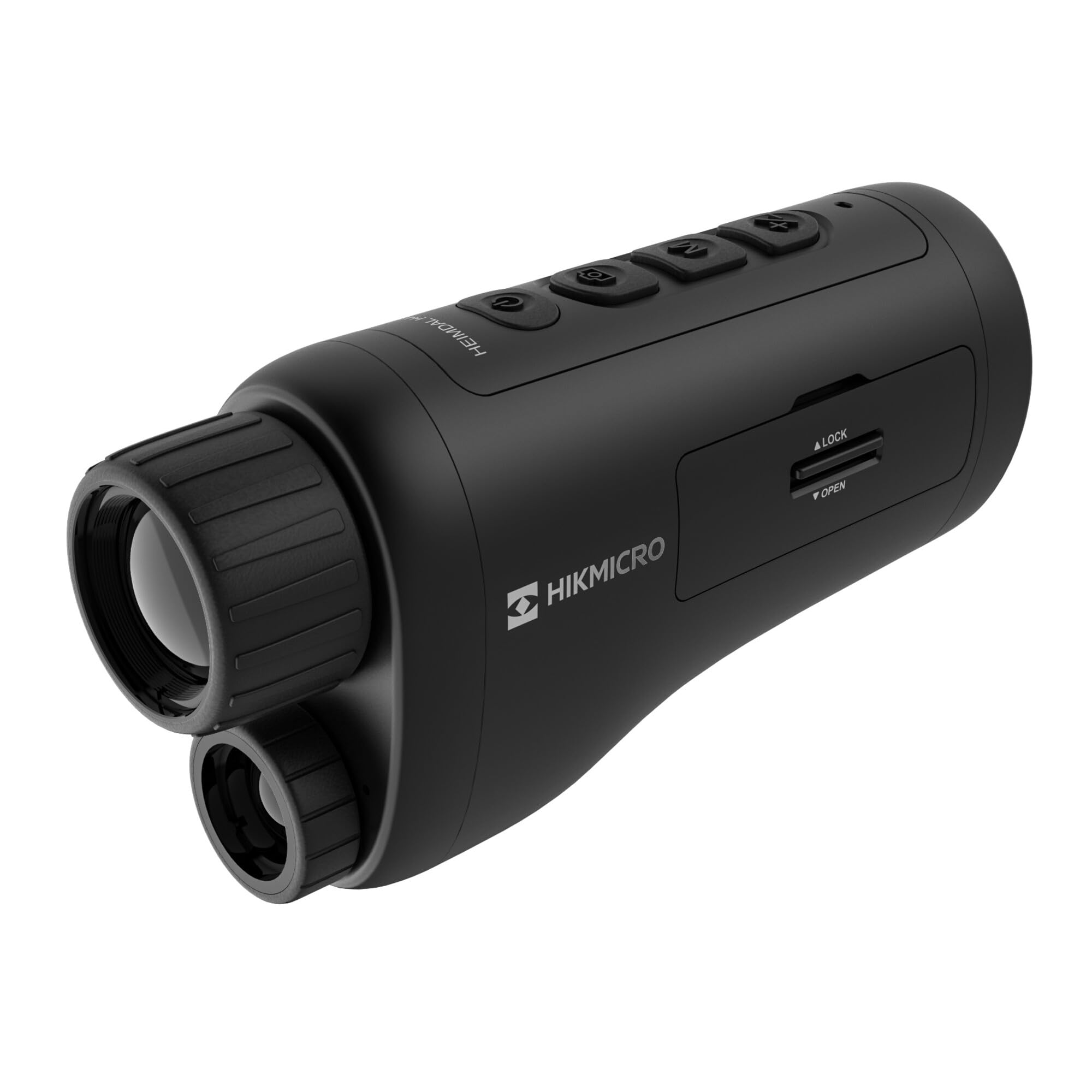
Un angolo view of the HIKMICRO HEIMDAL H4D monocular, showing its compact, ergonomic design and the main lens.
Controlli e pulsanti

Superiore view of the monocular showing the power button, photo/video record button, mode button, and zoom/IR adjustment buttons.
Lenses and Focus

Davanti view displaying the objective lens and the integrated infrared illuminator.
Vano batteria

Lato view showing the battery compartment with 'LOCK' and 'OPEN' indicators.
3. Impostazione
Installazione della batteria
- Individuare il vano batteria sul lato del dispositivo.
- Slide the lock mechanism to the 'OPEN' position.
- Inserire la batteria ricaricabile, assicurandosi della corretta polarità.
- Close the compartment and slide the lock mechanism to the 'LOCK' position.
Carica della batteria
Connect the device to a power source using the provided USB-C cable. The charging indicator will show the charging status.
Accensione iniziale
Premere e tenere premuto il pulsante di accensione (solitamente contrassegnato con Ⓘ) until the HIKMICRO logo appears on the display.
4. Istruzioni per l'uso
Accensione/spegnimento
- Accensione: Tieni premuto il pulsante di accensione per circa 3 secondi.
- Spegni: Tenere premuto il pulsante di accensione per circa 3 secondi finché il dispositivo non si spegne.
Regolazione della messa a fuoco
Rotate the focus ring on the objective lens to achieve a clear image of your target.
Selezione della modalità
Press the 'M' (Mode) button to cycle through observation modes: Day, Night, Auto, and Defog.
Zoom and IR Adjustment
Use the '+' and '-' buttons to adjust the digital zoom level. These buttons also control the intensity of the infrared illuminator in night mode.
Photo and Video Recording
- Scatta una foto: Press the photo/video button (usually marked with 📷) once to capture an image.
- Registra video: Press and hold the photo/video button to start recording. Press again to stop.
Connecting to HIKMICRO Sight App
Download the HIKMICRO Sight app from your device's app store. Follow the in-app instructions to connect your monocular for live view, controllo remoto e gestione dei media.
5. Manutenzione
Pulizia
- Use the provided dust cloth or a soft, lint-free cloth to clean the lenses.
- For stubborn dirt, use a lens cleaning solution specifically designed for optics.
- Pulisci il corpo del dispositivo con un panno morbido eamp panno. Non usare detergenti abrasivi o solventi.
Magazzinaggio
- Store the monocular in its protective bag in a cool, dry place when not in use.
- Rimuovere la batteria se il dispositivo non verrà utilizzato per un periodo prolungato.
Cura della batteria
- Per preservarne la durata, caricare regolarmente la batteria, anche se non la si usa frequentemente.
- Evitare temperature estreme durante la ricarica e lo stoccaggio.
6. Risoluzione Dei Problemi
Problemi comuni e soluzioni
| Problema | Possibile causa | Soluzione |
|---|---|---|
| Il dispositivo non si accende. | La batteria è scarica o non è installata correttamente. | Caricare la batteria. Assicurarsi che la batteria sia inserita con la polarità corretta. |
| L'immagine è sfocata. | La messa a fuoco non è regolata. | Ruotare l'anello di messa a fuoco sulla lente dell'obiettivo finché l'immagine non diventa nitida. |
| Scarsa qualità dell'immagine al buio. | L'illuminatore IR è spento o impostato su bassa intensità. | Activate the IR illuminator or increase its intensity using the '+' button. Ensure you are in Night mode. |
| Cannot connect to HIKMICRO Sight app. | Bluetooth/Wi-Fi is off on device or phone, or app is not updated. | Ensure Bluetooth/Wi-Fi is enabled on both devices. Restart the app and monocular. Check for app updates. |
| Il dispositivo si blocca o non risponde più. | Problema temporaneo del software. | Esegui un soft reset tenendo premuto il pulsante di accensione fino al riavvio del dispositivo. Se il problema persiste, contatta l'assistenza. |
7. Specifiche
| Caratteristica | Dettaglio |
|---|---|
| Risoluzione sensore | 2560x1440 |
| Tipo di visualizzazione | AMOLED |
| Risoluzione dello schermo | 454x454 |
| Dimensioni dello schermo | 1.39 pollici (3.5 cm) |
| Illuminatore a infrarossi | Integrated 850 nm |
| Campo di rilevamento | Fino a 200 metri |
| Magazzinaggio | 32 GB EMMC (internal) |
| Durata della batteria | More than 4 hours (replaceable, rechargeable) |
| Grado di impermeabilità | Grado di protezione IP67 |
| Dimensioni | 153 mm x 50 mm x 80 mm (6.02" x 1.97" x 3.15") |
| Peso | 375 grammi (0.83 libbre) |
| Materiale | Plastica |
| Dispositivi compatibili | Rifle, Compound Bow |
| Tipo di montaggio | Montatura Picatinny |
| Sport Use | Camping, escursionismo |
| Colore | Bianco |
8. Garanzia e supporto
HIKMICRO products are covered by a limited warranty. For detailed warranty information, please refer to the official HIKMICRO websito o contattare il rivenditore locale.
For technical support, troubleshooting assistance, or service inquiries, please visit the official HIKMICRO support page or contact their customer service department.
Ufficiale Websito: www.hikmicrotech.com