
1. Prodotto finitoview
The ECLIPSE AVN-HS01F is a state-of-the-art car navigation system featuring a floating 10.1-inch HD display. Designed for compatibility with approximately 400 car models, this unit provides high-definition map displays and video content. Its low-reflection screen ensures clear visibility, making route guidance and multimedia viewing a superior experience. The system integrates seamlessly with smartphones via Apple CarPlay and HDMI, allowing access to a wide range of content for an enhanced driving experience.

Image: The ECLIPSE AVN-HS01F unit displaying a detailed navigation map.
2. Caratteristiche principali
- Schermo HD da 10.1 pollici: Features a low-reflection screen with 1280x720 resolution for crisp, clear visuals of maps and video content.
- Floating Structure: Enables installation in approximately 400 different car models, offering flexible positioning within the vehicle's dashboard.
- Apple CarPlay Support: Connect your iPhone to access navigation, music, messages, and more directly from the unit, with voice control via Siri.
- Ingresso/uscita HDMI: Allows connection of external devices like smartphones for high-definition video and game playback on the large screen.
- Riproduzione multimediale: Supports various media formats including SD cards, CDs, and DVDs, in addition to Bluetooth audio streaming.
- VICS WIDE: Provides advanced traffic information for optimized route guidance.

Image: The 10.1-inch large screen of the AVN-HS01F integrated into a car's dashboard.
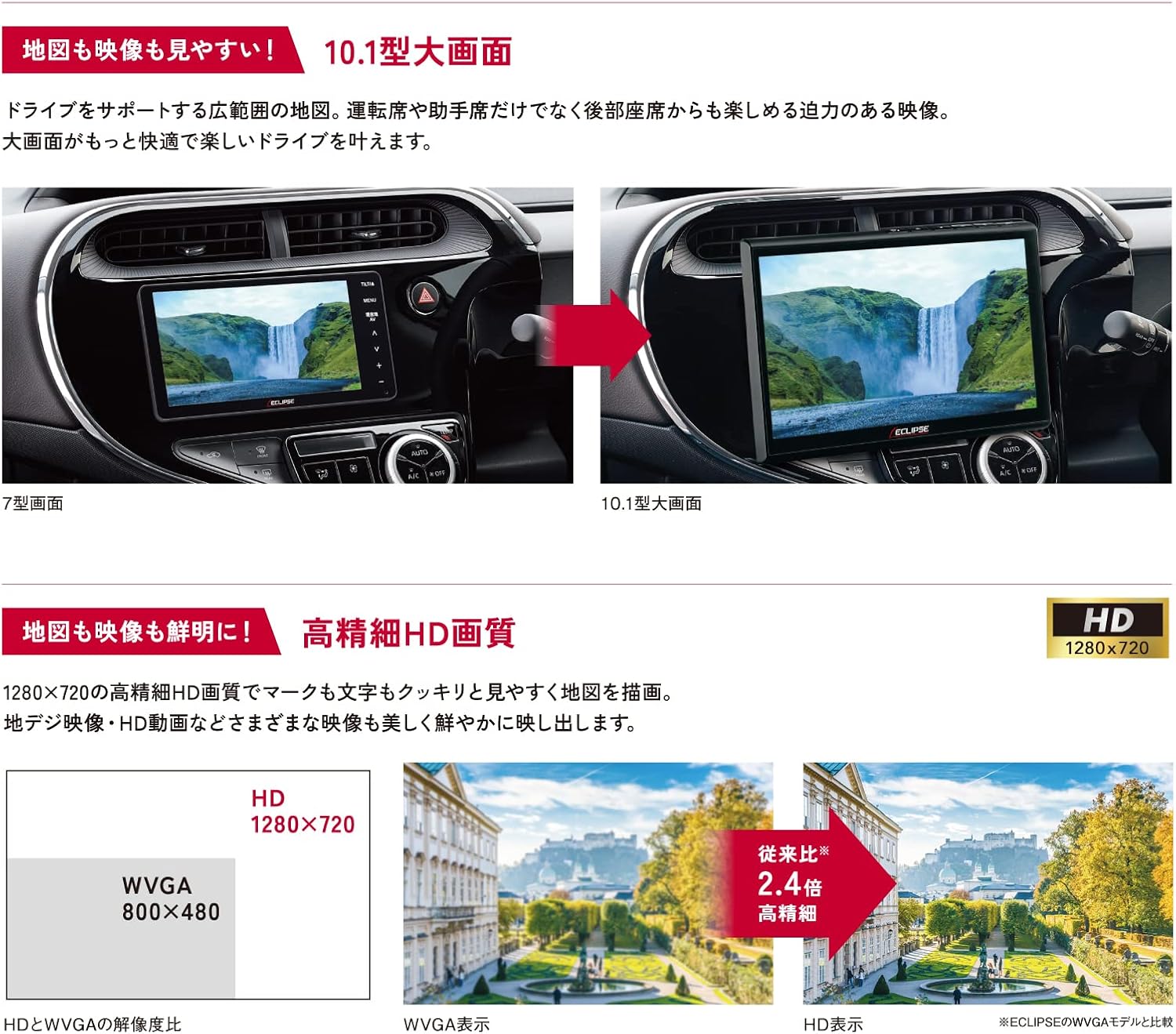
Image: Visual comparison demonstrating the superior HD quality (1280x720) of the AVN-HS01F compared to standard WVGA (800x480).
3. Configurazione e installazione
The AVN-HS01F utilizes a floating display structure, which allows for installation in a wide variety of vehicles. For detailed installation instructions, including wiring diagrams and mounting procedures, please refer to the dedicated Manuale di installazione provided with your unit. Professional installation is recommended to ensure proper functionality and safety.

Immagine: Un overview of different ECLIPSE navigation series, highlighting the floating display and various features across models.
4. Istruzioni per l'uso
4.1 Funzioni di navigazione
- Visualizzazione della mappa: View detailed maps in HD quality. Use pinch-to-zoom and swipe gestures for easy navigation.
- Indicazioni stradali: Enter your destination to receive clear, turn-by-turn directions. The HD display ensures route information is highly visible.
- VICS WIDE: Access real-time traffic information to avoid congestion and optimize your travel time.
4.2 Riproduzione multimediale
- Formato CD/DVD: Insert discs into the designated slot for audio and video playback.
- Scheda SD: Insert an SD card containing audio or video files nella fessura.
- Audio Bluetooth: Associa il tuo smartphone o un altro dispositivo abilitato Bluetooth per riprodurre l'audio in streaming in modalità wireless.
4.3 Supporto Apple CarPlay
Connect your iPhone via USB to enable Apple CarPlay. This allows you to use compatible iPhone apps, make calls, send messages, and control music directly from the navigation screen. Use Siri for hands-free voice commands.
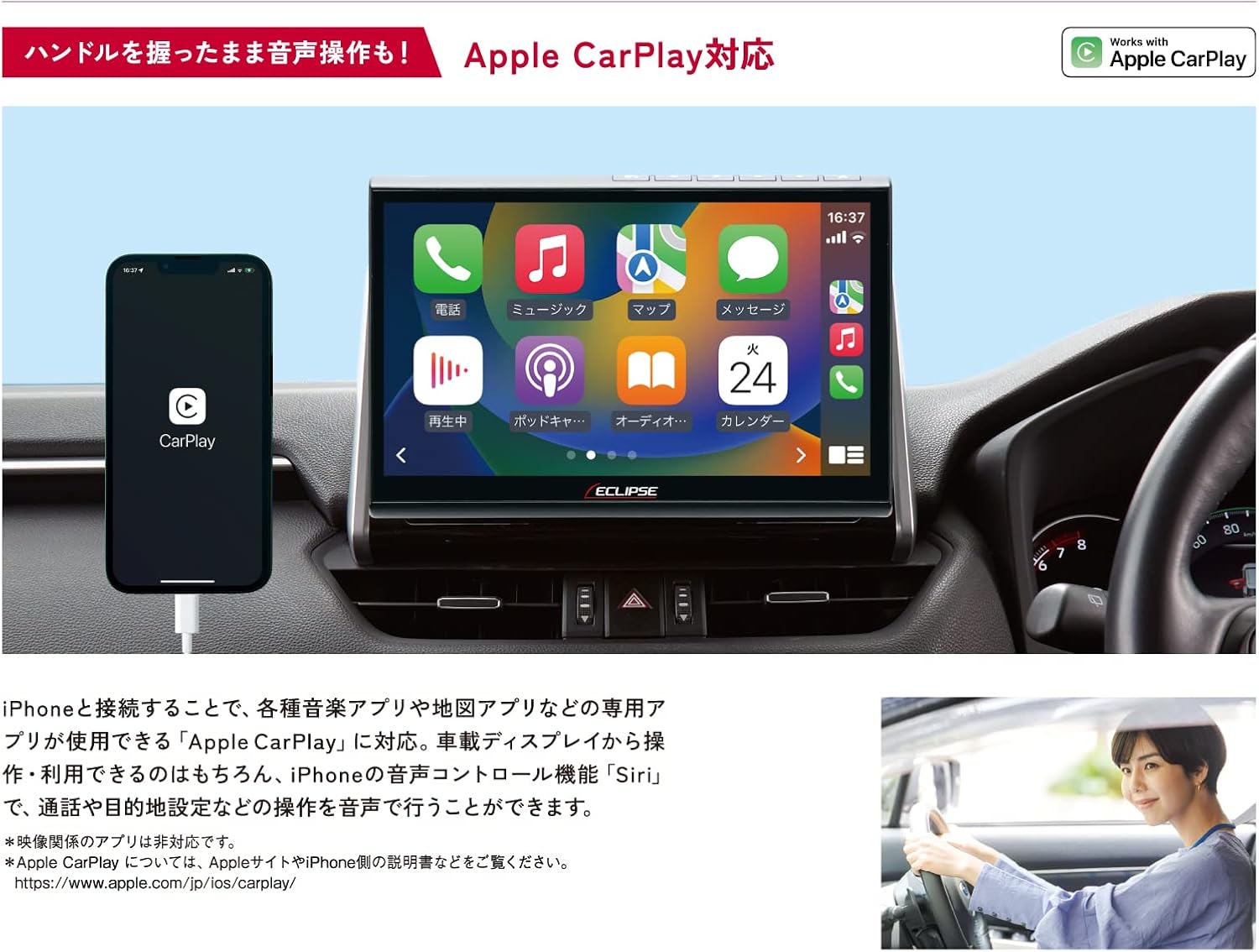
Image: The AVN-HS01F display showing the Apple CarPlay interface, with a connected iPhone.
4.4 HDMI Connectivity
Connect HDMI-compatible devices, such as smartphones or portable media players, to the unit to display their content on the large screen. Enjoy high-definition videos and games.

Image: The AVN-HS01F display showing content mirrored from a smartphone via HDMI connection.
4.5 Regolazione del display
The floating display allows for flexible positioning to optimize viewing angles and minimize glare. Adjust the screen's tilt (front/back), swivel (left/right), and height (up/down) manually to suit your preference.

Image: Diagrams demonstrating the various adjustable angles and positions of the AVN-HS01F display for optimal viewing.
5. Manutenzione
To ensure the longevity and optimal performance of your ECLIPSE AVN-HS01F, follow these maintenance guidelines:
- Pulizia dello schermo: Gently wipe the display with a soft, lint-free cloth. For stubborn smudges, slightly dampPulisci il panno con acqua o un detergente per schermi. Evita materiali abrasivi o sostanze chimiche aggressive.
- Pulizia dell'unità: Use a dry, soft cloth to wipe the main unit and surrounding areas. Ensure no dust or debris accumulates in ports or vents.
- Cura del disco: Handle CDs and DVDs by their edges. Keep them clean and free of scratches to prevent playback issues.
- Aggiornamenti software: Periodically check the official ECLIPSE websito per eventuali aggiornamenti software o mappe disponibili per garantire che il tuo sistema utilizzi la versione più recente.
6. Risoluzione Dei Problemi
If you encounter issues with your AVN-HS01F, try the following basic troubleshooting steps:
- Nessun potere: Controllare tutti i collegamenti elettrici. Assicurarsi che l'accensione del veicolo sia inserita.
- Nessun suono: Verificare le impostazioni del volume. Controllare la selezione della sorgente audio. Assicurarsi che gli altoparlanti siano collegati correttamente.
- Nessun segnale GPS: Assicurarsi che l'antenna GPS sia installata correttamente e abbia una visuale libera view del cielo. Spostare il veicolo in un'area aperta se ci si trova in un luogo coperto.
- Problemi di visualizzazione: If the screen is blank or distorted, try restarting the vehicle's ignition. Check display cable connections if accessible.
- Touchscreen non reattivo: Perform a system reset if available (refer to the main instruction manual for specific reset procedures).
- Errori di riproduzione del disco: Ensure the disc is clean and free of scratches. Try a different disc to confirm the issue is not with the media.
For persistent issues or problems not covered here, please contact ECLIPSE customer support or consult a qualified service technician.
7. Specifiche
| Caratteristica | Specificazione |
|---|---|
| Marca | ECLISSI |
| Nome del modello | AVN HS01F |
| Numero di modello del prodotto | AVN-HS01F |
| Dimensioni dello schermo | 10.1 pollici |
| Risoluzione dello schermo | Alta definizione (1280x720) |
| Capacità di archiviazione della memoria | 32 GB |
| Tecnologia di connettività | Bluetooth, HDMI |
| Caratteristiche speciali | VICS/VICS WIDE, Apple CarPlay Support |
| Tipo di montaggio | Dashboard Mount (Floating) |
| Tipo di veicolo compatibile | Passenger Cars (approx. 400 models) |
| Tipo di mappa | Asia, Japan |
| Peso dell'articolo | 5.26 chilogrammi |
| Dimensioni del pacco | Dimensioni: 35.7 x 33.8 x 20.5 cm |
| Componenti inclusi | Navigation unit, TV antenna, power cord, relay cord, vehicle speed cord, microphone, instruction manual, installation manual |
8. Garanzia e supporto
The ECLIPSE AVN-HS01F comes with a Garanzia del produttore di 1 anno dalla data di acquisto. Questa garanzia copre difetti di materiali e lavorazione in condizioni di normale utilizzo.
For warranty claims, technical support, or further inquiries, please contact ECLIPSE customer service or visit the official ECLIPSE brand store:
Conservare la prova d'acquisto per la convalida della garanzia.