
1. Introduzione
The TASI TA612C is a portable digital thermometer designed for precise temperature measurement using K/J type thermocouples. This model supports four channels, allowing simultaneous measurement of multiple points. It features a VA digital color display, data hold function, MAX/MIN value tracking, extensive data storage capabilities, an alarm buzzer, and automatic shutdown for convenient and efficient operation. The TA612C also includes a USB interface for data upload and real-time measurement.
2. Contenuto della confezione
Al momento di disimballare la confezione, controllare il contenuto per assicurarsi che tutti gli articoli siano presenti e integri.
- 1 x TASI TA612C Thermometer
- 4 x K-type Thermocouple Probes
- 1 cavo USB
- 1 x Borsa portaoggetti
- 1 x Manuale utente (inglese)

3. Caratteristiche del prodotto
- 4-Channel Measurement: Simultaneously monitor temperatures from up to four different locations using K/J type thermocouples.
- Ampio intervallo di temperatura: Misura temperature da -200℃ a 1372℃ (da -328℉ a 2501℉).
- VA Digital Color Display: Provides clear and easy-to-read temperature values and operational status.
- Funzione di conservazione dei dati: Blocca la lettura della temperatura corrente sul display.
- MAX/MIN Value Tracking: Records and displays the maximum and minimum temperatures measured during a session.
- Ampia capacità di archiviazione dei dati: Stores up to 5000 groups of temperature data.
- USB Data Logger: Allows data upload to a computer and real-time measurement monitoring via USB connection.
- Adjustable Probe Error Compensation (ADJ): Compensates for probe inaccuracies within a range of -9℃ to 9℃.
- Allarme alta/bassa temperatura: Configurable alarm limits (default 1300℃/-200℃) with dual sound and light alerts.
- Spegnimento automatico: Conserva la durata della batteria spegnendosi automaticamente dopo un periodo di inattività.

4. Impostazione
4.1 Alimentazione
The TA612C thermometer can be powered by three AA/LR06 batteries (not included) or via a 5V 1A USB power source. Ensure batteries are inserted with correct polarity. For continuous operation or data transfer, connect the device using the provided USB cable.
4.2 Collegamento delle sonde termocoppia
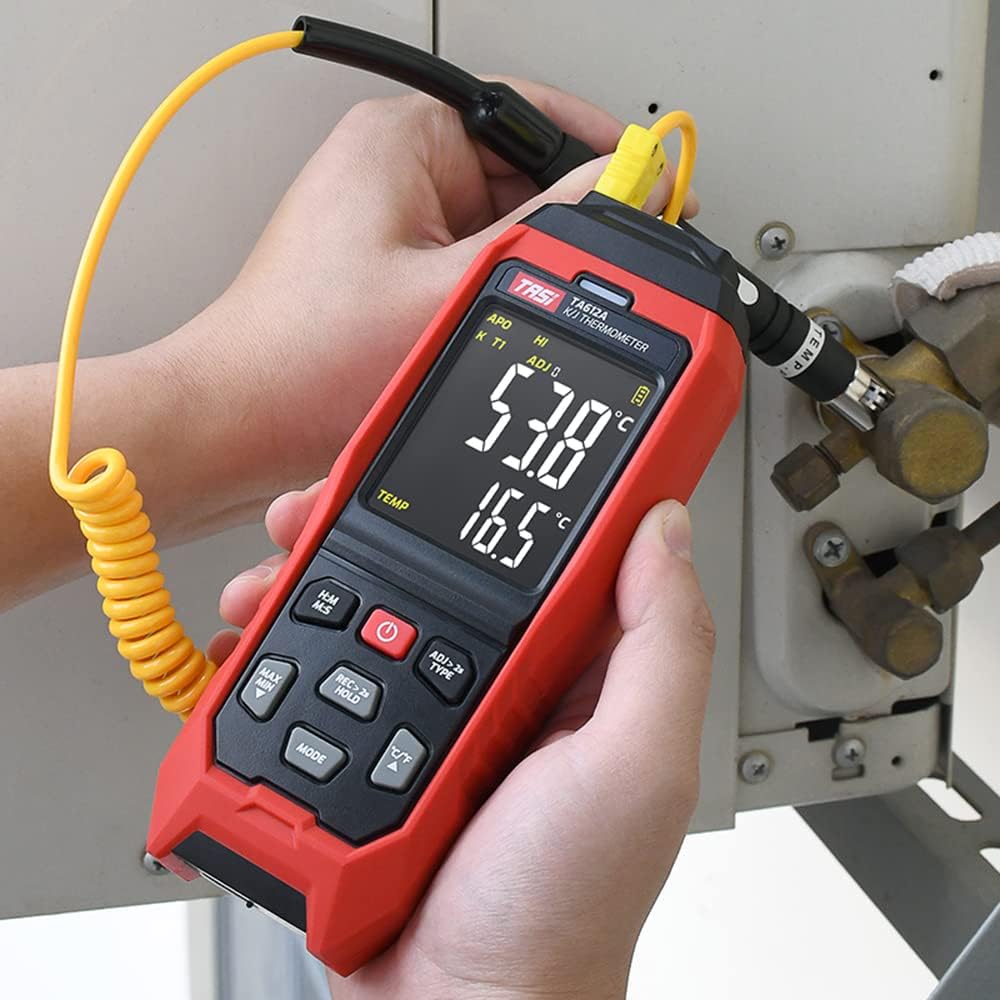
The device supports K/J type thermocouples. Four K-type probes are included in the package. Connect the thermocouple probes to the corresponding input jacks (T1, T2, T3, T4) at the top of the device. Ensure a secure connection for accurate readings.
5. Istruzioni per l'uso
5.1 Accensione/spegnimento
- Premere il tasto Pulsante di accensione (
 ) per accendere il dispositivo.
 - Premere e tenere premuto il tasto Pulsante di accensione for approximately 2 seconds to turn the device off.
5.2 Fine displayview
The VA color display provides comprehensive information. Refer to the diagram below for key indicators:

5.3 Misurazione di base
Once powered on and probes are connected, the device will automatically begin displaying temperature readings for each active channel. The sampling rate is approximately 1 time per second.
5.4 Conservazione dei dati
Premere il tasto REC > 2s HOLD button briefly to activate/deactivate the data hold function. The 'HOLD' indicator will appear on the display when active.
5.5 MAX/MIN Value
Premere il tasto MASSIMO MIN button to cycle through current, maximum (MAX), and minimum (MIN) temperature readings. The corresponding indicator will show on the display.
5.6 Commutazione unità (°C/°F)
Premere il tasto ° C / ° F pulsante per passare dalle unità di temperatura Celsius a Fahrenheit e viceversa.
5.7 Conservazione dei dati
The TA612C can store up to 5000 groups of temperature data. To manually record data, press and hold the REC > 2s HOLD button for more than 2 seconds. The 'REC' indicator will flash, and the data group number will increment. The device stores the temperature values of the thermocouple channels, not ambient temperature.

5.8 Impostazioni di allarme
The device has default high/low alarm limits of 1300℃ and -200℃. Consult the full user manual for detailed instructions on how to adjust these alarm thresholds. When an alarm condition is met, the device will provide both sound and light alerts.
5.9 Probe Error Compensation (ADJ)
The TA612C allows for probe error compensation (ADJ) within a range of -9℃ to 9℃. This feature helps to fine-tune the accuracy of readings for specific probes. Refer to the detailed user manual for steps on how to access and adjust this setting.
6. Gestione dei dati (USB)
The TA612C model features a USB interface for data connectivity. Connect the thermometer to a computer using the provided USB cable. This allows for:
- Caricamento dati: Transfer stored temperature data from the device to your computer for analysis and record-keeping.
- Misurazione in tempo reale: Monitor live temperature readings on your computer screen, which can be useful for long-term logging or detailed observation.
Software for data management is typically available from the manufacturer's website, as indicated in the included user manual.
7. Manutenzione
7.1 Pulizia
Per pulire il dispositivo, utilizzare un panno morbido, damp cloth. Do not use abrasive cleaners, solvents, or immerse the device in water. Ensure the device is powered off and disconnected from any power source before cleaning.
7.2 Conservazione
When not in use, store the thermometer and its probes in the provided storage bag in a cool, dry place, away from direct sunlight and extreme temperatures. Remove batteries if the device will not be used for an extended period to prevent leakage.
7.3 Sostituzione della batteria
When the battery indicator shows low power, replace the three AA/LR06 batteries. Ensure the device is powered off before opening the battery compartment and observe correct polarity when inserting new batteries.
8. Risoluzione Dei Problemi
- Il dispositivo non si accende: Check battery installation and ensure batteries are not depleted. If using USB power, verify the cable and power source.
- Letture imprecise: Ensure thermocouple probes are correctly and securely connected. Check for any visible damage to the probes. Consider using the ADJ compensation feature if a known offset exists.
- Il display è vuoto o tremolante: Replace batteries or connect to USB power. If the issue persists, contact customer support.
- Problemi di trasferimento dati: Ensure the USB cable is properly connected to both the device and the computer. Verify that the correct software/drivers are installed on your computer.
- Allarme non funzionante: Check alarm settings to ensure limits are correctly configured and the alarm function is enabled.
For issues not covered here, please refer to the comprehensive user manual or contact KKnoon customer support.
9. Specifiche tecniche
| Parametro | Specificazione |
|---|---|
| Modello | TA612C |
| Canale | 4 canali |
| Archiviazione dei dati | 5000 Gruppi |
| Data Upload & Real-time Measurement | Supported (USB) |
| Materiale | ABS (Acrylonitrile Butadiene Styrene), PC (Polycarbonate) |
| K/J Type Measurement Range | -200~1372℃/-328~2501℉ |
| Precisione | ±0.2% + 0.7℃ |
| High/Low Alarm Limit (Default) | 1300℃ / -200℃ |
| Intervallo di compensazione ADJ | -9℃ ~ 9℃ |
| Samptasso di ling | Approx. 1 time/s |
| Alimentazione elettrica | 3 x AA/LR06 Batteries (not included) or USB 5V 1A |
| Dimensioni dell'articolo | 177 x 70 x 35 mm (6.97 x 2.76 x 1.38 pollici) |
| Peso dell'articolo | 565 g (1.25 libbre) |
| Tipo di visualizzazione | Digital VA Color Display |
| Tecnologia di connettività | USB |
10. Informazioni sulla sicurezza
Please read and understand all safety instructions before using this device. Failure to follow these instructions may result in electric shock, fire, or personal injury.
- Non utilizzare il dispositivo se appare danneggiato o non funziona correttamente.
- Non tentare di riparare o modificare il dispositivo. Per qualsiasi intervento di assistenza, rivolgersi a personale qualificato.
- Ensure the correct type of thermocouple probes (K or J) are used and properly connected.
- Evitare di esporre il dispositivo a temperature estreme, umidità o luce solare diretta.
- Tenere il dispositivo lontano da forti campi elettromagnetici.
- Remove batteries if the device is not used for a long period to prevent battery leakage.
- Smaltire le batterie e il dispositivo secondo le normative locali.
11. Garanzia e supporto
For warranty information, technical support, or service inquiries, please refer to the contact details provided in the original product packaging or visit the official KKnoon websito. Conservare la ricevuta d'acquisto come prova d'acquisto per eventuali reclami in garanzia.