
1. Prodotto finitoview
The BOBLOV M7 Pro is a 4K GPS body worn camera designed for various recording needs, featuring a 180° rotatable lens, 256GB internal storage, and a long-lasting battery. This manual provides instructions for its proper use and maintenance.
1.1 Contenuto della confezione
Verifica che tutti gli articoli elencati di seguito siano inclusi nel pacco. Se alcuni articoli risultano mancanti o danneggiati, contatta l'assistenza clienti.
- 1x M7 Pro Body Worn Camera
- 1x cavo USB-C
- 1x spina di ricarica rapida
- 1 clip corta con rotazione a 360°
- 1 clip lunga con rotazione a 360°
- 1x Manuale utente

Figure 1: Packaging List of BOBLOV M7 Pro
2. Impostazione
2.1 Caricamento della fotocamera
Before first use, fully charge the camera. The 4000mAh battery provides up to 14 hours of video recording and takes approximately 4-5 hours to fully charge using the provided fast charger.
- Collegare il cavo USB-C alla porta di ricarica della fotocamera.
- Plug the other end of the USB-C cable into the fast charger plug.
- Inserire la spina del caricabatterie in una presa di corrente.
- La spia di carica indicherà lo stato di carica. Solitamente si spegnerà o cambierà colore quando la carica sarà completa.

Figure 2: Charging the M7 Pro Body Camera
2.2 Fissaggio delle clip
The M7 Pro comes with two types of rotatable clips for flexible mounting options: a short back clip and a long shoulder clip. Both support 360° rotation.
- Align the clip with the slot on the back of the camera.
- Slide the clip firmly into place until it clicks.
- Per rimuoverlo, premere la linguetta di rilascio (se presente) e far scorrere la clip verso l'esterno.
- Attach the camera to your uniform, belt, or shoulder strap using the desired clip.
Video 1: Demonstrates how to attach and rotate the shoulder and back clips on the M7 Pro body camera.
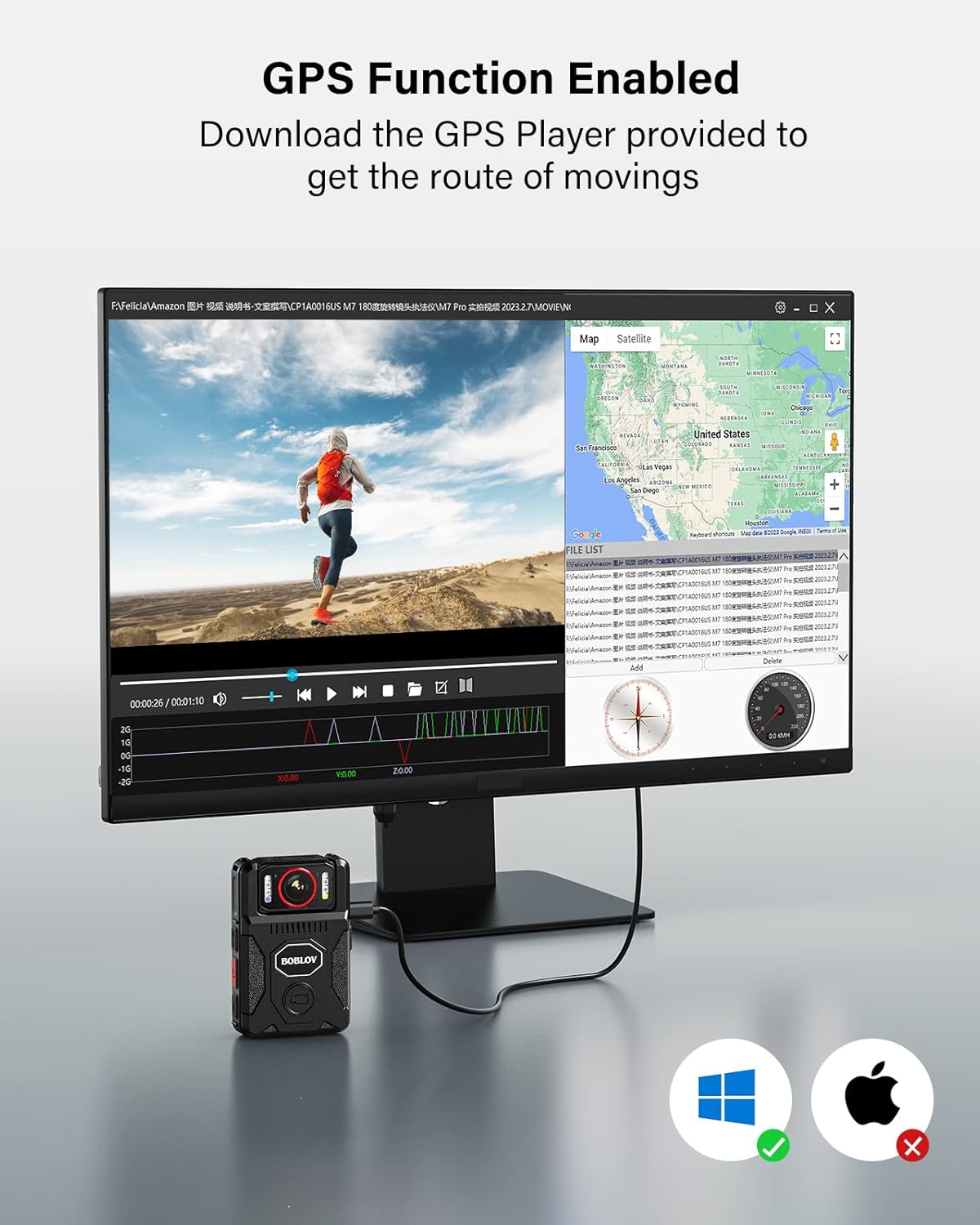
Figure 3: M7 Pro with Long Shoulder Clip

Figure 4: M7 Pro with Short Back Clip
2.3 Impostazione di data e ora
Ensure the camera's time and date are correctly set for accurate record-keeping.
2.3.1 Without GPS (Manual Setting)
- Enter the camera's menu.
- Navigate to the 'Date&Time' setting option.
- Edit the date and time to your local settings.
- Exit the menu and verify the display.
2.3.2 With GPS (Automatic Synchronization)
For automatic time synchronization, ensure GPS is enabled and the camera can acquire a signal in an open area.
- In the camera's menu, set your local 'Time Zone'. For example, in the US, this is typically GMT -8:00. Adjust according to your specific location.
- Turn on the 'GPS' option in the menu.
- Take the M7 Pro to an open area to allow it to acquire a GPS signal.
- Once GPS is successfully located, the GPS icon on the display will change (e.g., from grey to green), and the time and date will automatically sync to the local time zone.
Video 2: Instructions on how to set the correct time for the M7 Pro body worn camera, both manually and using GPS synchronization.
3. Istruzioni per l'uso
3.1 Accensione/spegnimento e registrazione
The M7 Pro is designed for quick activation and recording.
- Accensione: Tieni premuto il pulsante di accensione finché la fotocamera non si accende.
- Avvia la registrazione: Press the dedicated video recording button (often red or clearly marked) to begin recording. The camera will typically provide an audio or visual cue (e.g., red light) to indicate recording has started.
- Interrompi registrazione: Per interrompere la registrazione, premere nuovamente il pulsante di registrazione video.
- Spegni: Press and hold the power button until the camera powers off.
Video 3: Oltreview of BOBLOV M7 Pro 4K GPS Body Worn Camera features, including power on, recording, and lens rotation.
3.2 180° Rotating Lens
The unique 180° rotatable lens allows for flexible shooting angles and auto-adjustment of image direction during standby or video recording.
- Manually rotate the lens to your desired angle.
- The camera will automatically adjust the image orientation on the display to ensure correct viewing, even if the camera body is inverted.
- Allow a few seconds for the camera to adjust the image direction after rotation.
Video 4: Guide on how to rotate the BOBLOV M7 Pro camera's lens and record videos, demonstrating the auto-orientation feature.

Figura 5: Lente girevole a 180°
3.3 Night Vision (IR Lights)
The M7 Pro is equipped with 4 IR lights for clear recording in low-light or nighttime conditions.
- After powering on, long press the dedicated night vision button (often marked with a moon or IR symbol) to turn on/off the four IR lights.
- The camera can operate in auto or manual night vision mode.

Figure 6: M7 Pro with IR Night Vision
3.4 White Light and Alarm Function
The camera includes a white light and an alarm function with red-blue flash lights for warning purposes.
- Luce bianca: After powering on, short press the night vision button (often marked with a moon or IR symbol) to turn on/off the white light.
- Alarm Sound & Red-Blue Flash Lights: In standby mode, long press the photo button (often marked with a camera icon) to activate the alarm sound and red-blue flash lights.
- To deactivate the alarm sound, long press the photo button a second time.
- To turn off the lights (white and red-blue flash), long press the photo button a third time.
Video 5: Instructions on how to activate and deactivate the warning lights and alarm sound on the M7 Pro body camera.
3.5 Funzionalità GPS
The integrated GPS allows for tracking driving routes via the provided GPS Player software.
- Ensure GPS is enabled in the camera's settings (refer to Section 2.3.2).
- Record video as usual. The GPS data will be embedded in the video files.
- Trasferisci il video files a un computer.
- Use the dedicated GPS Player software (provided by BOBLOV, typically available for download) to view the video and its corresponding route on a map.

Figure 7: GPS Functionality with GPS Player
3.6 Registrazione in loop
The M7 Pro supports loop recording, which automatically overwrites the oldest files quando la scheda di memoria è piena.
- Loop Recording is enabled by default.
- You can set the 'Video Duration' in the camera's menu to 5, 10, or 15 minutes per segment.
3.7 Utilizzo esteso come Dash Camera
The M7 Pro can also be used as a dash camera for vehicle recording. An optional suction mount (not included) is required for this application.

Figure 8: M7 Pro Used as a Dash Camera
4. Manutenzione
4.1 Pulizia
- Per pulire il corpo della fotocamera, utilizzare un panno morbido e asciutto.
- Per la lente, utilizzare un panno e una soluzione specifici per la pulizia delle lenti, per evitare graffi.
- Non utilizzare prodotti chimici aggressivi o materiali abrasivi.
4.2 Conservazione
- Conservare la fotocamera in un luogo fresco e asciutto, lontano dalla luce solare diretta e da temperature estreme.
- Evitare di conservare la fotocamera in ambienti polverosi o umidi.
- Se si prevede di non utilizzarla per lunghi periodi, assicurarsi che la batteria sia parzialmente carica (circa il 50%) per prolungarne la durata.
5. Risoluzione Dei Problemi
If you encounter issues with your BOBLOV M7 Pro camera, refer to the following common problems and solutions:
| Problema | Possibile causa | Soluzione |
|---|---|---|
| La fotocamera non si accende. | Batteria scarica; fotocamera bloccata. | Charge the camera fully. If frozen, try pressing the reset button (if available) or holding the power button for an extended period. |
| Scarsa qualità video/immagine. | Lente sporca; impostazioni errate; condizioni di scarsa illuminazione. | Clean the lens. Check video resolution settings (ensure 4K is selected). Activate IR night vision in low light. |
| GPS not locating or inaccurate. | GPS disabled; obstructed signal; incorrect time zone. | Ensure GPS is enabled in settings. Move to an open area with clear sky view. Verify time zone settings. |
| Camera locks up or freezes. | Software glitch; internal memory issue. | Press the reset button (if available). Power off and restart. If persistent, contact customer support. |
| Cannot access recorded videos. | Connection issue; corrupted files. | Ensure proper USB connection to computer. Try a different USB port or cable. If files are corrupted, formatting the camera (which will erase data) might be necessary. |
If the problem persists after attempting these solutions, please contact BOBLOV customer support for further assistance.
6. Specifiche
Key technical specifications for the BOBLOV M7 Pro 4K GPS Body Worn Camera:
| Caratteristica | Dettaglio |
|---|---|
| Marca | capitoli |
| Nome del modello | M7 Pro |
| Risoluzione di acquisizione video | 4K |
| Tecnologia del sensore fotografico | CMOS |
| Tipo di lente | Zoom, 180° Rotatable |
| Dimensioni della memoria flash installata | 256 GB |
| Capacità della batteria | 4000 mAh (up to 14 hours recording) |
| Tempo di ricarica | 4-5 ore (con caricabatterie rapido) |
| Caratteristica speciale | Infrared Night Vision, GPS |
| Dimensioni dello schermo | 2 pollici |
| Tecnologia di connettività | USB |
| Livello di resistenza all'acqua | Non resistente all'acqua |
| Compatibilità del sistema operativo | Android, iOS (for GPS Player software) |

Figure 9: M7 Pro Dimensions and Weight
7. Garanzia e supporto
7.1 Informazioni sulla garanzia
The BOBLOV M7 Pro Body Worn Camera comes with a Garanzia di 2 anno dalla data di acquisto. La presente garanzia copre difetti di fabbricazione e malfunzionamenti in condizioni di normale utilizzo. Non copre danni causati da uso improprio, incidenti, modifiche non autorizzate o calamità naturali.
7.2 Assistenza clienti
For any questions, technical assistance, or warranty claims, please contact BOBLOV customer service:
- E-mail: Refer to the contact information provided in your product packaging or on the official BOBLOV websito.
- Risorse online: Visita il sito ufficiale BOBLOV website for FAQs, software downloads (e.g., GPS Player), and additional support materials.