
ANRAN Q03
Manuale utente della telecamera di sicurezza solare per esterni ANRAN
Modello: Q03
1. Prodotto finitoview
The ANRAN Solar Security Camera Outdoor is a high-performance wireless surveillance solution designed for outdoor use. It features 5MP HD resolution, 360° pan and tilt capabilities, and is powered by a solar panel for continuous operation. The camera offers advanced features such as color night vision, PIR human detection, two-way audio, and smart siren alerts, ensuring comprehensive security for your property.

Figure 1: ANRAN Solar Security Camera Outdoor with solar panel.
Le caratteristiche principali includono:
- 5MP Crisp Image & 360° View: Provides 355° horizontal and 140° vertical panoramic shooting with 5MP HD resolution.
- Solar Powered, Energy Efficient: Equipped with a solar panel for constant power in sunny conditions, reducing the need for manual charging.
- HD Colour Night Vision: Offers clear color night vision up to 15 meters, activated by four powerful spotlights upon human movement detection.
- Conversazione bidirezionale: Built-in microphone and speaker enable real-time two-way audio communication via the mobile app.
- Smart Home Enabled: Compatible with Alexa/Google Assistant for voice control and live video streaming.
- Rilevamento umano PIR: Intelligent AI human detection triggers alerts and siren.
- IP65 resistente alle intemperie: Progettato per resistere a diverse condizioni meteorologiche esterne.
2. Cosa c'è nella scatola
Verificare che tutti i componenti siano presenti nella confezione prima di procedere con l'installazione.

Figure 2: Package contents of the ANRAN Solar Security Camera.
- 1 fotocamera da 5 MP
- 1 x pannello solare
- 1 cavo USB
- 1 x Manuale utente
- 1 x confezione di viti
- 1 x modello di montaggio
- 1 x Staffa
- 1 x Surveillance Sticker
3. Impostazione
3.1 Carica iniziale
Before first use, fully charge the camera's internal battery using the provided USB cable. Connect the USB cable to the camera's charging port and a 5V/2A USB power adapter (not included). A full charge ensures optimal performance, especially during initial setup and periods of low sunlight.
3.2 Installazione dell'app e creazione dell'account
Download the official ANRAN app from the App Store (iOS) or Google Play Store (Android). Follow the on-screen instructions to create an account and log in.

Figure 3: ANRAN app availability and key features.
3.3 Abbinamento della fotocamera
Within the ANRAN app, select "Add Device" and follow the prompts to connect your camera to your 2.4GHz Wi-Fi network. Ensure your mobile device is connected to the same 2.4GHz Wi-Fi network during the pairing process. The camera supports 2.4GHz Wi-Fi only.
3.4 Montaggio della telecamera e del pannello solare
Scegliere una posizione di montaggio che fornisca una visione chiara view dell'area che desideri monitorare e riceve ample direct sunlight for the solar panel. Use the provided mounting template and screws to securely attach the camera and solar panel to a wall or other stable surface. Ensure the solar panel is positioned to maximize sun exposure throughout the day.

Figure 4: Illustrates the wireless setup and solar charging capability.
Connect the solar panel cable to the camera's charging port. The IP65 rating ensures the connection is protected from outdoor elements.
4. Utilizzo della fotocamera
4.1 Vivere View e Registrazione
Apri l'app ANRAN per accedere alla diretta view of your camera. You can manually record video or capture screenshots directly from the live feed. The camera supports local storage via Micro SD card (up to 128GB, not included) and cloud storage (free 7-day trial available).

Figure 5: Cloud service and Micro SD card storage options.
4.2 Controllo panoramica e inclinazione
Utilizzare i controlli direzionali all'interno dell'app per regolare da remoto la telecamera viewing angle. The camera offers 355° horizontal pan and 140° vertical tilt for comprehensive coverage without blind spots.

Figure 6: Demonstrates the camera's 360° pan and tilt capabilities.
4.3 Modalità di visione notturna
The camera automatically switches between day and night vision modes. It supports both infrared (IR) night vision for clear black and white images in complete darkness and 2.5K color night vision, enabled by its four powerful spotlights, which illuminate the scene for full-color recording.
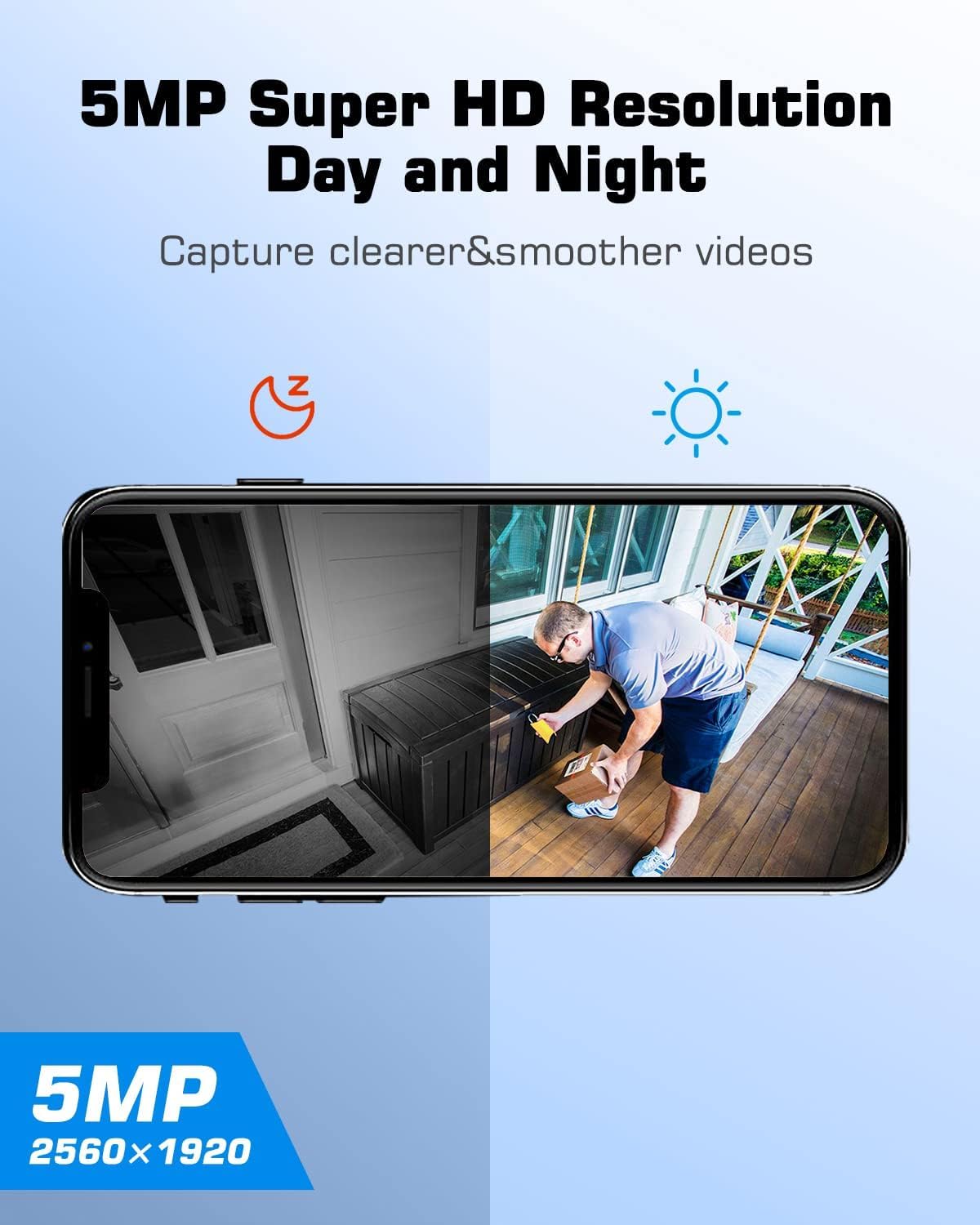
Figure 7: Comparison of day and night vision clarity.
4.4 Audio bidirezionale
Utilize the two-way audio feature to communicate with visitors or deter intruders. Tap the microphone icon in the app's live view to speak through the camera's speaker, and listen through its built-in microphone.

Figure 8: Demonstrates the two-way audio feature via the app.
4.5 Rilevamento e avvisi umani PIR
The camera employs Passive Infrared (PIR) technology for accurate human detection, minimizing false alarms. When human motion is detected, the camera can automatically trigger a smart siren, activate spotlights, and send instant alerts to your mobile device. You can adjust the detection sensitivity in the app settings.

Figure 9: Illustrates the smart siren and instant alert system.

Figure 10: Adjustable detection sensitivity settings.
4.6 Integrazione Smart Home (Alexa/Assistente Google)
Integrate your ANRAN camera with Amazon Alexa or Google Assistant for convenient voice control. Once linked, you can ask your smart assistant to display the live feed from your camera on compatible smart displays.

Figure 11: ANRAN camera compatibility with Alexa.
5. Manutenzione
5.1 Pulizia dei pannelli solari
Pulire regolarmente la superficie del pannello solare per garantire il massimo assorbimento della luce solare. Polvere, sporco e detriti possono ridurre l'efficienza di ricarica. Utilizzare un panno morbido e asciutto.amp panno per pulire delicatamente il pannello.
5.2 Pulizia dell'obiettivo della fotocamera
Keep the camera lens clean for optimal image clarity. Use a soft, lint-free cloth to wipe away any smudges or dirt. Avoid abrasive materials that could scratch the lens.
5.3 Aggiornamenti firmware
Controlla periodicamente l'app ANRAN per verificare la disponibilità di aggiornamenti firmware. Mantenere aggiornato il firmware della tua telecamera ti garantisce di disporre delle funzionalità più recenti, dei miglioramenti della sicurezza e delle correzioni di bug.
6. Risoluzione Dei Problemi
6.1 La fotocamera non si connette al Wi-Fi
- Assicurati che la tua rete Wi-Fi sia a 2.4 GHz. La telecamera non supporta la rete Wi-Fi a 5 GHz.
- Controlla la potenza del segnale Wi-Fi nel punto in cui si trova la telecamera. Se necessario, avvicina la telecamera al router.
- Verificare che la password Wi-Fi inserita nell'app sia corretta.
- Riavvia il router Wi-Fi e la telecamera.
6.2 Battery Not Charging / Low Battery
- Assicurarsi che il pannello solare sia pulito e riceva la luce solare diretta per diverse ore al giorno.
- Controllare il collegamento tra il pannello solare e la telecamera.
- If sunlight is insufficient, manually charge the camera using the USB cable and a 5V/2A power adapter.
- Verify the ambient temperature is within the camera's operating range. Extreme cold can affect battery performance.
6.3 Scarsa qualità dell'immagine
- Pulisci l'obiettivo della fotocamera per rimuovere sporco o macchie.
- Assicurare un'illuminazione adeguata nell'area monitorata, in particolare per la visione notturna a colori.
- Check your Wi-Fi connection speed. A weak signal can lead to choppy video.
6.4 Falsi allarmi
- Adjust the PIR detection sensitivity in the ANRAN app.
- Ensure the camera is not pointed at areas with frequent movement from non-human sources (e.g., trees swaying, busy roads).
7. Specifiche
| Caratteristica | Specificazione |
|---|---|
| Nome del modello | Q03 |
| Risoluzione di acquisizione video | 1920p (5 MP) |
| Tecnologia di connettività | Senza fili (Wi-Fi a 2.4 GHz) |
| Fonte di alimentazione | Alimentato a energia solare, alimentato a batteria |
| Viewangolo di ing | 110 gradi (obiettivo fisso) |
| Gamma di panoramica/inclinazione | 355° Orizzontale, 140° Verticale |
| Gamma di visione notturna | 55 piedi (circa 15 metri) |
| Frequenza dei fotogrammi | 25 fotogrammi al secondo |
| Livello di resistenza all'acqua | IP65 (impermeabile) |
| Peso dell'articolo | 930 grammi |
| Batterie | Sono necessarie 2 batterie AA (incluse) |
| Dispositivi compatibili | Amazon Alexa, Assistente Google |
8. Garanzia e supporto
8.1 Garanzia del prodotto
The ANRAN Solar Security Camera Outdoor comes with a Garanzia di 1 anni dalla data di acquisto. La presente garanzia copre i difetti di fabbricazione e garantisce il corretto funzionamento del prodotto in condizioni di utilizzo normale. Si prega di conservare la prova d'acquisto per eventuali reclami in garanzia.
8.2 Assistenza clienti
For any questions, technical assistance, or warranty claims, please contact ANRAN customer support. ANRAN provides multi-channel service including email, phone, and live chat, available 7x24 hours online. Our dedicated team is ready to provide high-quality and considerate service.

Figure 12: ANRAN after-sales service details.
You can find contact information in the user manual provided with your product or by visiting the official ANRAN websito.
Ask a question about this manual
Ask about setup, troubleshooting, compatibility, parts, safety, or missing instructions. Manuals+ will review the question and use this page’s manual context to help answer it.