
1. Introduzione
This user manual provides detailed instructions for the installation, operation, and maintenance of the ISEEVY 8ch HDMI 1080P H.265 H.264 Video Encoder. This device is designed to convert HDMI video signals into IP streams, supporting various protocols for live streaming, IPTV, and broadcast applications. Please read this manual thoroughly before using the product to ensure proper functionality and to prevent damage.
2. Prodotto finitoview
2.1 Caratteristiche principali
- Supports 8 channels of 1080P HDMI video input.
- Advanced H.265 and H.264 video encoding (high/main/baseline profile).
- AAC/MP3 audio encoding.
- Supports multiple streaming protocols: RTMP, RTMPS, RTSP, UDP, RTP, HTTP, FLV, HLS, TS, Multicast, Unicast, SRT.
- Each channel supports up to 2 streams, with resolutions up to 1920x1080P at 60fps.
- Customizable logo, text, or fly text watermark for each channel.
2.2 Aspetto del prodotto
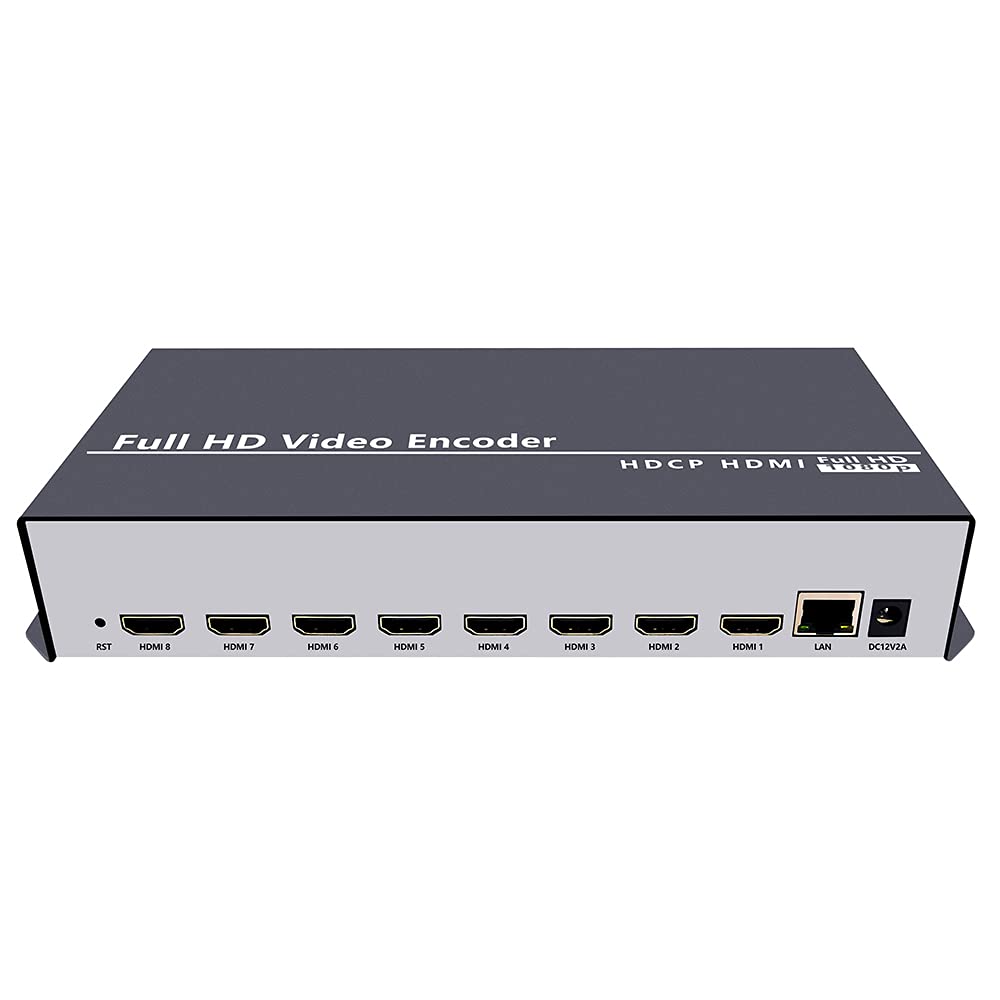
Figura 2.2.1: Fronte view of the ISEEVY 8ch HDMI Video Encoder, showing the 'Full HD Video Encoder' label and the HDMI input ports.

Figura 2.2.2: Posteriore view of the ISEEVY 8ch HDMI Video Encoder, displaying eight HDMI input ports, a LAN port, and a DC 12V power input.
2.3 Contenuto della confezione
- ISEEVY 8ch HDMI Video Encoder Unit
- Adattatore di alimentazione (CC 12V)
- Manuale dell'utente (questo documento)
- Cavo Ethernet
3. Impostazione
3.1 Connessioni fisiche
- Collegamento di sorgenti HDMI: Connect up to eight HDMI video sources (e.g., cameras, DVD players, computers) to the HDMI input ports on the rear of the encoder using standard HDMI cables.
- Connetti alla rete: Connect the encoder's LAN port to your network router or switch using the provided Ethernet cable. Ensure your network provides DHCP or assign a static IP address later.
- Connetti alimentazione: Plug the DC 12V power adapter into the encoder's DC 12V input port and then into a power outlet. The device will power on automatically.
3.2 Network Configuration Overview
The encoder requires a network connection to stream video. It can obtain an IP address automatically via DHCP or be configured with a static IP. For initial setup, it is recommended to connect it to a network with DHCP enabled.

Figure 3.2.1: Typical network setup for the ISEEVY HDMI Encoder, illustrating its connection to a router and various playback devices and platforms.
4. Istruzioni per l'uso
4.1 Web Accesso all'interfaccia
- Trova l'indirizzo IP: If your network has DHCP, the encoder will automatically obtain an IP address. You can find this IP address using an IP scanner tool on your network or by checking your router's connected devices list. The default IP address is often 192.168.1.169 if DHCP is not available.
- Accesso Web Interfaccia: Aprire un web browser (e.g., Chrome, Firefox) on a computer connected to the same network as the encoder. Enter the encoder's IP address into the browser's address bar and press Enter.
- Login: Il nome utente predefinito è amministratore e la password predefinita è amministratore. It is highly recommended to change the password after the first login for security.
4.2 Configuring Input and Stream Settings
Una volta effettuato l'accesso al web interface, you can configure each HDMI input and its corresponding output streams.
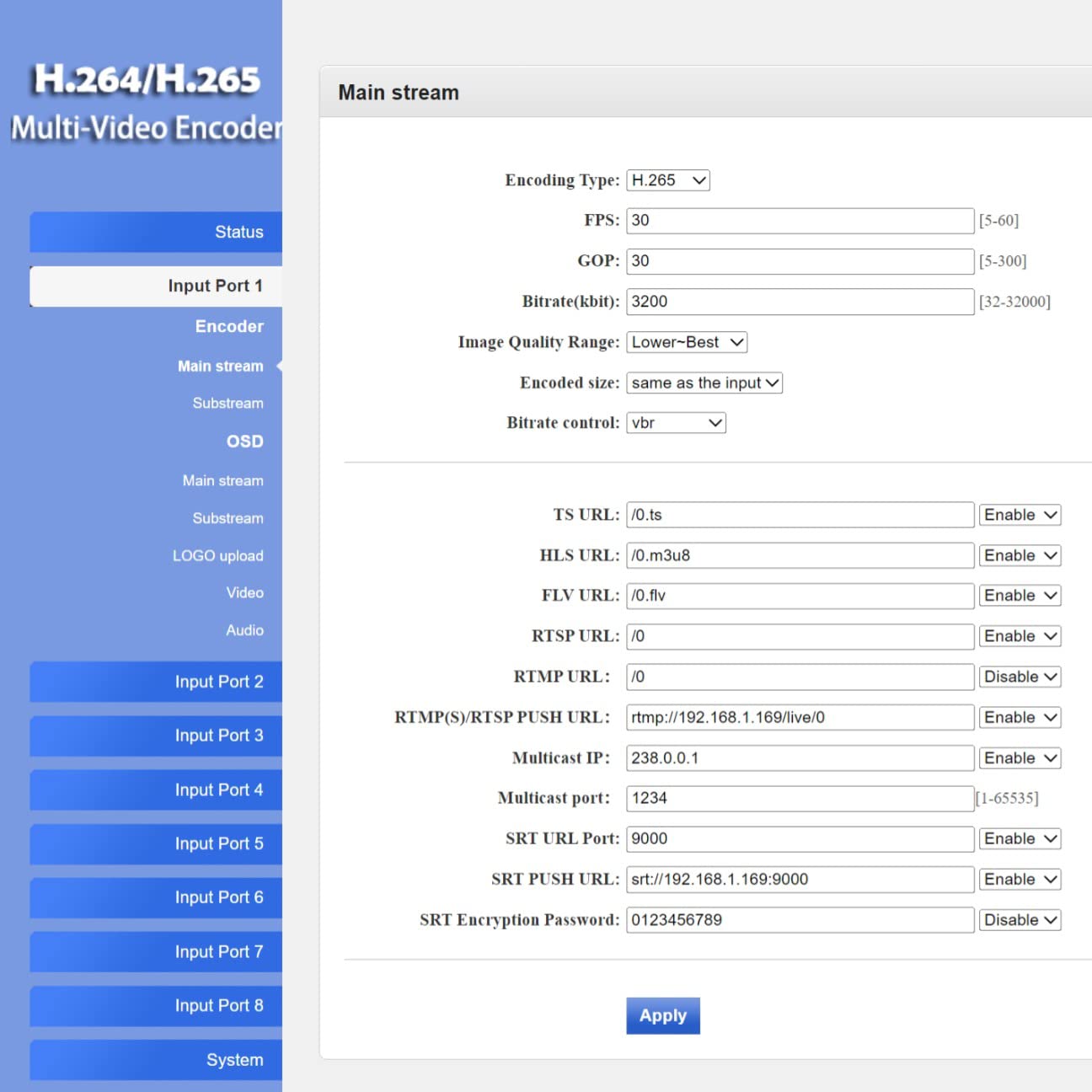
Figura 4.2.1: Web interface 'Status' page for Input Port 1, displaying current input resolution, frame rate, and stream URLs.
- Seleziona ingresso: On the left navigation panel, select the desired input port (e.g., "Input Port 1").
- Impostazioni del codificatore: Navigate to the "Encoder" or "Main stream" section for the selected input. Here you can adjust:
- Tipo di codifica: H.265 or H.264.
- FPS (Frames Per Second): Typically 30 or 60.
- Bitrate (kbit/s): Adjust based on desired quality and network bandwidth.
- Risoluzione: Output resolution for the stream.
- Protocollo URLs: Configure RTMP, RTSP, HLS, FLV, TS, and SRT URLs per lo streaming.

Figura 4.2.2: Web interface 'Main stream' configuration page, allowing adjustment of encoding parameters like FPS, Bitrate, and various protocol URLs.
- Impostazioni audio: Navigate to the "Audio" section to configure audio input, sampling rate, encoder type (AAC/MP3), and bitrate.
- OSD (visualizzazione su schermo): In the "OSD" section, you can enable and configure text or image overlays (watermarks) for your streams.
- Impostazioni avanzate: The "System" > "Advanced" section provides fine-tuning options for video processing, network settings, and more.
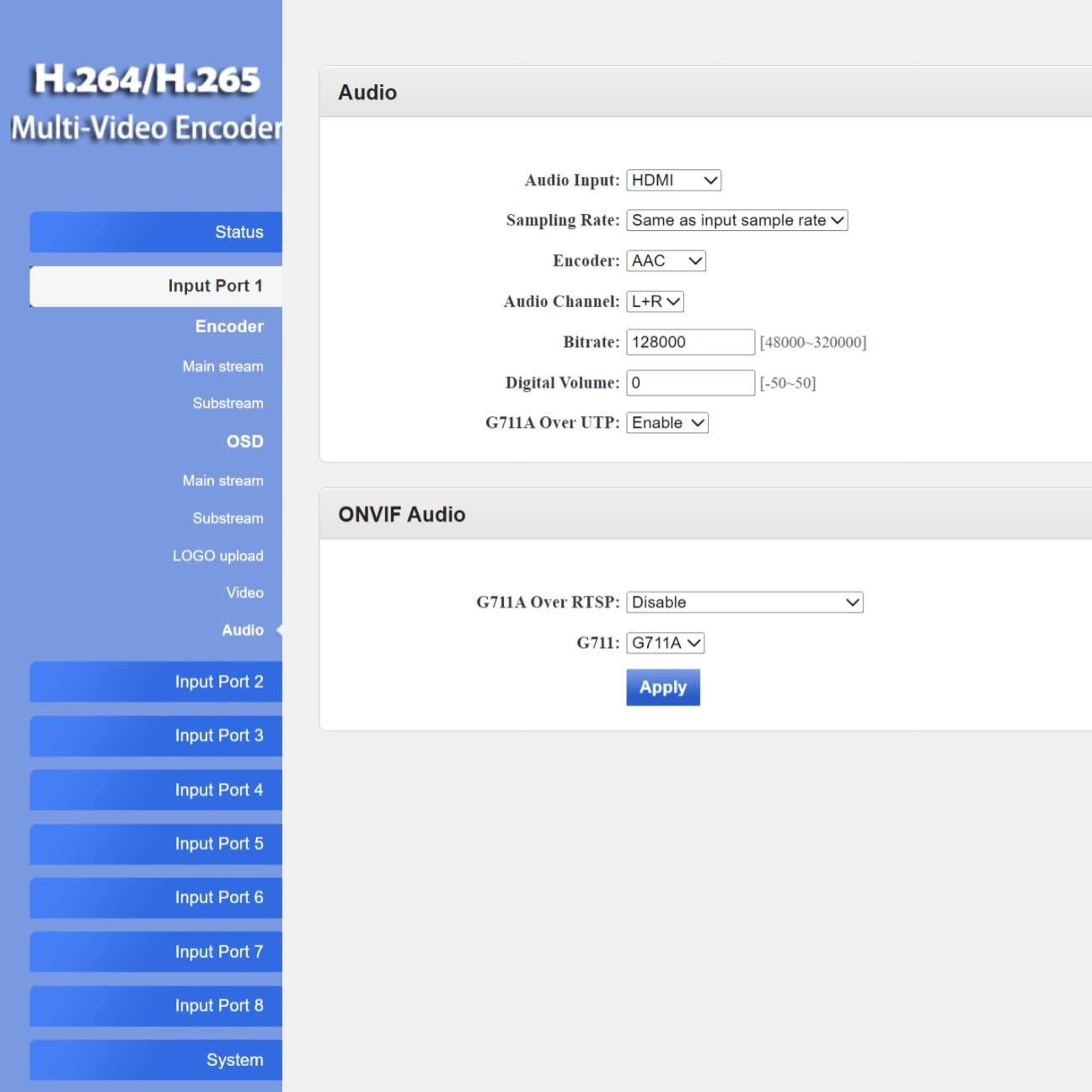
Figura 4.2.3: Web interface 'Advanced' settings page, offering detailed configuration options for video, network, and system parameters.
4.3 Live Streaming Platforms and Software Compatibility
The encoder supports various protocols, making it compatible with a wide range of streaming platforms and playback software.

Figura 4.3.1: Esamples of compatible live streaming platforms, including Twitch, Facebook Live, YouTube, and Vimeo.

Figura 4.3.2: Esamples of compatible playback and streaming software, such as OBS, VLC Player, and FFmpeg.
5. Manutenzione
5.1 Pulizia
- Assicurarsi che il dispositivo sia spento e scollegato prima della pulizia.
- Use a soft, dry cloth to wipe the exterior of the encoder.
- Non utilizzare detergenti liquidi, spray o solventi, poiché potrebbero danneggiare il dispositivo.
5.2 Aggiornamenti firmware
Controllare periodicamente le istruzioni del produttore webSito per gli aggiornamenti del firmware. Gli aggiornamenti del firmware possono offrire nuove funzionalità, miglioramenti delle prestazioni e correzioni di bug. Seguire attentamente le istruzioni fornite con il pacchetto di aggiornamento del firmware per evitare di danneggiare il dispositivo.
5.3 Conservazione
When not in use for extended periods, store the encoder in a cool, dry place away from direct sunlight and extreme temperatures. Keep it in its original packaging or a protective case to prevent dust accumulation and physical damage.
6. Risoluzione Dei Problemi
This section addresses common issues you might encounter with the ISEEVY 8ch HDMI Video Encoder.
| Problema | Possibile causa | Soluzione |
|---|---|---|
| No video output/stream | Nessun segnale di ingresso HDMI | Check HDMI cable connections and ensure the source device is powered on and outputting video. |
| No video output/stream | Incorrect stream settings | Verify encoding type, resolution, and bitrate settings in the web interface. Ensure protocol URLsono corretti. |
| Impossibile accedere web interfaccia | Incorrect IP address or network issue | Ensure the encoder is connected to the network. Verify the IP address using an IP scanner. Check network cable. Try resetting the encoder. |
| Stream buffering or poor quality | Insufficient network bandwidth or high bitrate | Reduce the stream bitrate in the web interface. Check your network's upload speed. Ensure no other devices are saturating the network. |
| Audio issues (no audio, distorted audio) | Incorrect audio settings or source issue | Verify audio input and encoding settings in the web interface. Ensure the HDMI source is providing audio. |
7. Specifiche
Detailed technical specifications for the ISEEVY 8ch HDMI Video Encoder.
| Caratteristica | Dettaglio |
|---|---|
| Marca | iseevy |
| Modello | 8ch HDMI 1080P H.265 H.264 Video Encoder |
| Ingresso | 8 x HDMI (1080P) |
| Codifica video | H.265, H.264 (High/Main/Baseline Profile) |
| Codifica audio | AAC, MP3 |
| Risoluzione di uscita | Up to 1920x1080P @ 60fps |
| Protocolli di streaming | RTMP, RTMPS, RTSP, UDP, RTP, HTTP, FLV, HLS, TS, Multicast, Unicast, SRT |
| Interfaccia di rete | 1 porta Ethernet RJ45 |
| Alimentazione elettrica | CC 12V |
| Dimensioni del prodotto | 9.06 x 5.91 x 1.73 pollici (23 x 15 x 4.4 cm) |
| Peso | 1.72 libbre (0.78 kg) |
| Produttore | ISEEVY Limited |
8. Garanzia e supporto
ISEEVY products are designed for reliability and performance. For warranty information and technical support, please refer to the official ISEEVY webo contattare il rivenditore autorizzato. Conservare la ricevuta d'acquisto come prova d'acquisto per eventuali reclami in garanzia.
For the latest drivers, firmware, and support resources, please visit the official ISEEVY support page.