
Introduzione
This manual provides comprehensive instructions for the installation, operation, and maintenance of your Natec Cabassu G2 Midi Tower PC Case. Please read this manual thoroughly before beginning installation to ensure proper setup and optimal performance.
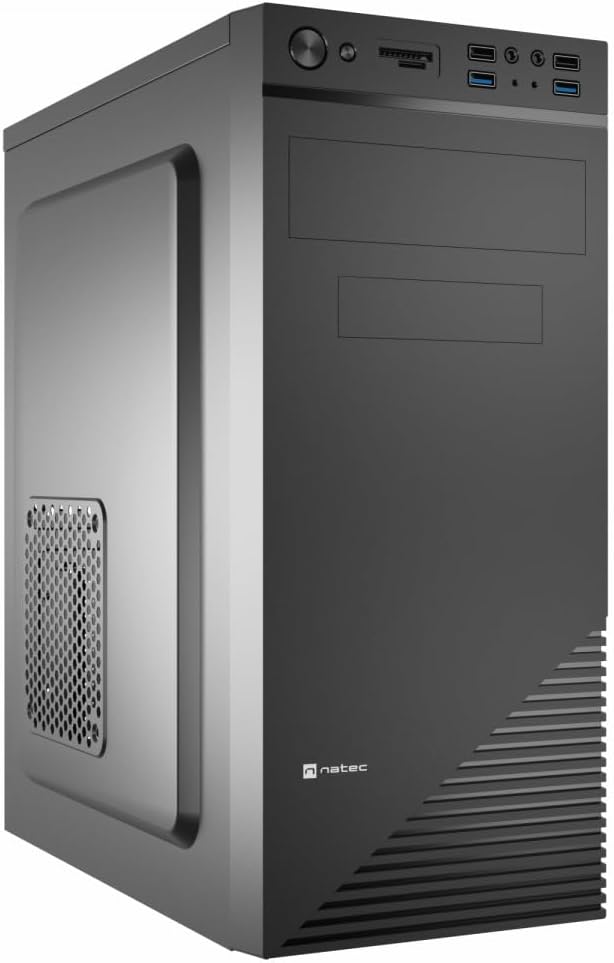
Figure 1: Natec Cabassu G2 Midi Tower PC Case. This image shows the front and left side of the black PC case, highlighting its sleek design and front panel layout.
Informazioni sulla sicurezza
- Scollegare sempre l'alimentatore dalla presa a muro prima di installare o rimuovere qualsiasi componente.
- Maneggiare i componenti con cura per evitare danni causati dall'elettricità statica.
- Tenere la custodia lontana da acqua, umidità e temperature estreme.
- Garantire una ventilazione adeguata per evitare il surriscaldamento.
- Do not attempt to open the power supply unit.
Contenuto della confezione
Verificare che tutti gli articoli siano presenti nel pacco:
- Natec Cabassu G2 Midi Tower PC Case
- Accessory kit (screws, standoffs, cable ties)
- Manuale dell'utente (questo documento)
Configurazione e installazione dei componenti
1. Preparazione del caso
- Posizionare la custodia su una superficie piana e stabile.
- Rimuovere i pannelli laterali svitando le viti a testa zigrinata sul retro e facendo scorrere i pannelli all'indietro.

Figura 2: Interno view of the Natec Cabassu G2 case with the side panel removed, illustrating the internal layout for component installation.
2. Installazione della scheda madre
- Installare la schermatura I/O nell'apertura posteriore del case.
- Align the motherboard with the pre-installed standoffs. The Cabassu G2 supports Mini ITX, Micro ATX, and ATX motherboards.
- Fissare la scheda madre con le viti fornite.
3. Installazione dell'alimentatore
- L'alimentatore è montato nella parte inferiore del case.
- Slide the power supply into its designated bay from the rear of the case.
- Secure it with screws from the rear.
4. Installazione dell'unità di archiviazione
- 2.5" Drives (SSDs/HDDs): The case features 3 x 2.5" drive bays. Mount drives using the provided screws in the designated locations.
- Unità da 3.5" (HDD): The case also supports 3.5" drives.
5. Installazione della scheda di espansione
- Remove the necessary expansion slot covers from the rear of the case (7 expansion slots available).
- Inserisci la scheda grafica o altre schede di espansione negli slot PCIe della scheda madre.
- Fissare le schede con le viti.

Figura 3: Posteriore view of the Natec Cabassu G2 case, detailing the I/O shield cutout, power supply opening, and seven expansion slots.
6. Gestione dei cavi
Route cables behind the motherboard tray where possible to improve airflow and aesthetics. Use the included cable ties to secure bundles.
7. Collegamento dei cavi del pannello frontale
Connect the front panel cables (USB 2.0, USB 3.0, audio, power switch, reset switch, HDD LED, power LED) to the corresponding headers on your motherboard. Refer to your motherboard manual for exact pin assignments.

Figure 4: Close-up of the Natec Cabassu G2 front panel, showing 2x USB 2.0 ports, 2x USB 3.0 ports, audio jacks, and power/reset buttons.
Istruzioni per l'uso
Accensione/spegnimento
- Accensione: Premere il pulsante di accensione situato sul pannello frontale.
- Spegni: Initiate shutdown through your operating system. For a forced shutdown, press and hold the power button for several seconds.
- Reset: Press the reset button on the front panel to restart the system.
Using Front Panel Ports
Il pannello frontale consente un comodo accesso a:
- 2 porte USB 2.0
- 2 porte USB 3.0
- Audio input (microphone) and output (headphone) jacks
Connect compatible devices to these ports as needed.
Manutenzione
Pulizia
- Pulire regolarmente l'esterno della custodia con un panno morbido eamp stoffa. Evitare detergenti abrasivi.
- Use compressed air to remove dust from fan filters and internal components. Ensure the system is powered off and unplugged before cleaning.
Filtri antipolvere
The case may include removable dust filters. Periodically remove and clean these filters to maintain optimal airflow and cooling performance.
Risoluzione dei problemi
| Problema | Possibile causa | Soluzione |
|---|---|---|
| Il sistema non si accende. | Power cables not connected properly. Faulty power supply. | Check all power connections (motherboard, CPU, GPU, power supply to wall). Ensure power supply switch is ON. |
| Le porte USB del pannello frontale non funzionano. | Front panel USB cables not connected to motherboard. | Verify that the USB 2.0 and USB 3.0 headers are correctly connected to the motherboard. |
| Rumore eccessivo della ventola. | Dust accumulation. Loose fan. | Clean dust from fans and filters. Ensure all fans are securely mounted. |
Specifiche
| Caratteristica | Dettaglio |
|---|---|
| Nome del modello | Cabassu G2 |
| Numero modello articolo | S5624687 |
| Tipo di caso | Torre Midi |
| Dimensioni (LxWxH) | 19.69 x 19.69 x 11.02 pollici (50 x 50 x 28 cm) |
| Peso | 7.04 libbre (3.19 kg) |
| Materiale | Acrilonitrile-butadiene-stirene (ABS), acciaio legato |
| Compatibilità della scheda madre | Mini ITX, Micro ATX, ATX |
| Alloggiamenti per unità da 2.5" | 3 |
| Slot di espansione | 7 |
| Porte I / O anteriori | 2 x USB 2.0, 2 x USB 3.0, ingresso/uscita audio |
| Supporto per i fan | 120mm (rear, pre-installed if applicable) |
| Metodo di raffreddamento | Aria |
| Montaggio dell'alimentatore | Montaggio inferiore |
Informazioni sulla garanzia
Natec products are covered by a manufacturer's warranty. Specific warranty terms and conditions may vary by region and retailer. Please refer to the warranty card included with your product or visit the official Natec websito per informazioni dettagliate sulla copertura della garanzia e sui reclami.
Supporto
For technical assistance, troubleshooting, or further inquiries, please visit the official Natec support websul sito o contattare il servizio clienti. Le informazioni di contatto sono in genere riportate sulla confezione del prodotto o sul marchio ufficiale. websito.
Websito: www.natec-zone.com (Exampil collegamento (il collegamento effettivo può variare)