
Introduzione
Thank you for choosing the Chieftec PPS-850FC-A3 850W ATX 3.0 Power Supply Unit. This manual provides essential information for the safe and efficient installation, operation, and maintenance of your new power supply. Please read this manual thoroughly before installation and retain it for future reference.
Istruzioni di sicurezza
- Scollegare sempre il cavo di alimentazione CA dalla presa a muro prima di installare o rimuovere l'alimentatore.
- Do not open the power supply unit casing. Alto volumetagsono presenti all'interno e non ci sono parti riparabili dall'utente. L'apertura del casing invaliderà la garanzia.
- Assicurarsi che l'alimentatore sia installato in un'area ben ventilata, priva di calore eccessivo, umidità o polvere.
- Utilizzare solo i cavi modulari forniti con questo alimentatore. L'utilizzo di cavi incompatibili può danneggiare l'alimentatore o i componenti collegati.
- Prima di accendere il sistema, assicurarsi che tutti i connettori siano saldamente collegati.
- Questo prodotto è progettato per l'uso in sistemi di personal computer. Non utilizzarlo per altri scopi.
Contenuto della confezione
Si prega di controllare il contenuto del pacco. Se qualche articolo risulta mancante o danneggiato, contattare il rivenditore.
- Chieftec PPS-850FC-A3 850W ATX 3.0 Power Supply Unit
- Modular Cable Set (including PCIe Gen 5 connector)
- Cavo di alimentazione CA
- Viti di montaggio
- Manuale dell'utente (questo documento)
Configurazione e installazione
Follow these steps to properly install your Chieftec PPS-850FC-A3 power supply unit.
1. Controllo pre-installazione
- Ensure your computer case supports ATX form factor power supplies.
- Verify that your motherboard and other components are compatible with an 850W power supply and ATX 3.0 standard.
2. Installazione fisica
- Montaggio dell'alimentatore: Carefully slide the power supply into the designated PSU bay in your computer case. Ensure the fan is oriented correctly for optimal airflow (typically facing down if there's a bottom vent, or facing inside the case). Secure the PSU with the provided mounting screws.
- Collegamento dei cavi modulari: Identify the necessary modular cables for your system components (motherboard, CPU, GPU, storage drives). Connect them to the appropriate ports on the power supply.

Image: Chieftec PPS-850FC-A3 power supply shown with its retail packaging, highlighting the unit itself and a detailed view of the PCIe Gen 5 connector, which is essential for modern high-performance graphics cards.
- Connessione alla scheda madre: Collegare il connettore di alimentazione principale ATX a 24 pin alla scheda madre.
- Connecting to CPU: Connect the 4+4-pin or 8-pin EPS/CPU power connector(s) to your motherboard.
- Connecting to GPU: For graphics cards, use the appropriate PCIe power connectors. For modern GPUs, utilize the dedicated 12VHPWR (PCIe Gen 5) connector if your GPU supports it.
- Connecting to Peripherals: Connect SATA power cables to SSDs/HDDs and Molex connectors to other peripherals as needed.
- Connessione alimentazione CA: Una volta effettuati tutti i collegamenti interni, collegare il cavo di alimentazione CA all'alimentatore e poi a una presa a muro.
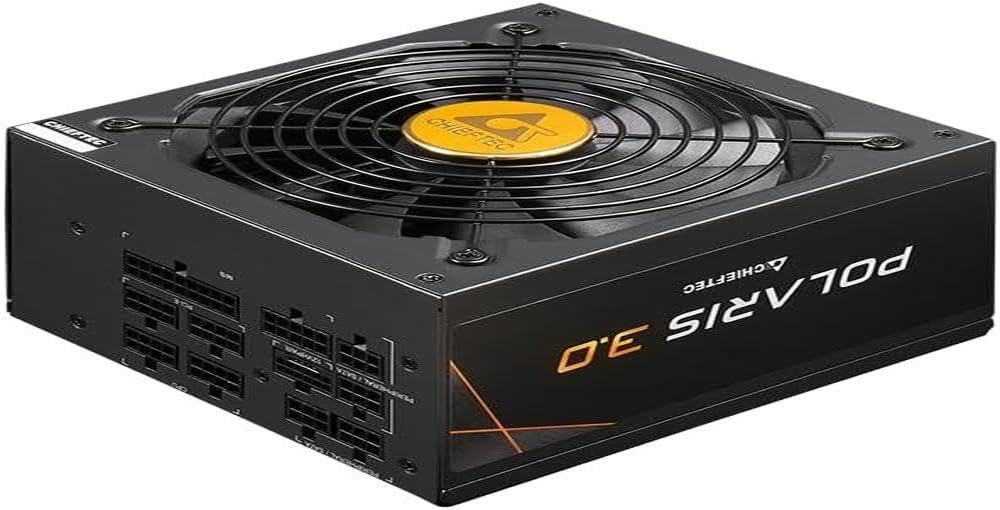
Immagine: Un fronte diretto view of the Chieftec PPS-850FC-A3 power supply, showcasing its large cooling fan and the protective grille. The Chieftec logo is visible in the center of the fan.
Istruzioni per l'uso
After successful installation, ensure the power switch on the back of the PSU is in the 'ON' position (usually marked 'I'). You can then power on your computer system using the case's power button. The power supply will automatically manage power delivery to your components.
Manutenzione
- Pulizia: Periodically clean the exterior of the power supply and its fan grille to prevent dust buildup, which can impede airflow and cooling performance. Use compressed air to gently remove dust. Ensure the system is powered off and unplugged before cleaning.
- Ventilazione: Ensure that the computer case has adequate ventilation and that the power supply's fan intake and exhaust are not obstructed.
- Gestione dei cavi: Proper cable management can improve airflow within your case, contributing to better cooling for all components, including the PSU.
Risoluzione dei problemi
Se riscontri problemi con l'alimentatore, fai riferimento ai seguenti passaggi comuni per la risoluzione dei problemi:
- Nessun potere:
- Verificare che il cavo di alimentazione CA sia collegato saldamente sia all'alimentatore che alla presa a muro.
- Ensure the power switch on the PSU is in the 'ON' position ('I').
- Verificare che la presa a muro funzioni collegandovi un altro dispositivo.
- Confirm all internal power cables (24-pin ATX, CPU, GPU) are correctly and firmly seated.
- Instabilità del sistema/Arresti casuali:
- This could indicate insufficient power or a faulty component. Ensure your system's power requirements do not exceed the PSU's 850W capacity.
- Check for overheating of components.
- Ensure the PSU fan is spinning freely and not obstructed.
- Rumori insoliti:
- A rattling or grinding noise may indicate a fan issue. If the noise is persistent and loud, contact support.
- Coil whine (a high-pitched electronic noise) can occur under certain loads but is generally harmless.
If these steps do not resolve your issue, please contact Chieftec customer support or your retailer for further assistance.
Specifiche
| Caratteristica | Specificazione |
|---|---|
| Nome del modello | PPS-850FC-A3 |
| Marca | Capotecnico |
| Dispositivi compatibili | Personal computer |
| Tipo di connettore | ATX |
| Uscita Wattage | 850 Watt |
| Fattore di forma | ATX |
| Metodo di raffreddamento | Aria |
| Dimensioni della ventola | 120 millimetri |
| Volume massimo in ingressotage | 230 Volt |
| Tipo di connettore utilizzato sul cavo | ATX |
| System Bus Connector Type | 4 perni |
| Codice UPC | 753263078131 |
Garanzia e supporto
This Chieftec PPS-850FC-A3 power supply unit comes with a manufacturer's warranty. Please refer to the warranty card included in your package or visit the official Chieftec websito per termini e condizioni di garanzia dettagliati.
For technical support, product inquiries, or warranty claims, please contact Chieftec customer service through their official websito o le informazioni di contatto fornite con l'acquisto.