
Introduzione
This manual provides instructions for the Allimity RMT-B122A replacement remote control. This remote is designed to be compatible with Sony BDP-S2100 and BDP-S790 Blu-ray players. It functions as a direct replacement for the original remote without requiring any programming or setup, allowing for immediate use upon battery installation.
Impostare
To begin using your Allimity RMT-B122A replacement remote control, follow these simple steps for battery installation:
- Aprire il vano batteria: Individuare il coperchio del vano batterie sul retro del telecomando. Far scorrere il coperchio verso il basso o premere il fermo per aprirlo.
- Inserire le batterie: Inserire due (2) batterie alcaline AAA nel vano. Assicurarsi che i terminali positivo (+) e negativo (-) delle batterie siano allineati correttamente con le marcature all'interno del vano. Un inserimento errato può impedire il funzionamento del telecomando.
- Chiudere il vano batteria: Riposizionare il coperchio del vano batteria finché non scatta in posizione.
The remote control is now ready for use. No additional programming is required.
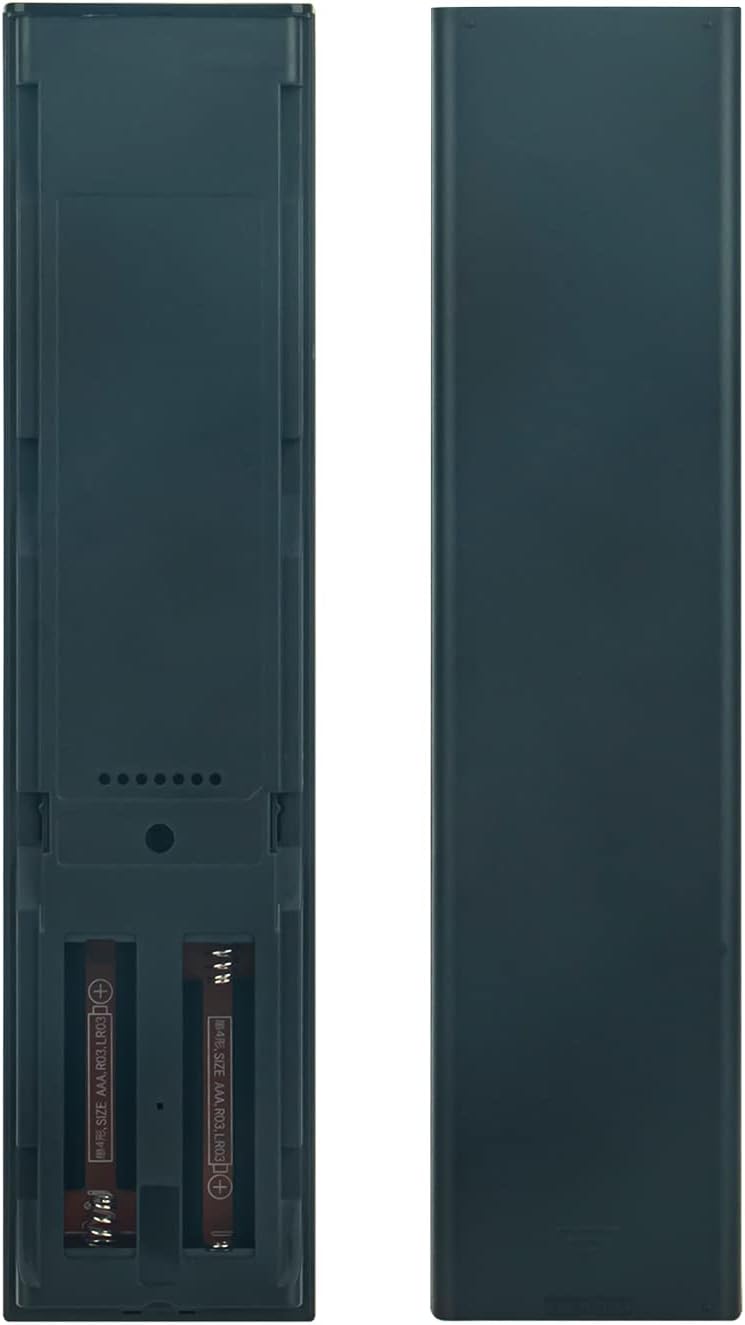
Immagine: Back of the remote control with the battery compartment open, illustrating where to insert the two AAA batteries.
Istruzioni per l'uso
The Allimity RMT-B122A remote control operates using infrared (IR) technology. Ensure a clear line of sight between the remote control and your Sony Blu-ray player for optimal performance. Point the remote directly at the Blu-ray player when pressing buttons.

Immagine: Davanti view of the Allimity RMT-B122A remote control, displaying its layout and various function buttons.
Funzioni chiave:
- Pulsante di accensione: Located at the top right, typically green, to turn the Blu-ray player on or off.
- Tastierino numerico (0-9): For direct input of track numbers or other numerical selections.
- Navigation Pad (Up, Down, Left, Right, Enter/Home): Used to navigate menus and confirm selections. The 'HOME' button typically returns to the main menu.
- Controlli di riproduzione (Riproduci, Pausa, Interrompi, Avanzamento rapido, Riavvolgimento, Salta): Standard buttons for media playback control.
- Volume Controls (VOL +/-): Regola il volume di uscita audio.
- Display/Input/Subtitle: Buttons for specific functions related to display settings, input selection, and subtitle options.
- Pulsanti colorati (giallo, blu, rosso, verde): Often used for specific functions within menus or interactive content.
- Pulsante Netflix: Accesso diretto all'applicazione Netflix.
Refer to your Sony Blu-ray player's user manual for specific functions of each button as they relate to your device's features.
Manutenzione
Una cura e una manutenzione adeguate prolungheranno la durata del tuo telecomando:
- Pulizia: Use a soft, dry cloth to clean the remote control. Do not use liquid cleaners, sprays, or abrasive materials, as these can damage the remote's surface or internal components.
- Evitare l'umidità: Keep the remote control away from water, humidity, and other liquids. Exposure to moisture can cause internal damage.
- Temperatura: Do not expose the remote control to extreme temperatures (hot or cold) or direct sunlight for extended periods.
- Sostituzione della batteria: Replace batteries promptly when the remote's performance diminishes. If the remote will not be used for an extended period, remove the batteries to prevent leakage and potential damage.
- Evitare gocce: Protect the remote from drops and impacts, which can damage its internal circuitry or external casing.
Risoluzione dei problemi
Se riscontri problemi con il telecomando, prova a seguire i seguenti passaggi per la risoluzione dei problemi:
- Il telecomando non risponde:
- Controllare che le batterie siano inserite correttamente con la polarità corretta (+/-).
- Sostituire le batterie con batterie alcaline AAA nuove.
- Ensure there are no obstructions between the remote control and the Blu-ray player.
- Make sure you are pointing the remote directly at the Blu-ray player's IR sensor.
- Gamma limitata:
- Ensure batteries are fresh. Weak batteries can reduce the remote's effective range.
- Rimuovere eventuali oggetti che potrebbero bloccare il percorso del segnale.
- Pulsanti specifici non funzionanti:
- This remote is a replacement and should function identically to the original. If a specific button does not work, ensure it is a function supported by your Blu-ray player model.
- Re-check battery installation or replace batteries.
If problems persist after trying these steps, contact the seller for further assistance.
Specifiche
| Marca | ALLIMITÀ |
| Numero di modello | RMT-B122A |
| Dispositivi compatibili | Sony BDP-S2100, Sony BDP-S790 Blu-ray Players |
| Tecnologia di connettività | Infrarossi (IR) |
| Numero massimo di dispositivi supportati | 1 |
| Quantità del pulsante | 49 |
| Portata massima | 33 piedi (circa 10 metri) |
| Numero di batterie richieste | 2 |
| Tipo di batteria | AAA alcalino |
| Peso dell'articolo | 99 grammi |
Garanzia e supporto
Specific warranty information for the Allimity RMT-B122A replacement remote control is not provided in the product details. For any warranty claims, technical support, or further assistance, please contact the original seller or manufacturer directly through your purchase platform.