
1. Introduzione
This manual provides detailed instructions for the proper installation, operation, and maintenance of your Dioche 4mm C Mount Lens. This 10MP lens features low distortion, manual focus, and an adjustable aperture, designed for industrial camera applications. Please read this manual thoroughly before use to ensure optimal performance and longevity of the product.
2. Caratteristiche del prodotto
- Detailed Image Quality: Utilizes advanced glass composites and anti-reflective coatings for high-contrast, detailed images.
- Ampia applicazione: Designed with low distortion and high compatibility, suitable for most security camera systems.
- Installazione semplice: Easy to install and disassemble without interfering with other accessories.
- Risoluzione 10MP: Supports high-resolution cameras up to 10 megapixels, with a 4mm focal length and F1.8-16 aperture.
- Materiale di prima qualità: Constructed from durable aluminum alloy, offering anti-corrosion, wear-resistant, and sturdy performance in various environments.
3. Contenuto della confezione
Si prega di verificare che tutti gli articoli elencati di seguito siano inclusi nel pacco. Se alcuni articoli risultano mancanti o danneggiati, contattare immediatamente l'assistenza clienti.
- 1 x Dioche 4mm C Mount Lens
- 1 x C-Mount Adapter Ring

Figure 3.1: The Dioche 4mm C Mount Lens shown with its front and rear caps, and the C-mount adapter ring.
4. Istruzioni per l'installazione
Follow these steps to properly install the Dioche 4mm C Mount Lens onto your industrial camera.
- Preparare la fotocamera: Ensure your industrial camera is powered off and disconnected from any power source. Remove any existing lens or body cap from the camera's C-mount.
- Collegare l'adattatore (se necessario): If your camera requires a C-mount adapter, screw the provided adapter ring onto the camera body first. Ensure it is securely tightened.
- Montare l'obiettivo: Carefully align the threads of the Dioche 4mm C Mount Lens with the C-mount on your camera (or adapter). Gently screw the lens clockwise until it is firmly attached. Avoid overtightening.
- Rimuovere i tappi delle lenti: Remove the front and rear lens caps. Store them in a safe place to protect the lens when not in use.

Figure 4.1: The Dioche 4mm C Mount Lens shown installed on an industrial camera, ready for operation.
5. Istruzioni per l'uso
The Dioche 4mm C Mount Lens features manual focus and adjustable aperture. Proper adjustment is crucial for achieving clear and well-exposed images.
5.1. Regolazione della messa a fuoco
- Accensione della fotocamera: Power on your industrial camera and access its live view or monitoring interface.
- Rotate Focus Ring: Locate the focus ring on the lens (often marked with "NEAR" and "FAR" or infinity symbol). Gently rotate this ring to adjust the focus until the image appears sharp on your monitor.
- Sintonizzare: For critical focus, zoom in on a specific area of interest in your camera's live view and make small adjustments to the focus ring.
5.2. Adjusting Aperture
The aperture controls the amount of light entering the lens and affects the depth of field.
- Locate Aperture Ring: Find the aperture ring on the lens, typically marked with F-numbers (e.g., F1.8, F2.8, F4, F8, F16).
- Rotate for Desired Brightness/Depth of Field:
- Rotating towards smaller F-numbers (e.g., F1.8) opens the aperture, allowing more light in and creating a shallower depth of field (more background blur).
- Rotating towards larger F-numbers (e.g., F16) closes the aperture, allowing less light in and creating a deeper depth of field (more of the scene in focus).
- Monitor Image: Observe the image on your camera's monitor to achieve the desired brightness and depth of field for your application.
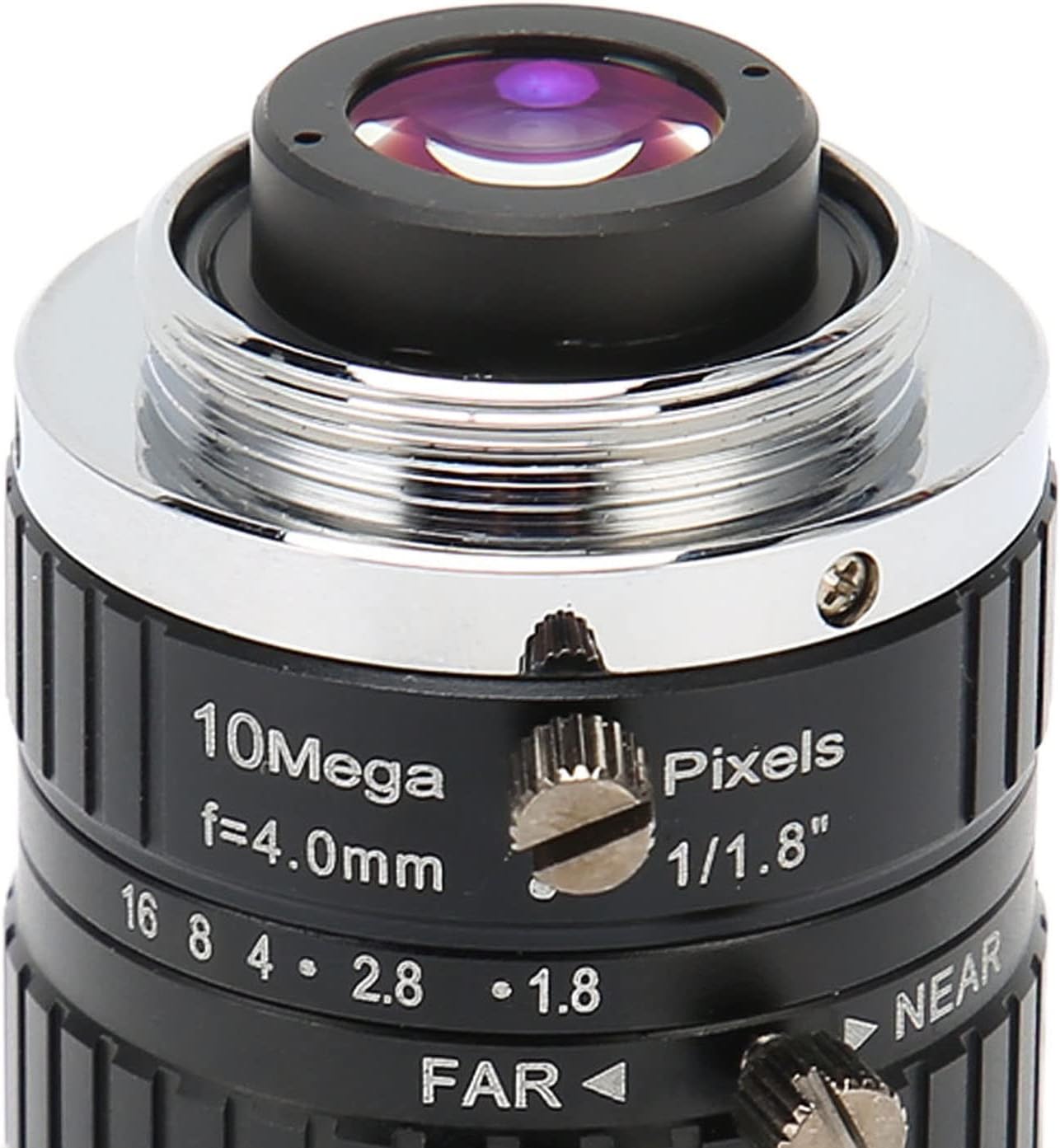
Figura 5.1: dettagliata view of the lens, highlighting the manual focus and aperture adjustment rings.
Video 5.1: Un overview demonstrating the physical features and adjustments of the Dioche C Mount Lens, including focus and aperture rings.
6. Manutenzione
Una corretta manutenzione garantisce la longevità e le prestazioni ottimali delle lenti.
- Pulizia della lente: Use a soft, lint-free microfiber cloth specifically designed for optics to clean the lens elements. For stubborn smudges, use a small amount of lens cleaning solution applied to the cloth, not directly to the lens.
- Rimozione della polvere: Utilizzare un pennello a soffietto per rimuovere le particelle di polvere dalla superficie della lente prima di pulirla. Evitare l'uso di aria compressa, che può danneggiare i rivestimenti.
- Magazzinaggio: When not in use, always attach the front and rear lens caps to protect the lens elements. Store the lens in a dry, cool place, away from direct sunlight and extreme temperatures.
- Evitare l'impatto: Handle the lens with care to prevent drops or impacts, which can damage the optical elements or mechanical components.
7. Risoluzione Dei Problemi
If you encounter issues with your Dioche 4mm C Mount Lens, refer to the following common problems and solutions.
| Problema | Possibile causa | Soluzione |
|---|---|---|
| L'immagine è sfocata o fuori fuoco. | Regolazione della messa a fuoco errata. | Adjust the manual focus ring until the image is sharp. Ensure the camera's back focus is correctly set if applicable. |
| L'immagine è troppo scura o troppo chiara. | Incorrect aperture setting. | Adjust the manual aperture ring to allow more or less light. Check camera exposure settings. |
| Dust or spots visible on the image. | Polvere sugli elementi dell'obiettivo o sul sensore della fotocamera. | Clean the lens elements using a blower brush and microfiber cloth. If spots persist, clean the camera sensor according to your camera's manual. |
| Lens cannot be mounted securely. | Incorrect mount type or damaged threads. | Ensure your camera has a C-mount or the correct adapter is used. Inspect lens and camera threads for damage. |
8. Specifiche
Detailed technical specifications for the Dioche 4mm C Mount Lens.
- Tipo di articolo: C Mount Lens
- Materiale: Lega di alluminio
- Lunghezza focale: 4mm
- Formato immagine: 1/1.8 pollici
- Risoluzione: 10MP
- Aperture Range (D/f'): Codice articolo: F1.8-16
- Tipo di montaggio: Supporto C
- Field Angle (HxV) (1/1.8in): 103.2° x 76.8°
- Field Angle (HxV) (1/2in): 91.3° x 68.05°
- Field Angle (HxV) (1/3in): 68.05° x 51.4°
- Back Focal Length (BFL): 17.53mm
- Minimum Object Distance (M.O.D.): 0.1 metri
- Dimensioni: Circa 39x38 mm / 1.54x1.5 pollici
- Lens Structure: Aluminum Alloy + 12G
- Tipo di messa a fuoco: Messa a fuoco manuale
- Temperatura di esercizio: da -20℃ a +80℃

Figure 8.1: Diagram illustrating the approximate dimensions of the Dioche 4mm C Mount Lens.
9. Garanzia e supporto
Dioche products are manufactured to high quality standards. While specific warranty details are not provided in this manual, please retain your proof of purchase. For any product inquiries, technical support, or warranty claims, please contact your retailer or the manufacturer directly through their official channels.
You can visit the Dioche store for more information: Dioche Official Store


