
Introduzione
This manual provides detailed instructions for the installation, operation, and maintenance of your Strong SRT 7040 Digital Satellite HD Receiver. Please read this manual carefully before using the device to ensure proper functionality and to prevent damage.

Image: The Strong SRT 7040 DTT Tuner and its retail packaging.
The Strong SRT 7040 is a Full HD digital satellite receiver designed for Free-To-Air (FTA) channels. It features a USB port for multimedia playback and software updates, and supports Dolby Audio for enhanced sound quality.
1. Impostazione
1.1 Disimballaggio
Rimuovere con cautela tutti i componenti dall'imballaggio. Assicurarsi che siano presenti i seguenti elementi:
- Strong SRT 7040 DTT Tuner
- Telecomando (con 2 batterie AAA)
- Adattatore di alimentazione
- Manuale d'uso
1.2 Collegamento del dispositivo
Follow these steps to connect your SRT 7040 receiver:
- Ingresso satellitare: Collega il cavo della parabola satellitare al SABATO porta sul retro del ricevitore.
- Uscita video (HDMI): Collegare un cavo HDMI dal Cavo HDMI porta del ricevitore a un ingresso HDMI del televisore.
- Uscita video (SCART): In alternativa, per i televisori più vecchi, collegare un cavo SCART dal SCART TV porta del ricevitore all'ingresso SCART del televisore.
- Audio Output (Digital): For digital audio, connect a coaxial cable from the COAXIAL S/PDIF port to your digital audio amppiù vivace.
- Audio Output (Analog): Per l'audio analogico, collegare i cavi RCA dal AUDIO R/L ports to your audio Hi-Fi amppiù vivace.
- Dispositivo USB: If desired, connect a USB storage device to the USB port for multimedia playback or software updates.
- Energia: Collegare l'adattatore di alimentazione a 12V === 1.5A input on the receiver, then plug the adapter into a wall outlet.

Image: Rear panel connections of the Strong SRT 7040 DTT Tuner, showing SAT IN, HDMI, TV SCART, COAXIAL S/PDIF, AUDIO R/L, USB, and Power input.
1.3 First-Time Installation and Channel Scan
Upon first power-on, the receiver will guide you through an initial setup wizard. Follow the on-screen prompts to select your language, country, and perform an automatic channel scan. This process will detect and store all available satellite channels.
2. Istruzioni per l'uso
2.1 Controllo remoto finitoview
The included remote control allows you to access all functions of the SRT 7040. Insert the two AAA batteries into the remote control, ensuring correct polarity.

Image: The remote control for the Strong SRT 7040 DTT Tuner, showing buttons for power, numbers, volume, channel, menu, and special functions.
2.2 Funzioni di base
- Energia: Premere il tasto ENERGIA button to turn the receiver on or off (standby mode).
- Selezione canale: Utilizzare il CH+ / CH- buttons to change channels sequentially, or use the numeric keypad to enter a channel number directly.
- Controllo del volume: Utilizzare il Volume+ / vol- pulsanti per regolare il volume audio.
- Disattiva audio: Premere il tasto MUTE pulsante per disattivare temporaneamente l'audio.
2.3 Navigazione nel menu
Premere il tasto MENU pulsante per accedere al menu principale. Utilizzare i tasti freccia (UP, GIÙ, SINISTRA, GIUSTO) per navigare tra le opzioni e OK per confermare le selezioni. Premere EXIT to return to the previous screen or live TV.
2.4 Funzioni speciali
- Timer: The receiver supports programming timers for recording or switching to specific channels at scheduled times. Access this feature via the menu.
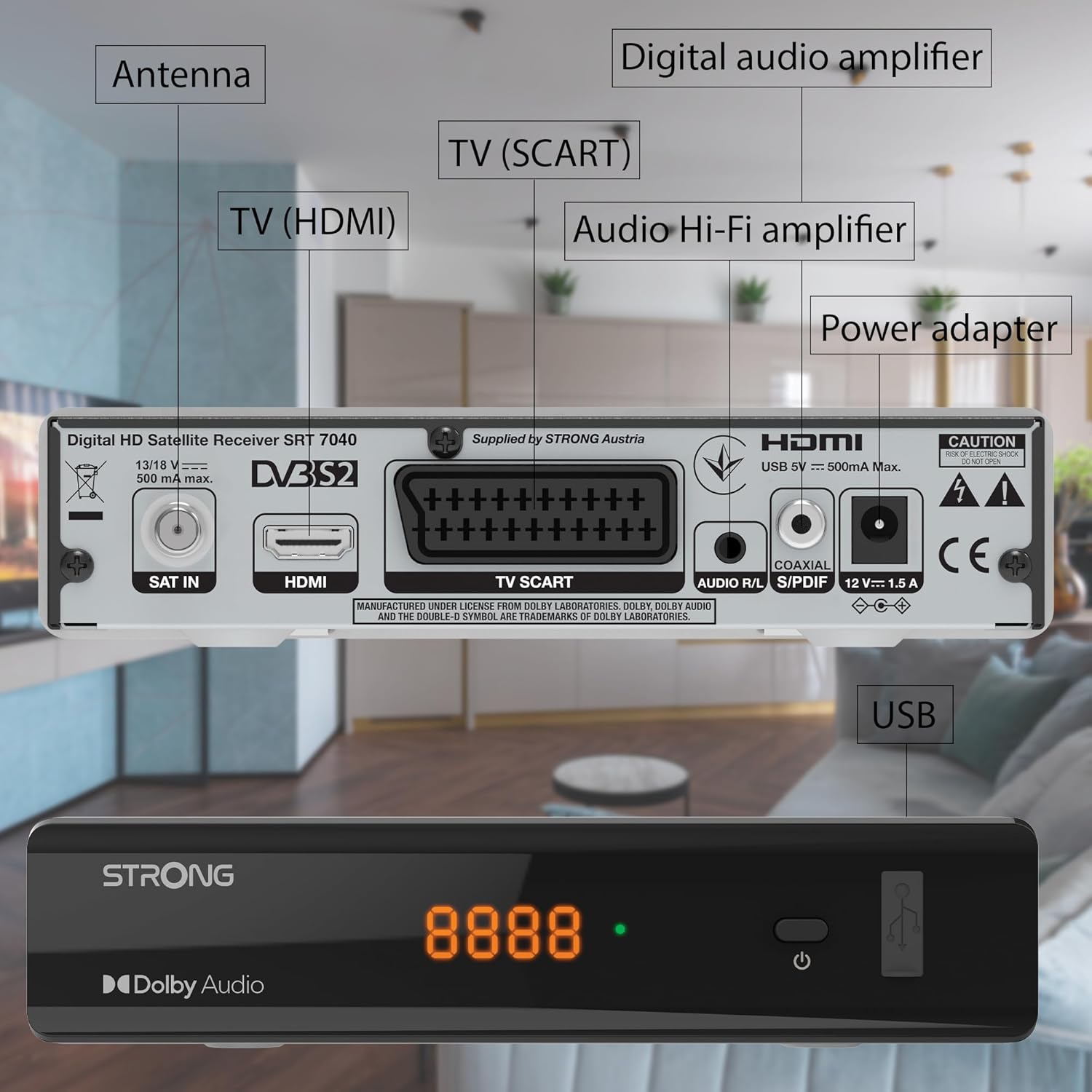
Image: The Strong SRT 7040 DTT Tuner displaying a timer icon, indicating its scheduling capabilities.
- Liste dei preferiti: Create customized lists of your preferred channels for quick access.
- Sottotitoli: Enable or disable subtitles for compatible broadcasts using the SUB pulsante sul telecomando.
- Guida elettronica ai programmi (EPG): Premere il tasto EPG pulsante per view program information for upcoming broadcasts.
- Audio Dolby: The receiver supports Dolby Audio for a high-quality sound experience.

Image: The Strong SRT 7040 DTT Tuner with the Dolby Audio logo, illustrating its sound processing capability.
3. Manutenzione
3.1 Pulizia
To clean the receiver, disconnect it from the power supply. Use a soft, dry cloth to wipe the exterior. Do not use liquid cleaners, aerosols, or abrasive materials, as these can damage the finish or internal components.
3.2 Aggiornamenti software
Controllare periodicamente le istruzioni del produttore website for available software updates. Updates can improve performance, add new features, or resolve issues. Software updates are typically performed via the USB port following specific instructions provided with the update file.
3.3 Informazioni sulla sicurezza
- Non aprire il ricevitore casing. All'interno non sono presenti parti riparabili dall'utente. Per qualsiasi intervento di manutenzione, rivolgersi a personale qualificato.
- Tenere il ricevitore lontano dalla luce solare diretta, da fonti di calore e dall'umidità.
- Assicurare un'adeguata ventilazione attorno al dispositivo per evitare il surriscaldamento.
- Utilizzare solo l'alimentatore fornito.
4. Risoluzione Dei Problemi
If you encounter problems with your SRT 7040, consult the following table before contacting support.
| Problema | Possibile causa | Soluzione |
|---|---|---|
| Nessun potere | Adattatore di alimentazione non collegato; presa di corrente difettosa | Check power adapter connection; Try a different power outlet |
| Nessun segnale / Schermo nero | Satellite cable loose or disconnected; Incorrect input selected on TV; Satellite dish alignment issue | Check SAT IN cable connection; Ensure TV is on correct HDMI/SCART input; Perform a channel scan; Consult a professional for dish alignment if necessary |
| Il telecomando non funziona | Batterie scariche o inserite in modo errato; Ostruzione tra telecomando e ricevitore | Replace batteries; Ensure correct polarity; Remove any obstructions; Point remote directly at receiver |
| Qualità dell'immagine scadente | Weak satellite signal; Incorrect display settings | Check satellite signal strength in menu; Adjust TV display settings; Ensure Full HD content is being broadcast |
5. Specifiche
The following are the technical specifications for the Strong SRT 7040 Digital Satellite HD Receiver:
- Modello: SRT 7040 (SAT FTA Full HD)
- Marca: Forte
- Dimensioni: 3.39 x 6.46 x 1.38 pollici (8.6 x 16.4 x 3.5 cm)
- Peso dell'articolo: 9.2 once (260 grammi)
- Colore: Nero
- Tecnologia di connettività: USB
- Voltage: 100 - 240 V
- Frequenza: 50 - 60 Hz
- Consumo energetico: 18 kWh (operational, typical)
- Intervallo di temperatura di lavoro: da 0ºC a 40ºC
- Umidità relativa: 10% - 95%
- Batterie: 2 batterie AAA (incluse per il telecomando)
- Specifiche soddisfatte: Digitale terrestre (DVB-S2)
- Incluso: Wally Receiver
6. Garanzia e supporto
For warranty information and technical support, please refer to the warranty card included in your product packaging or visit the official Strong websito. Conservare la ricevuta d'acquisto come prova d'acquisto per eventuali reclami in garanzia.
For further assistance, you may contact Strong customer service through the contact details provided on their official websito.