
Introduzione
This manual provides instructions for the VINABTY MBE741 replacement remote control. This remote is designed to be compatible with various AKAI LCD/LED TV models, including ATE-48N1104K, ATE-55N1104K, and ATE-55D1044K. It offers a direct replacement for your original remote without requiring complex programming.
Impostare
Installazione della batteria
The VINABTY MBE741 remote control requires two AAA batteries for operation. No programming or setup is needed; simply insert the batteries, and the remote will be ready to use.
- Individuare il vano batterie sul retro del telecomando.
- Per aprire il coperchio del vano batteria, farlo scorrere verso il basso o verso l'esterno.
- Inserire due batterie AAA, assicurandosi che i terminali positivo (+) e negativo (-) siano allineati correttamente con le marcature all'interno del vano.
- Riposizionare il coperchio del vano batteria finché non scatta in posizione.
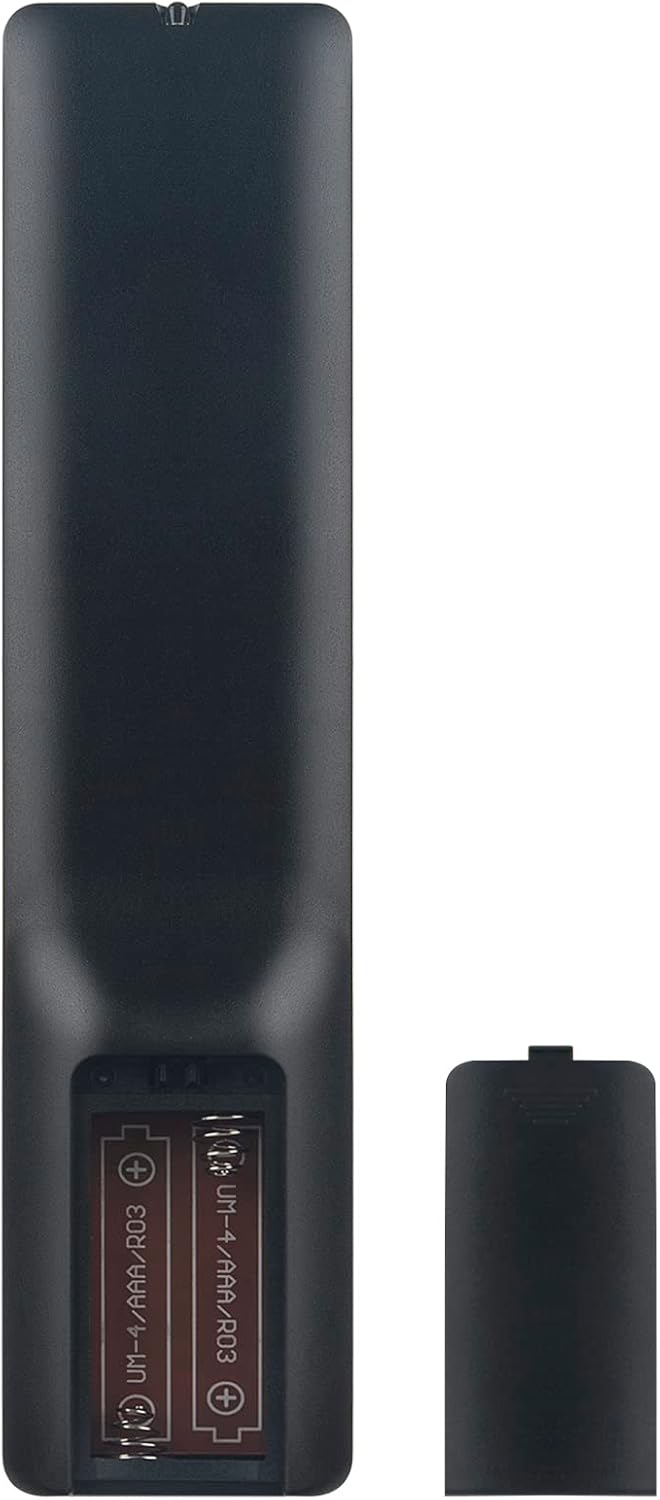
Image: Back of the remote control with the battery compartment open, illustrating correct battery placement.
Istruzioni per l'uso
Once batteries are installed, the remote control is ready for immediate use with compatible AKAI LCD/LED TVs. Point the remote directly at your television's infrared receiver.
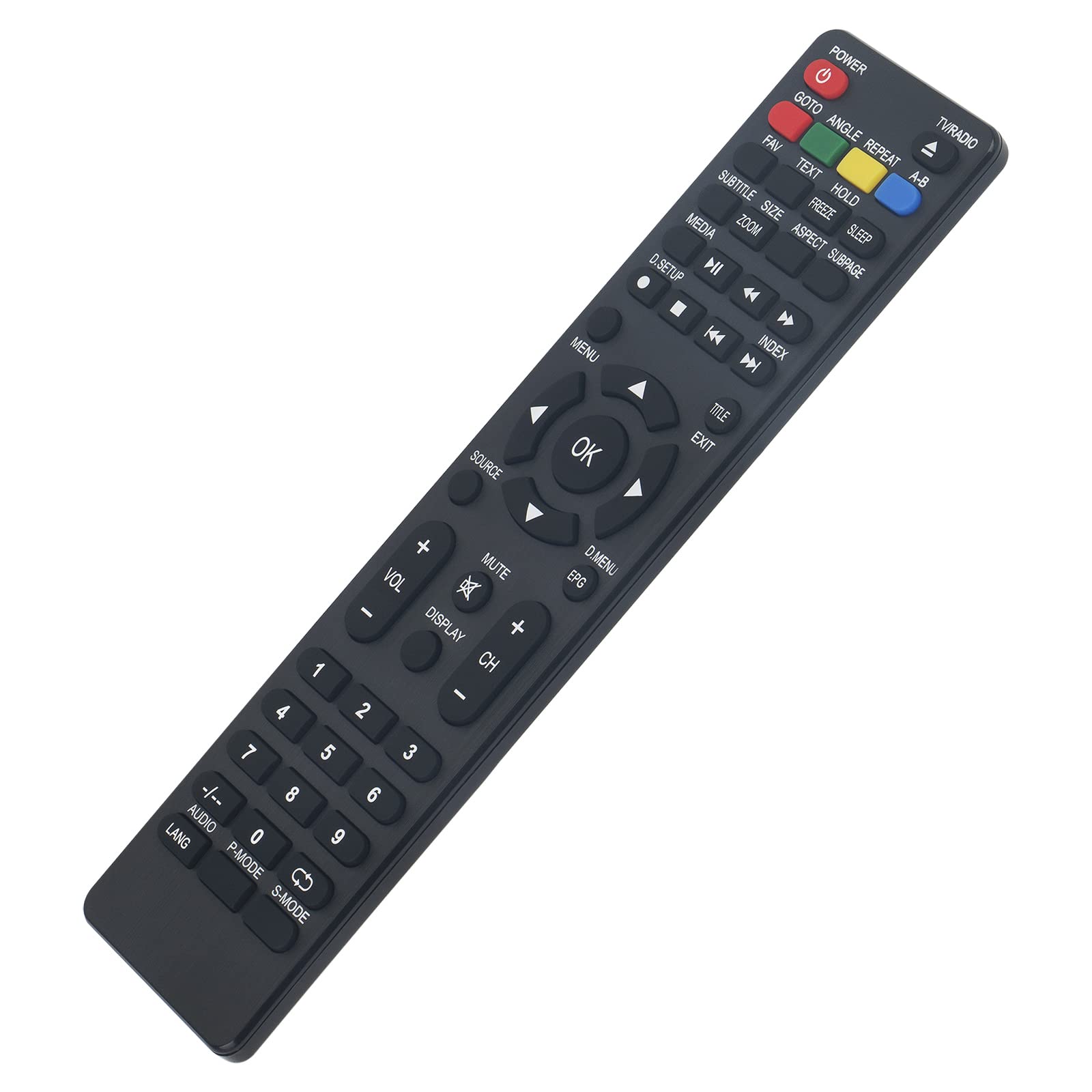
Immagine: Frontale view del telecomando, che visualizza tutti i pulsanti funzione.
Funzioni chiave finiteview
- ENERGIA: Accende o spegne la TV.
- TV/RADIO: Passa dalla modalità TV alla modalità Radio.
- Tasti numerici (0-9): Selezione diretta del canale.
- VOL +/-: Regola il livello del volume.
- CH +/-: Cambia il canale in alto o in basso.
- MUTO: Disattiva o riattiva l'audio della TV.
- MENU: Accede al menu principale del televisore.
- OK: Conferma le selezioni all'interno dei menu.
- Frecce di navigazione (su, giù, sinistra, destra): Consente di navigare tra le opzioni del menu.
- USCITA: Esce dal menu o dalla funzione corrente.
- FONTE: Seleziona le sorgenti di ingresso (HDMI, AV, ecc.).
- MEDIA Controls (Play, Pause, Stop, Rewind, Fast Forward, Skip): Controlla la riproduzione multimediale.
- EPG: Visualizza la guida elettronica ai programmi.
- SOTTOTITOLO: Attiva o disattiva i sottotitoli.
- LANG / AUDIO: Cambia la lingua o la traccia audio.
- MODALITÀ P: Seleziona le modalità immagine.
- MODALITÀ S: Seleziona le modalità audio.
- DISPLAY: Mostra informazioni sullo schermo.
- Other Function Buttons (GOTO, ANGLE, REPEAT, A-B, FAV, TEXT, HOLD, FREEZE, SLEEP, SIZE, ZOOM, ASPECT, SUBPAGE, D.SETUP, INDEX, TITLE, D.MENU): Provide access to specific TV features as labeled.
Manutenzione
Pulizia
Per pulire il telecomando, utilizzare un panno morbido e asciutto. Per lo sporco ostinato, utilizzare un panno leggermente dampPulisci il panno con acqua o una soluzione detergente delicata. Evita di utilizzare detergenti abrasivi, alcol o solventi, poiché potrebbero danneggiare la superficie del telecomando o i componenti interni.
Sostituzione della batteria
Replace batteries when the remote control's response becomes sluggish or stops working. Always replace both batteries at the same time with new AAA alkaline batteries. Do not mix old and new batteries, or different types of batteries, as this can lead to leakage or malfunction.
Risoluzione dei problemi
- Il telecomando non risponde:
- Controllare le batterie: Ensure batteries are inserted correctly with the correct polarity (+/-). Replace old batteries with new AAA alkaline batteries.
- Linea di vista: Assicuratevi che non vi siano ostacoli tra il telecomando e il sensore a infrarossi del televisore. Puntate il telecomando direttamente verso il televisore.
- Sensore remoto: Assicurarsi che il sensore a infrarossi del televisore sia pulito e non coperto.
- Alcuni pulsanti non funzionano:
- While this remote is designed for broad compatibility, some specific TV models might have unique functions not directly mapped to a button. Refer to your TV's original manual for specific feature access.
- Ensure the remote is in the correct mode (e.g., TV mode if applicable, though this remote is generally universal for the listed models).
Specifiche
| Marca | VINABITÀ |
| Numero di modello | MBE741 |
| Dispositivi compatibili | AKAI ATE-48N1104K, ATE-55N1104K, ATE-55D1044K, Linsar LED LCD HDTV TV LS50UHD LS32CHD LS40CFHD LS24CFHD12V |
| Tecnologia di connettività | Infrarossi |
| Portata massima | 10 metri |
| Tipo di batteria | 2 x AAA (si consigliano batterie alcaline) |
| Materiale | addominali |
| Caratteristica speciale | Design ergonomico |
Garanzia e supporto
VINABTY is committed to customer satisfaction. If you encounter any issues with your product or require assistance, please contact our customer support. We aim to provide a satisfactory response within 24 hours.
For support inquiries, please refer to the contact information provided with your purchase or on the VINABTY official websito.