
Worlde Easykey.25
Manuale di istruzioni del controller MIDI USB Worlde Easykey.25
Model: Easykey.25
Brand: Worlde
Introduzione
This manual provides detailed instructions for the setup, operation, and maintenance of your Worlde Easykey.25 Portable Keyboard Mini 25-Key USB MIDI Controller. Please read this manual thoroughly to ensure proper use and to maximize the performance of your device.

Immagine: Un angolo view of the Worlde Easykey.25 MIDI Controller, showcasingrazie al suo design compatto e alla disposizione dei tasti.
Caratteristiche principali
- 25 velocity-sensitive mini-keyboard keys for expressive playability.
- 4 programmable memory banks for custom settings.
- 6 dedicated control buttons: Edit, Mod, Pitch Down, Pitch Up, Octave Down, Octave Up.
- 1 rotary knob for versatile tone adjustment and parameter control.
- Plug and Play USB 2.0 connectivity, eliminating the need for driver installation.
- USB bus powered, requiring no external power adapter.
- Compact and portable design for easy transport and use.
Contenuto della confezione
Si prega di verificare che tutti gli articoli elencati di seguito siano inclusi nel pacchetto:
- 1 x Worlde Easykey.25 MIDI Keyboard Controller
- 1 cavo USB

Image: The Worlde Easykey.25 MIDI Controller shown alongside its included USB cable.
Guida all'installazione
- Collegare il cavo USB: Insert one end of the provided USB cable into the USB port on the Worlde Easykey.25 controller.
- Connessione al computer: Insert the other end of the USB cable into an available USB port on your computer (PC or Mac).
- Accensione: The device is USB bus powered and will automatically power on once connected to your computer. No external power supply is needed.
- Installazione del driver: The Worlde Easykey.25 is a Plug and Play device. No specific drivers are required for most operating systems (Windows 8 / 7 / XP / Vista, Mac OSX). Your computer should automatically recognize the device.
- Configurazione software: Open your preferred Digital Audio Workstation (DAW) or music software. Navigate to the MIDI settings or preferences and select "Easykey.25" (or similar) as your MIDI input device.

Immagine: un primo piano view of the USB port on the side of the Worlde Easykey.25 controller, where the USB cable connects.
Istruzioni per l'uso
Keys and Velocity Sensitivity
The Easykey.25 features 25 velocity-sensitive mini-keys. This means the volume and timbre of the sound produced will vary depending on how hard or soft you press the keys, allowing for expressive musical performance.

Immagine: Un dettaglio view of the black and white keys on the Worlde Easykey.25, highlighting their mini size and arrangement.
Control Buttons and Rotary Knob
The left panel of the controller houses various buttons and a rotary knob for real-time control over your sounds.
- Pulsante Modifica: Used to enter edit mode for programming various parameters. Refer to your software's manual for specific MIDI learn functions.
- Pulsante Mod: Activates the modulation function, typically used to add vibrato or other effects to your sound.
- Pitch Down / Pitch Up Buttons: Adjust the pitch of the notes downwards or upwards in real-time.
- Octave Down / Octave Up Buttons: Shift the entire keyboard's pitch range down or up by octaves. The red LED indicators typically show the current octave setting.
- Manopola rotante: This knob can be assigned to control various parameters within your music software, such as volume, filter cutoff, or effect depth. Its function is programmable via MIDI learn.
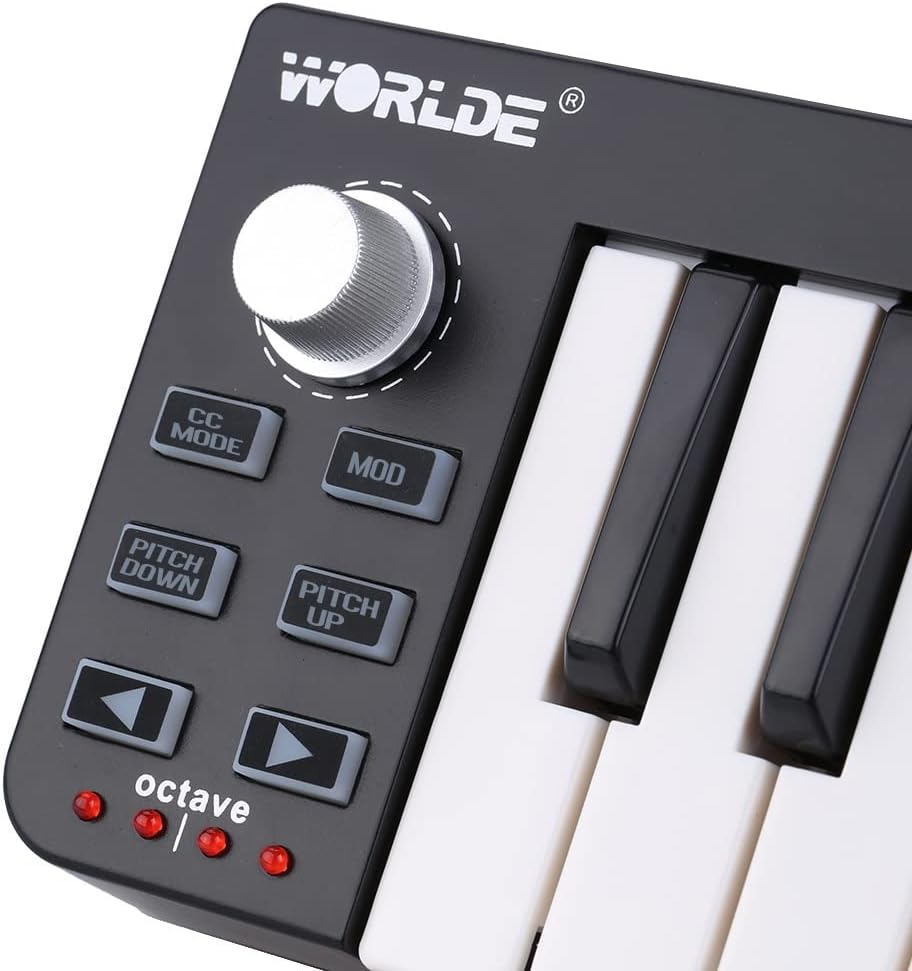
Image: A close-up of the control panel on the Worlde Easykey.25, showing the rotary knob, Edit, Mod, Pitch, and Octave buttons, along with the octave indicator LEDs.
Manutenzione
To ensure the longevity and optimal performance of your Worlde Easykey.25, follow these maintenance guidelines:
- Pulizia: Use a soft, dry, lint-free cloth to wipe the surface of the controller. For stubborn dirt, slightly dampLavare il panno con acqua. Evitare l'uso di detergenti abrasivi, solventi o cere, poiché potrebbero danneggiare la finitura.
- Magazzinaggio: When not in use, store the controller in a clean, dry place away from direct sunlight, extreme temperatures, and excessive humidity.
- Gestione: Evitare di far cadere il dispositivo o di sottoporlo a forti urti. Non posizionare oggetti pesanti sopra il controller.
- Connettività: Always handle the USB cable by the connector, not the cable itself, to prevent damage to the cable or the port.
Risoluzione dei problemi
If you encounter issues with your Worlde Easykey.25, please refer to the following common solutions:
- Dispositivo non riconosciuto:
- Assicurarsi che il cavo USB sia collegato saldamente sia al controller che al computer.
- Prova a connetterti a un'altra porta USB del tuo computer.
- Se disponibile, provare con un cavo USB diverso.
- Riavvia il computer.
- Nessuna uscita audio:
- Verify that the Easykey.25 is selected as the MIDI input device in your music software's preferences.
- Ensure that the correct instrument or sound is loaded and armed for recording/playback in your software.
- Check the volume levels within your software and on your audio output device.
- I tasti non rispondono correttamente:
- Check if the octave buttons have shifted the keyboard to an extreme range (very high or very low) that might not produce audible sound with your current instrument.
- Ensure no other MIDI devices are conflicting with the Easykey.25.
Specifiche
| Chiavi | 25 mini-tasti sensibili alla velocità |
| Pulsanti di controllo | Edit, Mod, Pitch Down, Pitch Up, Octave Down, Octave Up |
| Manopola rotante | 1 (programmabile) |
| Banche di memoria | 4 programmabili |
| Connettività | USB 2.0 (Plug and Play) |
| Alimentazione elettrica | Alimentato tramite bus USB |
| Supporto del sistema operativo | Windows 8 / 7 / XP / Vista, Mac OSX |
| Materiale | Plastica |
| Dimensioni (L x P x A) | 34 cm x 10 cm x 3 cm (13.4" x 3.9" x 1.2") |
| Peso | 407 g (14.4 once) |
Garanzia e supporto
Specific warranty information for this product is not provided in the available documentation. For details regarding warranty coverage, technical support, or service, please contact the retailer or manufacturer directly.
Conservare sempre la prova d'acquisto per eventuali reclami in garanzia.
Documenti correlatiEasykey.25

Ask a question about this manual
Ask about setup, troubleshooting, compatibility, parts, safety, or missing instructions. Manuals+ will review the question and use this page’s manual context to help answer it.