
Introduzione
This user manual provides detailed instructions for the operation and maintenance of your Jensen CD-660 Portable Stereo CD Player Boombox. Please read this manual thoroughly before using the device to ensure proper function and to maximize your listening experience. Keep this manual for future reference.
Importanti istruzioni di sicurezza
Per ridurre il rischio di scosse elettriche, incendi o lesioni, seguire sempre queste precauzioni di sicurezza di base:
- Non esporre questo apparecchio a pioggia o umidità.
- Non ostruire le aperture di ventilazione.
- Non installare vicino a fonti di calore come radiatori, bocchette di riscaldamento, stufe o altri apparecchi (inclusi amplificatori) che producono calore.
- Proteggere il cavo di alimentazione per evitare che venga calpestato o schiacciato.
- Utilizzare solo accessori/componenti specificati dal produttore.
- Scollegare questo apparecchio durante i temporali o quando non viene utilizzato per lunghi periodi.
- Affidare tutti gli interventi di assistenza a personale qualificato.
Contenuto della confezione
Verifica che tutti gli articoli elencati di seguito siano inclusi nel tuo pacchetto:
- Jensen CD-660 Portable Stereo CD Player Boombox
- Adattatore CA (120 V)
- Manuale del proprietario
Prodotto finitoview
Familiarize yourself with the various parts and controls of your Jensen CD-660 boombox.
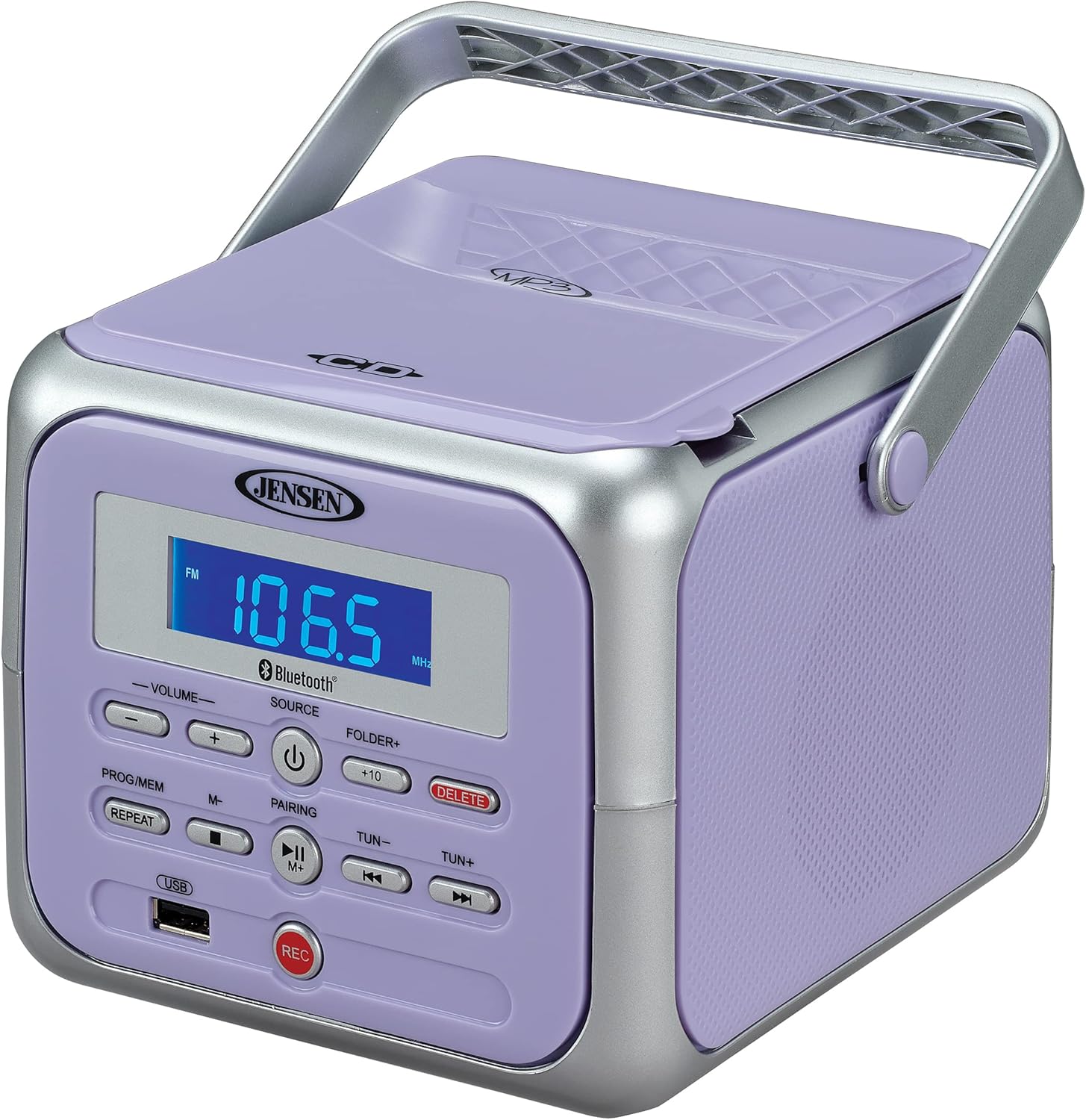
Figura 1: Fronte view of the Jensen CD-660 with the carrying handle extended. This image displays the main control panel, including the display screen, volume controls, source selection, and playback buttons.

Figura 2: Fronte view of the Jensen CD-660 with the carrying handle folded down. This perspective highlights the compact design and the arrangement of buttons and the LCD display.

Figura 3: in alto view of the Jensen CD-660 with the CD compartment lid open, revealing the CD tray. This illustrates the top-loading mechanism for disc insertion.
Caratteristiche del pannello di controllo:
- Schermo LCD: Mostra la modalità corrente, il numero della traccia, la frequenza e altre informazioni.
- Pulsanti VOLUME +/-: Regola il livello di uscita audio.
- Pulsante FONTE: Selects between CD, Bluetooth, FM Radio, and Aux-in modes.
- Pulsante di accensione: Accende o spegne l'unità.
- PROG/MEM Button: Programs CD tracks or stores FM radio presets.
- Pulsante RIPETI: Ripete la traccia corrente o tutte le tracce.
- PAIRING Button: Avvia la modalità di associazione Bluetooth.
- Pulsante RIPRODUCI/PAUSA: Avvia o mette in pausa la riproduzione.
- Pulsante STOP: Interrompe la riproduzione.
- Pulsanti SALTA/CERCA (◀◀ / ▶▶): Skips tracks or searches within a track.
- TUN +/- Buttons: Sintonizza la frequenza radio FM.
- FOLDER+ Button: Navigates to the next folder on a USB device.
- +10 Button: Skips 10 tracks forward on CD/USB.
- Pulsante ELIMINA: Elimina i dati registrati fileda USB.
- Pulsante REC: Initiates recording to a USB flash drive.
- Porta USB: Per la riproduzione e la registrazione su unità flash USB.
- Jack ingresso ausiliario: Collega dispositivi audio esterni.
- Jack per cuffie: Per l'ascolto privato.
Impostare
Alimentazione dell'unità
The Jensen CD-660 can be powered by either the included AC adapter or batteries.
Funzionamento con alimentazione CA:
- Plug the AC adapter into the AC IN jack located on the back of the unit.
- Collegare l'altra estremità dell'adattatore CA a una presa a muro standard da 120 V CA.
Funzionamento a batteria:
For portable use, the unit requires 6 x 'C' (UM-2) batteries (not included).
- Aprire il coperchio del vano batterie nella parte inferiore dell'unità.
- Inserire 6 batterie di tipo 'C', assicurandosi che la polarità (+/-) sia corretta, come indicato all'interno del vano.
- Chiudere saldamente il coperchio del vano batterie.
Nota: Disconnect the AC adapter when operating on battery power. Remove batteries if the unit will not be used for an extended period.
Istruzioni per l'uso
Funzionamento generale:
- Premere il tasto ENERGIA pulsante per accendere l'unità.
- Premere il tasto FONTE button repeatedly to select your desired mode (CD, Bluetooth, FM, USB, AUX).
- Regolare il volume utilizzando il VOLUME +/- pulsanti.
Riproduzione CD:
The unit supports CD, CD-R/RW, MP3, and WMA disc formats.
- Aprire il coperchio del vano CD.
- Posizionare un CD sul perno con l'etichetta rivolta verso l'alto.
- Chiudere il coperchio del vano CD.
- Premere il tasto FONTE per selezionare la modalità CD.
- Premere il tasto RIPRODUCI/PAUSA pulsante per avviare la riproduzione.
- Utilizzare il SALTA/CERCA pulsanti (◀◀ / ▶▶) per navigare tra le tracce.
- Premere il tasto FERMARE per interrompere la riproduzione.
Funzionamento Bluetooth:
Riproduci in streaming l'audio in modalità wireless dal tuo dispositivo abilitato Bluetooth.
- Premere il tasto FONTE button to select Bluetooth mode. The display will show "BT" and flash, indicating pairing mode.
- Sul tuo dispositivo Bluetooth, attiva il Bluetooth e cerca i dispositivi disponibili.
- Select "JENSEN CD-660" from the list of devices.
- Once paired, the display will stop flashing and show "BT".
- Avvia la riproduzione dell'audio sul dispositivo connesso.
- Utilizzare il RIPRODUCI/PAUSA E SALTA/CERCA buttons on the boombox or your device to control playback.
FM Radio:
Ascolta le tue stazioni radio FM preferite.
- Premere il tasto FONTE pulsante per selezionare la modalità radio FM.
- Extend the FM wire antenna for optimal reception.
- Premere il tasto TUN +/- pulsanti per sintonizzarsi manualmente su una stazione.
- Premere e tenere premuto il tasto TUN +/- pulsanti per la scansione automatica alla successiva stazione disponibile.
Storing and Recalling Presets:
The unit can store up to 30 FM presets.
- Sintonizzarsi sulla stazione FM desiderata.
- Premere il tasto PROG/MEM pulsante. Il display mostrerà un numero preimpostato lampeggiante.
- Utilizzare il SALTA/CERCA buttons (◀◀ / ▶▶) to select the desired preset number.
- Premere il tasto PROG/MEM nuovamente il pulsante per confermare e salvare la stazione.
- Per richiamare una preimpostazione, premere il tasto PROG/MEM ripetutamente il pulsante per scorrere le stazioni memorizzate.
Riproduzione USB:
Play MP3, WAV, or FLAC audio files da un'unità flash USB.
- Inserire una chiavetta USB nella porta USB.
- Premere il tasto FONTE per selezionare la modalità USB.
- The unit will automatically begin playing the first compatible audio file.
- Utilizzare il SALTA/CERCA pulsanti (◀◀ / ▶▶) per navigare tra le tracce.
- Utilizzare il CARTELLA+ pulsante per navigare tra le cartelle sull'unità USB.
- IL +10 button can be used to skip 10 tracks forward.
Registrazione USB:
Record audio directly to a USB flash drive from CD, FM Radio, Aux-in, or Bluetooth sources.
- Inserire una chiavetta USB nella porta USB.
- Select the desired audio source (CD, FM, AUX, or Bluetooth).
- Start playback of the audio you wish to record.
- Premere il tasto RICORDA button to begin recording. The display will indicate recording status.
- Premere il tasto RICORDA nuovamente il pulsante per interrompere la registrazione.
- Per eliminare una registrazione file, vai a file in USB playback mode and press the ELIMINARE pulsante.
Collegamento Aux-in:
Connect external audio devices like smartphones or tablets.
- Connect one end of a 3.5mm audio cable (not included) to the Aux-in jack on the boombox.
- Collegare l'altra estremità del cavo alla presa delle cuffie o all'uscita audio del dispositivo esterno.
- Premere il tasto FONTE button to select Aux-in mode.
- Avvia la riproduzione dell'audio sul tuo dispositivo esterno.
- Per un suono ottimale, regola il volume sia sullo stereo che sul dispositivo esterno.
Manutenzione
Pulizia dell'unità:
- Pulire l'esterno dell'unità con un panno morbido, damp panno. Non usare detergenti abrasivi o solventi.
- Per la lente del CD, utilizzare un disco apposito per la pulizia delle lenti del CD.
Cura della batteria:
- Rimuovere le batterie se l'unità non verrà utilizzata per un periodo prolungato per evitare perdite.
- Non mischiare batterie vecchie e nuove o diversi tipi di batterie.
Risoluzione dei problemi
If you encounter issues with your Jensen CD-660, refer to the following table for common problems and solutions.
| Problema | Possibile causa | Soluzione |
|---|---|---|
| Nessun potere | Adattatore CA non collegato; batterie scariche o inserite in modo errato. | Ensure AC adapter is securely plugged in; Replace batteries or check polarity. |
| Nessun suono | Volume troppo basso; Sorgente selezionata non corretta; Cuffie collegate. | Aumentare il volume; Selezionare la sorgente corretta; Scollegare le cuffie. |
| Il CD non viene riprodotto | CD inserted incorrectly; Disc is dirty or scratched; CD compartment not closed. | Insert CD with label side up; Clean or replace disc; Close compartment securely. |
| Associazione Bluetooth non riuscita | Device too far; Bluetooth not enabled on external device; Boombox not in pairing mode. | Move device closer; Enable Bluetooth; Ensure boombox is in BT pairing mode. |
| Scarsa ricezione FM | Antenna non estesa; segnale debole. | Fully extend the FM wire antenna; Reposition the unit for better reception. |
| Problemi di riproduzione USB | Non supportato file format; USB drive not properly inserted or corrupted. | Garantire files are MP3/WAV/FLAC; Reinsert USB drive; Try a different USB drive. |
Specifiche
| Caratteristica | Dettaglio |
|---|---|
| Numero di modello | Codice CD-660 |
| Fonte di alimentazione | AC 120V (included adapter) or 6 x 'C' (UM-2) batteries (not included) |
| Connettività | Bluetooth 5.1 (A2DP, AVRCP), USB, Aux-in |
| Compatibilità CD | CD, CD-R/RW, MP3, WMA |
| Riproduzione USB | MP3, WAV, FLAC |
| Radio FM | Stereo Receiver with 30 Presets, PLL Digital Tuning |
| Dimensioni (L x A x P) | 6.38" x 5.2" x 6.57" (16.2 cm x 13.2 cm x 16.7 cm) |
| Peso | Circa 2.46 libbre (1.12 kg) |
Garanzia e supporto
This Jensen CD-660 Portable Stereo CD Player Boombox comes with a manufacturer's warranty. Please refer to the included Owner's Manual for specific details regarding warranty coverage, terms, and conditions. For technical support or service inquiries, please contact Jensen customer service directly. Contact information can typically be found in the Owner's Manual or on the official Jensen websito.