
1. Introduzione
Thank you for choosing the XTUGA D900 Dual UHF Wireless Microphone System. This system is designed to provide high-quality audio transmission for various applications, including karaoke, DJ events, weddings, church services, business meetings, classroom activities, and live performances. This manual will guide you through the setup, operation, and maintenance of your new wireless microphone system.
The XTUGA D900 features dual handheld microphones with adjustable echo, treble, and bass controls, paired with a versatile mini receiver that offers both 3.5mm and 6.35mm output options for broad compatibility with audio devices.

Image: The XTUGA D900 system is suitable for performances, family entertainment, classroom speeches, and program hosting.
2. Contenuto della confezione
Si prega di controllare il pacco per assicurarsi che siano presenti tutti gli articoli:
- 2 x XTUGA D900 Handheld Wireless Microphones
- 1 x Mini Wireless Receiver (with 3.5mm jack)
- 1 x 6.35mm Adapter (for receiver)
- 1 cavo di ricarica USB (per il ricevitore)
- 2 x Anti-roll Rings (for microphones)
- Manuale d'uso
3. Caratteristiche del prodotto
- Suono di alta qualità: Clear voice transmission without feedback or distortion.
- Dual UHF Wireless System: Two microphones operating on independent UHF channels (ChA and ChB), each with 50 adjustable frequencies (573-599 MHz range) to prevent interference.
- On-Microphone Controls: Each handheld microphone features direct controls for volume, 7 levels of echo adjustment, and 5 levels of treble/bass adjustment.
- Versatile Receiver: Mini wireless receiver with a 3.5mm output, convertible to 6.35mm for wide compatibility with various audio equipment.
- Lunga portata wireless: Stable signal transmission up to 20 meters (65 feet).
- Ricevitore ricaricabile: Built-in battery provides up to 8 hours of use on a 4-hour charge.
- Riproduzione Bluetooth: The receiver supports Bluetooth connectivity for playing background music from a smartphone or other devices.

Image: Close-up of the XTUGA D900 microphone displaying its multifunctional adjustment capabilities for echo, volume, treble, and bass.
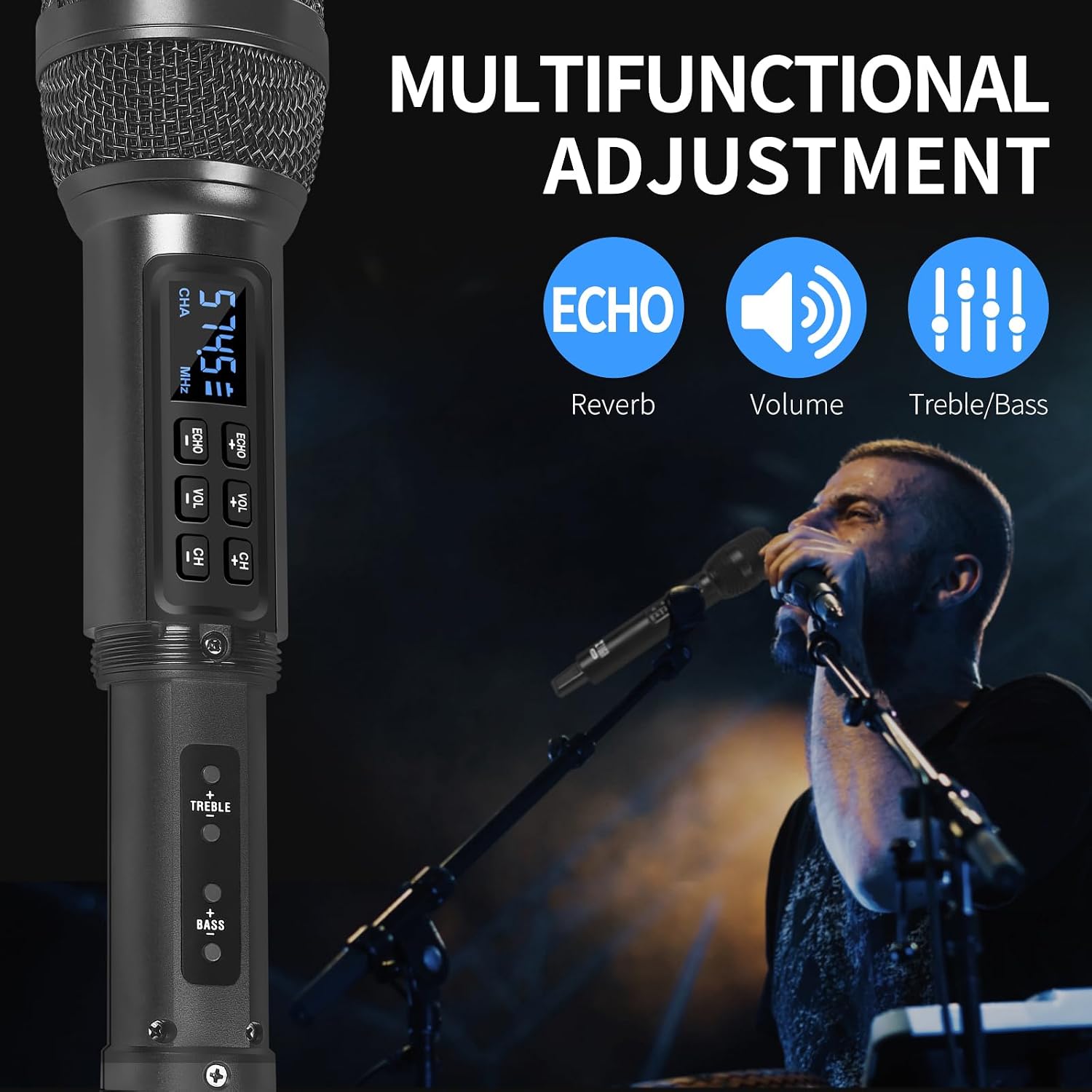
Image: The XTUGA D900 handheld microphone featuring a digital display for frequency and channel information.
4. Guida all'installazione
4.1. Connessione del ricevitore
- Identify Output: Determine if your audio device (e.g., amplifier, mixer, speaker, soundbar, PC) requires a 3.5mm or 6.35mm input.
- Collegare il ricevitore:
- For 3.5mm input: Directly plug the mini wireless receiver's 3.5mm jack into your device's audio input port.
- For 6.35mm input: Attach the provided 6.35mm adapter to the receiver's 3.5mm jack, then plug it into your device's 6.35mm audio input port.
- Accendi il ricevitore: Press and hold the POWER button on the receiver until the indicator lights illuminate.
4.2. Configurazione del microfono
- Inserire le batterie: Open the battery compartment of each microphone and insert two AA batteries (not included), ensuring correct polarity.
- Accensione dei microfoni: Press and hold the power button on each microphone. The display will light up, showing the channel and frequency.
- Associazione automatica: The microphones and receiver should automatically pair. The RF indicator lights (A.RF, B.RF) on the receiver will turn solid blue when a microphone is successfully connected.

Image: Connectivity diagram illustrating how to connect the XTUGA D900 microphone and receiver to different audio systems using 3.5mm or 6.35mm inputs. Note: Not recommended for small speakers under 15 watts.

Image: The XTUGA D900 system, showing two microphones and the receiver, highlighting a stable 20-meter wireless signal range.
5. Istruzioni per l'uso
5.1. Controlli del microfono
- Accensione/spegnimento: Press and hold the power button on the microphone for 2-3 seconds.
- Regolazione del volume: Press the 'VOL +' or 'VOL -' buttons on the microphone to adjust the microphone's output volume.
- Regolazione dell'eco: Press the 'ECHO +' or 'ECHO -' buttons to cycle through 7 levels of echo effect.
- Regolazione alti/bassi: Press the 'TREBLE +' or 'TREBLE -' buttons to adjust the treble. Press the 'BASS +' or 'BASS -' buttons to adjust the bass. There are 5 levels for each.
- Regolazione della frequenza: Press the 'CH +' or 'CH -' buttons to change the operating frequency. Each microphone (ChA and ChB) has 50 selectable frequencies to avoid interference.

Image: Two XTUGA D900 microphones illustrating the frequency adjustment buttons (CH+/-) and their digital displays.
5.2. Receiver Bluetooth Playback
The receiver supports Bluetooth connectivity for playing background music from a compatible device.
- Attiva Bluetooth: Assicurarsi che il ricevitore sia acceso.
- Abbinamento: On your smartphone or Bluetooth-enabled device, search for Bluetooth devices and select "X168" to connect.
- Riproduci musica: Once connected, you can play music from your device, and the audio will be transmitted through the receiver to your connected sound system.

Image: The XTUGA D900 receiver demonstrating Bluetooth playback functionality, connected to a smartphone.
6. Informazioni sulla batteria
6.1. Receiver Battery
- The receiver has a built-in rechargeable battery.
- Per caricare, collegare il ricevitore a una fonte di alimentazione USB utilizzando il cavo di ricarica USB in dotazione.
- Una carica completa richiede in genere circa 4 ore e garantisce fino a 8 ore di utilizzo continuo.
- The POWER indicator light on the receiver will show charging status.
6.2. Microphone Batteries
- Ogni microfono richiede due batterie AA (non incluse).
- Replace batteries when the microphone display indicates low power or when audio quality degrades.
- Always use fresh, high-quality batteries for optimal performance.

Image: The XTUGA D900 receiver highlighting its strong battery life, offering up to 8 hours of operation after a 4-hour charge.
7. Manutenzione
- Pulizia: Pulire i microfoni e il ricevitore con un panno morbido e asciutto. Non utilizzare detergenti liquidi o solventi.
- Magazzinaggio: Conservare il sistema in un luogo fresco e asciutto, lontano dalla luce solare diretta e da temperature estreme.
- Cura della batteria: Remove AA batteries from microphones if not used for an extended period to prevent leakage. Charge the receiver's battery periodically if stored for long durations to maintain battery health.
- Gestione: Avoid dropping the microphones or receiver, as this can damage internal components.
8. Risoluzione Dei Problemi
| Problema | Possibile causa | Soluzione |
|---|---|---|
| Nessun suono dal microfono |
|
|
| Distorsione o interferenza del suono |
|
|
| Receiver Bluetooth not connecting |
|
|
9. Specifiche
| Caratteristica | Dettaglio |
|---|---|
| Marca | XTUGA |
| Nome del modello | XTUGA D900 |
| Tecnologia di connettività | UHF Wireless, Auxiliary, Bluetooth (Receiver) |
| Tipo di connettore | Jack da 3.5 mm, jack da 6.35 mm (con adattatore) |
| Fattore di forma del microfono | Portatile |
| Gamma di frequenza | 573 MHz - 599 MHz (30 adjustable frequencies per channel) |
| Numero di frequenze | 50 frequencies per channel (ChA and ChB) |
| wireless Range | Fino a 20 metri (65 piedi) |
| Durata della batteria del ricevitore | Fino a 8 ore (dopo 4 ore di ricarica) |
| Fonte di alimentazione del microfono | 2 x AA Batteries (per microphone, not included) |
| Dispositivi compatibili | PC, Smartphone, TV, Tablets, Laptops, Power Amplifiers, Mixers, Speakers, Soundbars, Bus Audio |
| Caratteristiche speciali | Volume Control, 7-level Echo Adjustment, 5-level Treble Adjustment, 5-level Bass Adjustment |
| Componenti inclusi | 2 Microphones, 1 Mini Wireless Receiver, 1 6.35mm Adapter, 1 USB Charging Cable |
| Paese di origine | Cina |
10. Informazioni sulla sicurezza
- Non esporre il dispositivo a pioggia o umidità.
- Non smontare l'unità. Per qualsiasi intervento di manutenzione, rivolgersi a personale qualificato.
- Tenere lontano da fonti di calore e fiamme libere.
- Smaltire le batterie in modo responsabile, nel rispetto delle normative locali.
- Avoid using the system near strong electromagnetic fields, which may cause interference.
11. Garanzia e supporto
XTUGA products are designed for reliability and performance. For warranty information or technical support, please refer to the warranty card included with your purchase or contact XTUGA customer service through the retailer where you purchased the product.
Si prega di conservare la prova d'acquisto per eventuali reclami in garanzia.