
Introduzione
The TAXNELE THC30A is a digital programmable timer switch designed for automatic control of various electrical equipment. It features daily and weekly programming capabilities with up to 20 ON/OFF settings, a manual override function, and a built-in lithium battery for power-off memory. This manual provides detailed instructions for installation, operation, and maintenance to ensure safe and efficient use of your timer switch.
Informazioni sulla sicurezza
- Assicurarsi che l'alimentazione sia scollegata prima dell'installazione o della manutenzione.
- L'installazione deve essere eseguita da un elettricista qualificato o da una persona esperta.
- Non superare la capacità di carico massima di 30A / 5000W.
- Tenere il dispositivo lontano dall'acqua e da temperature estreme.
- Verify correct wiring connections to prevent damage to the device or connected appliances.
Caratteristiche del prodotto
- Controllo programmabile: Up to 20 ON/OFF settings per day or week.
- Memoria di spegnimento: Built-in 3V lithium battery maintains timing, display, and data storage for up to 3 years during power interruptions.
- Alta precisione: Industrial-grade chip for accurate timing.
- Sostituzione manuale: Allows temporary or permanent manual control.
- Schermo LCD: Display digitale chiaro per una facile programmazione e monitoraggio.
- Din Rail Mount: Progettato per una facile installazione su una guida DIN standard.
- Ampia applicazione: Suitable for street lights, neon lamps, advertising signs, production equipment, and home appliances.

Figure 1: The THC30A timer switch highlighting its power-off memory function, which retains data for up to 3 years using a built-in CR2032 lithium battery.

Figure 2: The THC30A timer switch featuring a 30A big load relay for stable and safe operation with various electrical loads.
Product Components and Display
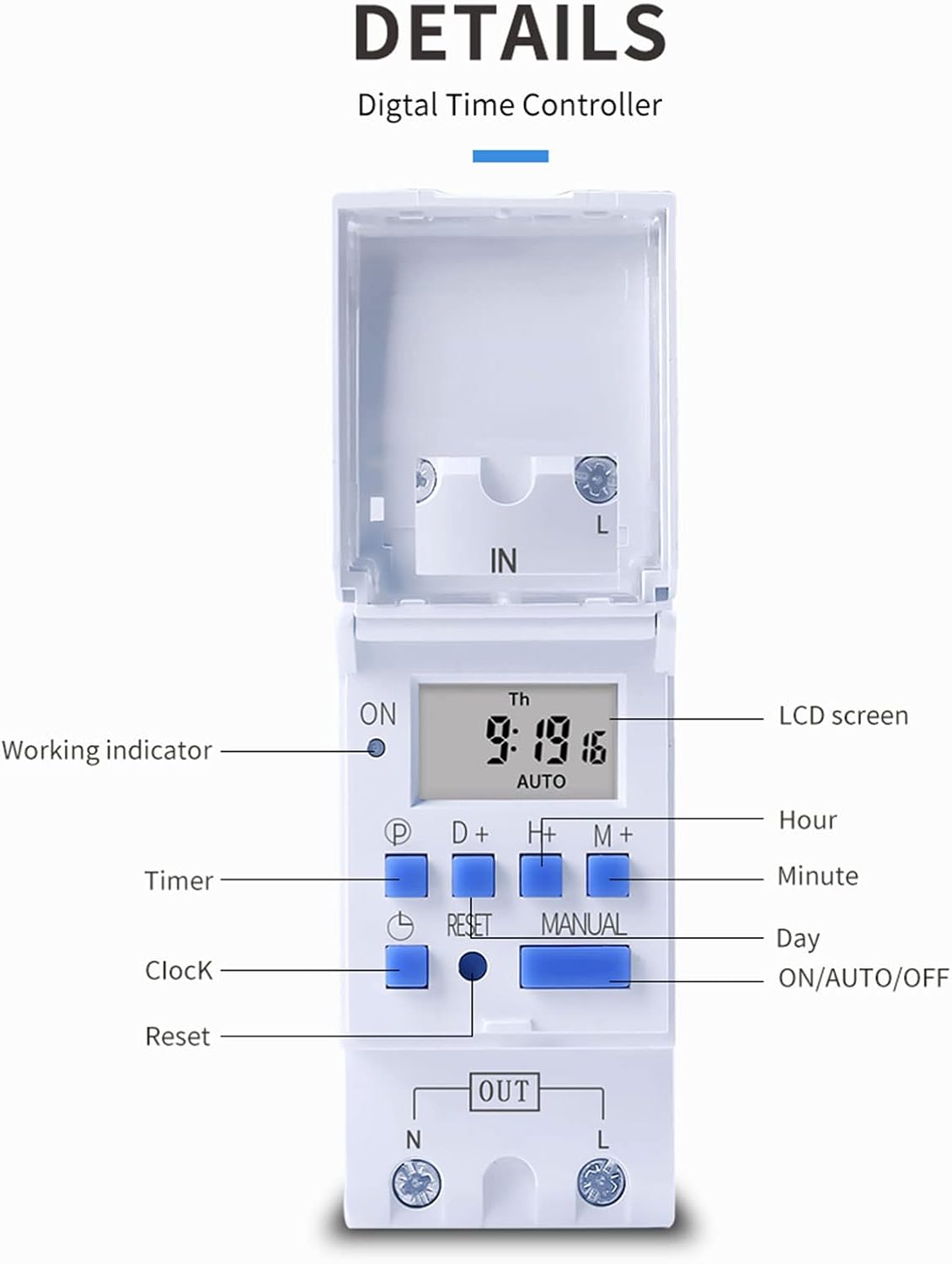
Figura 3: dettagliata view of the THC30A timer switch's LCD screen and control buttons. Labels include Working indicator, Timer, Clock, Reset, P (Program), D+ (Day), H+ (Hour), M+ (Minute), Manual, and ON/AUTO/OFF status.
- Schermo LCD: Displays current time, day, and ON/OFF status.
- Indicatore di lavoro: LED light indicating operation status.
- Pulsante P: Entra in modalità programmazione.
- D+ Button: Adjusts day in clock setting or program.
- H+ Button: Adjusts hour in clock setting or program.
- Pulsante M+: Adjusts minute in clock setting or program.
- Pulsante dell'orologio: Returns to clock display or exits programming mode.
- Pulsante di reset: Cancella tutte le impostazioni e reimposta il timer.
- Pulsante manuale: Alterna tra le modalità ON, AUTO e OFF.
Specifiche
| Parametro | Valore |
|---|---|
| Modello | THC30A |
| Valutazione attuale | 30A |
| Potenza nominale | 5000W |
| Voltage Opzioni | 12V DC AC, 24V DC AC, 48V DC AC, 110V AC, 220V AC |
| Errore di tempo | ≤2 seconds/day |
| Display | LCD |
| Intervallo di tempo | Da 1 minuto a 168 ore (7 giorni) |
| Impostazioni ON/OFF | 20 gruppi |
| Temperatura di esercizio | -20℃ a 50℃ |
| Dimensioni | 86 x 36 x 65mm (3.38 x 1.41 x 2.56 pollici) |
| Riserva di carica | 3V Lithium battery (CR2032 type) for 3 years data retention |

Figure 4: Dimensions of the THC30A timer switch, showing measurements for height, width, and depth for proper installation planning.
Configurazione e installazione
1. Montaggio
The THC30A timer switch is designed for DIN rail mounting. Securely attach the device to a standard 35mm DIN rail in an appropriate electrical enclosure.
2. Cablaggio
AVVERTIMENTO: Prima di effettuare qualsiasi cablaggio, assicurarsi che tutta l'alimentazione sia scollegata.
Connect the input power supply to the "IN" terminals (N for Neutral, L for Live). Connect the load (e.g., light, appliance) to the "OUT" terminals (N for Neutral, L for Live). The timer acts as a switch for the live wire. Refer to the wiring diagram below for correct connections.

Figure 5: Simplified wiring diagram for the THC30A timer switch. The new version offers direct power output, simplifying connections compared to older models.
- Ingresso (IN): Connect your main power supply (e.g., AC 12V, 24V, 48V, 110V, 220V) to these terminals.
- Uscita (FUORI): Connect your electrical load (e.g., light, motor) to these terminals. The timer controls the power flow to this output.
Istruzioni per l'uso
1. Configurazione iniziale / Ripristino
Al primo utilizzo o dopo un prolungato spegnimentotage, the display may be blank. Press the Reset button (located in a small hole, use a pointed object) to clear all settings and initialize the timer. The LCD will display "0:00" and "AUTO".
2. Impostazione dell'ora e del giorno correnti
- Premere e tenere premuto il tasto Orologio pulsante.
- Mentre si tiene Orologio, premere D+ to set the current day (Monday to Sunday).
- Mentre si tiene Orologio, premere H+ per impostare l'ora corrente (0-23).
- Mentre si tiene Orologio, premere M+ per impostare i minuti correnti (0-59).
- Rilasciare il Orologio pulsante. L'ora è ora impostata.
3. Programmazione dei cicli di accensione/spegnimento
Il timer supporta fino a 20 programmi di accensione/spegnimento. Ogni programma è composto da un orario di accensione e uno di spegnimento.
- Premere il tasto P button once. The display will show "1 ON". This is for the first ON setting.
- Premere D+ to select the day(s) for this ON event. You can choose a single day, specific days, or blocks of days (e.g., Mon-Fri, Sat-Sun, Mon-Sun).
- Premere H+ to set the hour for the first ON event.
- Premere M+ to set the minute for the first ON event.
- Premere il tasto P button again. The display will show "1 OFF". This is for the first OFF setting.
- Ripetere i passaggi da 2 a 4 per impostare il giorno/i, l'ora e i minuti per il primo evento OFF.
- Continua a premere P to cycle through "2 ON", "2 OFF", up to "20 ON", "20 OFF" and set additional programs as needed.
- Dopo aver impostato tutti i programmi desiderati, premere il tasto Orologio pulsante per uscire dalla modalità di programmazione e tornare alla visualizzazione dell'ora corrente.
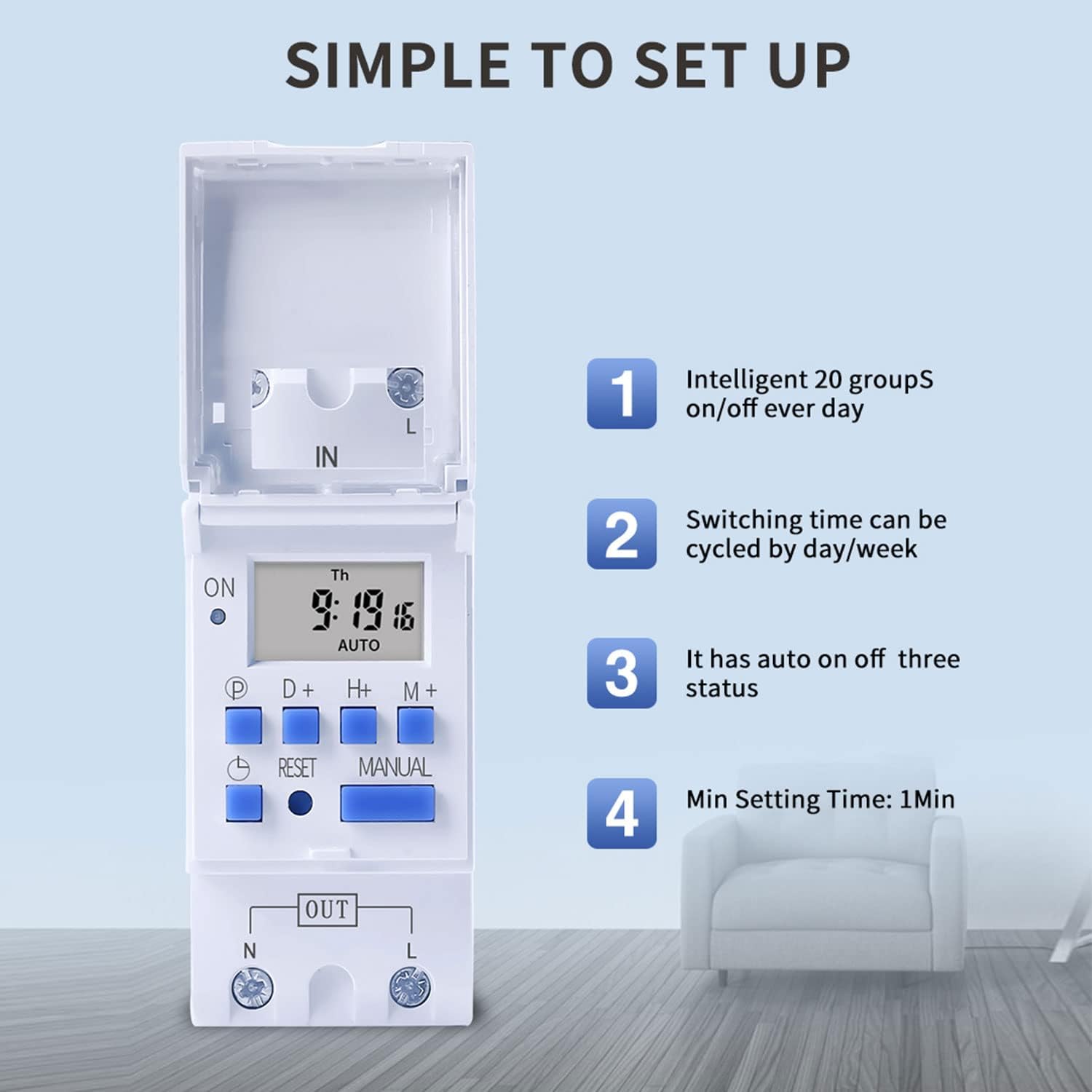
Figure 6: Visual guide to the simple setup of the THC30A timer, highlighting its 20 ON/OFF groups, daily/weekly cycling, auto ON/OFF status, and minimum 1-minute setting time.
4. Azionamento manuale
Premere il tasto Manuale pulsante per scorrere le modalità di output:
- SOPRA: L'uscita è sempre attiva, ignorando tutti i programmi.
- AUTO: The output operates according to the programmed ON/OFF cycles. This is the standard operating mode.
- OFF: L'uscita è sempre disattivata, ignorando tutti i programmi.
Assicurarsi che il timer sia in AUTO modalità per il funzionamento delle operazioni programmate.
Manutenzione
- Mantenere il timer pulito e privo di polvere. Utilizzare un panno asciutto e morbido per la pulizia.
- Non utilizzare detergenti abrasivi o solventi.
- The internal lithium battery (CR2032) has a long lifespan (up to 3 years). If the display consistently goes blank after power outages, the battery may need replacement. This should be done by a qualified technician.
Risoluzione dei problemi
| Problema | Possibile causa | Soluzione |
|---|---|---|
| Il display è vuoto. | Nessuna alimentazione; batteria interna scarica. | Check power connections. Press the Reset button. If problem persists, internal battery may need replacement. |
| Il timer non si accende/spegne come programmato. | Timer is not in AUTO mode; incorrect program settings; current time/day is wrong. | Premere Manuale until "AUTO" is displayed. Verify program settings (ON/OFF times, days). Check and correct current time and day. |
| L'uscita è sempre ON o sempre OFF. | Il timer è in modalità manuale ON o OFF. | Premere Manuale finché non viene visualizzato "AUTO". |
| I programmi vengono persi dopo lo spegnimentotage. | Internal backup battery is depleted. | The internal CR2032 battery may need replacement. Contact support if necessary. |
Applicazioni
The TAXNELE THC30A timer switch is versatile and can be used in various applications to automate electrical devices:

Figura 7: Esamples of common applications for the THC30A timer switch, including street light control, home appliance control, battery charging control, and advertising light control.
- Street Light Control: Automate the turning ON/OFF of street lights based on time.
- Controllo degli elettrodomestici: Schedule operation of water heaters, fans, or other household devices.
- Battery Charging Control: Manage charging cycles for batteries to prevent overcharging.
- Advertising Light Control: Program display times for neon signs and advertising boards.
- Attrezzature di produzione: Control machinery operation in industrial settings.
Garanzia e supporto
For warranty information or technical support, please refer to the contact details provided with your purchase or visit the official TAXNELE websito. Conserva la ricevuta d'acquisto come prova d'acquisto.