
1. Introduzione
This manual provides detailed instructions for the safe installation, operation, and maintenance of your Fanimation FP3050BN Obvi LED Indoor Ceiling Fan. Please read this manual thoroughly before beginning installation and keep it for future reference.

Figure 1.1: Fanimation FP3050BN Obvi LED Indoor Ceiling Fan (Brushed Nickel)
The Fanimation FP3050BN is a 26-inch LED indoor ceiling fan featuring a modern design with integrated LED lighting and smart control capabilities via remote and app. It is designed for indoor use and offers both flush mount and semi-flush mount installation options.
2. Importanti istruzioni di sicurezza
Read and save these instructions to prevent injury or damage.
- Disconnessione dell'alimentazione: Always disconnect power at the main circuit breaker or fuse box before attempting any installation, maintenance, or repair.
- Cavi elettrici: All electrical wiring must be performed by a qualified electrician and conform to national and local electrical codes.
- Supporto per il montaggio: Ensure the outlet box and supporting structure are securely fastened and capable of supporting the fan's weight (approximately 20 pounds).
- Solo per uso interno: This ceiling fan is designed exclusively for indoor environments. Do not install in damp o luoghi umidi.
- Distanza tra le lame: Ensure there is adequate clearance from the fan blades to any obstructions.
- Parti autorizzate: Use only Fanimation authorized replacement parts and accessories.
- LED integrato: The LED light source is integrated and non-removable. Do not attempt to replace individual LEDs.
3. Contenuto della confezione
Before beginning installation, carefully unpack all components and verify that you have received all items listed below. If any parts are missing or damaged, contact Fanimation customer support immediately.
- Gruppo motore ventola
- LED Light Kit (integrated)
- Telecomando
- Staffa di montaggio e hardware
- Manuale di istruzioni
4. Configurazione e installazione
The Fanimation FP3050BN supports both Flush Mount and Semi Flush Mount installation types. Due to the electrical nature of this product, professional installation is highly recommended.
4.1 Montaggio della ventola
Follow the detailed wiring and mounting instructions provided in the separate installation guide included with your fan. Ensure all electrical connections are secure and properly insulated.
4.2 Connecting to Smart Devices (fanSync App)
Your Fanimation ceiling fan is equipped with a fanSync WiFi receiver for smart control. Refer to the diagram below for an overview of the connection process.

Figure 4.1: fanSync WiFi Receiver and App Integration
- Wire and Install Receiver: Wire and install the fanSync WiFi receiver into your ceiling fan's hanger bracket/canopy as per the wiring diagram.
- Download fanSync App: Download the fanSync Wifi app from the Google Play Store (for Android) or the Apple App Store (for iOS).
- Segui le istruzioni nell'app: Open the fanSync app and follow the simple on-screen setup instructions to pair your fan with your smart device.
The fanSync system integrates with popular smart home platforms including Amazon Echo (Alexa), Google Home (Google Assistant), Nest, Ecobee, and SmartThings, allowing for voice control and advanced automation.
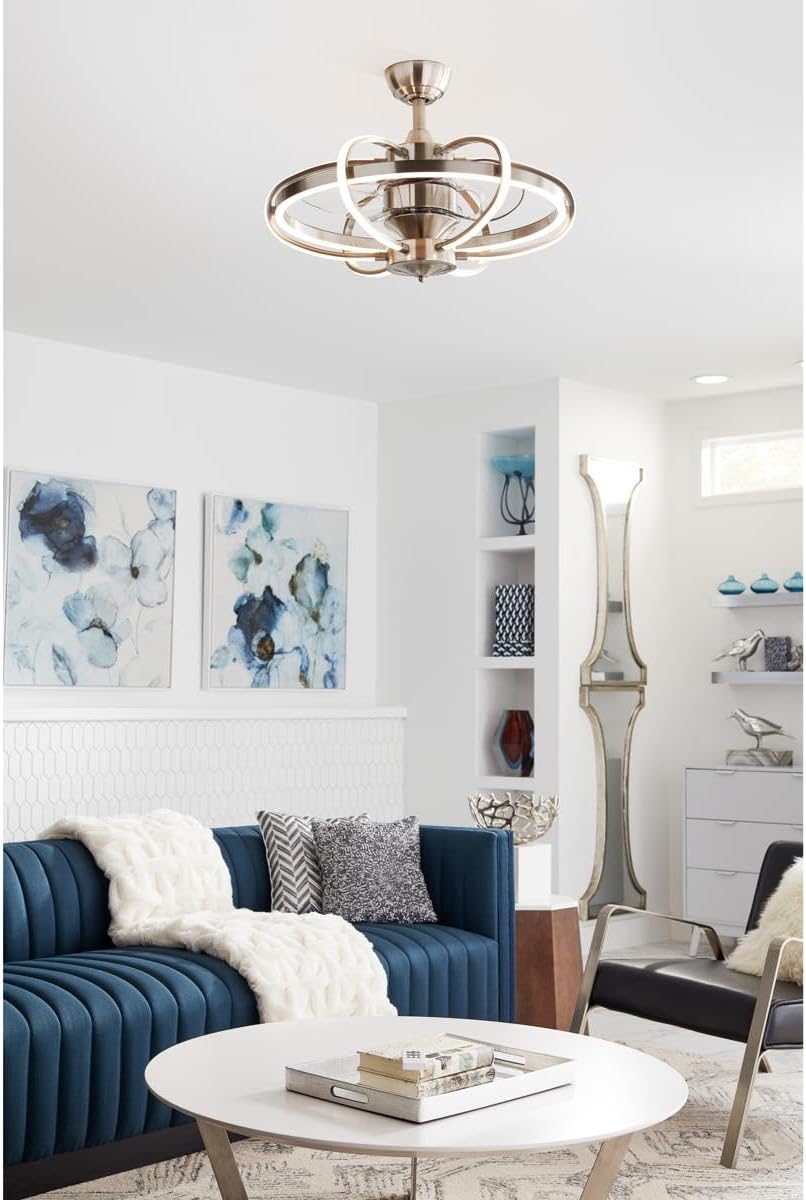
Figure 4.2: Fanimation FP3050BN installed in a modern living space.
5. Istruzioni per l'uso
Your Fanimation Obvi LED Ceiling Fan can be controlled using the included remote control or through the fanSync mobile application.
5.1 Funzionamento del telecomando
The remote control allows for direct control of the fan and light functions:
- Pulsante di accensione: Accende o spegne la ventola e la luce.
- Pulsanti della velocità della ventola: Adjusts the fan speed (typically 3 speeds for AC fans, variable for DC fans).
- Pulsante luce: Accende o spegne la luce LED.
- Pulsanti di oscuramento: Regola la luminosità della luce LED.
5.2 App Control (fanSync)
The fanSync app provides enhanced control features:
- Controllo completo: Operate fan speed and light functions from your smartphone.
- Funzioni del timer: Set schedules for the fan and light to turn on/off automatically.
- Impostazioni preferite: Save preferred fan speeds and light brightness levels for quick access.
- Integrazione del controllo vocale: Connect with Amazon Alexa or Google Assistant for hands-free operation. Exampi comandi: "Hey Google, turn bedroom fan on." or "Alexa, turn living room light on."
6. Cura e manutenzione
Regular care and maintenance will help preserve the appearance and extend the life of your ceiling fan.
- Pulizia: Per pulire la ventola, strofinare con un panno morbido eamp panno. Non utilizzare detergenti abrasivi, solventi o prodotti chimici aggressivi, poiché potrebbero danneggiare la finitura o i componenti elettrici.
- Sorgente luminosa: The LED light source is integrated and non-removable. Do not attempt to replace individual LEDs. If the light fails, contact Fanimation customer support.
- Motore: The fan motor is permanently lubricated and requires no oiling.
- Controllo di tenuta: Controllare periodicamente tutte le viti e i collegamenti della ventola e dell'hardware di montaggio per accertarsi che siano ben saldi.
7. Risoluzione Dei Problemi
Prima di contattare l'assistenza clienti, consultare la seguente guida alla risoluzione dei problemi più comuni.
| Problema | Possibile causa | Soluzione |
|---|---|---|
| La ventola non si avvia. | No power to the fan; loose wiring connection; remote control battery dead. | Check circuit breaker and wall switch. Ensure all wiring connections are secure. Replace remote control batteries. |
| La ventola fa troppo rumore. | Loose mounting screws; unbalanced blades; internal component issue. | Ensure all mounting screws are tight. Check for any loose parts. If noise persists, contact customer support. |
| La luce non funziona. | Light kit wiring issue; LED failure. | Check light kit wiring connections. Since the LED is non-removable, if it's faulty, contact Fanimation customer support for service. |
| Il telecomando non risponde. | Batterie scariche; telecomando non associato al ventilatore. | Replace batteries in the remote control. Refer to the full installation manual for remote pairing instructions. |
| Il controllo dell'app non funziona. | Wi-Fi connectivity issue; fan not paired with app. | Ensure your home Wi-Fi network is active and the fan is within range. Re-pair the fan with the fanSync app if necessary. |
8. Specifiche del prodotto
- Modello: FP3050BN
- Marca: Fananimazione
- Colore: Nichel spazzolato
- Stile: Moderno
- Forma della lampada: Soffitto
- Utilizzo interno/esterno: Al chiuso
- Fonte di energia: Elettrico con cavo
- Tipo di installazione: Flush Mount, Semi Flush Mount
- Metodo di controllo: Controllo remoto, controllo app
- Tipo di sorgente luminosa: GUIDATO
- Tipo di finitura: Spazzolato
- Materiale ombra: Cristallo
- Numero di sorgenti luminose: 6
- Voltage: 120 Volt
- Colore chiaro: Bianco
- Componenti inclusi: Kit luce
- Peso dell'articolo: 20 libbre
- Cosatage: 4 watt
- Luminosità: 2000 lumen
- Dimensioni del prodotto: 1 x 1 x 1 pollici
- Data prima disponibilità: 14 luglio 2021
9. Garanzia e assistenza clienti
For detailed warranty information, technical assistance, or to purchase replacement parts, please contact Fanimation customer support directly. Keep your proof of purchase for warranty claims.
You can find additional resources and contact information by visiting the official Fanimation websito o la pagina del loro negozio su Amazon: