
1. Introduzione
Thank you for choosing the LEOTEC LT-1811 Portable AM FM Bluetooth Radio. This manual provides essential information for the safe and efficient operation of your new radio. Please read it thoroughly before use and retain it for future reference. This radio offers versatile listening options, including AM/FM radio, Bluetooth connectivity, and a headphone jack, powered by either AC or batteries for both indoor and outdoor use.
2. Informazioni sulla sicurezza
- Non esporre la radio a pioggia, umidità o temperature estreme.
- Evitare di posizionare la radio vicino a fonti di calore come radiatori, bocchette di riscaldamento, stufe o altri apparecchi (inclusi amplificatori) che producono calore.
- Use only the power supply specified in this manual or on the product.
- When using batteries, ensure correct polarity (+/-) to prevent damage.
- Rimuovere le batterie se la radio non verrà utilizzata per un periodo prolungato per evitare perdite.
- Do not disassemble or modify the radio. Refer all servicing to qualified service personnel.
- Pulire solo con un panno asciutto.
3. Contenuto della confezione
Si prega di controllare la confezione per verificare la presenza dei seguenti elementi:
- LEOTEC LT-1811 Portable AM FM Bluetooth Radio
- Cavo di alimentazione CA.
- Manuale del proprietario (questo documento)
4. Prodotto finitoview
Familiarize yourself with the various parts and controls of your LEOTEC LT-1811 radio.

Figura 4.1: Fronte view of the LEOTEC LT-1811 radio.
This image displays the main unit of the LEOTEC LT-1811 radio, featuring its dual speaker grilles, tuning dial, and an extended telescopic antenna. The model number LT-1811 is visible on the tuning dial.

Figure 4.2: Key controls of the LEOTEC LT-1811 radio.
This image highlights the primary controls: the Volume Control knob, the Tuning Control knob for station selection, and the Function Button for switching between modes like Bluetooth, FM, and AM.
Descrizioni dei controlli:
- Controllo del volume: Rotary knob to adjust the audio output level.
- Controllo della sintonizzazione: Rotary knob to select AM or FM radio frequencies.
- Pulsante funzione: Slide switch to select between AM, FM, and Bluetooth modes.
- Antenna retrattile: Antenna estensibile per una migliore ricezione FM.
- Jack per cuffie (3.5 mm): Per l'ascolto privato con le cuffie.
- Ingresso alimentazione CA: Port for connecting the AC power cable.
- Vano batteria: Located on the back, for D-cell batteries.
5. Impostazione
5.1 Alimentazione
Your LEOTEC radio can be powered by two methods: AC power or batteries.
Funzionamento con alimentazione CA:
- Assicurarsi che la radio sia spenta.
- Insert the included AC power cable into the AC input jack on the radio.
- Plug the other end of the AC power cable into a standard 120V/60Hz wall outlet.
- La radio è ora pronta per essere utilizzata con alimentazione CA.

Figure 5.1: Radio connected to AC power.
This image shows the LEOTEC radio placed on a shelf, with its power cable plugged into a standard wall outlet, demonstrating AC power operation.
Funzionamento a batteria:
For portable use, the radio requires 3 x 'D' cell batteries (not included).
- Individuare il vano batteria sul retro della radio.
- Aprire il coperchio del vano batterie.
- Insert 3 'D' cell batteries, ensuring the correct polarity (+/-) as indicated inside the compartment.
- Chiudere saldamente il coperchio del vano batterie.
- The radio is now ready for use with battery power.

Figure 5.2: Battery installation for portable use.
This image illustrates the internal battery compartment of the radio, showing three D-cell batteries correctly inserted, ready for portable operation.
6. Istruzioni per l'uso
6.1 Accensione/spegnimento e controllo del volume
- Per accendere la radio ON, ruotare il Controllo del volume la manopola in senso orario finché non si sente un clic e la radio si accende.
- Per regolare il volume, continuare a ruotare la manopola Controllo del volume knob clockwise to increase volume, or counter-clockwise to decrease volume.
- Per accendere la radio SPENTO, ruotare il Controllo del volume knob counter-clockwise until you hear a click.
Funzionamento radio AM/FM 6.2
The radio supports AM (520-1710 kHz) and FM (87-108 MHz) frequencies.
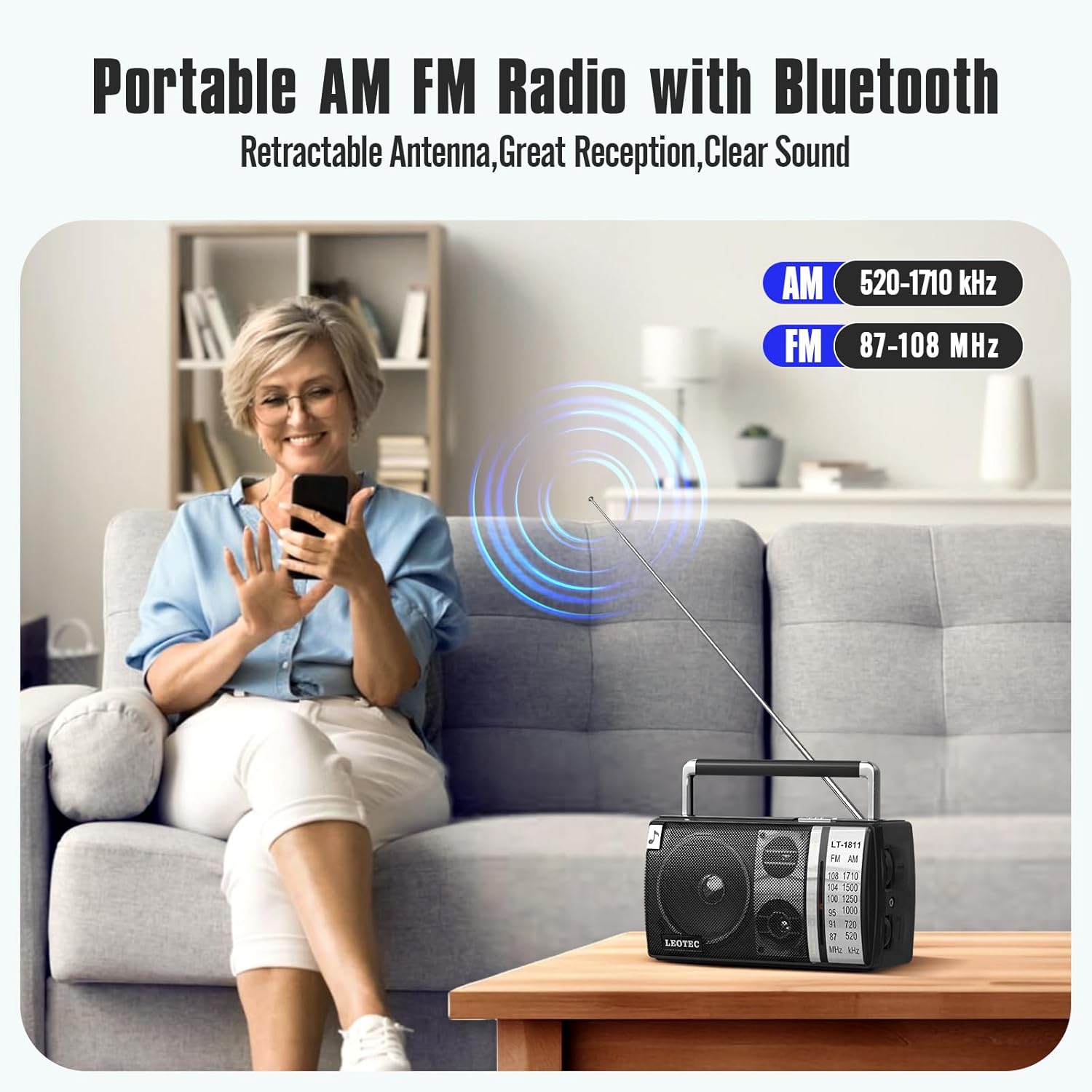
Figure 6.1: AM and FM frequency ranges.
This image illustrates the radio's capability to receive both AM (520-1710 kHz) and FM (87-108 MHz) radio bands, highlighting its versatility for different broadcast types.
- Fai scorrere il Pulsante funzione to select either 'AM' or 'FM' mode.
- For FM reception, extend the Antenna retrattile fully for optimal signal. For AM reception, the internal antenna is generally sufficient, but you may need to rotate the radio for best signal.
- Ruotare il Controllo della sintonizzazione knob to scan for radio stations. The tuning dial will indicate the selected frequency.
- Regolare il Controllo del volume al livello di ascolto desiderato.
6.3 Funzione Bluetooth
Connect your smartphone or other Bluetooth-enabled device to the radio for wireless audio playback.

Figura 6.2: Connessione Bluetooth in corso.
This image depicts a user's hand holding a smartphone, with a Bluetooth icon indicating a wireless connection to the LEOTEC radio, which is placed on a table outdoors.
- Fai scorrere il Pulsante funzione to 'BT' (Bluetooth) mode. The radio will enter pairing mode, indicated by an audible prompt or flashing indicator (if available).
- Sul tuo dispositivo Bluetooth, attiva il Bluetooth e cerca i dispositivi disponibili.
- Select 'LEOTEC LT-1811' (or similar name) from the list of devices.
- Once paired, you will hear a confirmation sound, and you can now play audio from your device through the radio.
6.4 Uso delle cuffie
For private listening, use the 3.5mm headphone jack.

Figure 6.3: Headphone jack detail.
Questa immagine fornisce un primo piano view of the 3.5mm earphone jack on the side of the LEOTEC radio, indicating its location for connecting headphones.
- Plug any standard 3.5mm stereo headphones into the headphone jack on the side of the radio.
- The radio's internal speakers will automatically mute when headphones are connected.
- Regolare il Controllo del volume ad un livello di ascolto confortevole.
7. Manutenzione
7.1 Pulizia
- Always disconnect the power cable and remove batteries before cleaning.
- Pulire l'esterno della radio con un panno morbido e asciutto.
- Non utilizzare detergenti abrasivi, cere o solventi poiché potrebbero danneggiare la finitura.
7.2 Conservazione
- If storing the radio for an extended period, remove the 'D' cell batteries to prevent leakage and corrosion.
- Conservare la radio in un luogo fresco e asciutto, lontano dalla luce solare diretta e da temperature estreme.
8. Risoluzione Dei Problemi
Se riscontri problemi con la radio, consulta i seguenti problemi comuni e le relative soluzioni:
| Problema | Possibile causa | Soluzione |
|---|---|---|
| La radio non si accende. | No power supply; Batteries drained or incorrectly inserted; AC cable not connected. | Check AC power connection; Replace batteries or ensure correct polarity; Ensure Volume knob is turned ON. |
| Scarsa ricezione radio (AM/FM). | Antenna not extended (FM); Radio position; Weak signal area. | Extend FM antenna fully; Rotate the radio for better AM reception; Try moving the radio to a different location. |
| Il Bluetooth non si connette. | Radio not in BT mode; Device too far; Device not in pairing mode. | Ensure Function Button is set to 'BT'; Move device closer to the radio; Ensure Bluetooth is enabled on your device and it's searching for devices. |
| Nessun suono dagli altoparlanti. | Volume too low; Headphones connected; Mute function active (not applicable for this model). | Increase volume; Disconnect headphones if not desired; Ensure correct mode (AM/FM/BT) is selected. |
9. Specifiche
Technical specifications for the LEOTEC LT-1811 Portable AM FM Bluetooth Radio.
| Caratteristica | Dettaglio |
|---|---|
| Modello | LT-1811 |
| Marca | LEOTEC |
| Dimensioni del prodotto | 8.26 x 3.74 x 4.6 pollici (20.98 x 9.5 x 11.68 cm) |
| Peso dell'articolo | 1.9 libbre (0.86 kg) |
| Colore | Nero |
| Caratteristica speciale | Portatile |
| Tecnologia di connettività | Bluetooth |
| Tecnologia sintonizzatore | AM/FM |
| Stile | Classico |
| Fonte di alimentazione | AC Plug-in / 3 x 'D' Cell Batteries |
| Bande radio supportate | AM (520-1710kHz), FM (87-108MHz) |
| Componenti inclusi | Owner's Manual, AC Power Cable |
10. Garanzia e supporto
LEOTEC is committed to providing high-quality products and customer satisfaction. While specific warranty details are not provided in this manual, LEOTEC offers professional technical assistance and 24/7 after-sales support for its products. For any questions, concerns, or technical support needs, please contact LEOTEC customer service through the retailer's platform or the official LEOTEC websito.
Conservare la ricevuta d'acquisto come prova d'acquisto per eventuali reclami in garanzia o richieste di supporto.