
1. Introduzione
This manual provides essential information for the safe and efficient operation of your Sennheiser EW-D CI1 Wireless Guitar System (Q1-Q6). Please read this manual thoroughly before using the product to ensure proper setup, operation, and maintenance. Keep this manual for future reference.
2. Informazioni sulla sicurezza
- Always follow the safety instructions provided in this manual and on the product itself.
- Non esporre il sistema a temperature estreme, umidità o luce solare diretta.
- Evitare di far cadere o di sottoporre i componenti a forti urti.
- Use only the power adapter and USB cable supplied with the system.
- Do not attempt to open or modify the components. Refer all servicing to qualified personnel.
- Tenere il sistema lontano dall'acqua e da altri liquidi.
3. Contenuto della confezione
Verifica che tutti gli articoli siano presenti nel tuo pacco:
- EW-D CI1 Wireless Receiver
- EW-D CI1 Wireless Transmitter
- Adattatore di alimentazione
- Cavo USB
- Custodia per il trasporto
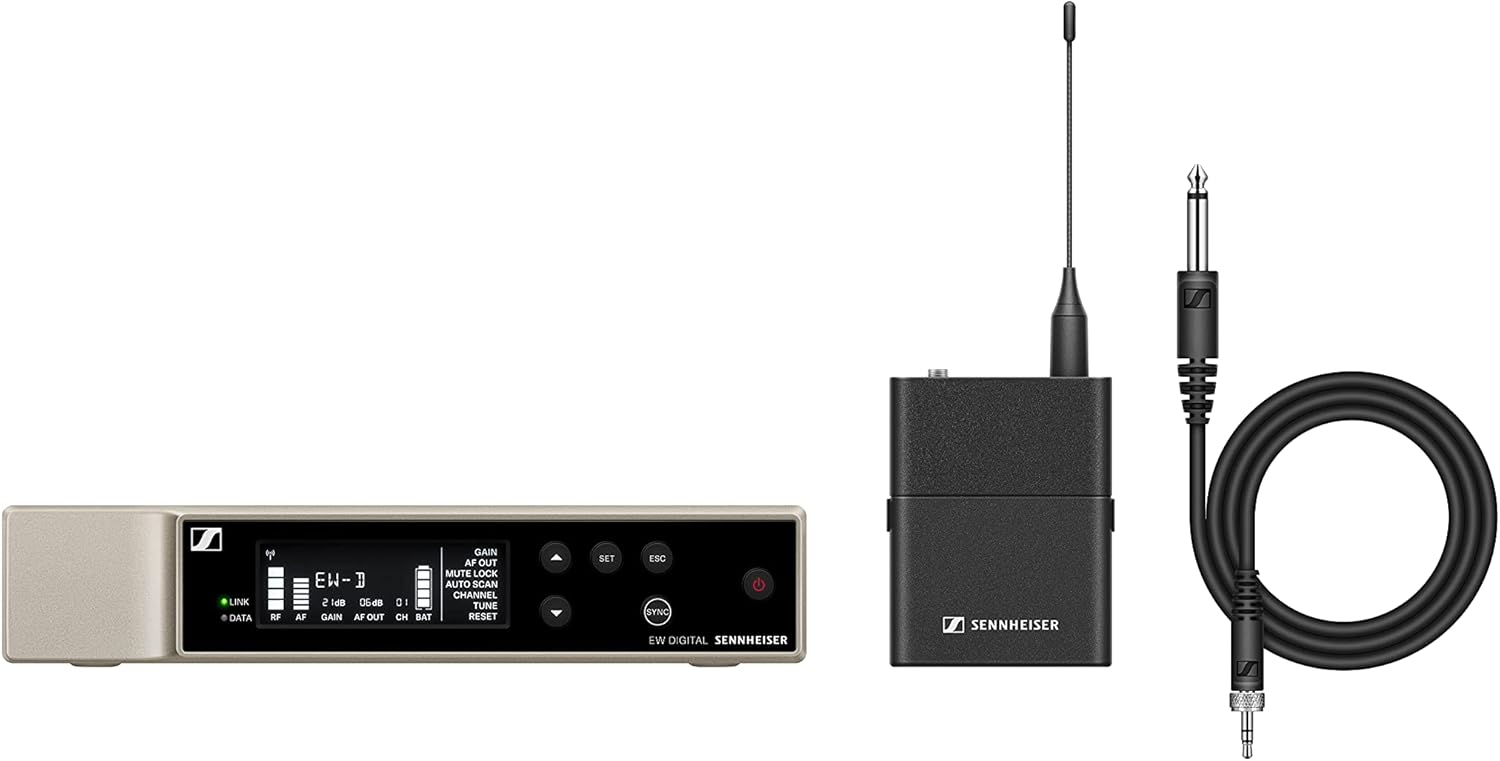
An image showing the main components of the Sennheiser EW-D CI1 Wireless Guitar System, including the receiver, transmitter, and accessories.
4. Impostazione
4.1 Collegamento del ricevitore
- Place the EW-D CI1 Wireless Receiver on a stable surface, ensuring good line-of-sight to the transmitter.
- Connect the supplied power adapter to the receiver's power input and then to a power outlet.
- Connect the receiver's audio output to your amplifier, mixer, or audio interface using an appropriate audio cable (not included).
4.2 Collegamento del trasmettitore
- Ensure the EW-D CI1 Wireless Transmitter is charged. Use the USB cable to charge if necessary.
- Plug the transmitter directly into your guitar's output jack. Ensure it is securely connected.
4.3 Abbinamento del sistema
The EW-D CI1 system typically pairs automatically upon power-up. If pairing does not occur:
- Power on both the receiver and the transmitter.
- Refer to the receiver's display or indicator lights for pairing status.
- If a manual pairing option is available (consult the quick guide for specific button presses), initiate pairing on both devices within a short timeframe.
5. Operativo
5.1 Accensione/Spegnimento
- To power on: Press and hold the power button on both the receiver and transmitter until the indicators light up.
- To power off: Press and hold the power button on both devices until the indicators turn off.
5.2 Utilizzo di base
- Ensure both the transmitter and receiver are powered on and successfully paired.
- Regola il volume del tuo amplifier or mixer as needed.
- Monitor the signal strength and battery indicators on the receiver and transmitter to ensure optimal performance.
Selezione canale 5.3 (90 canali)
The system offers 90 channels for operation. In environments with potential interference, you may need to select a different operating channel:
- Access the channel selection menu on the receiver (refer to the quick guide for navigation).
- Scan for available frequencies or manually select a channel.
- Ensure the transmitter automatically syncs to the new channel, or manually set it if required.
6. Manutenzione
- Pulizia: Use a soft, dry cloth to clean the surfaces of the receiver and transmitter. Do not use liquid cleaners or solvents.
- Cura della batteria: For battery-powered components, ensure regular charging. If storing for extended periods, charge the battery to approximately 50% to prolong its lifespan.
- Magazzinaggio: Quando non viene utilizzato, conservare il sistema nella sua custodia in un luogo fresco e asciutto.
7. Risoluzione Dei Problemi
| Problema | Possibile causa | Soluzione |
|---|---|---|
| Nessun suono dal sistema. | Transmitter or receiver not powered on; not paired; volume too low; incorrect cable connection. | Ensure both devices are on and paired. Check all cable connections. Increase volume on amplificatore/miscelatore. |
| Interference or dropouts. | Other wireless devices nearby; too far from receiver; obstacles blocking signal. | Change operating channel. Reduce distance between transmitter and receiver. Ensure clear line-of-sight. |
| Transmitter not charging. | Faulty USB cable or power source; dirty charging port. | Try a different USB cable or power adapter. Clean the charging port carefully. |
If you encounter issues not listed here, or if the problem persists, please contact Sennheiser customer support.
8. Specifiche
- Marca: Sennheiser
- Modello: EW-D CI1
- Tecnologia di connettività: Senza fili
- Tipo di connettore: USB (for charging/data)
- Dispositivi compatibili: Chitarra
- Peso dell'articolo: 6 Pounds (approximate total package weight)
- Materiale della custodia: Metallo
- Numero di canali: 90
- Fonte di energia: Battery Powered (transmitter), Power adapter (receiver)
- Dimensioni articolo (L x P x A): 15.94 x 13.78 x 2.87 pollici (dimensioni della confezione)
- Numero di parte del produttore: 508730-cr
- Codice UPC: 657768463013
9. Garanzia
This Sennheiser EW-D CI1 Wireless Guitar System (Q1-Q6) comes with a Garanzia limitata di 90 giorniSi prega di conservare la prova d'acquisto per eventuali reclami in garanzia. La garanzia copre difetti di materiali e fabbricazione in condizioni di normale utilizzo. Non copre danni causati da uso improprio, incidenti, modifiche non autorizzate o normale usura.
10. Supporto
For technical assistance, troubleshooting, or warranty inquiries, please visit the official Sennheiser website or contact their customer support directly. You may need to provide your product model number (EW-D CI1) and serial number (if applicable) when seeking support.


