
1. Introduzione
Thank you for choosing the CAMKORY DC403 Digital Camera. This compact and easy-to-use camera is designed for capturing high-quality photos and videos, making it suitable for beginners and children. This manual provides essential information on setting up, operating, and maintaining your camera to ensure optimal performance and longevity.

Image 1.1: The CAMKORY DC403 camera is designed to be pocket-sized and easy to use, making it ideal for children and beginners. It has passed drop tests for durability.
2. Prodotto finitoview
2.1 Caratteristiche principali
- Alta risoluzione: 44 Megapixel photos and 1080p Full HD video recording.
- Zoom digitale: Zoom digitale 16x per catturare soggetti distanti.
- Stabilizzazione dell'immagine: Optical image stabilization to reduce blur.
- Display: 2.5-inch LCD screen for clear viewing.
- Modalità versatili: Includes self-timer, fill light, fun filters, smile capture, burst shooting, and webfunzionalità della camma.
- Portabilità: Compact and lightweight design (9.5 x 5.5 x 2 cm, 120g) for easy carrying.
- Energia: Comes with two 3.7V 700mAh rechargeable lithium-polymer batteries.
- Connettività: USB Type-C for charging and data transfer to PC.
2.2 Componenti della fotocamera
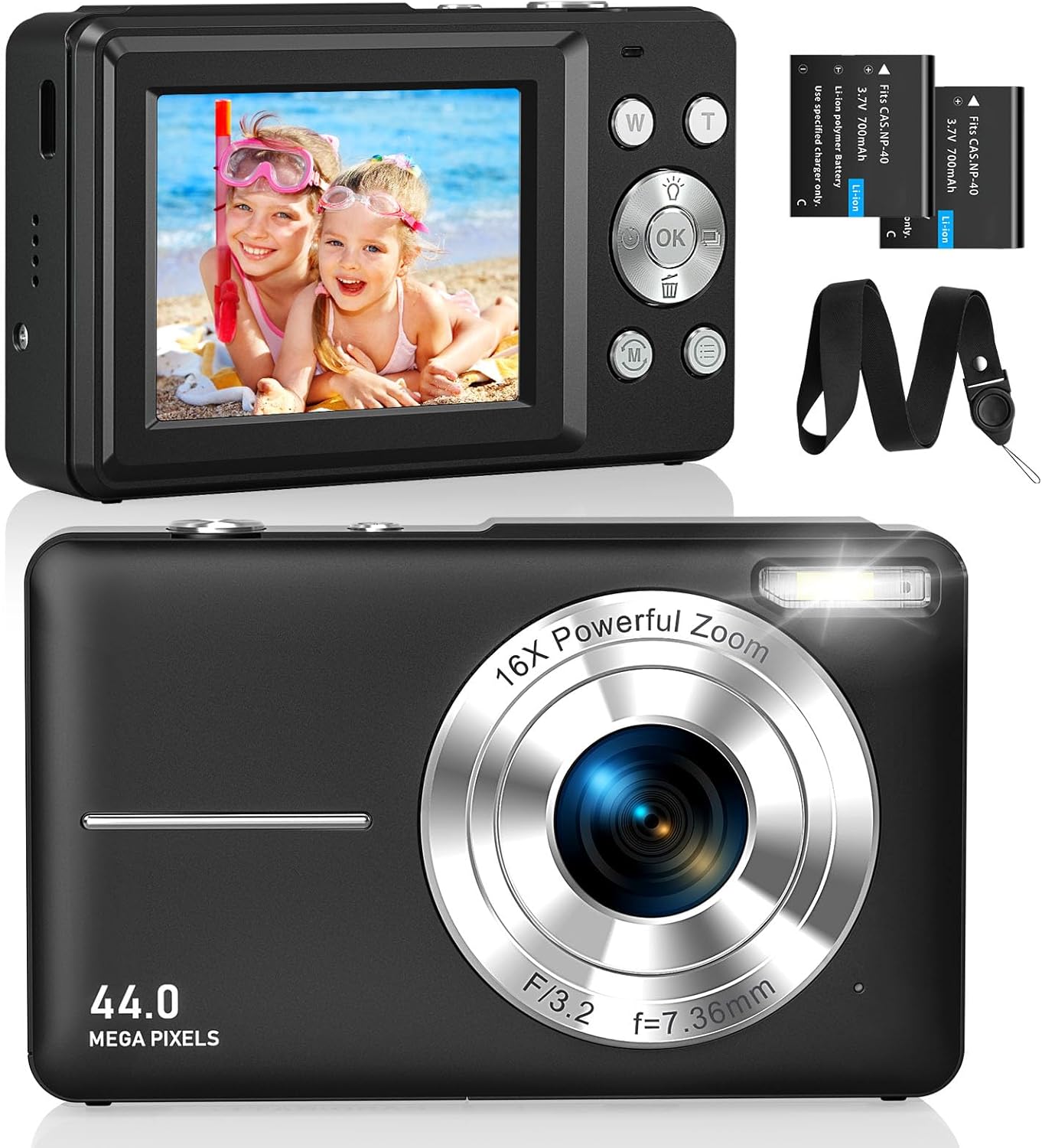
Immagine 2.1: Anteriore e posteriore views of the CAMKORY DC403 Digital Camera, illustrating the lens, flash, LCD display, and various control buttons. Two rechargeable batteries are also shown.
The camera features an intuitive layout with ergonomically placed buttons suitable for small hands. Key controls include the power button, shutter button, zoom (W/T) buttons, mode button, and an OK button for menu navigation.

Immagine 2.2: Dettagliata view of the camera's side controls, including the ON/OFF button, Shutter, W/T (Zoom), Fill Light, and Mode button.
3. Impostazione
3.1 Installazione e ricarica della batteria
- Aprire il coperchio del vano batteria nella parte inferiore della fotocamera.
- Insert the two provided 3.7V 700mAh rechargeable lithium-polymer batteries, ensuring correct polarity.
- Chiudere saldamente il coperchio del vano batterie.
- Connect the camera to a power source using the supplied USB Type-C cable for charging. The charging indicator will show the charging status.
3.2 Installazione della scheda di memoria
The camera supports Micro SD memory cards from 4GB to 32GB. A memory card is required to save photos and videos.
- Individuare lo slot per la scheda Micro SD, solitamente vicino al vano batteria.
- Insert the Micro SD card with the metal contacts facing the front of the camera until it clicks into place.
- Before first use, it is recommended to format the memory card directly within the camera's settings menu. This ensures compatibility and optimal performance.
3.3 Accensione iniziale
Press and hold the power button (usually located on the top or side of the camera) to turn on the device. The LCD screen will illuminate, and the camera will be ready for use.
4. Istruzioni per l'uso
4.1 Scattare foto
- Accendi la telecamera.
- Inquadra il tuo scatto utilizzando lo schermo LCD da 2.5 pollici.
- Use the W/T buttons to adjust the 16x digital zoom.
- Press the shutter button halfway down to focus, then press it fully to capture the 44MP image.

Image 4.1: The camera captures 44MP images, allowing for detailed and clear photographs.
4.2 Registrazione di video
- Passare alla modalità video utilizzando il pulsante Modalità.
- Press the shutter button to start recording 1080p FHD video.
- Press the shutter button again to pause or stop recording.

Image 4.2: The camera supports 1080p Full HD video recording, allowing users to capture moments with clarity.
4.3 Funzioni speciali
- Zoom digitale: Use the W/T buttons to zoom in and out. The camera features 16x digital zoom.
- Stabilizzazione dell'immagine: The optical image stabilization feature helps reduce blur from camera shake.
- Luce di riempimento: Activate the fill light for better illumination in low-light conditions.
- Autoscatto: Set a delay (e.g., 2s, 5s, 10s) before taking a photo, useful for group shots or selfies.
- Scatto continuo: Cattura una rapida sequenza di foto tenendo premuto il pulsante di scatto.
- Filtri: Experiment with 20 different built-in filters to add creative effects to your photos.
- Rilevamento del sorriso: The camera can automatically detect and capture a photo when a smile is detected.
- WebModalità videocamera: Collegare la fotocamera a un computer tramite USB per utilizzarla come webcam per streaming live o videochiamate.

Image 4.3: Demonstrations of 16x digital zoom and image stabilization. The zoom feature allows for closer shots, while stabilization helps maintain clarity during movement.

Immagine 4.4: Es.amples of self-timer, continuous shooting, and fill light functions. These features enhance photographic flexibility and quality in various scenarios.

Image 4.5: The camera can be used as a webcam when connected to a computer, suitable for streaming or video calls.
5. Manutenzione
5.1 Pulizia della fotocamera
- Per pulire il corpo della fotocamera, utilizzare un panno morbido e privo di lanugine.
- Per la lente e lo schermo LCD, utilizzare un panno e una soluzione specifici per la pulizia delle lenti. Evitare prodotti chimici aggressivi.
- Prima di procedere alla pulizia, assicurarsi che la fotocamera sia spenta.
5.2 Conservazione
- Conservare la fotocamera in un luogo fresco e asciutto, lontano dalla luce solare diretta e da temperature estreme.
- Se si conserva il prodotto per un periodo prolungato, rimuovere le batterie per evitare perdite.
- Use the provided long strap and pouch to protect the camera from drops and scratches during transport.
6. Risoluzione Dei Problemi
If you encounter issues with your CAMKORY DC403 camera, please refer to the following common solutions:
| Problema | Possibile soluzione |
|---|---|
| La fotocamera non si accende | Ensure batteries are correctly inserted and fully charged. Try using the second battery if available. |
| Non è possibile scattare foto/video | Check if a Micro SD card is inserted and has sufficient free space. Ensure the card is formatted in the camera. |
| Le immagini sono sfocate | Ensure the lens is clean. Hold the camera steady or use the image stabilization feature. Check lighting conditions. |
| Camera not recognized by PC | Ensure the USB Type-C cable is securely connected to both the camera and the PC. Try a different USB port or cable. |
| La batteria si scarica rapidamente | Reduce screen brightness. Turn off features like flash or continuous shooting when not needed. Ensure batteries are fully charged before use. |
7. Specifiche
| Caratteristica | Dettaglio |
|---|---|
| Marca | CAMKORY |
| Nome del modello | DC403 |
| Colore | Nero |
| Tipo di prodotto | Fotocamera digitale compatta |
| Risoluzione fissa efficace | 44 Megapixel |
| Risoluzione video | 1080p Full HD |
| Digital Zoom | 16x |
| Zoom ottico | 16x (Note: This appears to be a mislabeling in the source data, likely referring to digital zoom) |
| Stabilizzazione dell'immagine | Ottico |
| Dimensioni dello schermo | LCD da 2.5 pollici |
| Tecnologia di connettività | USB (tipo C) |
| Scheda di memoria supportata | Micro SD (4-32GB) |
| Tipo di batteria | Lithium-polymer (2 x 3.7V 700mAh included) |
| Dimensioni (L x P x A) | Dimensioni: 9.5 x 2 x 5.5 cm |
| Peso dell'articolo | 120 grammi |
| Velocità in modalità Burst | 30 fotogrammi al secondo |
| Gamma ISO | Da ISO 100 a ISO 1600 |
| Apertura | F3.5-F5.6 |
| Tipo di messa a fuoco | Messa a fuoco automatica |
| Livello di resistenza all'acqua | Non impermeabile |
8. Garanzia e supporto
For any questions, technical support, or warranty inquiries regarding your CAMKORY DC403 Digital Camera, please contact CAMKORY customer service through the retailer's platform or the official CAMKORY websito. Conservare la prova d'acquisto per eventuali reclami in garanzia.