
1. Introduzione
This manual provides comprehensive instructions for the setup, operation, and maintenance of your Roadtime L0155 Garage Door Remote Control. This remote is designed for compatibility with specific Hormann 868 MHz BiSecur series operators.
Caratteristiche principali:
- Compatibilità: Exclusively compatible with Hormann 868MHz BiSecur Series operators, including HSE1-868-BS, HSE2-868-BS, HSE4-868-BS, HS1-868-BS, HS4-868-BS, HS5-868-BS, HSS4-868-BS, HSP4-868-BS, and HSD2-868-BS.
- Costruzione durevole: Made from high-quality plastic with a metal frame for enhanced durability.
- Quattro canali: Features 4 buttons, allowing control of up to 4 garage doors or gates.
- Tecnologia Rolling Code: Utilizes rolling code technology for secure access.
- Design compatto: Small and lightweight, suitable for keychains, bags, or pockets.

Image 1: The Roadtime L0155 Garage Door Remote Control, featuring four control buttons and a compact design.
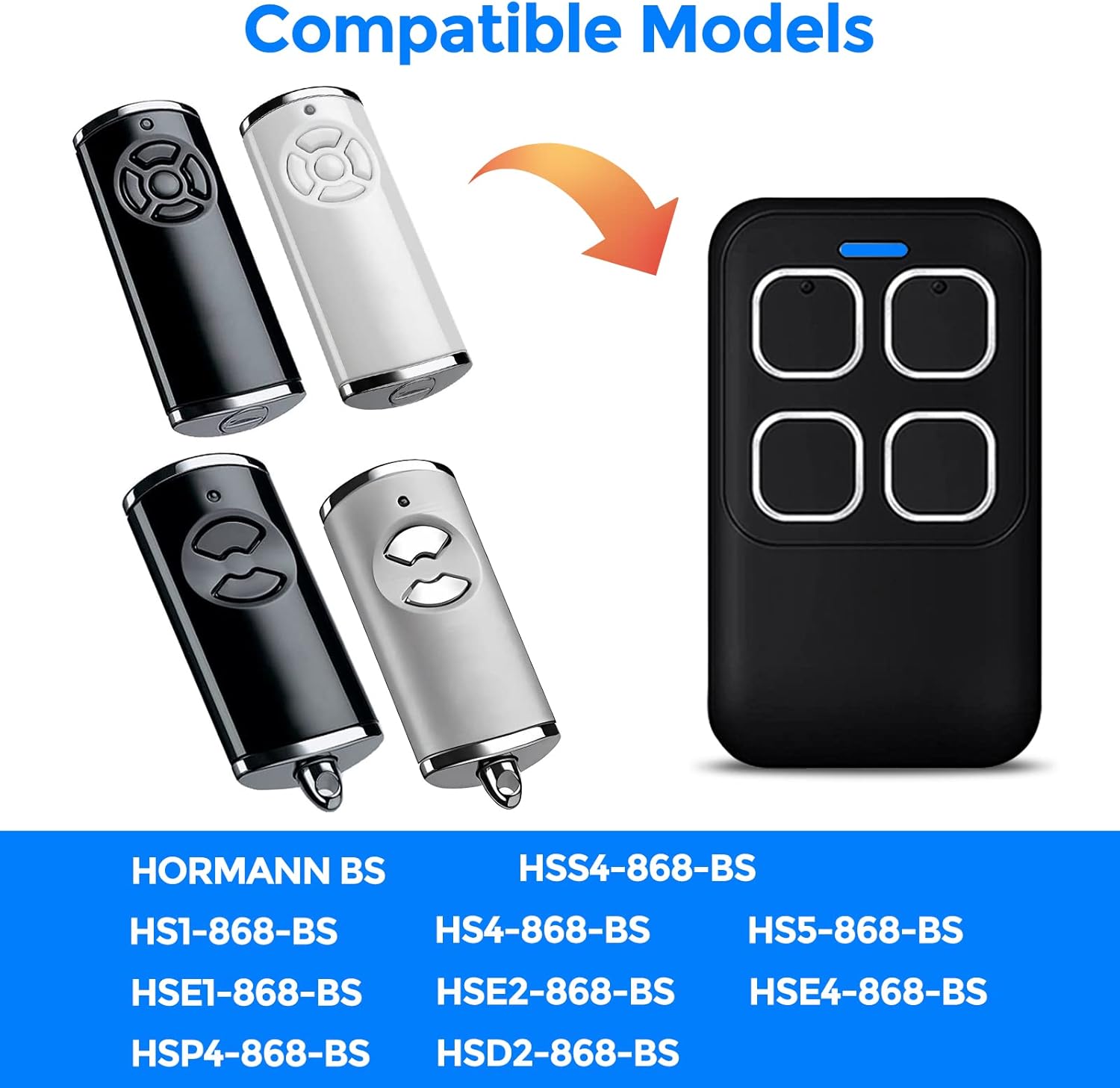
Image 2: Visual representation of compatible Hormann BiSecur remote control models, indicating the L0155's compatibility.
2. Configurazione e programmazione
Follow these steps to program your Roadtime L0155 remote control to your existing Hormann 868 BS series remote.
- Step 1: Prepare the New Remote
Continuously press one of the buttons on the new remote control. While holding it, use your other hand to press another button on the new remote three times. If the LED indicator on the new remote turns red, it signifies that the remote is ready to copy the code from your original remote. - Step 2: Position Remotes
Place your original Hormann remote control and the new Roadtime remote control as close to each other as possible, ideally side-by-side. - Step 3: Initiate Code Copying
Press and hold the desired button on your original Hormann remote. Continue holding until the LED indicators on both the original and new remotes begin to flash. Then, check if the LED on the new remote flashes blue. If the new remote's LED does not flash blue, try repositioning the remotes closer together and repeat this step. - Step 4: Complete Learning Procedure
The learning procedure is complete when the new remote's LED flashes blue rapidly. At this point, release all buttons. - Step 5: Program Additional Buttons
Repeat the same procedure (Steps 1-4) for any remaining buttons you wish to program on the new remote control.

Image 3: Visual guide illustrating the five steps for programming the Roadtime L0155 remote control.
3. Istruzioni per l'uso
Once programmed, operating your Roadtime L0155 remote control is straightforward:
- Funzionalità dei pulsanti: Each of the four buttons can be assigned to control a different garage door or gate opener.
- Attivazione: Press the corresponding programmed button to activate your garage door or gate. The blue LED indicator on the remote will illuminate during transmission.
- Allineare: Ensure you are within a reasonable operating range of your garage door opener for reliable signal transmission.

Image 4: A hand holding the Roadtime L0155 remote control, demonstrating its use to open a garage door.
4. Manutenzione
To ensure the longevity and optimal performance of your remote control, consider the following maintenance tips:
- Batteria: The remote control includes a battery. If the remote's range decreases significantly or the LED indicator fails to light up, it may be time to replace the battery. Refer to the specifications for battery type.
- Pulizia: Pulisci il telecomando con un panno morbido e asciutto. Evita di utilizzare prodotti chimici aggressivi o detergenti abrasivi.
- Magazzinaggio: Conservare il telecomando in un luogo asciutto, lontano da temperature estreme, luce solare diretta e umidità.
- Protezione fisica: While durable, avoid dropping the remote or subjecting it to strong impacts.
5. Risoluzione Dei Problemi
If you encounter issues with your Roadtime L0155 remote control, try the following troubleshooting steps:
- Remote Not Programming:
- Ensure your original remote is a compatible Hormann 868MHz BiSecur series model.
- Verify that the new remote's LED turns red in Step 1 of programming, indicating it's ready to copy.
- Make sure the original and new remotes are placed very close to each other during the copying process.
- Confirm that the original remote's battery is not depleted, as this can affect signal strength during copying.
- Repeat the programming steps carefully, ensuring each step is performed correctly and within the specified timing.
- Remote Not Operating Garage Door:
- Check if the remote's LED indicator lights up blue when a button is pressed. If not, the battery may be low or depleted.
- Ensure the remote was successfully programmed to your garage door opener. If unsure, repeat the programming steps.
- Verify that you are within the operating range of your garage door opener.
- Check for any obstructions between the remote and the garage door opener's receiver.
- Funzionamento intermittente:
- Sostituire la batteria del telecomando.
- Assicurarsi che non vi siano fonti di interferenze radio nelle vicinanze.
6. Specifiche
| Caratteristica | Dettaglio |
|---|---|
| Numero di modello | L0155 |
| Marca | Roadtime |
| Compatibilità | Hormann 868MHz BiSecur Series (HSE1, HSE2, HSE4, HS1, HS4, HS5, HSS4, HSP4, HSD2) |
| Dimensioni (L x P x A) | 6.47 cm x 3.8 cm x 1.54 cm (2.55 pollici x 1.5 pollici x 0.61 pollici) |
| Peso | 30 grammi |
| Numero di pulsanti | 4 |
| Batteria inclusa | SÌ |

Image 5: Detailed dimensions of the Roadtime L0155 remote control.

Image 6: Diagram highlighting the blue LED light indicator and 4-channel transmitter of the remote control.
7. Garanzia e supporto
For any questions regarding your Roadtime L0155 remote control, including operational assistance or troubleshooting, please contact the manufacturer or your point of purchase. We aim to respond to all inquiries within 24 hours.
Specific warranty details may vary by region and retailer. Please refer to your purchase documentation for warranty information.