
1. Introduzione
This manual provides detailed instructions for the installation, operation, and maintenance of the SOGTICPS 80A MPPT Solar Charge Controller, model SY8048. This intelligent regulator is designed for 12V, 24V, 36V, and 48V battery systems, featuring an LCD display, dual USB 5V charging ports, and a maximum PV input of 100V. It is compatible with various battery types including Sealed, GEL, Flooded, and LiFePO4.
The controller utilizes advanced Maximum Power Point Tracking (MPPT) technology to optimize energy harvesting from solar panels, ensuring efficient charging of your battery bank. It also incorporates multiple protection features to safeguard your system.
2. Informazioni sulla sicurezza
- Ensure all connections are correct and secure before operation. Incorrect wiring can cause damage to the controller, battery, or solar panels.
- Collegare sempre la batteria al controller Primo, then the solar panel, and finally the DC load.
- When disconnecting, follow the reverse order: Primo disconnect the DC load, then the solar panel, and finally the battery.
- Installare il controller in un'area ben ventilata, lontano da materiali infiammabili e umidità.
- Non tentare di smontare o riparare il controller da soli. Contattare personale qualificato per l'assistenza.
- Assicurarsi che la batteria voltage corrisponde al volume di sistematage setting of the controller.
- Quando si lavora con batterie e sistemi elettrici, indossare dispositivi di protezione individuale adeguati, tra cui protezioni per gli occhi.
3. Prodotto finitoview
The SOGTICPS SY8048 solar charge controller is designed for robust performance and user-friendly operation. Key features include:
- Tecnologia MPPT avanzata: High tracking efficiency (not less than 99.5%) for maximum power point tracking of the PV array.
- Volume automaticotage Riconoscimento: Supporta sistemi di batterie da 12 V, 24 V, 36 V e 48 V.
- Display LCD multifunzionale: Backlit display shows real-time operating data and status.
- Doppia porta USB: 5V charging ports for external devices.
- Molteplici modalità operative: Includes charging mode, light control mode, light control + time delay, universal control, manual control, and timing control.
- Protezione completa: Over-volumetage protezione da sovracorrente, interruzione di corrente, sovraccarico, scarica profonda, collegamento inverso e surriscaldamento.
- Compatibilità della batteria: Supports Sealed, GEL, Flooded, and LiFePO4 batteries.

Figura 1: Fronte view of the SY8048 Solar Charge Controller.

Figura 2: dettagliata view of the controller's features including USB ports and heat sink.
4. Impostazione
4.1 Montaggio
Mount the controller vertically on a flat, non-flammable surface in a dry, well-ventilated indoor location. Ensure adequate clearance around the controller for heat dissipation. The dimensions of the controller are approximately 7.67 x 7.24 x 2.59 inches.
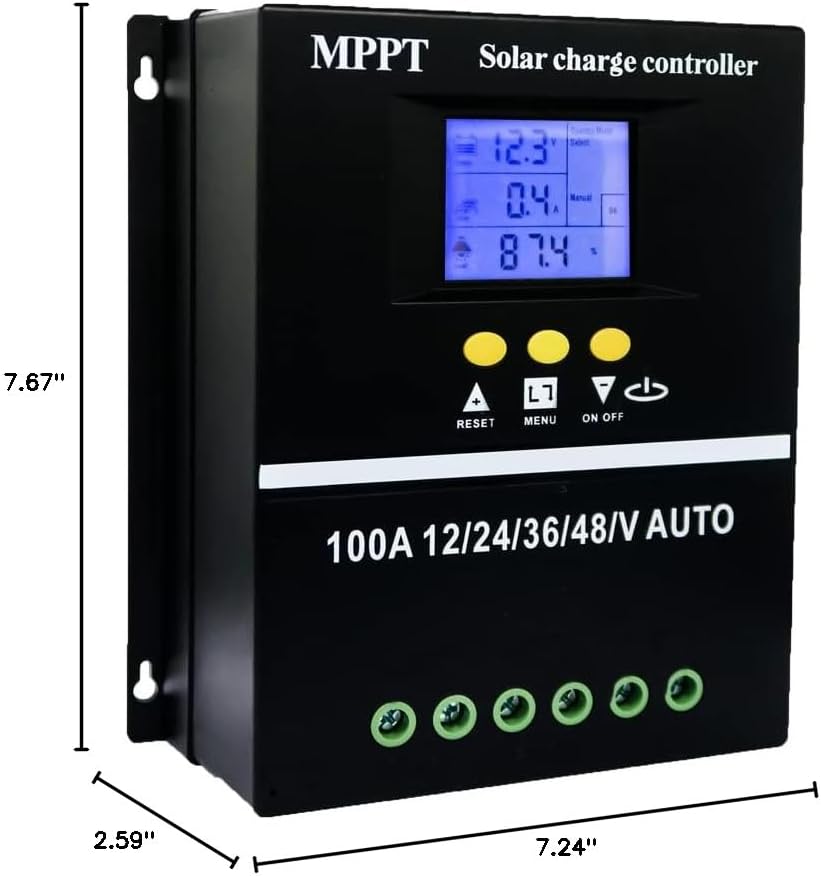
Figure 3: Controller dimensions for mounting.
4.2 Sequenza di cablaggio
Follow the correct wiring sequence to prevent damage to the controller and other components. Use appropriate gauge wiring for your system's current and distance requirements.
- Collegare la batteria: Collegare la batteria ai terminali della batteria del controller (positivo con positivo, negativo con negativo). Il controller rileverà automaticamente la tensione della batteria.tage.
- Collegare il pannello solare: Connect the solar panel array to the controller's PV terminals (positive to positive, negative to negative).
- Collegare il carico CC: Collegare il carico CC ai terminali di carico del controller (positivo con positivo, negativo con negativo).
Sequenza di disconnessione: To disconnect the system, reverse the order: first disconnect the DC load, then the solar panel, and finally the battery.

Figure 4: Wiring diagram for the solar charge controller.
5. Istruzioni per l'uso
Interfaccia display LCD 5.1
The LCD provides dynamic display of operational data and working status. It includes:
- Battery work status display area (voltage, corrente).
- Operating status of the solar panel (charging current).
- Load output status and display areas for all parameters (discharging current, working temperature, delay time).
- Mode control display area.
- Normal and fault status display area.

Figure 5: LCD Display Interface details.
Modalità operative 5.2
The controller offers seven operating modes, selectable via the menu:
- Modalità di ricarica: Ricarica standard della batteria.
- Modalità di controllo della luce: Il carico si accende al tramonto e si spegne all'alba.
- Modalità di controllo della luce + controllo del ritardo temporale: Il carico si attiva al tramonto e rimane attivo per un periodo di tempo stabilito.
- Modalità di controllo universale: Load is always on (24H).
- Modalità di controllo manuale: Il carico può essere acceso/spento manualmente.
- Modalità di controllo del tempo: Il carico funziona secondo una programmazione prestabilita.

Figure 6: Load Working Modes.
5.3 Ricarica della batteria Stages
Il controller utilizza un quattro-stage charging algorithm to ensure efficient and safe battery charging:
- Carica alla rinfusa: Carica la batteria alla massima corrente fino a voltage raggiunge il livello di assorbimento.
- Carica potenziata: Maintains absorption voltage for a set period to fully charge the battery.
- Carica galleggiante: Riduce il volumetage to a lower level to maintain a full battery charge.
- Carica di equalizzazione: Sovraccarica periodicamente le batterie allagate per bilanciare il volume delle celletages (if applicable and configured).

Figure 7: Four Battery Charging Stages.
5.4 Selezione del tipo di batteria
The controller is compatible with Sealed, GEL, Flooded, and LiFePO4 batteries. Ensure the correct battery type is selected in the controller settings for optimal charging and protection. Refer to the controller's menu for specific battery type configuration.

Figura 8: Tipi di batterie compatibili.
6. Manutenzione
- Controllare regolarmente tutti i collegamenti elettrici per verificarne la tenuta e la corrosione.
- Mantenere il controller pulito e privo di polvere e detriti. Utilizzare un panno asciutto per la pulizia.
- Assicurarsi che le aperture di ventilazione non siano ostruite per consentire una corretta dissipazione del calore.
- Controllare periodicamente i terminali della batteria per verificare la presenza di corrosione e pulirli se necessario.
- Controllare il display LCD per individuare eventuali codici di errore o letture insolite.
7. Risoluzione Dei Problemi
If you encounter issues with your SOGTICPS SY8048 controller, refer to the following common troubleshooting steps:
| Problema | Possibile causa | Soluzione |
|---|---|---|
| Il controller non si accende | Batteria non collegata o bassa tensionetage; polarità inversa. | Controllare i collegamenti della batteria e il voltage. Assicurarsi che la polarità sia corretta. Caricare la batteria se il livello è basso.tage è troppo basso. |
| Batteria non in carica | Solar panel not connected; insufficient sunlight; faulty panel; incorrect battery type setting. | Verify solar panel connections. Check for adequate sunlight. Test solar panel output. Confirm correct battery type is selected in settings. |
| Il carico non funziona | Load not connected; battery low voltage protection; load overcurrent protection; incorrect load mode. | Controllare i collegamenti del carico. Assicurarsi che la batteria sia carica.tage è sopra il basso volumetage disconnect. Reduce load if overcurrent. Verify selected load operating mode. |
| LCD display error | Internal fault; temporary glitch. | Restart the controller by disconnecting all power sources (load, solar, battery) and reconnecting in the correct sequence. If error persists, contact support. |
Per problemi non trattati qui, fare riferimento alla sezione Garanzia e supporto.
8. Specifiche
| Parametro | Valore |
|---|---|
| Modello | SY8048 |
| Corrente di carica nominale | 80A |
| Volume di sistematage | Riconoscimento automatico 12V/24V/36V/48V |
| Max ingresso PV Voltage | 100V |
| Uscita USB | Doppio 5V |
| Temperatura di esercizio | Fino a 60°C |
| Dimensioni del prodotto | 7.67 x 7.24 x 2.59 pollici |
| Peso dell'articolo | 1.87 libbre |
| Tipo di visualizzazione | LCD |
| Materiale | Plastica |
9. Garanzia e supporto
The SOGTICPS 80A MPPT Solar Charge Controller SY8048 comes with a Garanzia di 1 anno from the date of purchase. SOGTICPS also provides supporto tecnico a vita per questo prodotto.
If you require technical assistance, have questions about installation, operation, or encounter any issues with your controller, please do not hesitate to contact our support team. Our engineers are available to provide advice and solutions to any problems you may experience.
For support, please visit the SOGTICPS store on Amazon or refer to the contact information provided with your product packaging.