
AMZSA GT88
Manuale utente dello smartwatch AMZSA GT88
Modello: GT88
1. Introduzione
Thank you for choosing the AMZSA GT88 Smartwatch. This device is designed to enhance your daily life with its comprehensive features, including Bluetooth calling, advanced health monitoring, and a wide array of sports modes. This manual provides detailed instructions to help you set up, operate, and maintain your smartwatch effectively.

Figure 1: The AMZSA GT88 Smartwatch, featuring a vibrant orange band and a clear yellow watch face that displays essential information such as time, date, weather, steps, and calories burned.
2. Guida all'installazione
2.1 Installazione dell'app
To unlock the full potential of your AMZSA GT88 Smartwatch, you need to install the companion application, "DAfit," on your smartphone. The app is compatible with both Android and iOS devices.
- Scarica l'App: Cercare "DAfit" in your smartphone's app store (Google Play Store for Android or Apple App Store for iOS).
- Installare: Seguire le istruzioni sullo schermo per installare l'applicazione.
- Permessi: Grant necessary permissions (e.g., Bluetooth, notifications, location) when prompted to ensure proper functionality.
2.2 Associazione del dispositivo
Once the DAfit app is installed, follow these steps to pair your smartwatch with your smartphone:
- Abilita Bluetooth: Assicurati che il Bluetooth sia abilitato sul tuo smartphone.
- Open DAfit App: Launch the DAfit application on your smartphone.
- Aggiungi dispositivo: In the app, navigate to the "Device" or "Add Device" section. The app will scan for available devices.
- Select GT88: Select "GT88" or the corresponding device name from the list of found devices.
- Conferma associazione: Verrà visualizzata una richiesta di associazione sia sullo smartphone che sullo smartwatch. Conferma l'associazione su entrambi i dispositivi.
- Enable BT Audio: For call functionality, ensure "BT audio" and "phone calls" are enabled within the smartwatch settings and the DAfit app.
3. Caratteristiche principali
3.1 Monitoraggio sanitario
The GT88 Smartwatch offers comprehensive health tracking features to help you monitor your well-being.
- Monitoraggio della frequenza cardiaca: Monitoraggio della frequenza cardiaca in tempo reale durante tutto il giorno.
- Misurazione della pressione sanguigna: Monitor your blood pressure readings.
- Monitoraggio dell'ossigeno nel sangue (SpO2): Misura i livelli di saturazione dell'ossigeno nel sangue.
- Monitoraggio del sonno: Accurately records your sleep state and analyzes sleep quality, providing insights into deep sleep, light sleep, and awake times.
- Allenamento alla respirazione: Guided breathing exercises to help with relaxation.

Figure 2: The AMZSA GT88 Smartwatch displaying real-time health metrics including heart rate, blood pressure, and SpO2 levels, providing a quick overview of your vital signs.

Figure 3: A user sleeping while wearing the AMZSA GT88 Smartwatch, with a smartphone screen showing detailed sleep analysis, including sleep duration and quality metrics.
3.2 Caratteristiche di comunicazione
Rimani connesso direttamente dal tuo polso.
- Chiamate Bluetooth: Make and receive calls directly from the smartwatch using its built-in microphone and speaker.
- Notifiche dei messaggi: Receive alerts for incoming messages from various social applications (e.g., WhatsApp, Facebook) and SMS.
- Sincronizzazione dei contatti: Add up to 5 frequently used contacts to your watch for quick dialing.

Figure 4: The AMZSA GT88 Smartwatch displaying its phone call interface, including a dial pad and options for recent calls and contacts, enabling direct calls from the wrist.

Figure 5: The AMZSA GT88 Smartwatch showing an incoming message notification, demonstrating its ability to display alerts from various communication platforms.
3.3 Modalità sportive e monitoraggio delle attività
Tieni traccia del tuo percorso di fitness con oltre 120 modalità sportive.
- Oltre 120 modalità sportive: Supports a wide range of activities including swimming, cycling, tennis, running, walking, and more.
- Monitoraggio delle attività giornaliere: Monitors steps taken, calories burned, distance covered, and active hours.
- Movement Tracking Map: Available via the DAfit app to visualize your activity routes.

Figure 6: A person engaged in cycling, with the AMZSA GT88 Smartwatch on their wrist displaying a summary of their cycling activity, highlighting its multi-sport tracking capabilities.
3.4 Customization & AI Voice Assistant
Personalizza la tua esperienza con lo smartwatch.
- Quadranti personalizzati: Choose from over 150 watch faces or use your own photos as backgrounds.
- Assistente vocale AI: Control your watch and access information using voice commands.

Figure 7: A selection of diverse watch faces surrounding the AMZSA GT88 Smartwatch, illustrating the extensive customization options available to users.
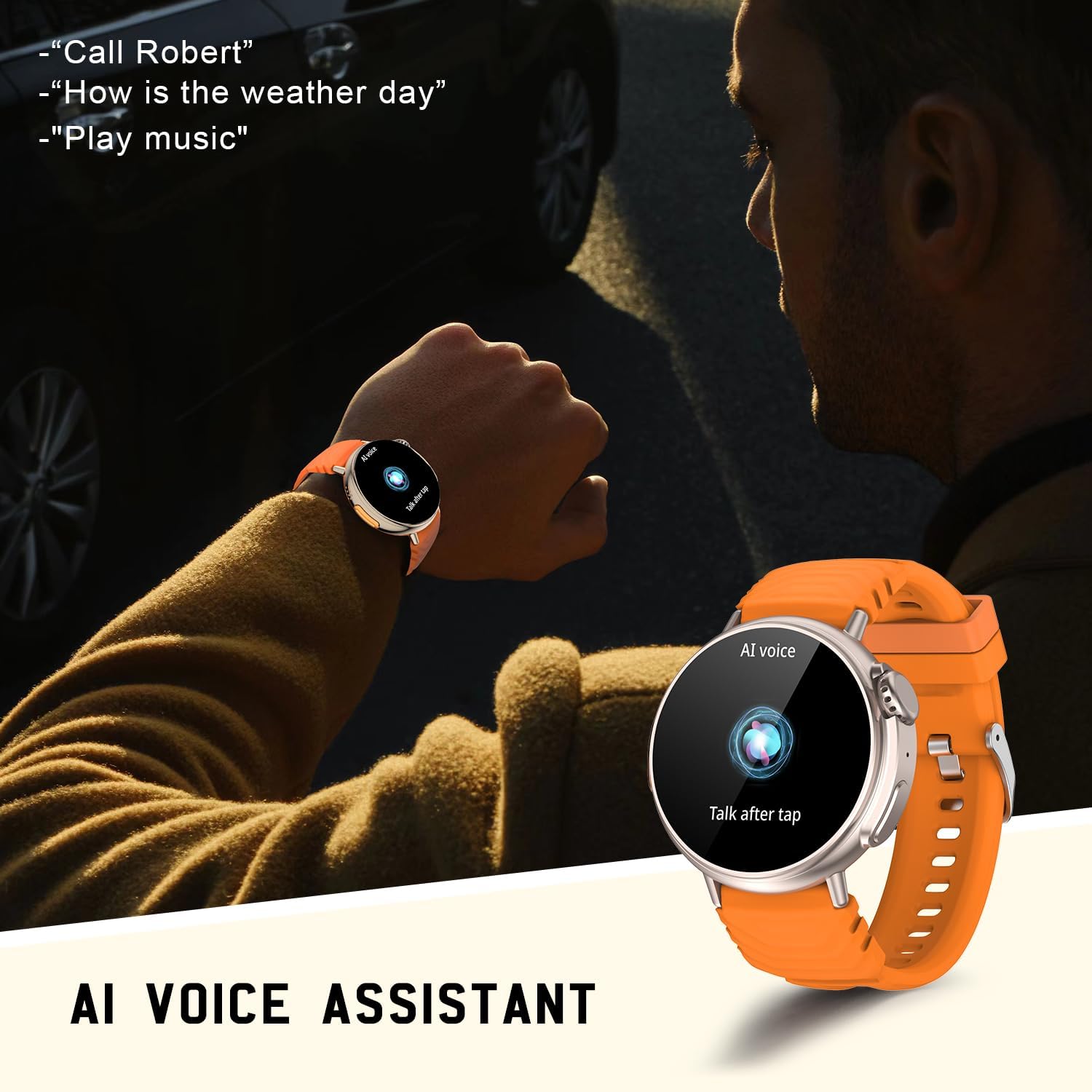
Figure 8: The AMZSA GT88 Smartwatch displaying the AI Voice Assistant interface, ready to receive voice commands for various functions.
4. Istruzioni per l'uso
4.1 Navigazione di base
- Schermo tattile: Swipe left/right to navigate between main screens, swipe up/down for quick settings or notifications. Tap to select.
- Pulsanti laterali: Use the physical buttons for power on/off, screen wake, and quick access to specific functions. The digital crown can be rotated for scrolling and pressed for selection.
4.2 Controllo della musica
Control your smartphone's music playback directly from your smartwatch.
- Riproduci/Pausa: Tap the play/pause icon on the watch's music control interface.
- Salta tracce: Use the next/previous track icons to change songs.
- Volume: Adjust volume directly from the watch.

Figure 9: The AMZSA GT88 Smartwatch displaying its music player controls, allowing users to manage audio playback on their connected smartphone.
4.3 Controllo della telecamera
Utilizza il tuo smartwatch come otturatore remoto per la fotocamera del tuo smartphone.
- Apri fotocamera: Navigate to the camera control function on your smartwatch.
- Otturatore remoto: Tap the camera icon on your watch to remotely trigger your smartphone's camera shutter.
4.4 Previsioni del tempo
Receive real-time weather updates directly on your smartwatch when connected to your phone.

Figure 10: The AMZSA GT88 Smartwatch showing current weather conditions, synchronized with a smartphone displaying a more detailed weather forecast.
5. Manutenzione
5.1 Ricarica
The smartwatch is equipped with a 300mAh lithium-polymer battery, offering long standby time. To charge your device:
- Collegare il cavo di ricarica magnetico ai punti di ricarica sul retro dell'orologio.
- Plug the USB end of the cable into a standard USB power adapter (e.g., phone charger, computer USB port).
- A charging indicator will appear on the watch screen. Ensure the watch is fully charged before first use.
5.2 Pulizia
Per mantenere l'aspetto e la funzionalità del tuo smartwatch:
- Pulisci lo schermo e il corpo dell'orologio con un panno morbido e privo di lanugine.
- Per macchie ostinate, leggermente dampLavare il panno con acqua. Evitare l'uso di prodotti chimici aggressivi o materiali abrasivi.
- Pulire periodicamente i contatti di ricarica per garantire una buona connessione.
5.3 Resistenza all'acqua (IP67)
The AMZSA GT88 Smartwatch is IP67 waterproof, meaning it is resistant to dust and can withstand immersion in water up to 1 meter for up to 30 minutes. While it is suitable for daily use and activities like swimming, it is not recommended for diving or high-pressure water activities.

Figure 11: The AMZSA GT88 Smartwatch shown with water droplets, emphasizing its IP67 waterproof rating, making it suitable for various daily activities.
6. Risoluzione Dei Problemi
| Problema | Possibile causa | Soluzione |
|---|---|---|
| L'orologio non si accende | Batteria scarica; dispositivo bloccato. | Caricare l'orologio per almeno 30 minuti. Tenere premuto il pulsante di accensione per 10-15 secondi per forzare il riavvio. |
| Impossibile associare al telefono | Bluetooth disattivato; app non in esecuzione; orologio non rilevabile. | Ensure phone Bluetooth is on. Restart both phone and watch. Make sure the DAfit app is open and scanning. Forget previous pairings on phone. |
| Notifiche non ricevute | App permissions not granted; notification access disabled. | Check DAfit app notification permissions in phone settings. Ensure notification access is enabled for DAfit. Keep the app running in the background. |
| Dati sanitari imprecisi | Vestibilità non corretta; movimento durante la misurazione. | Ensure the watch is snug but comfortable on your wrist. Remain still during measurements. Note that readings are for reference and not medical grade. |
| Durata breve della batteria | Frequent use of power-intensive features (calls, bright screen). | Reduce screen brightness, shorten screen-on time, limit continuous heart rate monitoring, and disable unnecessary notifications. |
7. Specifiche tecniche
| Caratteristica | Dettaglio |
|---|---|
| Marca | AMZSA |
| Numero di modello | La GT88 |
| Colore | Arancia |
| Dimensioni dello schermo | 1.52 pollici |
| Sistema operativo | Android (compatibile con Android e iOS) |
| Connettività | Bluetooth |
| Capacità della batteria | 300 mAh ai polimeri di litio |
| Resistenza all'acqua | Grado di protezione IP67 |
| Caratteristiche speciali | Heart Rate Tracking, Blood Pressure, Blood Oxygen, Sleep Tracking, Voice Assistant, Customizable Dials, Long Battery Life, Bluetooth Calling |
8. Garanzia e supporto
Specific warranty information for the AMZSA GT88 Smartwatch is not provided in the product details. Please refer to the retailer's return policy or contact the seller directly for warranty details and support inquiries.
For technical assistance or further questions, please consult the DAfit app's help section or visit the official AMZSA support websito (se disponibile).
Ask a question about this manual
Ask about setup, troubleshooting, compatibility, parts, safety, or missing instructions. Manuals+ will review the question and use this page’s manual context to help answer it.