
iKF iKF Solo
Manuale utente delle cuffie wireless over-ear iKF Solo
Model: iKF Solo | Brand: iKF
1. Prodotto finitoview
The iKF Solo Wireless Over Ear Headphones are designed to provide an immersive audio experience with advanced features such as Active Noise Cancelling (ANC), HiFi stereo sound, and an extended battery life. These headphones are suitable for various activities including travel, work, and gaming, offering both wireless Bluetooth and wired connectivity options.

Image: iKF Solo Wireless Over Ear Headphones, showcasing their sleek offwhite design.
2. Cosa c'è nella scatola
Upon unboxing your iKF Solo headphones, you will find the following components:
- Cuffie iKF Solo
- Cavo di ricarica USB
- Microfono esterno staccabile
- Manuale dell'utente (questo documento)
- Borsa portaoggetti

Image: A visual representation of the iKF Solo headphone package contents, including the headphones, charging cable, external microphone, and storage bag.
3. Caratteristiche principali
3.1 Cancellazione attiva del rumore (ANC)
The iKF Solo headphones feature hybrid active noise cancelling technology, effectively reducing background noise by up to 52dB. This is ideal for environments such as flights, commutes, or busy offices. ANC levels can be adjusted via the iKF app.

Image: A graphic demonstrating the principle of active noise cancellation, showing how ambient sound is filtered out.
3.2 Qualità del suono HiFi
Equipped with 40mm silk diaphragm speakers, these headphones deliver powerful bass and clear treble, providing a high-fidelity audio experience. An immersive 3D surround sound movie mode is also available for enhanced entertainment.

Immagine: Un esploso view highlighting the 40mm speaker driver, emphasizing the Hi-Res Audio capability.
3.3 Extended Playback Time
Enjoy up to 130 hours of playtime with ANC off, or 95 hours with ANC on, ensuring prolonged use without frequent recharging. The headphones charge fully in approximately 2 hours.
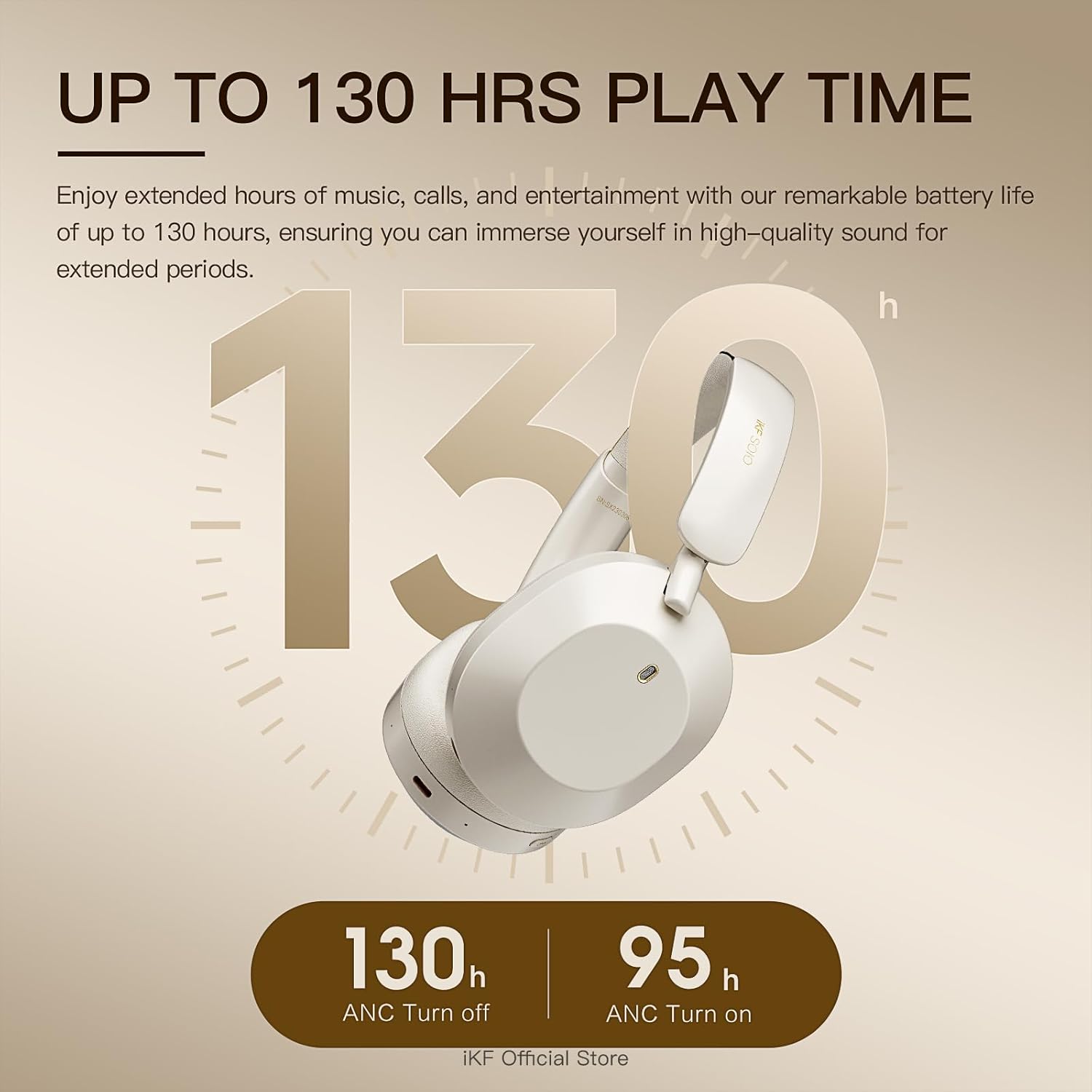
Image: A visual representation of the impressive battery life, indicating 130 hours with ANC off and 95 hours with ANC on.
3.4 Comfortable and Foldable Design
Soft protein leather ear cushions and memory foam padding provide a comfortable, pressure-free fit for extended wear. The lightweight and foldable design enhances portability and storage convenience.

Image: The iKF Solo headphones in their folded configuration, demonstrating their compact design for travel and storage, along with a detail of the soft, skin-friendly earcups.
3.5 Connettività versatile
Supports dual wireless (Bluetooth 5.3) and wired connections (AUX input, USB audio output). The detachable microphone ensures clear communication for calls and gaming.
4. Guida all'installazione
4.1 Ricarica delle cuffie
- Connect the USB charging cable to the Type-C port on the headphones.
- Collegare l'altra estremità del cavo a una fonte di alimentazione USB compatibile (ad esempio, una porta USB del computer, un adattatore da parete).
- L'indicatore LED mostrerà lo stato di carica. Una carica completa richiede circa 2 ore.
4.2 Associazione Bluetooth
- Assicurati che le cuffie siano spente.
- Tenere premuto il pulsante di accensione finché l'indicatore LED non lampeggia, indicando la modalità di associazione.
- Sul tuo dispositivo (smartphone, tablet, computer), attiva il Bluetooth e cerca i dispositivi disponibili.
- Select "iKF Solo" from the list of found devices to connect.
- Una volta effettuato il collegamento, l'indicatore LED diventerà fisso o si spegnerà, a seconda del modello.
5. Istruzioni per l'uso
5.1 Controlli delle cuffie
The iKF Solo headphones feature intuitive button controls for various functions:
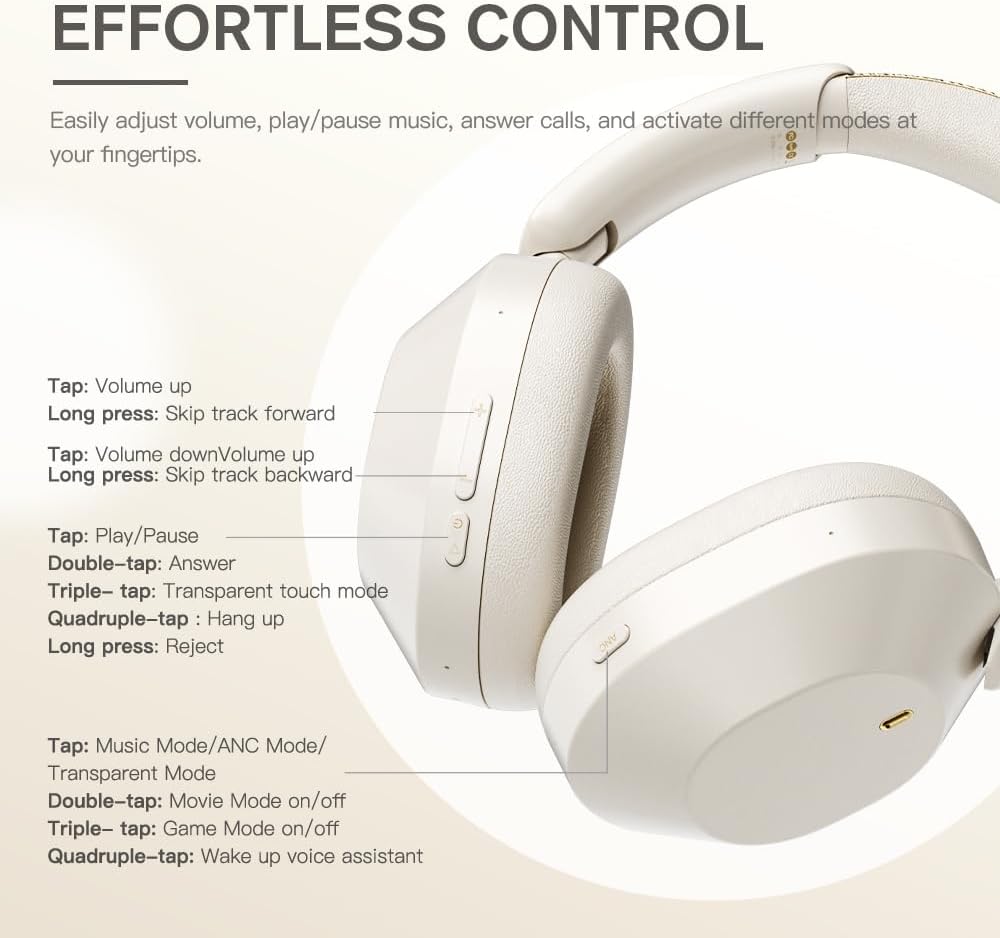
Image: A detailed diagram showing the location and function of each control button on the iKF Solo headphones.
| Azione | Funzione |
|---|---|
| Tocca (+) | Alza il volume |
| Long press (+) | Salta traccia in avanti |
| Rubinetto (-) | Abbassa il volume |
| Long press (-) | Salta la traccia indietro |
| Tap (Play/Pause) | Riproduci/Pausa musica |
| Double-tap (Play/Pause) | Rispondi alla chiamata |
| Triple-tap (Play/Pause) | Transparent Touch Mode |
| Quadruple-tap (Play/Pause) | Riagganciare la chiamata |
| Long press (Play/Pause) | Rifiuta chiamata |
| Tap (Mode Button) | Cycle Music Mode/ANC Mode/Transparent Mode |
| Double-tap (Mode Button) | Movie Mode On/Off |
| Triple-tap (Mode Button) | Modalità gioco attivata/disattivata |
| Quadruple-tap (Mode Button) | Assistente vocale sveglia |
5.2 Transparent Mode
The transparent mode allows you to hear your surroundings without removing your headphones, enhancing situational awareness. This can be activated via a triple-tap on the Play/Pause button or by cycling through modes with the Mode button.
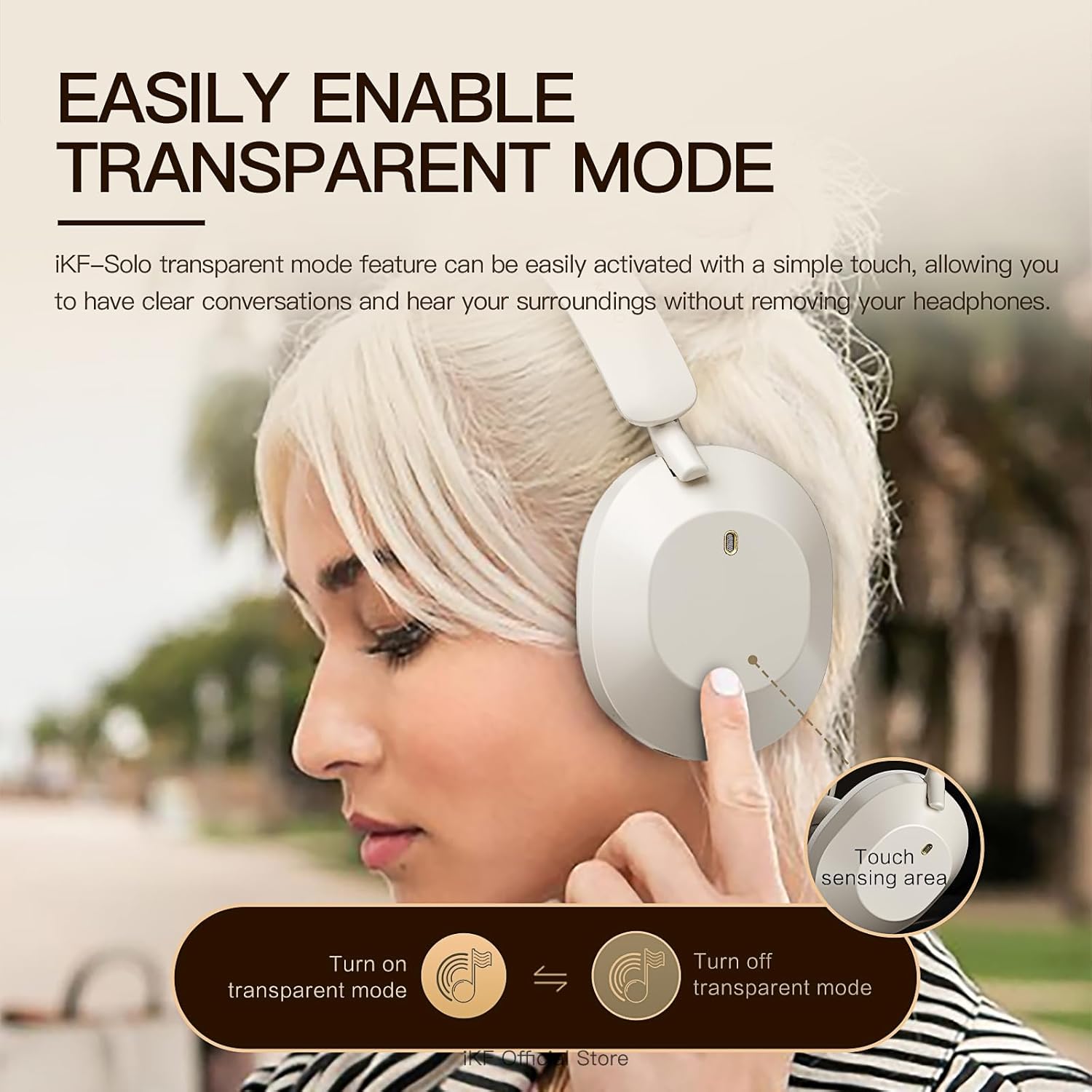
Image: A person demonstrating the activation of transparent mode by touching the ear cup, allowing them to hear their surroundings.
5.3 iKF App Customization
Personalize your listening experience by downloading the iKF app. The app allows you to:
- Adjust ANC strength.
- Switch between various listening modes (e.g., Noise Reduction, Transparent, Movie, Game).
- Control EQ settings for customized audio profiles.
- Enable dual device pairing for seamless switching between devices.
5.4 Video dimostrativo del prodotto
Watch this official video for a visual guide on the iKF Solo headphones' features and operation:
Video: Un video ufficiale del prodotto mostraasing the iKF Solo Hybrid Active Noise Cancelling Headphones, demonstrating features like ANC, transparent mode, Hi-Fi sound, and gaming latency.
6. Manutenzione
To ensure the longevity and optimal performance of your iKF Solo headphones, follow these maintenance guidelines:
- Pulizia: Use a soft, dry cloth to clean the exterior of the headphones. For ear cushions, gently wipe with a slightly damp panno e lasciare asciugare completamente all'aria prima dell'uso. Evitare l'uso di prodotti chimici aggressivi o materiali abrasivi.
- Magazzinaggio: When not in use, store the headphones in the provided storage bag to protect them from dust and scratches. Store in a cool, dry place away from direct sunlight and extreme temperatures.
- Ricarica: Use only the provided USB charging cable or a certified equivalent. Avoid using chargers with power exceeding 24 watts or unverified fast chargers, as this may damage the battery.
- Resistenza all'acqua: These headphones are not water resistant. Avoid exposure to liquids, moisture, or high humidity.
- Gestione: Handle the headphones with care. Avoid dropping them or subjecting them to strong impacts.
7. Risoluzione Dei Problemi
If you encounter issues with your iKF Solo headphones, refer to the table below for common problems and their solutions:
| Problema | Possibile causa | Soluzione |
|---|---|---|
| Le cuffie non si accendono | Batteria scarica | Caricare completamente le cuffie. |
| Impossibile effettuare l'associazione tramite Bluetooth | Cuffie non in modalità di associazione; Bluetooth del dispositivo disattivato; Interferenza | Ensure headphones are in pairing mode (flashing LED). Turn device Bluetooth off/on. Move closer to the device. Forget previous pairings on your device. |
| Nessun suono o volume basso | Volume too low; Incorrect audio source; Unpaired | Increase headphone and device volume. Ensure headphones are correctly paired/connected. Check audio output settings on your device. |
| Sound is choppy or cuts out | Distance from device; Interference; Low battery | Reduce distance between headphones and device. Avoid strong Wi-Fi signals or other Bluetooth devices. Charge the headphones. |
| L'ANC non funziona in modo efficace | ANC not activated; Improper fit | Ensure ANC is turned on. Adjust headphone fit for a proper seal around your ears. |
| Il microfono non funziona | Microphone not attached; Incorrect input device selected | Ensure the detachable microphone is securely plugged in. Check your device's audio input settings to select the headphone microphone. |
8. Specifiche del prodotto
| Caratteristica | Specificazione |
|---|---|
| Nome del modello | iKF Solo |
| Controllo del rumore | Cancellazione attiva del rumore, isolamento acustico |
| Tecnologia di connettività | Bluetooth, cablato (AUX, USB Type-C) |
| Tecnologia di comunicazione wireless | Bluetooth 5.3 |
| Portata Bluetooth | 10 metri |
| Tipo di driver audio | Driver dinamico |
| Dimensioni del driver audio | 40 millimetri |
| Gamma di frequenza | 20 Hz - 40,000 Hz |
| Impedenza | 64 Ohm |
| Durata della batteria (ANC disattivato) | Fino a 130 ore |
| Durata della batteria (ANC attivato) | Fino a 95 ore |
| Tempo di ricarica | Circa 2 ore |
| Presa per cuffie | Tipo C |
| Materiale | Plastica |
| Peso | 1.57 libbre |
| Posizionamento dell'orecchio | Sopra l'orecchio |
| Tipo di controllo | Button Control, App, Voice |
| Livello di resistenza all'acqua | Non resistente all'acqua |
9. Garanzia e supporto
Per informazioni dettagliate sulla garanzia e sull'assistenza clienti, fare riferimento al sito ufficiale iKF website or the comprehensive User Manual PDF provided with your product. You can typically find the PDF manual at the following link: iKF Solo User Manual (PDF).
For further assistance, please contact iKF customer service through their official channels.
Ask a question about this manual
Ask about setup, troubleshooting, compatibility, parts, safety, or missing instructions. Manuals+ will review the question and use this page’s manual context to help answer it.