
j5create JCC157-1N
Manuale utente del cavo USB-C a HDMI 2.1 8K J5create JCC157
Model: JCC157-1N
Introduzione
The J5create JCC157 USB-C to HDMI 2.1 8K Cable is designed to provide high-quality video and audio transmission from your USB-C enabled device to an HDMI display. Supporting resolutions up to 8K, this cable is ideal for gaming, professional presentations, and high-definition media consumption. It features a unique RGB indicator light, enhancing your setup's aesthetics and providing visual feedback.

Figura 1: The J5create JCC157 USB-C to HDMI 2.1 8K Cable, showcasing its sleek design and RGB indicator.
Caratteristiche
- Supporto per la risoluzione 8K: Experience stunning visuals with support for resolutions up to 8K, ensuring crisp and clear images.
- USB-C to HDMI 2.1: Connects modern USB-C devices to HDMI 2.1 compatible displays for high-bandwidth video and audio.
- Ampia compatibilità: Fully compatible with Windows, MacOS, and Chrome OS operating systems.
- Spia luminosa RGB: Features an integrated RGB light, providing visual flair and status indication, especially suited for gaming setups.
- Collega e usa: No drivers required for most operating systems, allowing for easy setup and immediate use.
- Modalità di visualizzazione versatili: Supports both Extended and Mirror display modes for various productivity and entertainment needs.

Figura 2: The RGB indicator light on the JCC157 cable, capable of displaying various colors.
Istruzioni di installazione
- Collega l'estremità USB-C: Insert the USB-C connector of the JCC157 cable into a compatible USB-C port on your source device (e.g., laptop, computer). Ensure the port supports video output (DisplayPort Alternate Mode).
- Collegare l'estremità HDMI: Insert the HDMI connector of the JCC157 cable into an available HDMI input port on your display device (e.g., monitor, TV, projector).
- Accendi i dispositivi: Assicurati che sia il dispositivo sorgente sia quello di visualizzazione siano accesi.
- Seleziona ingresso: On your display device, select the correct HDMI input source that the cable is connected to.
- Verifica connessione: The RGB indicator light on the cable will illuminate, indicating a successful connection and active signal. Your display should show the output from your source device.

Figura 3: Un primo piano view of the JCC157 cable's connectors and the illuminated RGB indicator, demonstrating a ready state.
Istruzioni per l'uso
Once connected, your operating system will typically detect the external display automatically. You can configure the display settings to suit your needs.
- Modalità estesa: This mode allows you to extend your desktop across multiple screens, providing more workspace. To enable, go to your operating system's display settings and select "Extend these displays."
- Modalità specchio (modalità duplicata): This mode duplicates your primary display onto the external monitor, showing the same content on both screens. To enable, go to your operating system's display settings and select "Duplicate these displays."

Figura 4: Visual representation of Extended Mode (left) and Mirror Mode (right) display configurations, illustrating how the JCC157 cable facilitates both.
The RGB indicator light will remain illuminated when a signal is active. Its color may vary based on the device's status or specific J5create software settings, if applicable.
Manutenzione
To ensure the longevity and optimal performance of your J5create JCC157 cable, follow these maintenance guidelines:
- Maneggiare con cura: Avoid bending the cable sharply or pulling it by the cord. Always grasp the connector ends when plugging or unplugging.
- Mantenere pulito: Utilizzare un panno morbido e asciutto per pulire delicatamente il cavo e i connettori. Non utilizzare detergenti liquidi o materiali abrasivi.
- Conservare correttamente: Quando non lo si utilizza, avvolgere il cavo senza stringerlo troppo e conservarlo in un luogo fresco e asciutto, lontano dalla luce solare diretta e da temperature estreme.
- Evitare l'umidità: Do not expose the cable to water or high humidity, as this can damage the internal components.
Risoluzione dei problemi
| Problema | Possibile causa | Soluzione |
|---|---|---|
| Nessuna visualizzazione sul monitor. |
|
|
| Low resolution or flickering display. |
|
|
| RGB indicator not lighting up. |
|
|
Specifiche
| Caratteristica | Dettaglio |
|---|---|
| Numero di modello | JCC157-1N |
| Tipo di connettore | USB-C Male to HDMI 2.1 Male |
| Supporto per la risoluzione massima | Fino a 8K (7680x4320) |
| Lunghezza del cavo | 1.8 metri (6 piedi) |
| Sistemi operativi compatibili | Windows, Mac OS, Chrome OS |
| Caratteristiche speciali | Indicatore luminoso RGB |
| Dispositivi compatibili | Computer, portatile |
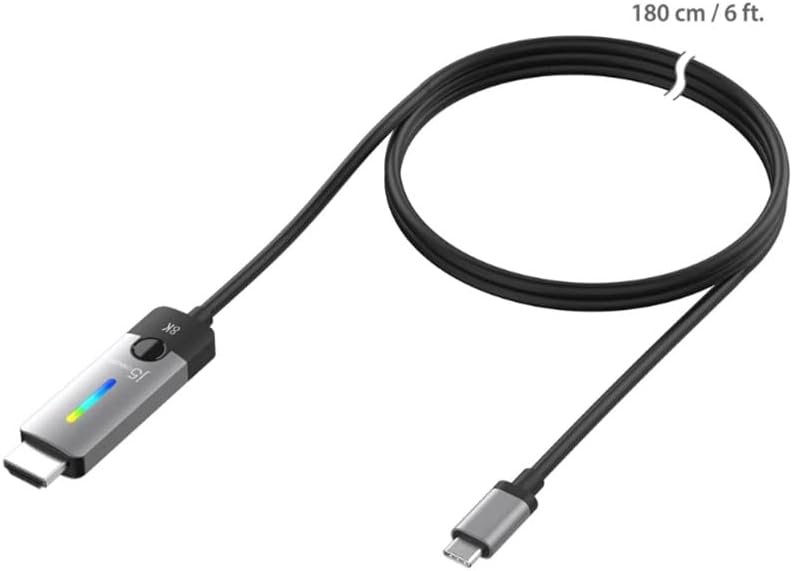
Figura 5: The JCC157 cable, illustrating its 180 cm (6 ft) length.
Garanzia e supporto
For warranty information and technical support, please refer to the documentation included with your purchase or visit the official j5create websito. I termini e le condizioni della garanzia possono variare in base alla regione e al rivenditore.
Produttore: J5CREATE
Ask a question about this manual
Ask about setup, troubleshooting, compatibility, parts, safety, or missing instructions. Manuals+ will review the question and use this page’s manual context to help answer it.