
BOMATA B613-3U
BOMATA Large Kitchen Scale
Manuale di istruzioni
1. Introduzione
Thank you for choosing the BOMATA Large Kitchen Scale. This digital scale is designed for high precision weighing in various culinary applications, from baking to general cooking. With its large stainless steel platform, multiple functions, and versatile power options, it provides accurate and convenient measurements for all your needs. Please read this manual thoroughly before use to ensure proper operation and maintenance.

Image: The BOMATA Large Kitchen Scale, featuring a sleek black base, a large stainless steel weighing platform, and a clear blue backlit LCD display. Accessories including a 100g calibration weight, AAA batteries, and USB cables are also shown.
2. Cosa c'è nella scatola
Upon unpacking your BOMATA Kitchen Scale, please verify that all the following items are included:
- BOMATA Kitchen Scale x 1
- 100g Calibration Weight x 1
- Large Transparent Container Box x 1
- Cavo USB x 1
- Batterie AAA x 2
- Manuale di istruzioni x 1

Image: The BOMATA Kitchen Scale displayed with its complete set of accessories, including the 100g calibration weight, a clear plastic container, USB charging cables, and two AAA batteries, highlighting the comprehensive package.
3 Caratteristiche
The BOMATA Kitchen Scale is equipped with advanced features to enhance your weighing experience:
- Large Size, HOLD Function: Weighing platform measures 7.2x7.2 inches, accommodating large items. The HOLD function allows measurement even if the item exceeds the platform size.
- 0.1g High Precision: Built-in high-quality sensor provides 0.1g accuracy within a 0.5g to 5kg (11lb) measurement range.
- percentualetageFunzione: Ideal for bakers, this function allows ratio-based measurements without manual gram calculations.
- Molteplici metodi di alimentazione: Can be powered via USB cable for continuous use, features a built-in rechargeable lithium battery, or can use 2 AAA batteries.
- Pieno-View Angle LCD with Backlight: Ensures clear readability from all angles.
- Durable Stainless Steel Pan: Facile da pulire e manutenere.
- Funzioni aggiuntive: Includes Tare, Counting (PCS), Unit Conversion, Auto-off (can be canceled), and Calibration.

Image: An infographic illustrating the scale's high precision (0.1g/0.001oz accuracy, 5kg/11lb capacity) and versatility for baking, cooking, milk, and pet food, along with various unit options.

Image: A visual comparison demonstrating the extra-large size of the BOMATA Kitchen Scale's platform (7.2x7.2 inches) relative to a smartphone, emphasizing its capacity for larger items.
4. Impostazione
Follow these steps for initial setup of your scale:
- Selezione della fonte di alimentazione:
- batterie AAA: Open the battery compartment on the underside of the scale and insert the two included AAA batteries, ensuring correct polarity.
- Alimentazione USB: Connect the provided USB cable to the Type-C port on the side of the scale and plug the other end into a USB power adapter (not included) or a computer USB port. The built-in lithium battery will charge while connected.
- Accensione iniziale: Press the 'ON/OFF' button to turn on the scale. The LCD display will light up.
- Calibration (Recommended): Your scale comes with a 100g calibration weight. To ensure optimal accuracy, perform calibration as follows:
- With the scale OFF, press and hold the 'CAL' button.
- The display will show 'CAL' followed by the calibration weight value (e.g., '100.0g').
- Place the 100g calibration weight precisely in the center of the weighing platform.
- The display will show 'PASS' and then return to '0.0g', indicating successful calibration. Remove the weight.

Image: The BOMATA Kitchen Scale highlighting its three power supply options: USB Type-C charging, an internal rechargeable battery, and the ability to use two AAA batteries, providing flexible power solutions.
5. Istruzioni per l'uso
Understand the various functions of your BOMATA Kitchen Scale:
- Pesatura di base: Place the scale on a flat, stable surface. Press 'ON/OFF' to turn it on. Once '0.0g' is displayed, place the item to be weighed on the center of the platform. The weight will be displayed.
- Conversione dell'unità: Press the 'UNIT' button to cycle through available units: grams (g), ounces (oz), pounds (lb), milliliters (ml) for water, and milliliters (ml) for milk.
- Funzione tara: To weigh items in a container, place the empty container on the platform and press the 'TARE' button. The display will reset to '0.0g'. Add your ingredients to the container, and only the weight of the ingredients will be displayed.
- Funzione HOLD: If weighing a large item that obscures the display, press the 'HOLD' button before placing the item. The display will lock the weight once stable, allowing you to remove the item and read the measurement.
- percentualetage Function (%): This function is useful for baking recipes that use percentages (e.g., baker's percentagE).
- Place your first ingredient (e.g., flour) on the scale.
- Press the '%' button. The display will show '100%', setting this ingredient as your 100% benchmark.
- Press 'TARE' to reset the display to '0%'.
- Add subsequent ingredients. The scale will display their weight as a percentage of your benchmark ingredient.
- Funzione di conteggio (PCS): For counting small, uniform items.
- With the scale on, press the 'PCS' button.
- Seleziona comeample quantity (e.g., 25, 50, 75, 100) by pressing 'UNIT'.
- Posizionare il numero corrispondente di sample items on the platform and press 'PCS' again. The scale is now calibrated for counting.
- Add more items, and the scale will display the total count.
- Controllo della retroilluminazione: Press the 'LIGHT' button to turn the LCD backlight on or off.
- Funzione di spegnimento automatico: The scale is set to automatically turn off after a period of inactivity to save power. This feature can typically be disabled by referring to the detailed instructions in the included paper manual for specific button sequences.
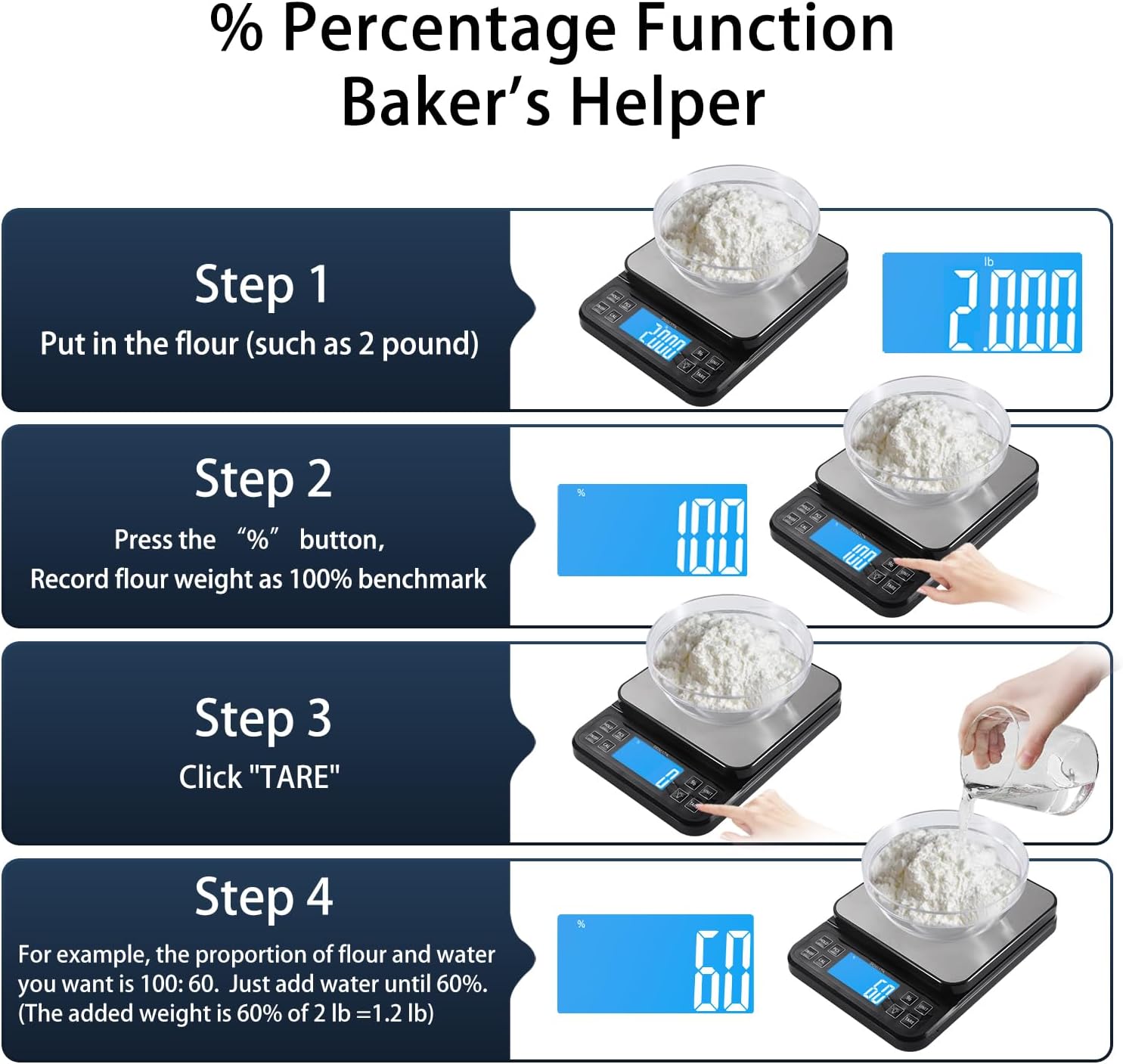
Image: A step-by-step visual guide demonstrating the percentage function, showing how to set a benchmark (100%) with flour, tare the scale, and then add water to a desired percentage, simplifying complex baking ratios.
Immagine: una vista dall'alto view of the BOMATA Kitchen Scale, clearly labeling each of its 8 buttons and their corresponding powerful functions, including PCS (Counting), HOLD, ON/OFF, CAL (Calibration), %, UNIT, TARE, and LIGHT.
6. Manutenzione
To ensure the longevity and accuracy of your BOMATA Kitchen Scale, follow these maintenance guidelines:
- Pulizia: The stainless steel weighing pan is durable and easy to clean. Wipe the scale with a soft, damp cloth. Do not immerse the scale in water or use abrasive cleaners, as this can damage the internal components.
- Magazzinaggio: Store the scale in a cool, dry place away from extreme temperatures and humidity. Avoid placing heavy objects on the scale when not in use.
- Cura della batteria: If using AAA batteries, remove them if the scale will not be used for an extended period to prevent leakage. For the rechargeable battery, ensure it is charged periodically to maintain its health.
- Maneggiare con cura: Avoid dropping or subjecting the scale to sudden shocks, as this can affect its precision.

Image: The BOMATA Kitchen Scale emphasizing its high quality and readability, showcasing the durable stainless steel platform, the clear full-view angle LCD with backlight, and the convenient storage of the 100g calibration weight on the underside.
7. Risoluzione Dei Problemi
Se riscontri problemi con la tua bilancia, fai riferimento ai seguenti problemi comuni e alle relative soluzioni:
| Problema | Possibile causa | Soluzione |
|---|---|---|
| Letture imprecise | Scale not on a flat surface; Overload; Needs calibration; Low battery. | Place on a stable, flat surface; Do not exceed max capacity; Perform calibration (Section 4); Replace/recharge batteries. |
| Il display mostra 'Lo' | Batteria scarica. | Replace AAA batteries or recharge the internal battery via USB. |
| Il display mostra 'O-Ld' | Sovraccarico. | Remove excess weight immediately. Do not exceed the maximum capacity of 5kg (11lb). |
| La bilancia non si accende | No power; Batteries incorrectly installed. | Check battery installation/charge; Connect USB power. |
| Auto-off too quickly | Impostazione predefinita di spegnimento automatico. | Refer to the detailed instruction manual for steps to disable or adjust the auto-off time. |
Se il problema persiste dopo aver provato queste soluzioni, contattare l'assistenza clienti.
8. Specifiche
| Specificazione | Dettaglio |
|---|---|
| Marca | BOMATA |
| Numero di modello | B613-3U |
| Colore | Black (as per product image, though spec says Silver) |
| Tipo di visualizzazione | LCD |
| Limite di peso | 5 kg / 11 libbre |
| Materiale | Stainless Steel (weighing pan) |
| Precisione di lettura | 0.1 grammi / 0.001 once |
| Peso dell'articolo | 3.53 once |
| Dimensioni del prodotto | 9.8 x 7.3 x 1.5 pollici |
| Fonte di alimentazione | USB Rechargeable (built-in lithium battery) or 2 x AAA Batteries |
9. Garanzia e supporto
BOMATA is committed to providing high-quality products. For information regarding warranty coverage, please refer to the warranty card included with your product packaging or visit the official BOMATA website. If you have any questions, require technical assistance, or need to report an issue, please contact BOMATA customer support through the contact information provided on the product packaging or the official brand store on Amazon.
Per ulteriore assistenza, puoi visitare il BOMATA Store on Amazon.
Ask a question about this manual
Ask about setup, troubleshooting, compatibility, parts, safety, or missing instructions. Manuals+ will review the question and use this page’s manual context to help answer it.