
Introduzione
This manual provides essential information for the safe and effective operation and maintenance of your CRAFTSMAN CMMT25166 Rechargeable Aluminum Pen Light. Please read this manual thoroughly before using the product and retain it for future reference. This pen light features a durable aluminum body, USB-C charging, and dual LED brightness modes for versatile illumination.
Informazioni sulla sicurezza
- Sicurezza degli occhi: Do not stare directly into the LED light. The high intensity light can cause temporary vision impairment or eye damage.
- Sicurezza della batteria: This product contains a Lithium-Ion battery. Do not expose the battery to extreme temperatures, fire, or water. Do not attempt to disassemble or replace the internal battery.
- Ricarica: Use only the provided USB-C cable or a certified USB-C cable with a compatible power adapter for charging.
- Resistenza all'acqua: Questo dispositivo è Non resistente all'acquaEvitare l'esposizione all'acqua o a elevata umidità per evitare danni.
- Disposizione: Smaltire il prodotto e la batteria in modo responsabile, nel rispetto delle normative locali. Non smaltire nei rifiuti domestici.
Contenuto della confezione
Verificare che tutti gli elementi siano presenti:
- CRAFTSMAN CMMT25166 Rechargeable Aluminum Pen Light
- USB-C Charging Cable (included with the product)
Prodotto finitoview
Familiarize yourself with the components of your pen light:

Figure 1: CRAFTSMAN CMMT25166 Pen Light
- Lente LED: Emits light in either flood or pen mode.
- Pulsante di accensione: Controls power and switches between light modes.
- Porta di ricarica USB-C: Located under a protective cover, used for recharging the internal battery.
- Clip da tasca: Per un fissaggio sicuro a indumenti o attrezzature.
- Corpo in alluminio: Durable, tri-sided design to prevent rolling.
Impostare
Carica iniziale
Before first use, fully charge the pen light.
- Locate the USB-C charging port, usually covered by a rubber flap for protection.
- Connect the provided USB-C cable to the pen light's charging port.
- Collegare l'altra estremità del cavo USB-C a una fonte di alimentazione USB compatibile (ad esempio, un adattatore da parete, una porta USB del computer).
- The charging indicator light (if present) will show the charging status. Refer to the product packaging for specific indicator light behavior.
- Charging typically takes a few hours. A full charge provides approximately 2-3 hours of runtime.
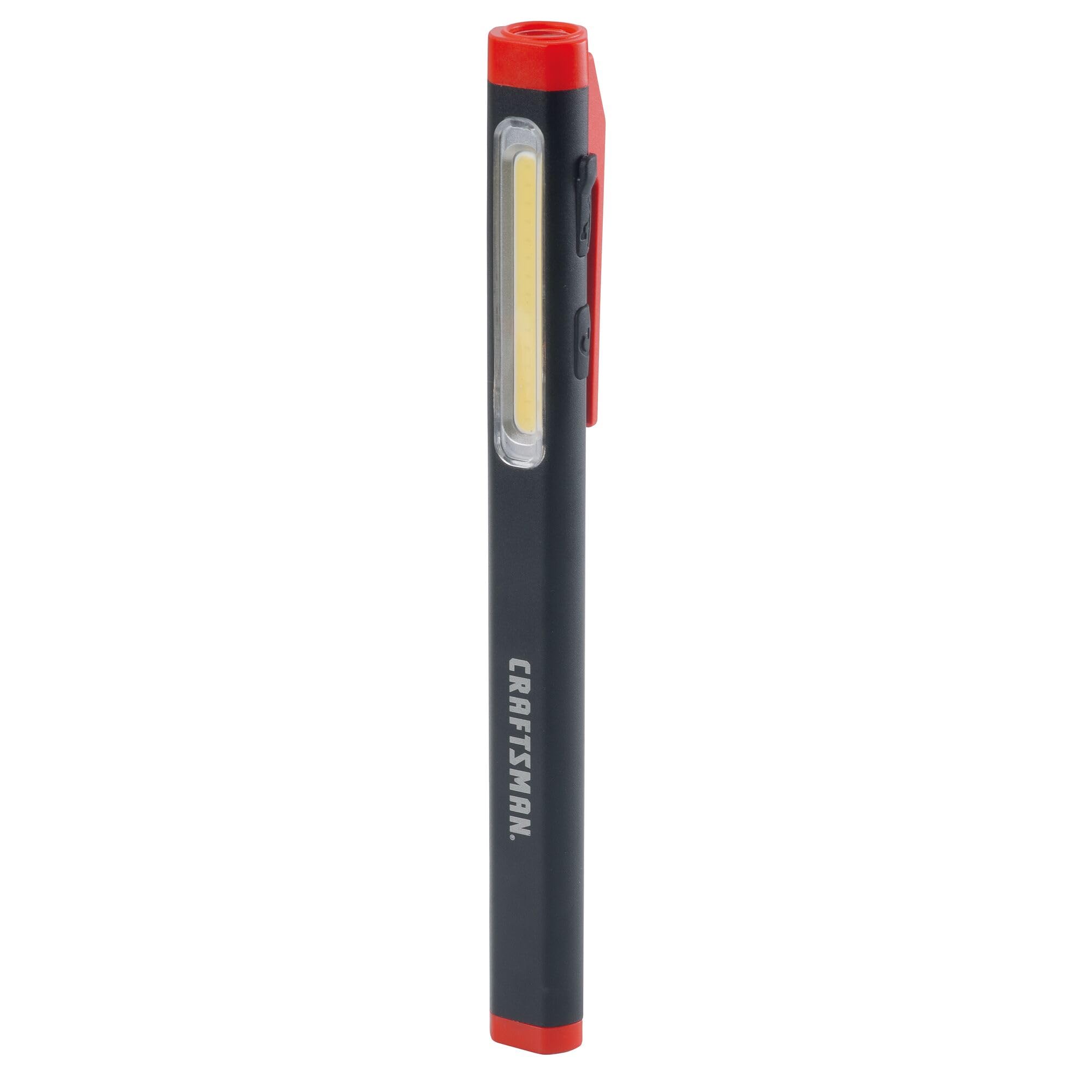
Figure 2: Charging the Pen Light via USB-C
Istruzioni per l'uso
Accensione/spegnimento e selezione della modalità
The pen light features a single power button for all operations.
- Per attivare: Press the power button once. The light will typically turn on in its last used mode or a default mode.
- Per cambiare modalità: While the light is on, press the power button repeatedly to cycle through the available modes: Flood Mode (300 Lumens) and Pen Mode (180 Lumens).
- Per spegnere: Tenere premuto il pulsante di accensione per circa 1-2 secondi oppure scorrere tutte le modalità finché la spia non si spegne.
Manutenzione
Pulizia e conservazione
- Pulizia: Pulisci la penna luminosa con un panno morbido e damp cloth. Do not use abrasive cleaners or solvents. Ensure the USB-C port cover is closed before cleaning.
- Magazzinaggio: Store the pen light in a cool, dry place away from direct sunlight and extreme temperatures. For long-term storage, ensure the battery is partially charged (around 50%) to maintain battery health.
- Cura della batteria: Recharge the battery regularly, even if not frequently used, to prevent deep discharge and prolong its lifespan.
Risoluzione dei problemi
| Problema | Possibile causa | Soluzione |
|---|---|---|
| La luce non si accende. | La batteria è scarica. | Charge the pen light using the USB-C cable. |
| La luce è fioca. | Batteria scarica. | Ricarica la penna luminosa. |
| Pen light not charging. | Cavo USB-C o fonte di alimentazione difettosi. | Prova un cavo USB-C o un alimentatore diverso. Assicurati che il cavo sia completamente inserito. |
| Non è possibile passare da una modalità all'altra. | Pressione errata del pulsante. | Ensure you are pressing the power button briefly to cycle modes. |
Specifiche
| Caratteristica | Dettaglio |
|---|---|
| Numero di modello | CMMT25166 |
| Fonte di alimentazione | Alimentato a batteria (ioni di litio) |
| Tipo di sorgente luminosa | GUIDATO |
| Materiale | Alluminio |
| White Brightness (Flood Mode) | 300 lumen |
| White Brightness (Pen Mode) | 180 lumen |
| Durata | Fino a 3 ore |
| Porta di ricarica | USB-C |
| Livello di resistenza all'acqua | Non resistente all'acqua |
| Peso dell'articolo | 3.68 once |
| Dimensioni articolo (L x P x A) | 2.7 cm L x 8.9 cm P x 1.5 cm A |
Garanzia
This CRAFTSMAN product is backed by a Garanzia a vita completa. If the product fails to perform for any reason, it will be replaced. No proof of purchase is required for warranty claims.
To initiate a warranty claim, return the damaged product to a stocking Retail Partner or call CRAFTSMAN customer service at 1-888-331-4569 for details and assistance.
Supporto
For further assistance, technical support, or to inquire about other CRAFTSMAN products, please visit the official CRAFTSMAN websito o contattare il servizio clienti.
CRAFTSMAN Customer Service: Numero di parte 1-888-331-4569
Puoi trovare maggiori informazioni e prodotti anche su Negozio CRAFTSMAN su Amazon.