
LIGE BW0382
Manuale utente dello smartwatch LIGE
Modello: BW0382
Introduzione
Welcome to the user manual for your new LIGE Smart Watch. This device is designed to enhance your daily life with advanced features such as ECG+PPG health monitoring, Bluetooth calling, message notifications, and comprehensive sport activity tracking. It is compatible with both iOS and Android devices and comes with two interchangeable bands (steel and silicon) for versatile styling. Please read this manual carefully to ensure proper use and maintenance of your smartwatch.
1. Impostazione
1.1 Unboxing e componenti
Dopo aver aperto la confezione, assicurarsi che siano presenti tutti i componenti:
- LIGE Smart Watch unit
- Steel Watch Band
- Silicon Watch Band
- Cavo di ricarica
- Manuale dell'utente (questo documento)

Figure 1.1: LIGE Smart Watch with both steel and silicon bands.
This image displays the LIGE Smart Watch featuring a black steel band, with an additional black silicon band shown separately. The watch face displays various metrics including time, date, temperature, and activity data.
1.2 Ricarica dello Smart Watch
Prima del primo utilizzo, caricare completamente lo smartwatch.
- Collegare il cavo di ricarica magnetico ai punti di ricarica sul retro dell'orologio.
- Collegare l'estremità USB del cavo a un adattatore di alimentazione USB standard (consigliato 5 V/1 A) o a una porta USB del computer.
- The watch screen will display a charging indicator. A full charge typically takes 2-3 hours.
1.3 Installazione e associazione dell'app
To unlock the full functionality of your LIGE Smart Watch, you need to install the companion application on your smartphone.
- Scarica l'App: Scan the QR code provided in the watch's initial setup screen or search for the official LIGE Smart Watch app in the Apple App Store (for iOS) or Google Play Store (for Android).
- Registrati/Accedi: Apri l'app e segui le istruzioni sullo schermo per creare un account o accedere.
- Abilita Bluetooth: Assicurati che il Bluetooth sia abilitato sul tuo smartphone.
- Accoppia il dispositivo: In the app, navigate to the "Device" or "Add Device" section. Select your LIGE Smart Watch from the list of available devices. Confirm the pairing request on both your watch and smartphone.
- Concedi permessi: Concedi le autorizzazioni necessarie (ad esempio notifiche, posizione, contatti) affinché l'app funzioni correttamente.
2. Utilizzo dello smartwatch
2.1 Navigazione di base
The LIGE Smart Watch features a 1.28-inch IPS full touch screen with a resolution of 240x240 pixels for clear and vivid display.

Figura 2.1: dettagliata view of the smartwatch display.
This image highlights the 1.28-inch IPS display of the LIGE Smart Watch, emphasizing its 240x240px resolution and clear visual experience with vibrant colors.
- Schermo tattile: Scorri verso sinistra/destra per navigare tra le funzioni principali, scorri verso l'alto/il basso per le impostazioni rapide o le notifiche. Tocca per selezionare.
- Pulsante/i laterale/i: Typically, one button serves as a power on/off, back, or home button. Refer to the watch's specific button layout for exact functions.
2.2 Notifiche di chiamate e messaggi Bluetooth
Once paired with your smartphone, your LIGE Smart Watch can handle calls and display notifications.
- Chiamata Bluetooth: Answer, reject, or make calls directly from your watch. Ensure your watch is connected to your phone's Bluetooth for this feature.
- Promemoria messaggio: Receive notifications for incoming calls, SMS, and app messages (e.g., WhatsApp, Facebook) directly on your watch. Configure app notifications in the companion app.
2.3 Monitoraggio sanitario
L'orologio è dotato di sensori avanzati per un monitoraggio completo della salute.

Figura 2.2: Posteriore view of the smartwatch with heart rate sensor.
This image shows the back of the LIGE Smart Watch, highlighting the optical heart rate sensor (green light) and charging contacts. The text "SMART WATCH" and "WITH HEART RATE" are visible.
- Monitoraggio della frequenza cardiaca: The watch uses an AI heart rate algorithm for 24-hour intelligent monitoring. Wear the watch snugly on your wrist for accurate readings.
- ECG+PPG: Advanced electrocardiogram and photoplethysmography sensors provide detailed heart health data. Follow in-app instructions for performing ECG measurements.
- Monitoraggio della pressione sanguigna: Provides estimated blood pressure readings. Note that this is for reference only and not a substitute for medical equipment.
- Monitoraggio del sonno: Tiene traccia automaticamente dei tuoi ritmi del sonno, inclusi sonno profondo, sonno leggero e orari di veglia. View report dettagliati nell'app.
2.4 Sport Activity Tracking
The watch supports multiple exercise modes to help you track your fitness goals.
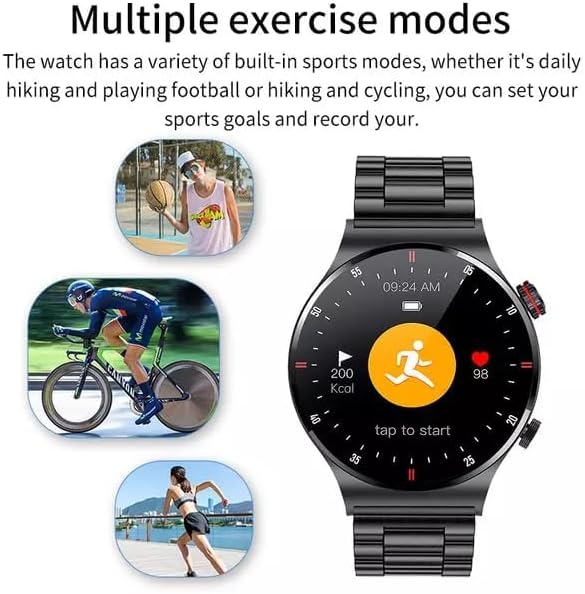
Figure 2.3: Smartwatch interface showing various sport modes.
This image illustrates the LIGE Smart Watch's capability to track multiple exercise modes, with icons representing activities like running, cycling, and basketball. The watch screen shows activity metrics such as calories burned and heart rate.
Select your desired sport mode from the watch menu (e.g., running, cycling, hiking) to record duration, distance, calories burned, and heart rate during your workout.
2.5 NFC Function (Note)
The product description indicates NFC functionality. Please refer to the companion app or the latest product specifications for details on how to utilize NFC features, such as access control or payment. Note that NFC functionality can vary by region and specific watch firmware.
2.6 Altre caratteristiche
- Riproduzione MP3: The watch supports MP3 playback. You may need to transfer music files to the watch's internal storage via the companion app or a direct connection, if supported.
- Impostazioni lingua: The watch supports 25 languages. You can change the language setting through the watch's settings menu or the companion app.
3. Manutenzione
3.1 Pulizia dello smartwatch
Una pulizia regolare aiuta a preservare l'aspetto e la funzionalità dell'orologio.
- Pulire lo schermo e il corpo con un panno morbido e privo di lanugine.
- Per macchie ostinate, leggermente dampLavare il panno con acqua. Evitare l'uso di prodotti chimici aggressivi o materiali abrasivi.
- Pulire periodicamente i contatti di ricarica per garantire una buona connessione.
3.2 Resistenza all'acqua (IP68)
Your LIGE Smart Watch is IP68 waterproof, meaning it is resistant to dust and can withstand immersion in water up to 1.5 meters for 30 minutes.
- Adatto all'uso quotidiano, al lavaggio a mano e alla pioggia leggera.
- Avoid hot water, steam, or prolonged immersion in water (e.g., swimming, diving) as this can compromise the seal.
- Non azionare i pulsanti sott'acqua.
- Asciugare accuratamente l'orologio dopo averlo esposto all'acqua.
3.3 Cura della batteria
Per prolungare la durata della batteria:
- Evitare temperature estreme.
- Caricare l'orologio prima che la batteria sia completamente scarica.
- Se si conserva l'orologio per un periodo prolungato, caricarlo al 50% circa e ricaricarlo ogni pochi mesi.
4. Risoluzione Dei Problemi
| Problema | Possibile causa | Soluzione |
|---|---|---|
| L'orologio non si accende | Batteria scarica | Caricare l'orologio per almeno 30 minuti. |
| Impossibile associare il telefono | Bluetooth disattivato, problema con l'app, orologio non rilevabile | Ensure phone Bluetooth is on. Restart watch and phone. Reinstall app. Check app for pairing instructions. |
| Nessuna notifica | Autorizzazioni app, impostazioni di notifica | Controlla le autorizzazioni di notifica delle app sul tuo telefono. Assicurati che le notifiche siano abilitate nell'app Watch. |
| Dati sanitari imprecisi | Adattamento non corretto, ostruzione del sensore | Ensure watch is worn snugly on the wrist. Clean the sensor area on the back of the watch. |
| Problemi di ricarica | Dirty contacts, faulty cable/adapter | Clean charging contacts. Try a different USB port or power adapter. Ensure cable is securely connected. |
5. Specifiche
| Caratteristica | Dettaglio |
|---|---|
| Numero di modello | BW0382 |
| Dimensioni del prodotto | 20 x 15 x 5 cm; 180 g |
| Produttore | LIGE |
| Sistema operativo | Android Wear (compatible with iOS and Android) |
| Caratteristiche speciali | Sleep Monitor, Notifications, Heart Rate Monitor, ECG, Blood Pressure Monitoring, MP3 Playback |
| Tecnologia di connettività | Bluetooth |
| Standard di comunicazione wireless | Bluetooth |
| Composizione delle celle della batteria | Polimero di litio |
| Resistenza all'acqua | Grado di protezione IP68 |
| Risoluzione dello schermo | 240x240 pixel |
| Dimensioni dello schermo | 1.28 pollici |
6. Garanzia e supporto
For warranty information and customer support, please refer to the warranty card included with your product or contact LIGE customer service directly.
Manufacturer: LIGE
For further assistance, please visit the official LIGE websito o contattare i loro canali di supporto.
Ask a question about this manual
Ask about setup, troubleshooting, compatibility, parts, safety, or missing instructions. Manuals+ will review the question and use this page’s manual context to help answer it.