
1. Introduzione
This manual provides essential instructions for the safe and effective use of your FLYLINKTECH 4000A Portable Car Battery Jump Starter. Please read this manual thoroughly before operation and retain it for future reference. This device is designed to jump-start vehicles with dead or low-voltage batteries and can also function as a portable power bank and LED flashlight.
2. Cosa c'è nella scatola
Verificare che tutti gli articoli siano presenti all'apertura della confezione:
- FLYLINKTECH CF900 Jump Starter Unit
- Cavi per ponticelli intelligenti
- Cavo di ricarica USB-C
- Portable EVA Carrying Case
- Manuale dell'utente (questo documento)

Image: Contents of the FLYLINKTECH CF900 package. This includes the jump starter unit, smart jumper cables, a USB-C charging cable, a portable EVA carrying case, and the user manual.
3. Caratteristiche del prodotto
- High-Power Jump Starter: Delivers 4000A peak current, suitable for vehicles with up to 9.0L gas or 8.0L diesel engines. Capable of up to 30 jump starts on a single charge.
- Power Bank versatile: Features an 18,000mAh battery capacity and dual USB ports, including Quick Charge 3.0, for charging various electronic devices. Maintains charge for up to 24 months when not in use.
- Torcia LED multifunzionale: Equipped with a bright 600-lumen LED light offering standard, SOS, and strobe modes for emergencies. Provides up to 48 hours of continuous illumination.
- Funzioni di sicurezza avanzate: Integrated smart protection system provides 10 layers of safety, including reverse polarity, over-current, and over-voltage protection. Ensures safe operation in extreme temperatures (-4°F to 140°F) and prevents sparks or incorrect connections.
- Design durevole e portatile: Compact and lightweight (820g) with a rugged ABS exterior for protection against impacts and scratches.

Immagine: dettagliata view of the FLYLINKTECH CF900 jump starter, highlighting the LED display, power button, LED flashlight, USB output ports (USB1 5V/2.4A, USB2 Quick Charge 3.0), jump start socket, and 5V/2A USB-C input port.
4. Configurazione e ricarica
Before first use, fully charge the jump starter. It is recommended to recharge the unit every 3-6 months to maintain optimal battery health.
- Locate the USB-C input port on the jump starter.
- Collegare il cavo di ricarica USB-C in dotazione alla porta di ingresso dell'avviatore di emergenza.
- Connect the other end of the USB-C cable to a 5V/2A USB wall adapter (not included) or a compatible USB charging port.
- Il display LCD mostrerà l'avanzamento della ricarica. Caricare finché il display non indica il 100%.

Image: The FLYLINKTECH jump starter functioning as a portable power bank, charging a smartphone and a tablet via its USB output ports. The image highlights the 18000mAh capacity and Quick Charge 3.0 feature.
5. Istruzioni per l'uso
5.1. Avviamento di emergenza di un veicolo
Prima di tentare di avviare un veicolo, assicurarsi che l'avviatore di emergenza sia carico almeno al 50%.
- Collegare i cavi Smart Jumper: Insert the blue plug of the smart jumper cables completely into the jump start socket on the jump starter unit. Ensure a secure connection. The indicator light on the smart clamp will flash green and red.
- Collegamento alla batteria dell'auto: Attacca il cl rossoamp al terminale positivo (+) della batteria dell'auto e al terminale nero clamp al terminale negativo (-).
- Controllare l'indicatore luminoso:
- Verde pieno: Connection is correct and safe. Proceed to start the vehicle.
- Rosso fisso con segnale acustico: Rilevata polarità inversa. Scollegare il cl.ampe ricollegarlo correttamente.
- Verde lampeggiante: Volume della batteriatage is too low. Press the "BOOST" button on the smart clamp for 3 seconds until the light turns solid green. Start the vehicle within 30 seconds.
- No Light/No Beep: Check connections or if the car battery is severely damaged.
- Avviare il veicolo: Once the indicator light is solid green, start your vehicle's engine.
- Rimuovere Clamps: As soon as the engine starts, remove the smart jumper cables from the car battery terminals first, then disconnect the blue plug from the jump starter unit.

Image: Easy operation guide for jump starting a car. Step 1: Insert the jump clamp into the booster. Step 2: Connect the clamps to the car battery. Step 3: Start your car. Step 4: Remove the clamps.
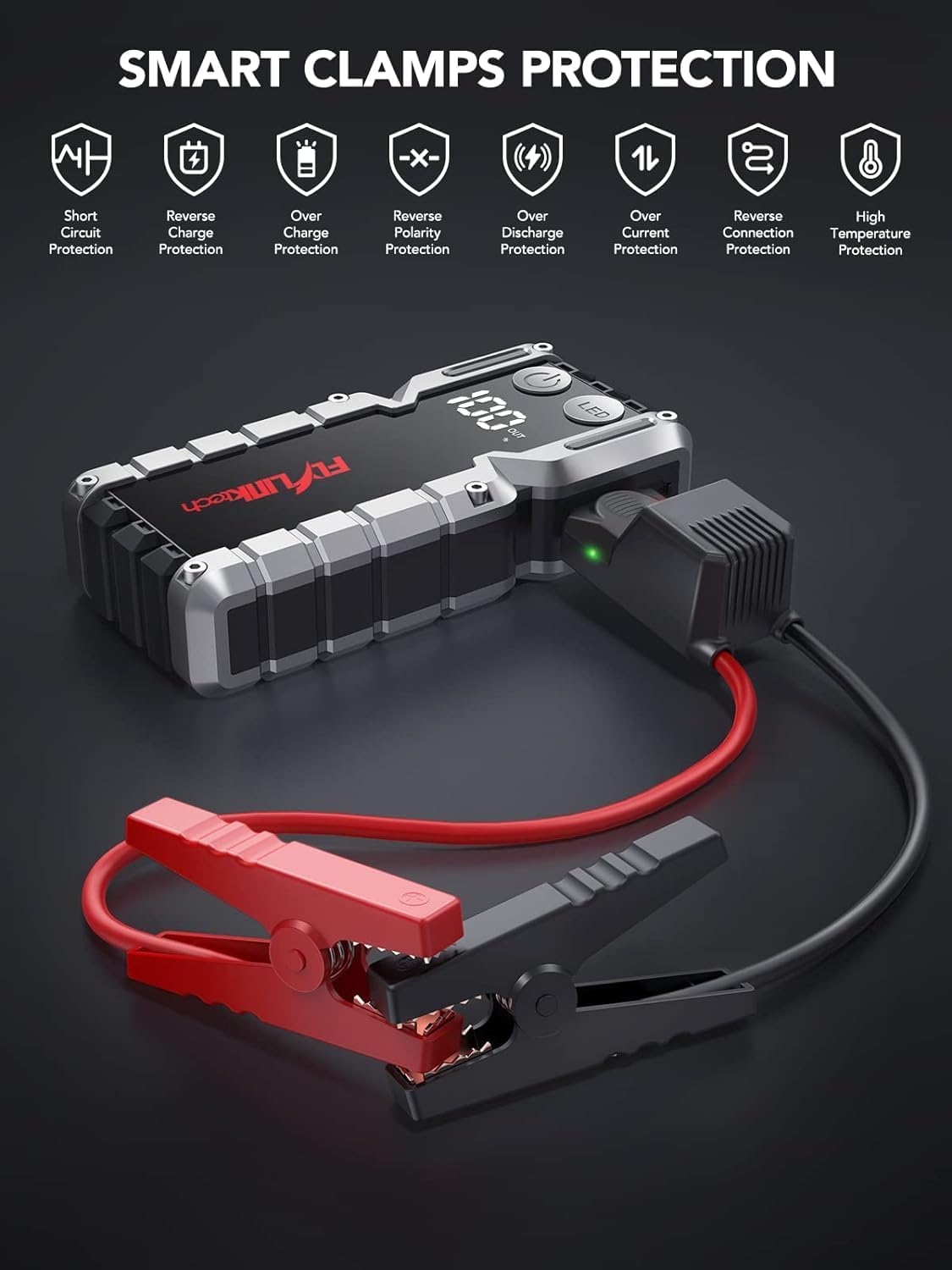
Immagine: Smart Clamps Protection. Icons represent various safety features including short circuit protection, reverse charge protection, over charge protection, reverse polarity protection, over discharge protection, over current protection, and high temperature protection.
5.2. Utilizzo come Power Bank
L'avviatore di emergenza può caricare vari dispositivi alimentati tramite USB.
- Connect your device's USB charging cable to one of the USB output ports (USB1 or USB2 QC3.0) on the jump starter.
- L'avviatore di emergenza inizierà automaticamente a caricare il tuo dispositivo.
- Il display LCD mostrerà la percentuale di batteria rimanentetage dell'avviatore di emergenza.
5.3. Utilizzo della torcia a LED
The built-in LED flashlight has three modes: standard, SOS, and strobe.
- Press and hold the "LED" button for 3 seconds to turn on the standard flashlight mode.
- Press the "LED" button again to cycle through the modes: Standard > SOS > Strobe.
- Press and hold the "LED" button for 3 seconds to turn off the flashlight.

Image: The built-in LED flashlight of the FLYLINKTECH jump starter, demonstrating its three modes: standard flashlight, SOS signal, and strobe light.
6. Manutenzione
- Store the jump starter in its portable EVA carrying case when not in use to protect it from dust and damage.
- Ricaricare l'unità ogni 3-6 mesi, anche se non utilizzata, per preservare la salute della batteria e prolungarne la durata.
- Pulire l'esterno con un panno morbido e asciutto. Non utilizzare prodotti chimici aggressivi o detergenti abrasivi.
- Keep the jump starter away from direct sunlight, heat sources, and moisture.
- Non smontare l'unità. La manutenzione deve essere eseguita solo da personale qualificato.
7. Risoluzione Dei Problemi
| Problema | Possibile causa | Soluzione |
|---|---|---|
| Il jump starter non si accende. | La batteria è completamente scarica. | Charge the jump starter fully using the provided USB-C cable. |
| Il veicolo non si avvia dopo la connessione. | clamp collegamento (polarità inversa). Batteria dell'avviatore di emergenza troppo scarica. Batteria del veicolo gravemente danneggiata. cl . intelligenteamp indicator not solid green. | Garantire clampsiano collegati correttamente (rosso a +, nero a -). Ricaricare l'avviatore di emergenza. Consultare un meccanico professionista. Follow indicator light instructions in Section 5.1. If flashing green, use BOOST function. |
| cl . intelligenteamp indicator is solid red and beeping. | Collegamento con polarità inversa. | Scollegare immediatamente clamps and re-attach correctly (red to +, black to -). |
| La torcia non funziona. | La batteria è troppo scarica. LED button not pressed correctly. | Caricare l'avviatore di emergenza. Press and hold the "LED" button for 3 seconds to activate. |
| Dispositivi che non si caricano tramite porte USB. | Batteria dell'avviatore di emergenza troppo scarica. Problema di connessione via cavo. | Caricare l'avviatore di emergenza. Ensure USB cables are securely connected to both the jump starter and the device. Try a different cable. |
8. Specifiche
| Caratteristica | Dettaglio |
|---|---|
| Modello | CF900 |
| Capacità della batteria | MAh 18000 (66.6Wh) |
| Corrente di picco | 4000A |
| Uscita Jump Start | 12V |
| Uscita USB1 | 5V/2.4A |
| Uscita USB2 (QC3.0) | 5V/2.4A, 9V/2A, 12V/1.5A |
| Ingresso di tipo C | 5V/2A |
| Temperatura di esercizio | -20°C a 60°C (-4°F a 140°F) |
| Dimensioni del prodotto | 19 cm x 9 cm x 4 cm (circa) |
| Peso dell'articolo | 820 grammi |
| Compatibilità del motore | Fino a 9.0 litri a benzina o 8.0 litri a gasolio |
9. Garanzia e supporto
FLYLINKTECH provides the following support for this product:
- Garanzia gratuita di 3 anno: Copre i difetti di fabbricazione e i malfunzionamenti in condizioni di normale utilizzo.
- Supporto tecnico a vita: Assistenza nell'utilizzo del prodotto, risoluzione dei problemi e richieste di informazioni generali.
- Servizio clienti 7 ore su 24, XNUMX giorni su XNUMX: Available around the clock for any questions or concerns.
For support, please refer to the contact information provided in your product packaging or visit the official Flylinktech websito.