
1. Introduzione
This manual provides detailed instructions for the setup, operation, and maintenance of your TECLAST N15 Mini PC. Please read this manual thoroughly before using the device to ensure proper functionality and to prevent damage.
The TECLAST N15 is a compact desktop computer featuring an Intel Celeron N5095 processor, 16GB DDR4 RAM, and a 512GB SSD. It supports triple 4K monitor output and comes with Windows 11 Pro pre-installed, making it suitable for various applications including office work, creative design, and multimedia entertainment.
2. Cosa c'è nella scatola
Verificare che tutti gli articoli siano presenti nel pacco:
- 1 x TECLAST N15 Mini PC
- 1 x adattatore di alimentazione
- 1 supporto VESA
- 1 cavo HDMI
- 1 x Manuale utente

Image: Contents of the TECLAST N15 Mini PC package.
3. Prodotto finitoview
3.1 Dimensioni e design
The TECLAST N15 Mini PC is designed for compactness and portability, measuring approximately 4.5 x 1.6 x 4.5 inches (115 x 43 x 115 mm) and weighing around 400g. Its aluminum body ensures a sturdy structure.
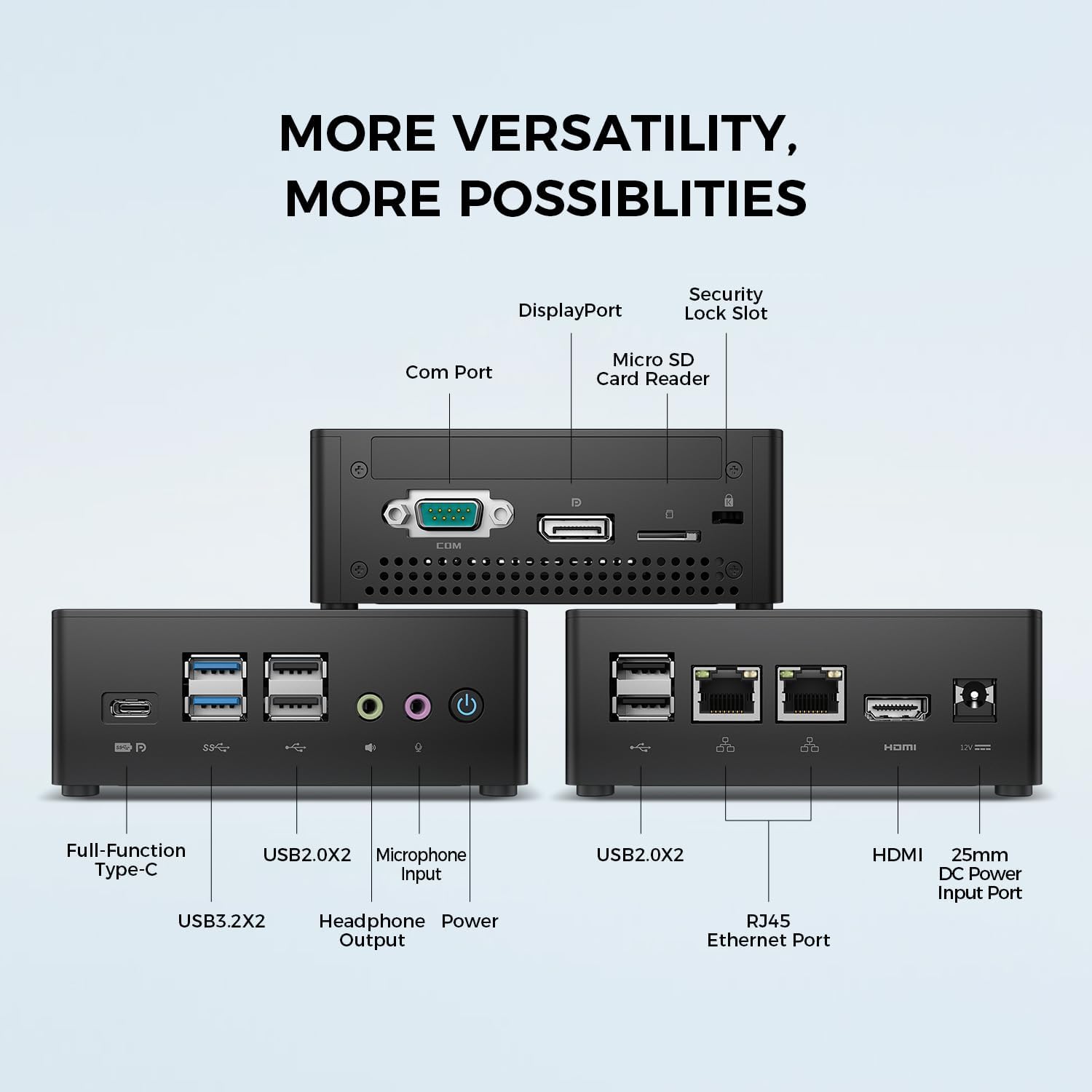
Image: TECLAST N15 Mini PC dimensions and compact design.
3.2. Porte e connettività
The N15 Mini PC offers extensive connectivity options to support various peripherals and displays.
- Porte anteriori: 1x Full-Function Type-C, 2x USB 3.0, 2x USB 2.0, 1x Headphone Output, 1x Microphone Input, Power Button.
- Porte laterali: 1x COM Port, 1x DisplayPort, 1x Micro SD Card Reader, 1x Security Lock Slot.
- Porte posteriori: 2x RJ45 Ethernet Ports (2.5Gbps), 2x USB 2.0, 1x HDMI Port, 1x DC Power Input.

Immagine: Oltreview of the TECLAST N15 Mini PC's various connectivity ports.

Image: Front panel ports of the TECLAST N15 Mini PC.

Image: Side panel ports of the TECLAST N15 Mini PC.

Image: Rear panel ports of the TECLAST N15 Mini PC.
3.3. Componenti interni
The N15 features an Intel Gen 11 N5095 processor, 16GB DDR4 RAM, and a 512GB PCIe 3.0 SSD. It also includes an M.2 E-slot for function expansion (pre-occupied by a wireless network card by default).

Image: Internal components of the TECLAST N15 Mini PC.
4. Istruzioni per l'installazione
4.1. Collegamento di periferiche
- Connetti Display: Use the HDMI, DisplayPort, or Full-Function Type-C port to connect your monitor(s). The N15 supports up to three 4K displays simultaneously.
- Collegare tastiera e mouse: Collega la tastiera e il mouse USB alle porte USB disponibili.
- Connetti rete: For a wired connection, connect an Ethernet cable to one of the two RJ45 ports. For wireless, ensure your Wi-Fi network is available during initial setup.
- Connetti alimentazione: Collegare l'adattatore di alimentazione alla porta di ingresso dell'alimentazione CC del Mini PC, quindi collegare l'adattatore a una presa di corrente.
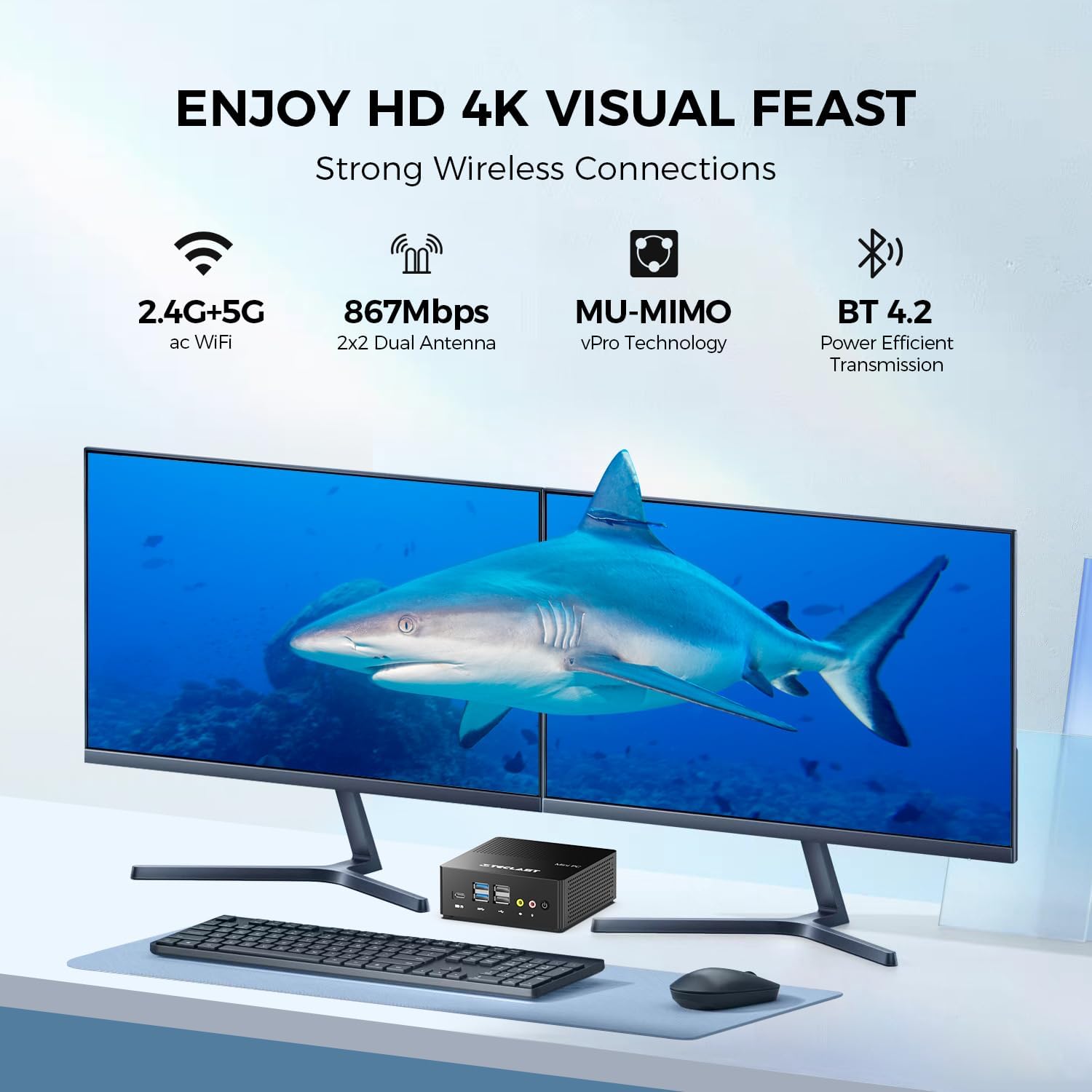
Immagine: Example setup with the TECLAST N15 Mini PC connected to multiple displays and peripherals.
4.2. Accensione iniziale
Press the power button on the front of the Mini PC. The device will boot into Windows 11 Pro. Follow the on-screen instructions to complete the initial Windows setup, including language, region, network connection, and user account creation.
4.3. Installazione con montaggio VESA (opzionale)
The included VESA mount allows you to attach the Mini PC to the back of a compatible monitor or to a wall, saving desk space. Refer to the VESA mount instructions for detailed installation steps.

Image: TECLAST N15 Mini PC with VESA mount for space-saving installation.
5. Istruzioni per l'uso
5.1 Windows 11 Pro
Your TECLAST N15 Mini PC comes with Windows 11 Pro pre-installed. This operating system provides a secure and versatile environment for various tasks, from productivity to entertainment. Ensure Windows updates are regularly installed to maintain system security and performance.

Image: Windows 11 Pro interface on the TECLAST N15 Mini PC.
5.2. Configurazione multi-monitor
The Mini PC supports connecting up to three displays simultaneously at 4096x2160@60Hz via HDMI, DisplayPort, and the Full-Function Type-C port. This allows for an extended workspace, enhancing productivity for tasks like creative design, data analysis, or multi-tasking.
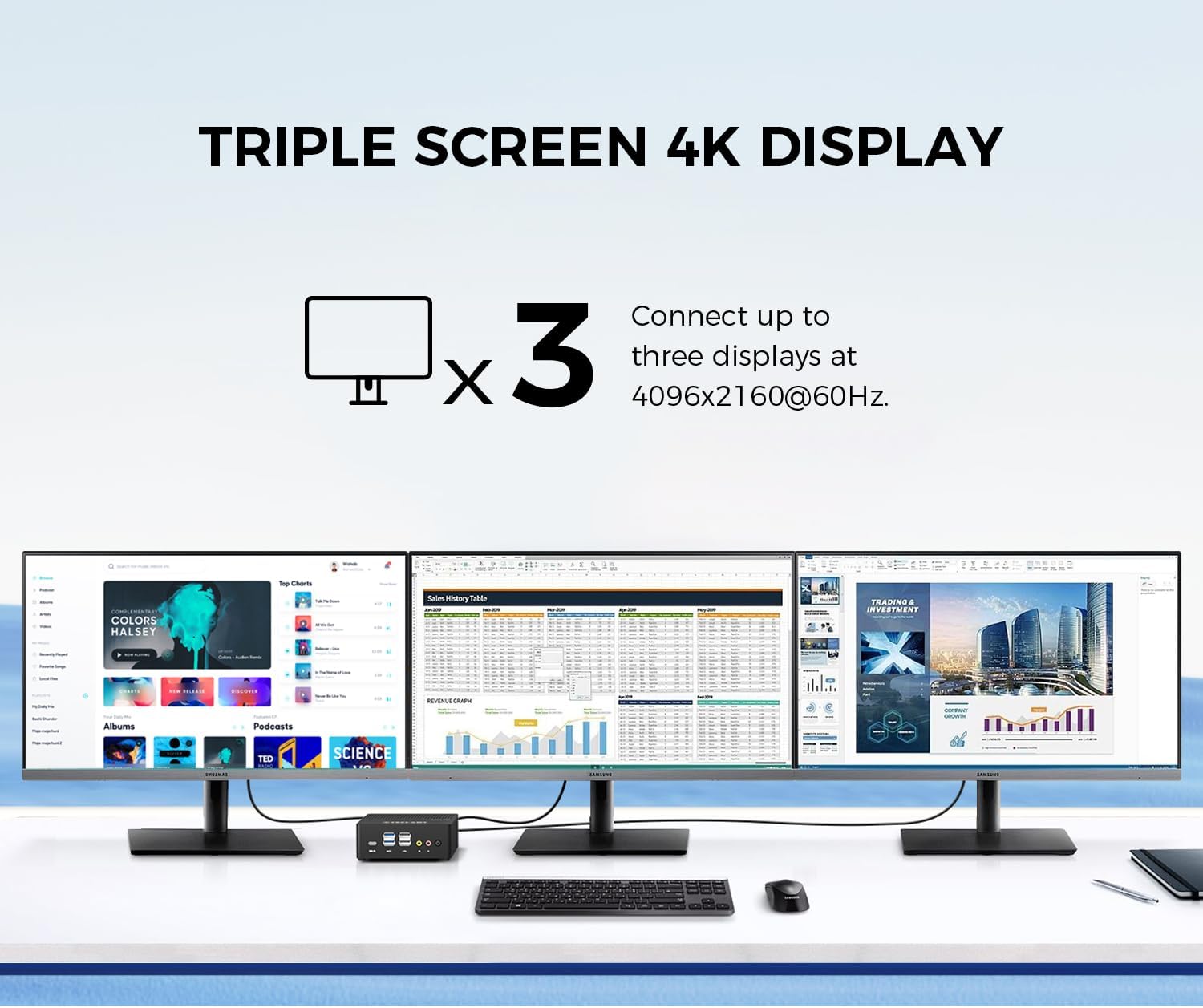
Image: Triple 4K monitor setup with the TECLAST N15 Mini PC.
5.3. Gestione energetica
- Fermare: Fare clic sul pulsante Start, quindi su Arresta > Arresta il sistema.
- Ricomincia: Fare clic sul pulsante Start, quindi su Arresta > Riavvia.
- Sonno: Fare clic sul pulsante Start, quindi su Alimentazione > Sospensione.
- Accensione automatica: The device supports Auto Power On, RTC Wake Settings, and Wake On LAN, which can be configured in the BIOS settings.
6. Prestazioni e raffreddamento
The TECLAST N15 is equipped with an Intel Celeron N5095 processor, offering a turbo frequency of up to 2.9 GHz. It features Intel UHD Graphics with 16 Execution Units (EU) and Quick Sync Video technology for efficient hardware video encoding and decoding.

Image: Key performance specifications of the TECLAST N15 Mini PC.
6.1. Sistema di raffreddamento
The Mini PC incorporates a built-in fan cooling system with a nickel-plated heat pipe and a large heat dissipation area (over 16000mm²). This design ensures efficient heat transfer and silent operation, preventing overheating during multitasking.

Image: Internal cooling system and noise level illustration.
7. Manutenzione
- Pulizia: Use a soft, dry cloth to clean the exterior of the Mini PC. For vents, use compressed air to remove dust buildup. Do not use liquid cleaners directly on the device.
- Aggiornamenti software: Controlla e installa regolarmente gli aggiornamenti di Windows e dei driver per garantire prestazioni e sicurezza ottimali.
- Gestione della memoria: Pulire periodicamente ciò che non è necessario filee applicazioni per liberare spazio di archiviazione e migliorare la reattività del sistema.
- Condizioni ambientali: Utilizzare il Mini PC in un'area ben ventilata, lontano dalla luce solare diretta, da calore eccessivo e dall'umidità.
8. Risoluzione Dei Problemi
| Problema | Possibile causa | Soluzione |
|---|---|---|
| Nessun potere | Adattatore di alimentazione non collegato, problema con la presa di corrente. | Ensure power adapter is securely connected to the Mini PC and a working power outlet. Try a different outlet. |
| Nessuna visualizzazione | Monitor non collegato, sorgente di ingresso errata, cavo difettoso. | Check HDMI/DP/Type-C cable connections. Ensure monitor is on and set to the correct input source. Try a different cable or monitor if possible. |
| Nessuna connessione internet | Ethernet cable disconnected, Wi-Fi disabled, router issue. | For wired: Check Ethernet cable. For Wi-Fi: Ensure Wi-Fi is enabled in Windows settings and connected to your network. Restart your router/modem. |
| Peripherals not recognized | Loose connection, driver issue, incompatible device. | Reconnect the peripheral. Try a different USB port. Check Device Manager for driver issues. Ensure the peripheral is compatible with Windows 11. |
9. Specifiche
| Caratteristica | Dettaglio |
|---|---|
| Processore | Intel Celeron N5095 (2.9 GHz Turbo Frequency) |
| Memoria RAM | 16 GB DDR4 |
| Magazzinaggio | SSD PCIe x4 da 512 GB |
| Grafica | Grafica Intel UHD (integrata) |
| Sistema operativo | Windows 11 Pro (preinstallato) |
| Uscita video | HDMI, DisplayPort, Full-Function Type-C (Supports Triple 4K @ 60Hz) |
| Porte USB | 2x USB 3.0, 4x USB 2.0, 1x Full-Function Type-C |
| Rete | 2x 2.5Gbps RJ45 Ethernet, 802.11ac Wi-Fi (Dual-band) |
| Bluetooth | Bluetooth 4.2 |
| Altre porte | COM Port, Micro SD Card Reader, Headphone Output, Microphone Input, Security Lock Slot |
| Dimensioni (LxWxH) | 4.5 x 1.6 x 4.5 pollici (115 x 43 x 115 mm) |
| Peso | 14.6 once (circa 400 g) |
| Raffreddamento | Built-in fan cooling with nickel-plated heat pipe |
10. Garanzia e supporto
The TECLAST N15 Mini PC comes with a 1-year product satisfaction warranty and lifetime technical support. For any questions or assistance, please contact TECLAST customer support.
You can find contact information and further resources on the official TECLAST websito o tramite la tua piattaforma di acquisto.
11. Dimostrazione video del prodotto
Guarda il video ufficiale del prodotto per una panoramica visivaview of the TECLAST N15 Mini PC's features and capabilities.
Video: Official demonstration of the TECLAST N15 Mini PC, highlighting its design, ports, and usage scenarios.