
1. Introduzione
This manual provides detailed instructions for the safe and effective operation of the RuoShui Handheld LCR Meter 4080. This digital bridge multimeter is designed for precise measurement of inductance (L), capacitance (C), and resistance (R) across various test frequencies. It is an essential tool for engineers, technicians, and hobbyists working with electronic components.
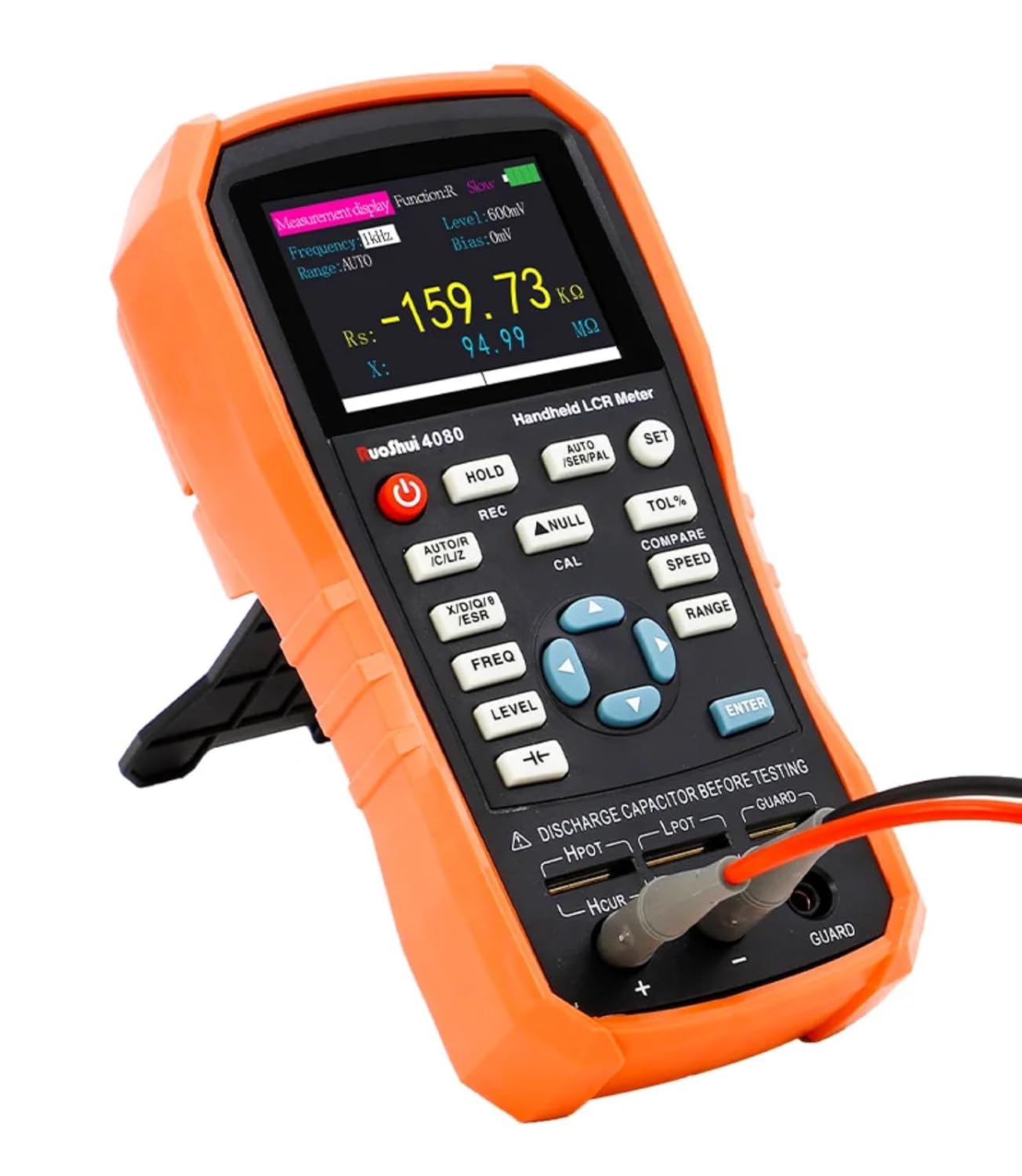
Figure 1: RuoShui Handheld LCR Meter 4080 with test leads connected.
2. Informazioni sulla sicurezza
Si prega di leggere attentamente tutte le avvertenze di sicurezza e le istruzioni per l'uso prima di utilizzare questo strumento. La mancata osservanza di queste istruzioni potrebbe causare lesioni personali o danni allo strumento.
- Non applicare voltage to the input terminals. This device is designed for passive component testing only.
- Always discharge capacitors before testing to prevent damage to the meter and ensure accurate readings.
- Assicurarsi che i puntali di prova siano in buone condizioni e correttamente collegati.
- Do not operate the meter in wet environments or near flammable gases.
- If the meter is damaged or malfunctioning, discontinue use immediately and contact support.
- Only use the specified battery type and charging method.
3. Prodotto finitoview
3.1 Caratteristiche principali
- Measurement Capability: Inductance, Capacitance, Resistance, ESR, D, Q, Theta.
- Test Frequencies: 100Hz, 120Hz, 1KHz, 10KHz, 40KHz, 100KHz.
- Precisione: 0.2%.
- Display: 2.8-inch TFT color display with backlight.
- Connettività: Mini-USB for PC communication and data acquisition.
- Energia: Internal Lithium Polymer battery, USB-C charging.
- Measurement Speeds: Fast (4 times/s), Medium (2 times/s), Slow (1 time/s).
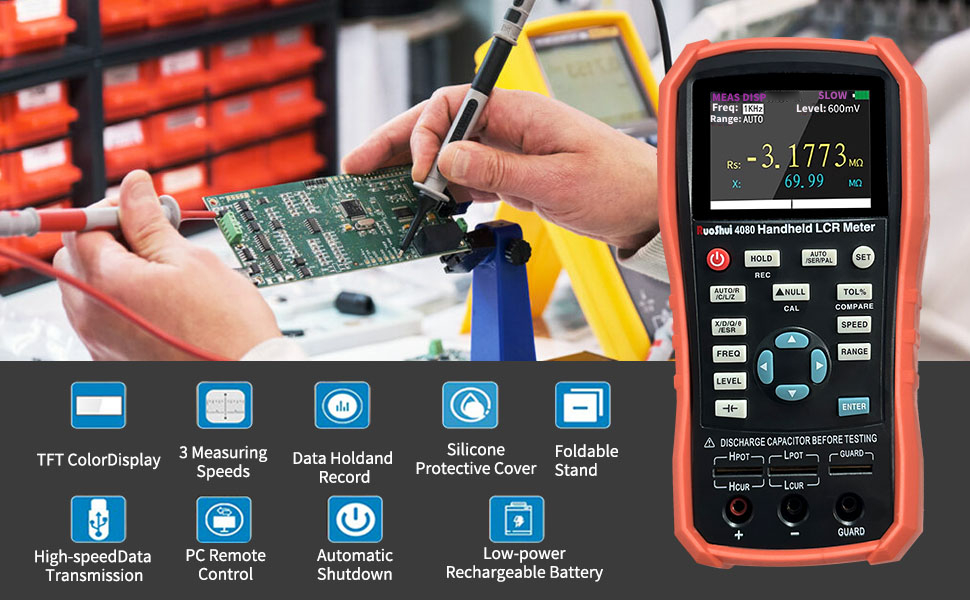
Figura 2: Oltreview of the RuoShui 4080 LCR Meter's key features including TFT color display, multiple measuring speeds, data hold, silicone protective cover, foldable stand, USB data transmission, PC remote control, automatic shutdown, and low-power rechargeable battery.
3.2 Meter Layout and Controls
Familiarize yourself with the meter's physical components and controls as shown in Figure 3.

Figure 3: Labeled diagram of the RuoShui 4080 LCR Meter's display, buttons, and test terminals.
- Schermo di visualizzazione: 2.8-inch TFT color display for measurement readings and settings.
- Pulsante di accensione: Accende/spegne il dispositivo.
- Pulsante ATTESA: Freezes the current measurement on the screen. A long press shows min/max/average values.
- AUTO/R/C/L/Z Button: Selects the main measurement parameter (Auto, Resistance, Capacitance, Inductance, or Impedance).
- Pulsante REC: Attiva la modalità di registrazione dei dati.
- NULL/CAL Button: Offsets displayed values (short press). Initiates calibration procedure (long press).
- X/D/Q/ESR Button: Selects secondary measurement parameters (Reactance, Dissipation Factor, Quality Factor, ESR).
- Pulsante FREQ: Cycles through test frequencies (100Hz, 120Hz, 1KHz, 10KHz, 40KHz, 100KHz).
- Pulsante LIVELLO: Adjusts the test signal level (300mV, 600mV, 1000mV).
- Pregiudizio voltagPulsante e: (Indicated by a specific symbol, often a capacitor with a DC line) Applies a DC bias voltage (0V, 100mV, 300mV, 600mV).
- Direction Keys (Up/Down/Left/Right): Navigare nei menu e regolare le impostazioni.
- Pulsante INVIO: Conferma le selezioni nei menu.
- Pulsante IMPOSTA: Accesses system settings (Language, Auto-off, Brightness, Beep, Colors, PowerOn).
- AUTO/SER/PAL Button: Toggles between Auto, Series, and Parallel equivalent circuit modes.
- TOL% Button: Activates tolerance comparison mode.
- COMPARE Button: Used in conjunction with TOL% for component sorting.
- Tasto VELOCITÀ: Selects measurement speed (Fast, Medium, Slow).
- Pulsante GAMMA: Selects measurement range (Auto or manual).
- Five-terminal Test Slot: For direct insertion of components.
- Three-terminal Test Jacks: For connecting test leads (Hpot, Lpot, Hcur, Lcur, Guard).
- Porta mini-USB: Per la ricarica e la comunicazione con il PC.
4. Impostazione
4.1 Caricamento della batteria
The LCR Meter 4080 is powered by an internal Lithium Polymer battery. Before first use, or when the battery indicator is low, charge the device using the provided Mini-USB cable and a compatible USB power adapter (not included). The screen will display "In Charging" and the battery level icon during charging. The meter can be used while charging.

Figura 4: lato view of the RuoShui 4080 LCR Meter showing the Mini-USB charging port.
4.2 Collegamento dei puntali di prova
For most measurements, use the provided alligator clip test leads. Connect the leads to the three-terminal test jacks at the bottom of the meter. Ensure a secure connection for accurate readings.
- Collegare il cavo rosso al Hpot E Hcur terminals (often combined).
- Connect the black lead to the Lpot E Lcur terminals (often combined).
- IL GUARDIA terminal can be used for shielded measurements to reduce external interference.
Alternatively, small components can be inserted directly into the five-terminal test slot for quick measurements. This slot is designed for 4-wire measurement, with the drive on the bottom metal lip and sense on the top metal lip.
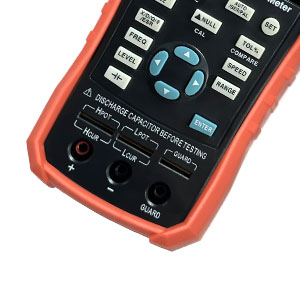
Figura 5: primo piano view of the five-terminal test slot and three-terminal test jacks.
5. Istruzioni per l'uso
5.1 Accensione/spegnimento
Premere e tenere premuto il tasto Pulsante di accensione (red circle with line) to turn the meter on or off.
5.2 Basic Measurements (L/C/R)
- Collega componente: Connect the component to be tested using the test leads or insert it into the direct test slot. Remember to discharge capacitors first.
- Select Main Parameter: Premere il tasto AUTO/R/C/L/Z button to cycle through automatic detection (AUTO), Resistance (R), Capacitance (C), Inductance (L), or Impedance (Z). In AUTO mode, the meter attempts to identify the component type.
- Select Test Frequency: Premere il tasto FREQUENZA button to choose the desired test frequency (100Hz, 120Hz, 1KHz, 10KHz, 40KHz, 100KHz). The chosen frequency will be displayed on the screen.
- Select Measurement Speed: Premere il tasto VELOCITÀ button to select Fast, Medium, or Slow measurement speed. Slower speeds generally provide more stable readings.
- Misurazione di lettura: The primary measurement (L, C, or R) will be displayed prominently on the screen.
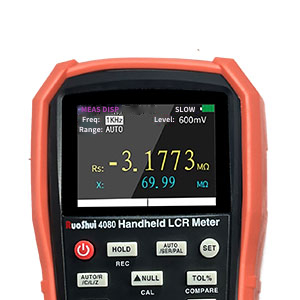
Figure 6: Close-up of the LCR Meter's display showing measurement readings.
5.3 Equivalent Circuit Modes (Series/Parallel)
Premere il tasto AUTO/SER/PAL button to switch between Auto, Series, and Parallel equivalent circuit modes. The appropriate mode depends on the component and test frequency:
- Modalità serie: Often preferred for low impedance components (e.g., small inductors, large capacitors).
- Modalità parallela: Often preferred for high impedance components (e.g., large inductors, small capacitors, resistors).
- Modalità automatica: The meter attempts to select the most suitable mode.
5.4 Calibration (Open/Short Correction)
Calibration helps to remove residual impedance from test leads and fixtures, improving measurement accuracy. It is recommended to perform calibration when changing test leads or frequently for critical measurements.
- Calibrazione breve:
- Connect the provided shorting bar to the test terminals or short the test leads together.
- Premere a lungo il tasto NULL/CAL button. The screen will indicate "Short" calibration in progress and show a countdown. This process takes approximately 45 seconds.
- Calibrazione aperta:
- Remove the shorting bar or ensure the test leads are open (not touching anything).
- Premere a lungo il tasto NULL/CAL button again. The screen will indicate "Open" calibration in progress and show a countdown. This process also takes approximately 45 seconds.
The meter automatically senses the presence or absence of the shorting bar, allowing calibration in either order. Calibration settings can be preserved through power cycles if "PowerOn: Last" is selected in the system settings.
5.5 Secondary Measurement Parameters (ESR, D, Q, X)
Premere il tasto X/D/Q/ESR button to cycle through secondary measurement parameters displayed below the main reading:
- ESR (Equivalent Series Resistance): Important for evaluating capacitor quality.
- D (Dissipation Factor): Indicates the energy loss in a component.
- Q (Quality Factor): The inverse of the dissipation factor, indicating the efficiency of a reactive component.
- X (Reactance): The imaginary part of impedance.
5.6 Test Signal Level and Bias Voltage
- Livello del test: Premere il tasto LIVELLO button to adjust the RMS test voltage (300mV, 600mV, 1000mV). A higher level can improve signal-to-noise ratio (SNR) for better accuracy, especially for low-value components.
- Pregiudizio voltage: Utilizza l'apposito Pregiudizio voltage Pulsante (or navigate via arrow keys) to apply a DC bias (0V, 100mV, 300mV, 600mV). This is useful for testing electrolytic capacitors or semiconductors.
5.7 Special Function for Electrolytic Capacitors
The meter includes a dedicated function for electrolytic capacitors. Activating this function typically sets the test level to a fixed 600mV RMS and applies a 1V offset, ensuring the lowest part of the test sine wave remains above ground. Refer to the meter's on-screen prompts or specific button for this function.
5.8 Impostazioni di sistema
Premere il tasto IMPOSTATO button to access system settings. Use the Tasti di direzione to navigate and adjust options:
- Lingua: Select Chinese or English.
- Spegnimento automatico: Set automatic power-off time (OFF, 5, 15, 30, 60 minutes).
- luminoso: Adjust backlight brightness in 20% increments.
- Accensione: Choose whether the meter starts with the last settings ("Last") or default settings ("Default").
- Bip: Configure audible alerts (Off, Key+Notice, Only Notice).
- Colori: Select display color scheme (White, Yellow, Cyan, Coral).
6. Remote Communication
The RuoShui 4080 LCR Meter supports remote communication and data acquisition via its Mini-USB port. Connect the meter to a PC using a Mini-USB cable. You may need to install specific driver software provided by RuoShui for your operating system to enable communication. This feature allows for remote control of the meter and logging of measurement data.

Figure 7: The LCR Meter connected to a PC for remote communication and data display.
7. Manutenzione
7.1 Pulizia
Pulisci l'esterno del misuratore con un panno morbido eamp panno. Non utilizzare detergenti abrasivi o solventi. Assicurarsi che non penetri umidità nel dispositivo.
7.2 Conservazione
Store the meter in a cool, dry place away from direct sunlight and extreme temperatures. If storing for extended periods, ensure the battery is partially charged (around 50%) to prolong its lifespan.
7.3 Protezione dello schermo
The screen may come with a protective film. Carefully remove this film for optimal display clarity. Use a soft cloth to clean the screen.
8. Risoluzione Dei Problemi
| Problema | Possibile causa | Soluzione |
|---|---|---|
| Il misuratore non si accende. | Batteria scarica o scarica. | Charge the battery using the Mini-USB cable. |
| Letture imprecise o instabili. |
|
|
| Meter freezes or becomes unresponsive. | Software glitch or unexpected input. | Press and hold the power button to force a restart. If persistent, disconnect the battery (if accessible) or contact support. |
| PC communication not working. | Driver mancanti o errati. | Ensure the correct drivers for the RuoShui 4080 LCR Meter are installed on your PC. Check cable connection. |
9. Specifiche
| Parametro | Valore |
|---|---|
| Modello | HT-LCR Meter-4080 |
| Measurement Frequencies | 100Hz, 120Hz, 1KHz, 10KHz, 40KHz, 100KHz |
| Campo di misura | L: 0-1000H, C: 0-20mF, R: 0-20MΩ |
| Parametri principali | L, C, R, Z |
| Sottoparametri | X, D, Q, ESR |
| Equivalent Method | Collegamento in serie e parallelo |
| Range Method | Manual, automatic |
| Test di velocità | Veloce (4 volte/s), Medio (2 volte/s), Lento (1 volta/s) |
| Test End Configuration | Three end and five end |
| Caratteristiche standard | Short circuit, open circuit correction |
| Interfaccia di comunicazione | Mini USB (Virtual Serial Port) |
| Livello del segnale di prova | 0.3Vrms/0.6Vrms optional (Note: Product description mentions 300mV, 600mV, 1000mV) |
| Impedenza di uscita | 100Ω |
| Massima precisione | 0.20% |
| Electrolytic Capacitor Mode | SÌ |
| DCR Mode | SÌ |
| pregiudizio interno | SÌ |
| Conservazione dei dati | SÌ |
| Registrazione dei dati | SÌ |
| Fonte di alimentazione | 5V, 2600mAh Lithium Polymer battery (included) or Mini USB power supply |
| Schermo di visualizzazione | Schermo LCD TFT da 2.8 pollici |
| Dimensioni del corpo | 190 * 90 * 50 mm (7.48 x 3.54 x 1.97 pollici) |
| Peso corporeo | 423 g (0.93 libbre) |
Nota: le specifiche sono soggette a modifiche senza preavviso.
10. Garanzia e supporto
For warranty information and technical support, please refer to the documentation included with your purchase or contact RuoShui customer service directly. Contact details can typically be found on the manufacturer's official websito o tramite il tuo punto vendita.
Produttore: Ruo Shui
Numero modello: HT-LCR Meter-4080