
Introduzione
This manual provides detailed instructions for the installation, operation, and maintenance of your EBTOOLS 4.3-inch 1080P Mirror Dash Cam. This device is designed to record video footage from both the front and rear of your vehicle, offering features such as parking monitoring and loop recording for enhanced driving safety and evidence collection. Please read this manual thoroughly before using the product to ensure proper functionality and to avoid any damage.
Caratteristiche del prodotto
- Costruzione durevole: Manufactured from high-quality ABS material for robustness and extended durability.
- Obiettivi grandangolari: Equipped with wide-angle lenses to minimize blind spots and capture comprehensive road details.
- Registrazione in loop: Ensures continuous recording by automatically overwriting the oldest video filequando la scheda di memoria raggiunge la sua capacità.
- Prestazioni per tutte le stagioni: Capable of recording clear video footage even in adverse weather conditions such as rain or fog.
- Design intuitivo: Features a straightforward installation process and intuitive controls for ease of use.
Contenuto della confezione
Si prega di verificare che tutti i seguenti articoli siano inclusi nel pacchetto:
- EBTOOLS 4.3-inch Mirror Dash Cam Unit
- Posterioreview Telecamera
- Caricabatterie per auto
- Cavo di collegamento della telecamera posteriore
- Mounting Straps/Adhesive
- Manuale dell'utente (questo documento)

Impostare
1. Montaggio della Dash Cam
Fissare la dash cam sullo specchio posteriore esistente del veicoloview mirror using the provided mounting straps. Ensure it is firmly attached and does not obstruct your view.
2. Collegamento della telecamera posteriore
Route the rear camera cable from the dash cam to the desired mounting location at the rear of your vehicle. Connect the rear camera to the AV IN port on the main dash cam unit. For optimal performance, ensure the cable is neatly tucked away and secured.


3. Collegamento elettrico
Connect the provided car charger to the dash cam's power input port and then plug the other end into your vehicle's 12V power outlet (cigarette lighter socket). The device will typically power on automatically with the vehicle's ignition.
4. Inserire la scheda di memoria
Insert a compatible Micro SD card (not included) into the TF CARD slot on the dash cam. Ensure the card is inserted correctly until it clicks into place. A high-speed Class 10 or higher card is recommended for reliable recording.

Istruzioni per l'uso
Accensione/spegnimento
- Automatico: The dash cam will power on and begin recording automatically when your vehicle's ignition is turned on.
- Manuale: Press and hold the Power button (usually marked with a power symbol) to manually turn the device on or off.
Navigazione nei menu
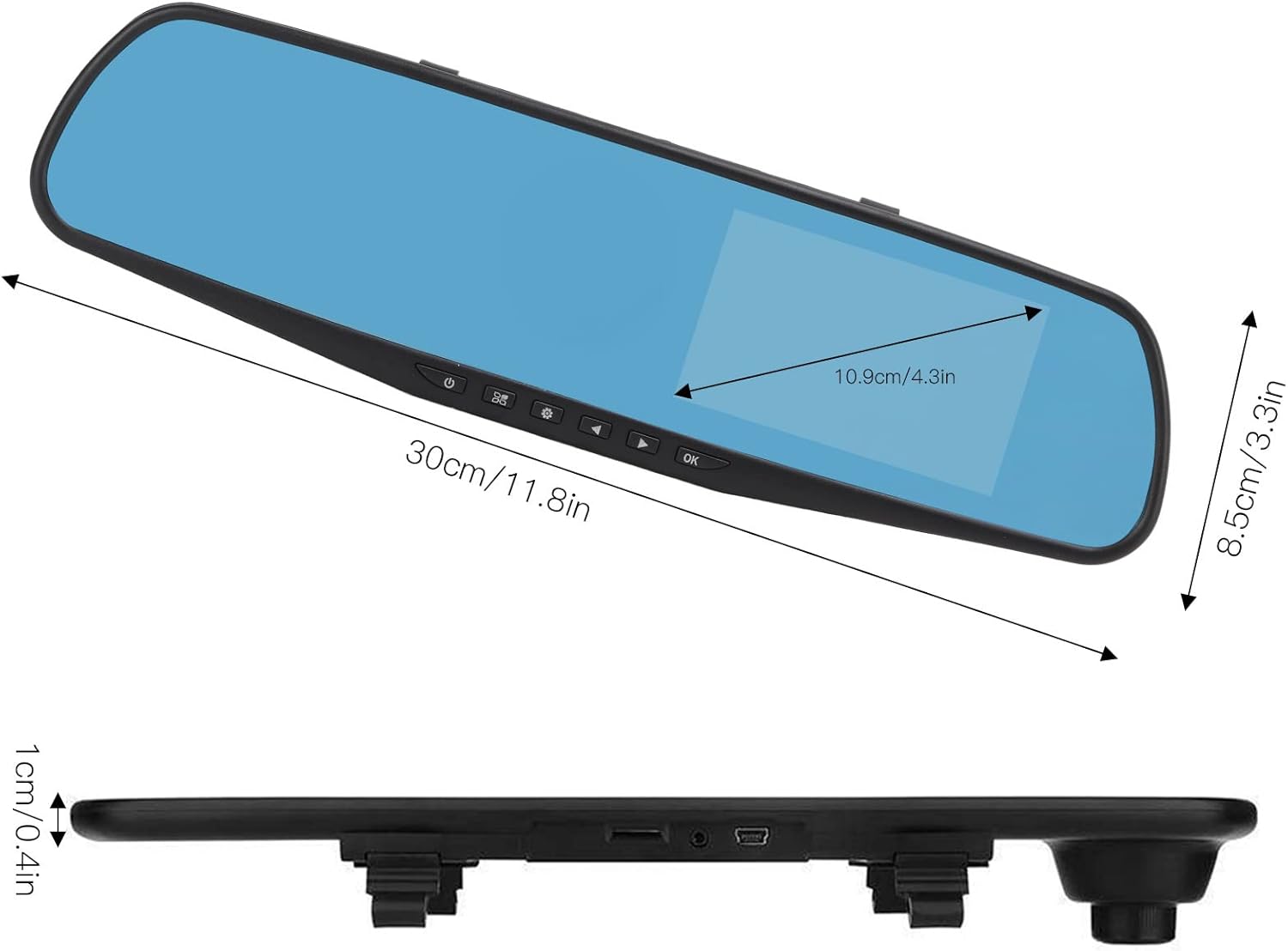
Use the physical buttons located on the bottom of the mirror unit to navigate through the menu options:
- Pulsante Menu: Premere per accedere al menu delle impostazioni.
- Pulsanti su/giù: Use to scroll through menu options.
- Pulsante OK: Press to confirm a selection or setting.
Modalità di registrazione
- Registrazione in loop: This feature records video in continuous segments (e.g., 1, 2, 3, or 5 minutes). When the memory card is full, the oldest filevengono sovrascritti automaticamente per fare spazio a nuove registrazioni.
- Rilevamento del movimento: When enabled, the dash cam will automatically start recording if it detects movement in front of the vehicle while parked. This feature is useful for parking surveillance.
Impostazioni di risoluzione video
You can adjust the video resolution for both front and rear cameras in the settings menu:
- Fotocamera frontale: Select between 1080P (FHD 1400x1080) or 720P (HD 1280x720).
- Telecamera posteriore: Records at 720P resolution.
Impostazioni della lingua
The device supports multiple languages. Navigate to the language settings in the menu to select your preferred language, including English, German, French, Italian, Japanese, Korean, and Simplified Chinese.

Manutenzione
- Pulizia: Utilizzare un panno morbido e asciutto per pulire lo schermo e le lenti della dash cam. Evitare l'uso di detergenti abrasivi o solventi.
- Scheda di memoria: Regularly format your Micro SD card (at least once a month) to ensure optimal performance and prevent data corruption. Back up any important footage prima della formattazione.
- Temperatura: Avoid exposing the device to extreme temperatures, both hot and cold, as this can affect battery life and component integrity.
Risoluzione dei problemi
- Il dispositivo non si accende:
- Ensure the car charger is properly connected to both the dash cam and the vehicle's 12V power outlet. Check if the vehicle's ignition is on. Test the charger in another port or with another device if possible.
- Problemi di registrazione (ad esempio, interruzione della registrazione, danneggiamento files):
- Verify that a compatible, high-speed Micro SD card (Class 10 or higher) is inserted correctly. Format the memory card through the dash cam's settings menu. If issues persist, try a different memory card.
- Screen display problems (e.g., black screen, distorted image):
- Check all cable connections, especially for the rear camera. Try resetting the device to factory settings via the menu. If the problem continues, contact customer support.
- La telecamera posteriore non visualizza:
- Ensure the rear camera cable is securely connected to both the rear camera and the AV IN port on the main unit. Check for any damage to the cable or connectors.
Specifiche
| Tipo di articolo | Dashcam con specchio da 4.3 pollici |
| Materiale | addominali |
| Dimensioni dello schermo | 4.3 pollici |
| Tipo di visualizzazione | Schermo LCD |
| Angolo della fotocamera frontale | 110 gradi |
| Angolo della telecamera posteriore | 90-110 degrees (Adjustable) |
| Risoluzione video frontale | 1080P (FHD 1400x1080), 720P (HD 1280x720) |
| Risoluzione video posteriore | 720P |
| Intervalli di registrazione in loop | 1 minuto, 2 minuti, 3 minuti, 5 minuti |
| Rilevamento del movimento | Supportato |
| Risoluzione dell'immagine | 12MP, 10MP, 5MP, 3MP, 2MP, 1.3MP |
| Formato video | AVI |
| Formato immagine | Formato JPEG |
| Tipo di lente | F2.78 glass resolution multi-layer filter wide-angle lens |
| Lingue supportate | English, German, French, Italian, Japanese, Korean, Simplified Chinese |
| Uscita video | USB Card Reader |
| Metodo di montaggio | Tipo di adesivo |
| Dimensioni del prodotto | Approx. 30cm (11.8in) L x 8.5cm (3.3in) W x 1cm (0.4in) T |
| Dimensioni del pacco | 34 x 12 x 6 cm; 512 g |
Garanzia e supporto
For warranty information or technical assistance, please refer to the warranty card included with your product or contact EBTOOLS customer support through the retailer's platform where the product was purchased. Our support team is available to help with any questions or issues you may encounter.