
Introduzione
This manual provides essential information for the safe and effective use of your Motorola Solutions NNTN8560B IMPRES 2 Li-Ion Battery. This battery is designed for professional use in demanding environments, offering enhanced durability, safety, and performance when paired with compatible Motorola radios and IMPRES 2 chargers.
Caratteristiche principali
- IMPRES 2 Technology: Provides automatic adaptive reconditioning, extended cycle life, and maximized talk time when used with IMPRES 2 chargers.
- Intrinsecamente sicuro: Certified to TIA4950 standards, making it suitable for hazardous environments where explosive gases or combustible dust may be present.
- IP68 Rugged and Submersible: Fully dustproof and capable of withstanding submersion in water deeper than 1 meter for extended periods, ensuring reliability in harsh conditions.
- Alta capacità: 2500 mAh rated capacity for extended operational periods.
- Qualità OEM: Genuine Motorola Solutions product, ensuring compatibility and performance.
Prodotto finitoview
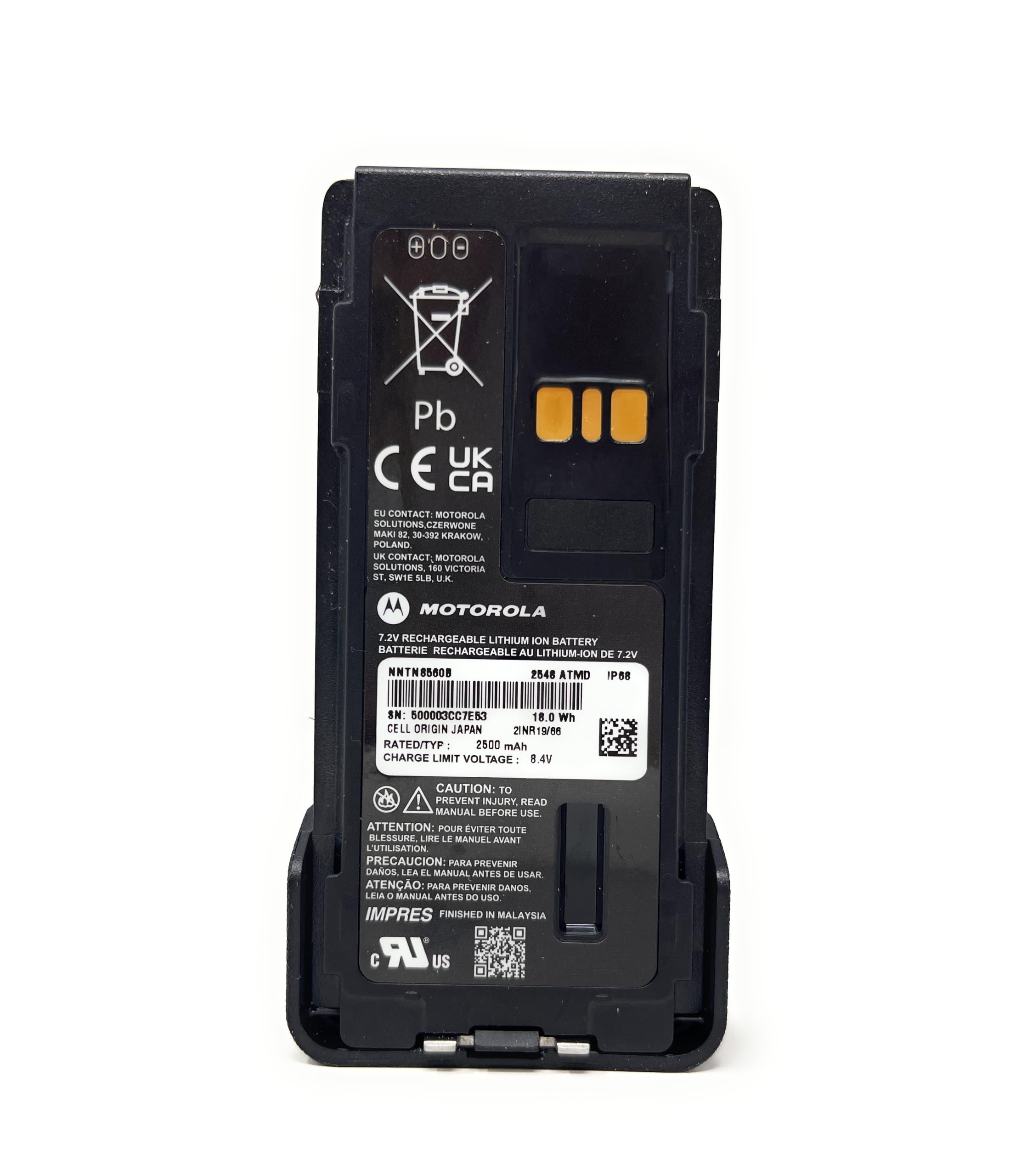

Compatibilità
The NNTN8560B battery is compatible with the following Motorola radio series:
- APX Series: APX1000, APX3000, APX4000
- MOTOTRBO Series: XPR3300, XPR3500, XPR7350, XPR7380, XPR7550, XPR7580
- MOTOTRBO Enhanced Series: XPR3300e, XPR3500e, XPR5380e, XPR7350e, XPR7380e, XPR7550e, XPR7580e
Configurazione e installazione
- Ispezionare la batteria: Before first use, visually inspect the battery for any signs of damage. Do not use a damaged battery.
- Align with Radio: Carefully align the battery with the battery compartment on the back of your compatible Motorola radio.
- Inserisci e proteggi: Slide the battery into the compartment until it clicks into place. Ensure the battery latch is fully engaged to prevent accidental detachment.
- Carica iniziale: Per prestazioni ottimali, caricare completamente la batteria prima del primo utilizzo.
Istruzioni per l'uso: Ricarica
To ensure maximum battery life and to maintain warranty validity, it is recommended to charge the NNTN8560B battery exclusively with compatible Motorola IMPRES 2 chargers (e.g., PMPN4284A, PMPN4576A).
- Collegare il caricabatterie: Plug the IMPRES 2 charger into a suitable power outlet.
- Inserire la batteria: Place the NNTN8560B battery into the designated charging slot on the IMPRES 2 charger. Ensure proper contact between the battery terminals and the charger pins.
- Ricarica del monitor: The charger's indicator light will typically show the charging status (e.g., solid red for charging, solid green for fully charged). Refer to your charger's manual for specific indicator meanings.
- Rimuovere la batteria: Una volta caricata completamente, rimuovere la batteria dal caricabatterie.
Nota: Using non-IMPRES chargers may affect battery performance and warranty terms.

Manutenzione
- Magazzinaggio: Store the battery in a cool, dry place away from direct sunlight and extreme temperatures. Avoid storing fully charged or fully discharged for extended periods.
- Pulizia: Periodically clean the battery contacts and the radio's battery terminals with a clean, dry cloth to ensure good electrical connection. Do not use abrasive cleaners or solvents.
- Rigenerazione: When used with IMPRES 2 chargers, the battery will undergo adaptive reconditioning to optimize its capacity and extend its lifespan. Follow the charger's instructions for reconditioning cycles.
- Disposizione: Dispose of batteries responsibly according to local regulations. Do not incinerate or puncture batteries.
Risoluzione dei problemi
Battery Not Charging or Not Recognized
- Ensure the battery is correctly seated in the charger and the charger is powered on.
- Verify that the charger is compatible with the NNTN8560B battery.
- Check the battery and charger contacts for dirt, debris, or damage. Clean if necessary.
- If using a non-IMPRES charger, charging behavior may vary, and the battery may not indicate full charge or percentage correttamente.
Shortened Talk Time
- The battery may require reconditioning. Use an IMPRES 2 charger to perform an adaptive reconditioning cycle.
- Battery capacity naturally degrades over time. If reconditioning does not improve performance, the battery may need replacement.
- Ensure the radio settings are optimized for power saving if extended talk time is critical.
Specifiche
| Caratteristica | Specificazione |
|---|---|
| Numero di modello | Numero di serie NNTN8560B |
| Chimica della batteria | Ioni di litio (Li-Ion) |
| Capacità | 2500 mAh |
| Protezione di ingresso | IP68 (Dustproof and Submersible) |
| Valutazione di sicurezza | Intrinsically Safe (TIA4950 certified) |
| IMPRES Technology | SÌ |
| Dimensioni (L x P x A) | 5 x 2.5 x 1 pollici |
| Peso | 8 once |
Informazioni sulla garanzia
Motorola Solutions provides a warranty for the NNTN8560B battery based on charging practices:
- Garanzia 24-mese: Valid when the battery is charged exclusively with compatible IMPRES 2 chargers. This warranty covers the battery's rated capacity.
- Garanzia 18-mese: Applies if the battery is charged with non-IMPRES chargers. This warranty also covers the battery's rated capacity.
Formato del codice data: To verify warranty status, refer to the date code on the battery, formatted as YYWW (Year and Week). For example, "2412" indicates the year 2024 and the 12th week of that year.

Supporto
For additional support, technical assistance, or to inquire about replacement parts, please visit the official Motorola Solutions website or contact their customer service department. Always refer to the specific radio's user manual for detailed instructions on battery installation and usage with your device.
Puoi trovare maggiori informazioni e prodotti su Negozio di soluzioni Motorola.