Introduzione
Thank you for choosing the GOBOULT Z60 Wireless Earbuds. This manual provides detailed instructions to help you set up, operate, and maintain your earbuds for an optimal audio experience. Please read this manual thoroughly before use and retain it for future reference.

Image: GOBOULT Z60 Earbuds, illustrating the brand transition from BOULT to GOBOULT, highlighting the new logo and packaging while assuring consistent product performance.
Cosa c'è nella scatola
Assicurarsi che tutti gli articoli siano presenti nel pacco:
- GOBOULT Z60 Wireless Earbuds (Left and Right)
- Custodia di ricarica
- Cavo di ricarica USB di tipo C.
- Punte auricolari (varie misure)
- Manuale d'uso
- Scheda di garanzia

Image: The GOBOULT Z60 Wireless Earbuds and their charging case, showcasing il design del prodotto e gli accessori inclusi.
Prodotto finitoview
The GOBOULT Z60 earbuds are designed for comfort and high-quality audio. Each earbud features a 13mm bass driver and multiple microphones for clear calls. The charging case provides extended battery life.
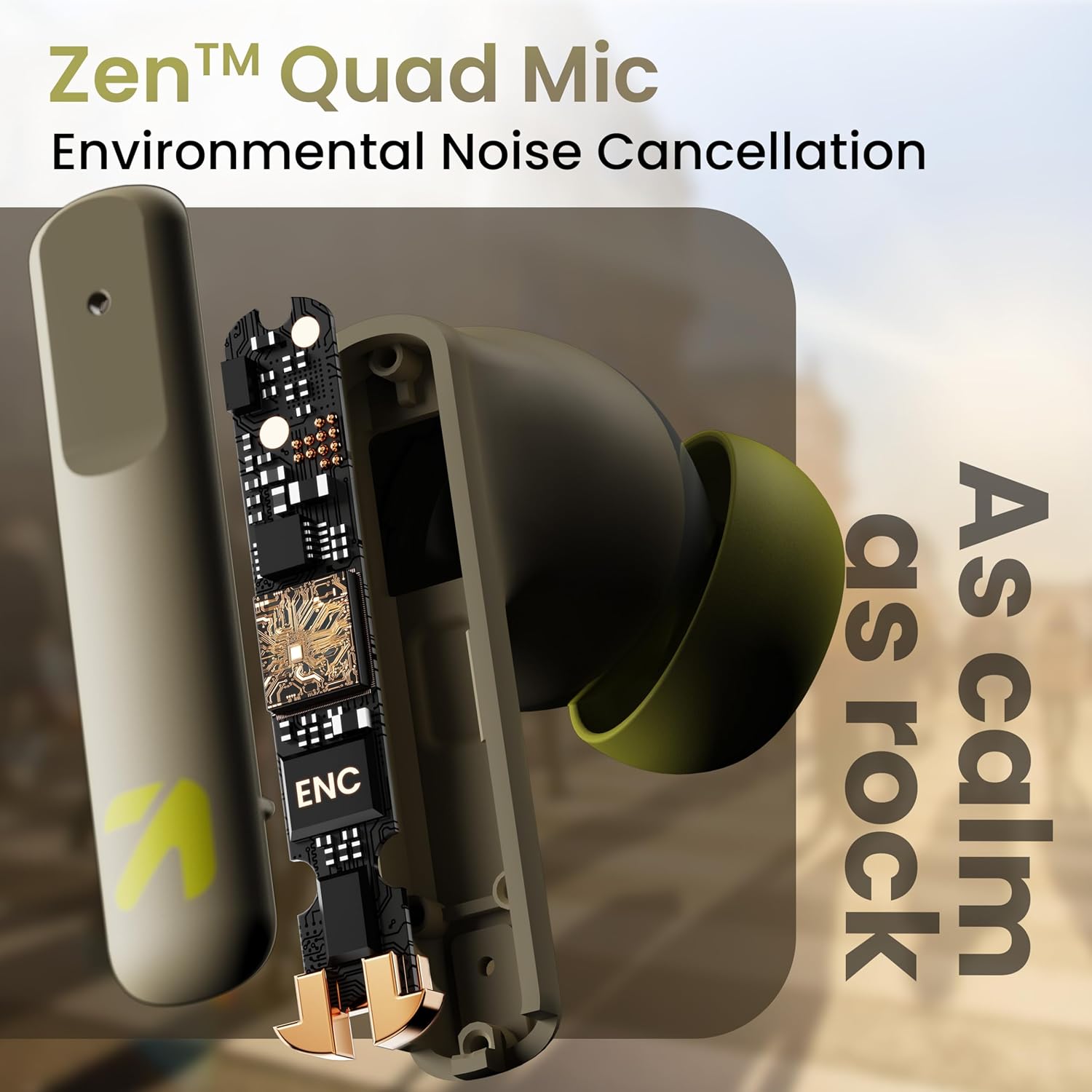
Immagine: Un interno view of a GOBOULT Z60 earbud, highlighting the Zen Quad Mic Environmental Noise Cancellation (ENC) technology for clear audio.

Image: A close-up of a GOBOULT Z60 earbud, emphasizing the 13mm BoomX Drivers responsible for rich bass and superior sound quality.
Ricarica
To charge your GOBOULT Z60 earbuds and charging case:
- Inserire gli auricolari nella custodia di ricarica. Assicurarsi che siano posizionati correttamente.
- Collegare il cavo di ricarica USB Type-C alla porta di ricarica sulla custodia e a una fonte di alimentazione.
- L'indicatore LED sulla custodia mostrerà lo stato di carica.
A full charge provides up to 60 hours of total playtime with the charging case. A quick 10-minute charge can provide up to 150 minutes of playtime.

Image: The GOBOULT Z60 charging case connected via a Type-C cable, illustrating the fast charging capability with indicators for 10 minutes charge yielding 150 minutes playtime.

Image: GOBOULT Z60 earbuds in their charging case, highlighting the impressive 60 hours of total playtime and 8 hours of playtime on a single earbud charge.
Setup: Pairing with Your Device
The GOBOULT Z60 earbuds utilize Bluetooth 5.3 for stable and efficient wireless connectivity.
- Abbinamento iniziale:
- Aprire la custodia di ricarica. Gli auricolari entreranno automaticamente in modalità di associazione.
- Sul tuo dispositivo (smartphone, tablet, laptop), attiva il Bluetooth.
- Cercare "GOBOULT Z60" in the list of available Bluetooth devices and select it to connect.
- Once connected, you will hear an audio prompt, and the LED indicator on the case will change.
- Riassociazione: Se il Bluetooth è abilitato sul dispositivo, gli auricolari si connetteranno automaticamente all'ultimo dispositivo associato quando vengono estratti dalla custodia.

Image: GOBOULT Z60 earbuds and their open charging case next to a smartphone, illustrating the Bluetooth 5.3 "Blink & Pair" feature for quick and stable connection.
Utilizzo degli auricolari
Controlli touch
The GOBOULT Z60 earbuds feature intuitive touch controls. The specific functions are:
- Riproduzione musicale:
- Tocco singolo: Riproduci/Pausa
- Doppio tocco (auricolare destro): traccia successiva
- Doppio tocco (auricolare sinistro): traccia precedente
- Triplo tocco (auricolare destro): aumento del volume
- Triplo tocco (auricolare sinistro): abbassamento del volume
- Gestione delle chiamate:
- Tocco singolo: Rispondi/Termina chiamata
- Long press: Reject call
- Assistente vocale: Long press (either earbud) to activate Google Assistant or Siri.
- Modalità di gioco: Tap 4 times on either earbud to activate/deactivate Combat Gaming Mode (50ms low latency).

Image: A visual guide to the GOBOULT Z60's touch controls, detailing actions for music playback (play/pause, next/back, volume), call management, activating voice assistance, and toggling game/music mode.
Modalità di gioco
Activate the 50ms low latency Combat Gaming Mode for a synchronized audio-visual experience during gaming. Tap 4 times on either earbud to switch between gaming and normal modes.

Image: GOBOULT Z60 earbuds in use with a smartphone displaying a racing game, emphasizing the "Combat Gaming Mode" with 50ms ultra-low latency, activated by tapping the earbud 4 times.
Assistente vocale
Access your device's voice assistant (Google Assistant or Siri) by long-pressing either earbud. This allows for hands-free control of your device.

Image: GOBOULT Z60 earbuds and their charging case, illustrating how to activate voice assistance (Ok Google, Hey Siri) with a long press on an earbud.
Manutenzione
To ensure the longevity and optimal performance of your GOBOULT Z60 earbuds:
- Pulizia: Pulisci regolarmente gli auricolari e la custodia di ricarica con un panno morbido e asciutto. Evita di utilizzare prodotti chimici aggressivi o materiali abrasivi.
- Auricolari: Remove and clean the eartips periodically. Ensure they are dry before reattaching.
- Resistenza all'acqua: The earbuds are IPX5 water-resistant, meaning they can withstand sweat and light rain. Do not submerge them in water or expose them to heavy downpours. Ensure the charging port is dry before charging.
- Magazzinaggio: Quando non li usi, riponi gli auricolari nella custodia di ricarica per proteggerli e mantenerli carichi.

Image: A GOBOULT Z60 earbud with water droplets on its surface, illustrating its IPX5 water resistance, suitable for protection against sweat, rain, and splashes.
Risoluzione dei problemi
If you encounter issues with your GOBOULT Z60 earbuds, refer to the following common solutions:
| Problema | Possibile soluzione |
|---|---|
| Gli auricolari non si accoppiano |
|
| Nessun suono da un auricolare |
|
| Gli auricolari non si caricano |
|
| Volume basso o scarsa qualità del suono |
|
Specifiche
| Caratteristica | Dettaglio |
|---|---|
| Nome del modello | AirBass (Z60) |
| Tecnologia di connettività | Wireless (Bluetooth) |
| Versione Bluetooth | 5.3 |
| Portata Bluetooth | 10 metri |
| Dimensioni del driver audio | 13 millimetri |
| Tipo di driver audio | Driver dinamico |
| Durata della batteria (totale) | Fino a 60 ore (con custodia di ricarica) |
| Tempo di ricarica | Circa 90 minuti |
| Ricarica rapida | 10 minuti di carica = 150 minuti di riproduzione |
| Porta di ricarica | Tipo C |
| Microfoni | 4 ENC Mics for Clear Calling |
| Latenza audio | 50 millisecondi (modalità di gioco) |
| Resistenza all'acqua | IPX5 (resistente al sudore, alla pioggia, agli schizzi) |
| Metodo di controllo | Tocco, Voce |
| Peso dell'articolo | 41.5 grammi |
| Paese di origine | India |
Garanzia e supporto
Your GOBOULT Z60 Wireless Earbuds come with a Garanzia del produttore di 1 anni dalla data di acquisto.
For any support, warranty claims, or technical assistance, please refer to the contact information provided on your warranty card or visit the official GOBOULT support websito.