
Introduzione
This manual provides essential information for the safe and efficient use of your SANSUI JSW50GSUHD 50-inch 4K Ultra HD Smart Google LED TV. Please read these instructions thoroughly before operating the television and retain them for future reference.

Immagine: Frontale view of the SANSUI JSW50GSUHD 50-inch 4K Ultra HD Smart Google LED TV.
Informazioni sulla sicurezza
Always follow basic safety precautions when using this television to reduce the risk of fire, electric shock, and injury. Keep the TV away from water and moisture. Do not block ventilation openings. Use only attachments/accessories specified by the manufacturer. Refer all servicing to qualified service personnel.
Cosa c'è nella scatola
Disimballare con attenzione la scatola e assicurarsi che siano presenti tutti gli articoli:
- 1 x SANSUI JSW50GSUHD 50-inch TV
- 1 x telecomando
- 1 pair x AAA Batteries (for remote)
- 1 set x Base Stand
- 2 pairs x Screws (for stand)
- 1 set x Wall Mounting Kit (if included)
- 1 x Manuale utente e scheda di garanzia
- 1 x cavo di alimentazione
- 1 x Mini AV cable
Impostare
1. Posizionamento televisivo
Place the TV on a stable, flat surface using the provided base stand, or mount it on a wall using a compatible VESA 100 x 100 mm wall mount (sold separately). Ensure adequate ventilation around the TV.

Image: The SANSUI JSW50GSUHD TV placed on a media console with its stand.
2. Collegamento di dispositivi esterni
Your SANSUI TV offers various connectivity options:
- Porte HDMI (3): Collega lettori Blu-ray, console di gioco, decoder, ecc.
- Porte USB (2): Collegare unità USB per la riproduzione multimediale.
- AV (Mini) Port: Per dispositivi più vecchi che utilizzano video composito e audio stereo.
- Porta Ethernet (LAN): Per una connessione Internet cablata.
- Antenna/RF Input: Per collegare un'antenna o una TV via cavo.
- Uscita audio ottica: Per il collegamento a sistemi audio esterni.
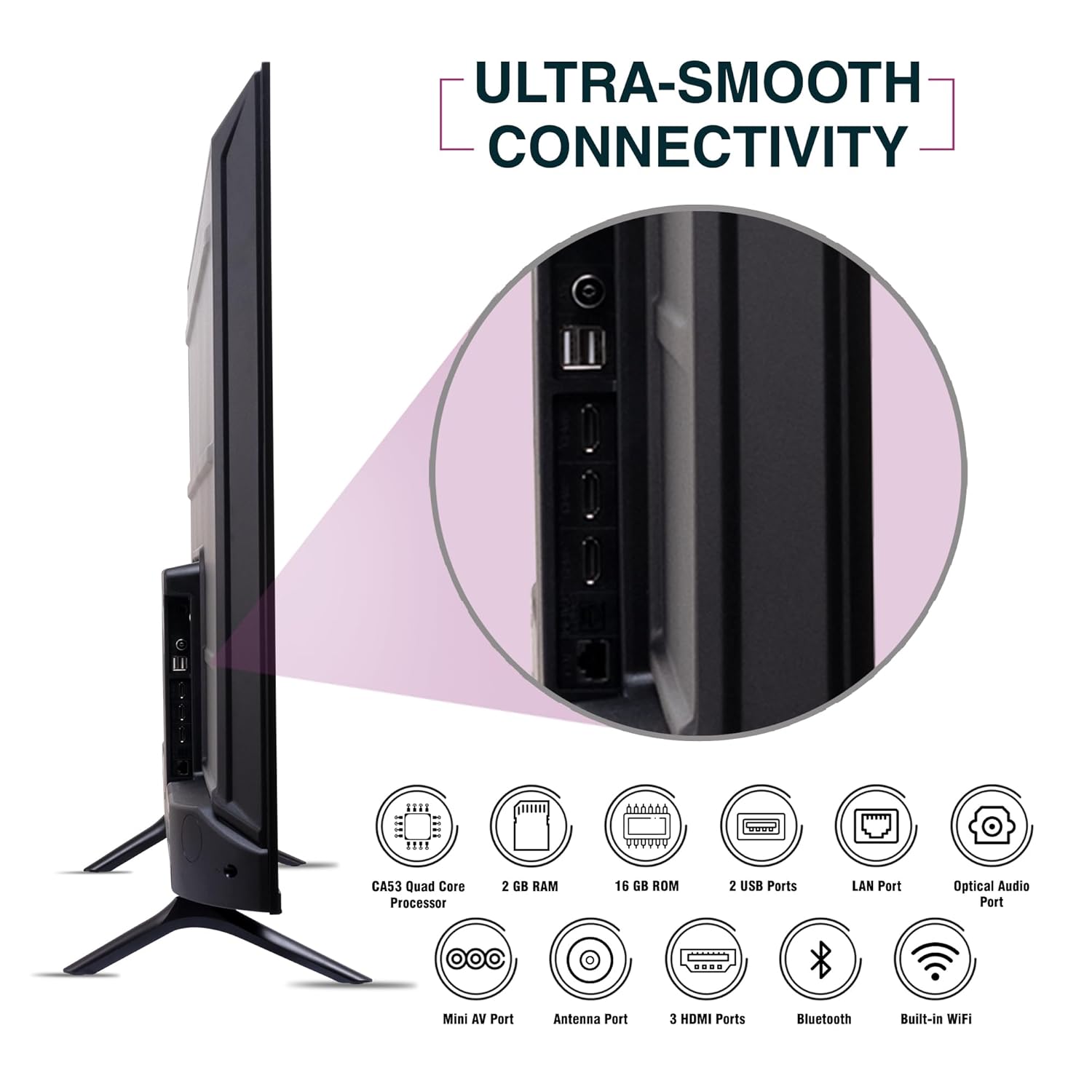
Immagine: Lato view of the SANSUI JSW50GSUHD TV highlighting the various input and output ports.
3. Collegamento elettrico
Connect the power cable to the TV's power input and then to a wall outlet. The TV supports 100-240 VAC, 50-60 Hz.
4. Impostazione del telecomando
Inserire le due batterie AAA nel telecomando, assicurandosi che la polarità sia corretta.
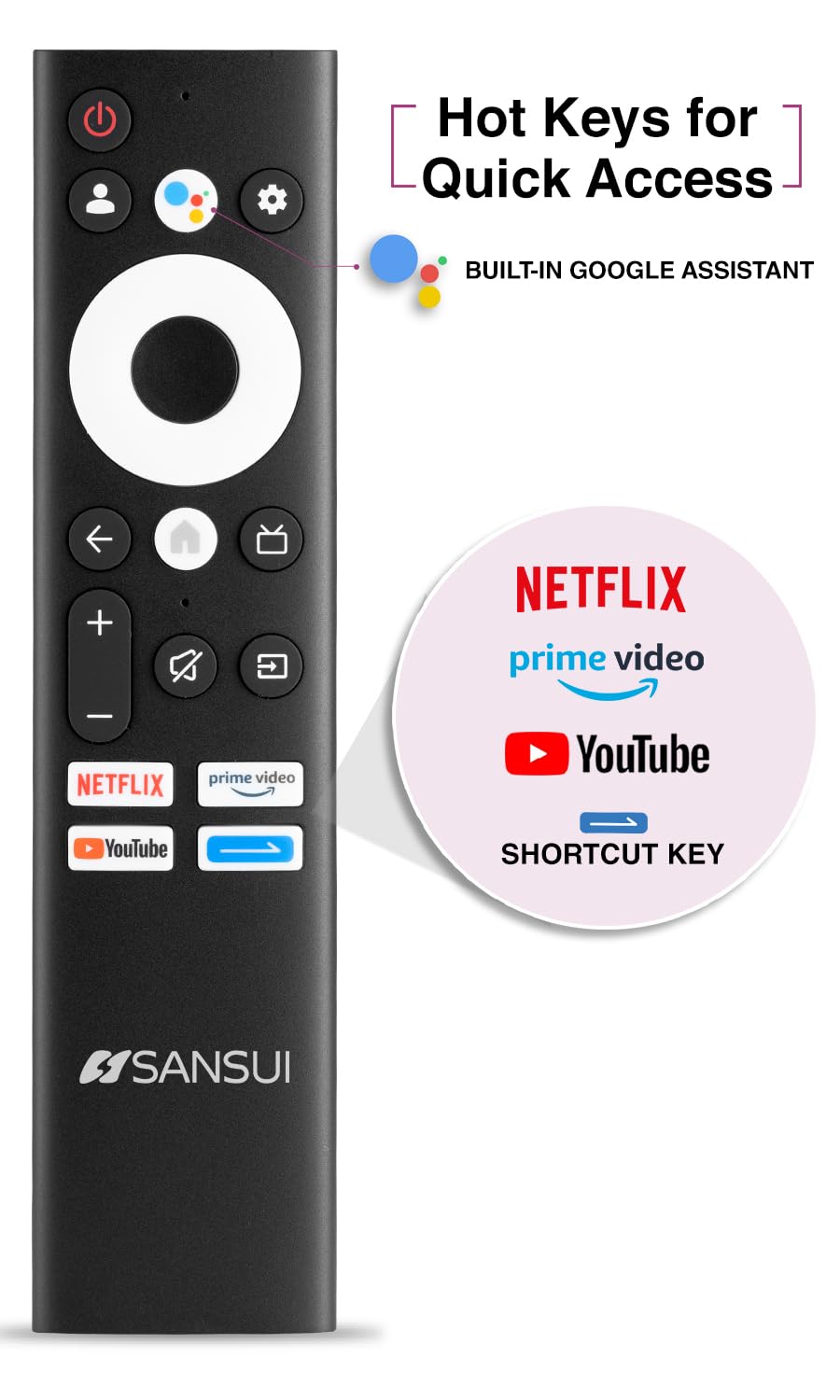
Image: The SANSUI JSW50GSUHD remote control, showing button layout and hot keys.
5. Configurazione iniziale (Google TV)
Upon first power-on, the TV will guide you through the initial setup process. This includes selecting your language, connecting to Wi-Fi, signing in with your Google account, and configuring Google TV settings. Follow the on-screen prompts.
Utilizzo del televisore
1. Funzioni di base
- Energia: Premere il pulsante di accensione sul telecomando per accendere o spegnere la TV.
- Volume: Utilizzare i pulsanti Volume su/giù per regolare i livelli audio.
- Sorgente di input: Press the Source button to select between HDMI, AV, TV, and other inputs.
- Navigazione: Utilizzare il tastierino direzionale e il pulsante OK per navigare nei menu.
2. Funzionalità Smart TV (Google TV)
Your TV runs on Google TV, providing access to a wide range of streaming services and smart features.
- Assistente Google: Use the dedicated button on your remote for voice commands to search for content, control smart home devices, and get information.
- Chromecast integrato: Trasmetti i contenuti dal tuo smartphone, tablet o computer compatibile direttamente sulla tua TV.
- Applicazioni: Access popular streaming apps like Netflix, Prime Video, Disney+ Hotstar, and YouTube directly from the Google TV interface. Download more apps from the Google Play Store.
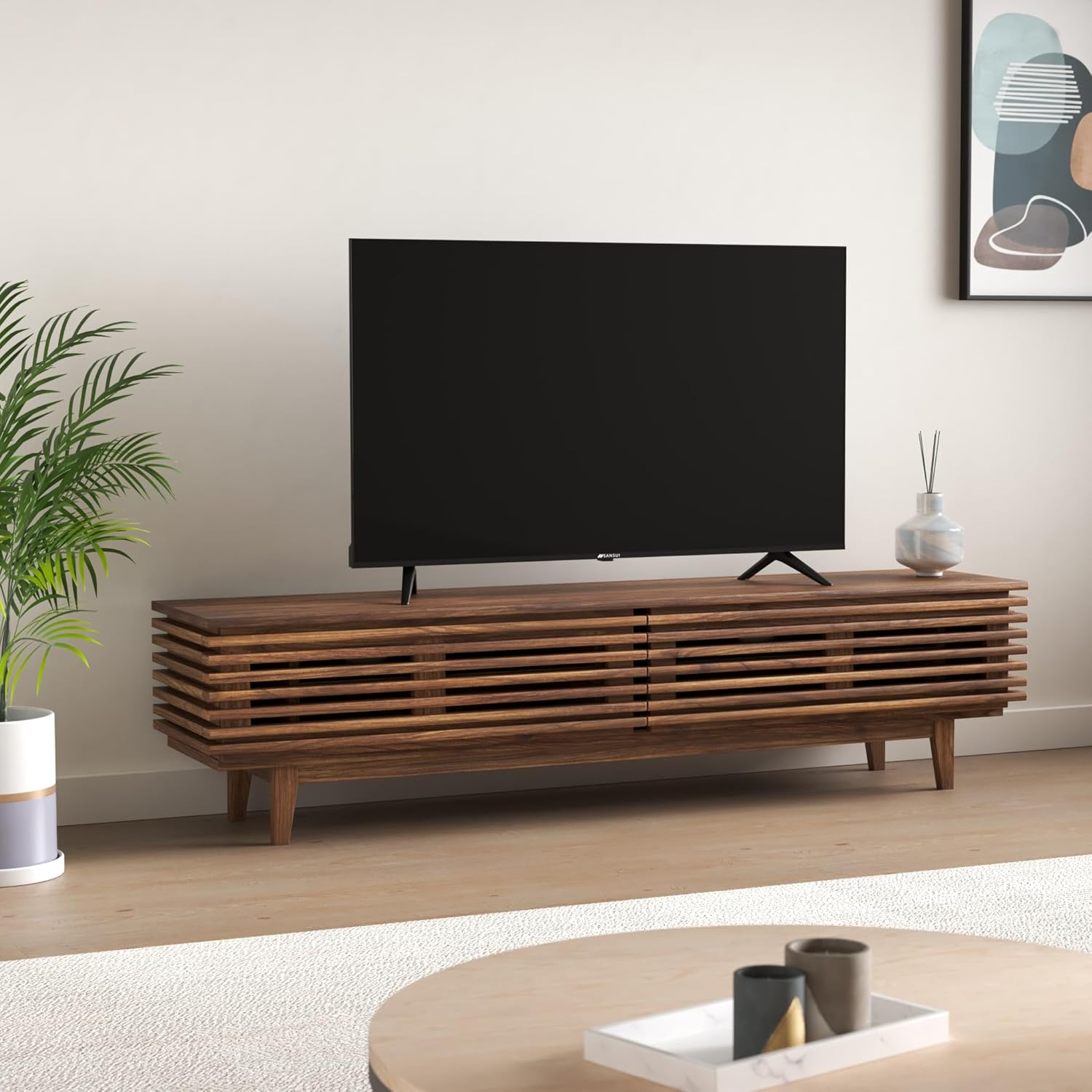
Image: The Google TV home screen displaying various streaming applications and content suggestions.
3. Display and Audio Enhancements
- Risoluzione 4K Ultra HD: Enjoy stunning clarity and detail with 3840x2160 resolution.
- Tipo di HDR: Experience enhanced contrast and a wider range of colors with HDR10 content.
- Zen Panel: The A+ Zen panel dynamically enhances visual content with uniform light dispersal for improved picture quality.
- Design senza cornice: Massimizza lo spazio sullo schermo per un'esperienza immersiva viewesperienza di acquisizione.
- Dolby Audio & DTS Studio Sound: Delivers rich, clear, and immersive audio with 20W output.

Immagine: Primo piano view of the SANSUI JSW50GSUHD TV showcasing its bezel-less design with a vibrant nature scene.

Image: An illustration demonstrating the advanced light dispersal technology of the Zen Panel for enhanced hues.
Manutenzione
1. Pulizia
Per pulire lo schermo, strofinarlo delicatamente con un panno morbido e privo di lanugine. Per macchie ostinate, strofinare leggermenteampen the cloth with water or a screen cleaner specifically designed for TVs. Do not spray liquid directly onto the screen. Clean the TV body with a soft, dry cloth.
2. Aggiornamenti software
La tua Google TV potrebbe ricevere aggiornamenti software automatici. Assicurati che la tua TV sia connessa a Internet per ricevere questi aggiornamenti, che possono migliorare le prestazioni e aggiungere nuove funzionalità.
Risoluzione dei problemi
Se riscontri problemi con la tua TV, fai riferimento alle seguenti soluzioni comuni:
| Problema | Possibile soluzione |
|---|---|
| Nessun potere | Controllare che il cavo di alimentazione sia collegato saldamente al televisore e alla presa a muro. Assicurarsi che la presa sia funzionante. |
| Nessuna immagine/suono | Verify the correct input source is selected. Check cable connections to external devices. Try a different HDMI port. |
| Il telecomando non funziona | Controllare e sostituire le batterie. Assicurarsi che non vi siano ostacoli tra il telecomando e il sensore IR del televisore. |
| Problemi di connessione Wi-Fi | Restart your router and modem. Reconnect the TV to the Wi-Fi network in the settings. Ensure the TV is within range of your router. |
| Problemi di qualità dell'immagine | Regola le impostazioni dell'immagine (luminosità, contrasto, colore) nel menu TV. Assicurati che la sorgente del contenuto sia di alta qualità. |
If problems persist, perform a factory reset via the TV settings menu (Settings > System > About > Reset). Note that a factory reset will erase all personal data and settings.
Specifiche
Detailed technical specifications for the SANSUI JSW50GSUHD TV:
- Dimensioni dello schermo: 127 Centimetres (50 Inches)
- Tecnologia di visualizzazione: GUIDATO
- Risoluzione: 4K Ultra HD (3840x2160)
- Frequenza di aggiornamento: Frequenza 60 Hz
- Caratteristiche speciali: Bezel-Less Design, Browser, Chromecast, Parental Controls, Sleep Timer, Google TV, Google Assistant, Voice Search Smart Remote
- Connettività: 3 HDMI ports, 2 USB ports, 1 AV (mini), Bluetooth, Wi-Fi, Ethernet (LAN), Optical Audio
- Uscita audio: 20W with Dolby Audio and DTS Studio Sound
- Processore: CA53 Quad core Processor
- Memoria: RAM 2GB, ROM 16GB (FLASH)
- Sistema operativo: TV di Google
- Dimensioni del prodotto (P x L x A): 9D x 111W x 71.7H centimetri
- Peso dell'articolo: 9300 grammi
- Consumo energetico: 130 Watt
- Standard di montaggio VESA: 100 x 100 millimetri
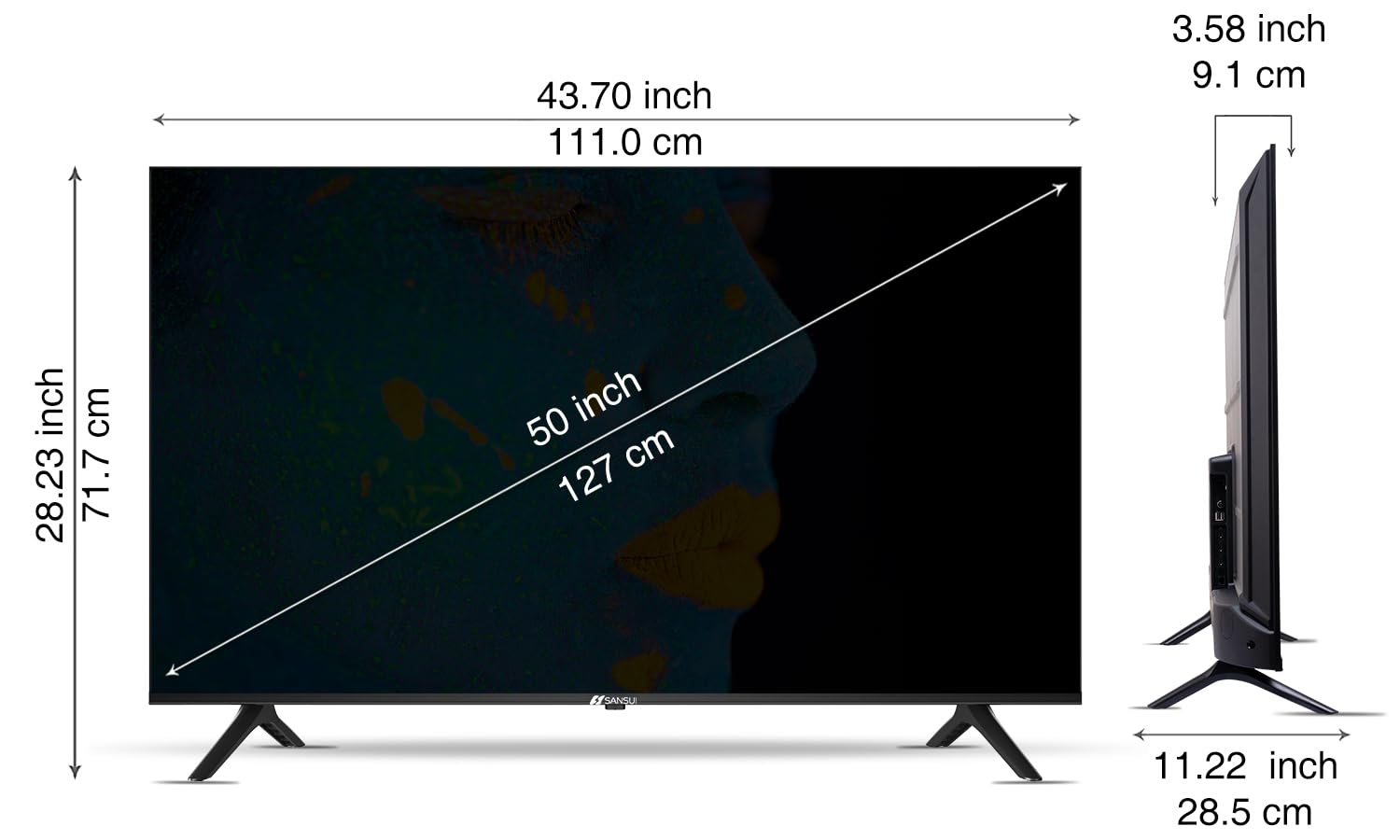
Image: Diagram illustrating the dimensions of the SANSUI JSW50GSUHD 50-inch TV.
Garanzia e supporto
Your SANSUI JSW50GSUHD TV comes with a 1-year comprehensive warranty, plus an additional 1-year warranty on the panel, provided by the brand from the date of purchase.
For warranty support or any technical assistance, please contact SANSUI customer care:
- Numero verde: 1800 419 3777
- E-mail: sansuicare@jainaindia.com
Manufacturer: PG Electroplast Limited
Importer: Jaina India Pvt Ltd.