
1. Introduzione
Thank you for choosing the Newmen GM101 Mechanical Gaming Keyboard. This wired keyboard is designed for an enhanced gaming and typing experience, featuring RGB backlighting, anti-ghosting capabilities, and a durable aluminum panel. This manual provides detailed instructions for setup, operation, and maintenance to ensure optimal performance and longevity of your device.

Image: The Newmen GM101 Mechanical Gaming Keyboard, showcasing its full layout with RGB backlighting and integrated wrist rest.
2. Contenuto della confezione
Si prega di verificare che tutti gli articoli siano presenti nel pacco:
- Newmen GM101 Mechanical Gaming Keyboard with Wrist Rest
- Manuale dell'utente (questo documento)
3. Caratteristiche principali
- Pannello metallico resistente: The keyboard features a high-quality aluminum alloy panel, providing durability and scratch resistance, along with a sleek, streamlined design.
- Foldable Wrist Rest: An integrated foldable wrist rest offers ergonomic support during use and can be neatly stowed away to protect the keys from dust when not in use.
- Multiple RGB Backlighting Modes: Equipped with 20 LED backlighting modes and 10 color sidelights, allowing for extensive customization of the keyboard's illumination.
- Multimedia & Anti-Ghosting: Includes 12 dedicated multimedia keys for improved efficiency. 104 non-conflicting keys ensure simultaneous key presses are registered accurately at high speeds, ideal for gaming and typing.
- Macro completamente programmabili: All keys and keypress combinations can be remapped. Macros can be recorded via software for complex commands and personalized function keys.
- Interruttori sostituibili a caldo: Allows for easy replacement of keycaps and switches to customize the typing feel and sound.

Image: The Newmen GM101 keyboard from an elevated angle, highlighting its design for a comfortable typing experience.

Image: A visual representation of the anti-ghosting feature on the Newmen GM101 keyboard, showing multiple key presses being registered simultaneously.

Image: Close-up of the Newmen GM101 keyboard demonstrating hot-swappable switches, with some keycaps and switches removed to show the mechanism.
4. Impostazione
Follow these steps to set up your Newmen GM101 Mechanical Gaming Keyboard:
- Disimballare la tastiera: Carefully remove the keyboard and any packaging materials from the box.
- Connetti al dispositivo: Locate the USB-A cable attached to the keyboard. Plug the USB-A connector into an available USB port on your computer (PC or Mac).
- Installazione del driver: The keyboard is plug-and-play and typically does not require additional drivers for basic functionality. Your operating system should automatically recognize the device.
- Posizionamento: Place the keyboard on a stable, flat surface. If desired, deploy the integrated wrist rest for ergonomic support.

Image: The Newmen GM101 keyboard set up on a desk next to a gaming mouse, connected to a computer, illustrating a typical user setup.
5. Istruzioni per l'uso
5.1 Funzioni di base della tastiera
The Newmen GM101 functions as a standard 104-key keyboard. All keys perform their labeled functions by default.
5.2 tasti multimediali
The keyboard features 12 multimedia keys, accessible via the Fn key in combination with the F1-F12 keys. These shortcuts enhance productivity and control over media playback.
- Fn+F1: Il mio computer
- Fn+F2: Cerca
- Fn+F3: Calcolatrice
- Fn+F4: Lettore multimediale
- Fn+F5: Traccia precedente
- Fn+F6: Traccia successiva
- Fn+F7: Riproduci/Pausa
- Fn+F8: Fermare
- Fn+F9: Muto
- Fn+F10: Abbassa il volume
- Fn+F11: Alza il volume
- Fn+F12: Blocco tastiera
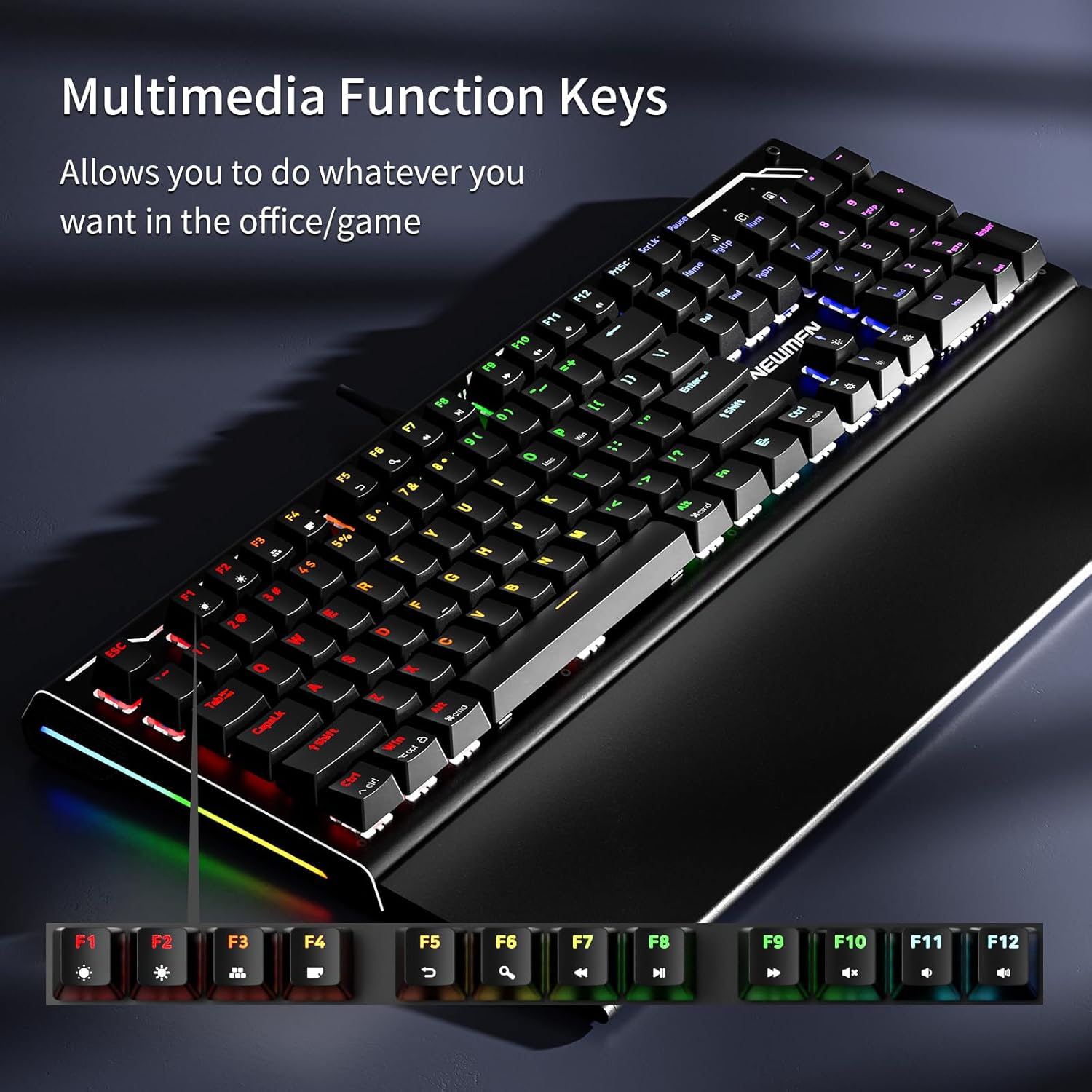
Image: The Newmen GM101 keyboard highlighting the F-keys with their corresponding multimedia functions, such as volume control and media playback.
5.3 Controllo della retroilluminazione RGB
The GM101 keyboard offers extensive RGB backlighting customization. Use the following Fn key combinations to control the lighting effects:
- Fn + Ins: Scegli tra 20 diverse modalità di retroilluminazione.
- Fn + Casa: Adjust backlight brightness (typically 5 levels).
- Fn + PagSu: Adjust backlight speed (for dynamic modes).
- Fn + Canc: Cycle through 10 different side light modes.
- Fn + Fine: Adjust side light brightness.
- Fn + PagGiù: Adjust side light speed.
- Fn + Freccia su/giù: Regola la luminosità della retroilluminazione.
- Fn + Freccia sinistra/destra: Regola la velocità della retroilluminazione.

Immagine: Tre diversi views of the Newmen GM101 keyboard, each displaying a unique RGB backlighting pattern, illustrating the variety of available modes.

Immagine: un primo piano view of the Newmen GM101 keyboard's side, showcasing the vibrant RGB side lights with their various switching modes.
6 Personalizzazione
6.1 Programmazione macro
The Newmen GM101 keyboard supports full macro programming through dedicated software. This allows you to remap keys and create complex command sequences for gaming or productivity.
- Download del software: Visit the official Newmen website to download the latest GM101 keyboard software.
- Registrazione macro: Follow the software's instructions to record and assign macros to any key.
- Professionistafile Gestione: Crea e salva più profileper diverse applicazioni o giochi.

Image: A computer screen displaying the Newmen GM101 keyboard's customization software interface, showing options for key assignment, macros, and advanced features.
6.2 Switch sostituibili a caldo
The GM101 features hot-swappable switches, allowing users to easily change switches without soldering. This enables customization of typing feel and sound.
- Rimozione interruttore: Use a switch puller tool (not included) to gently remove the existing switch from the PCB.
- Installazione dell'interruttore: Allineare i pin del nuovo interruttore con i fori sul PCB e premere con decisione fino a sentire uno scatto. Assicurarsi che i pin siano dritti per evitare piegature.
- Sostituzione dei tasti: Simply pull off the old keycap and press the new one onto the switch stem.
7. Manutenzione
Una corretta manutenzione garantisce la longevità e le prestazioni della tastiera:
- Pulizia:
- Utilizzare regolarmente un panno morbido e asciutto per pulire la superficie della tastiera.
- Per rimuovere polvere e detriti tra i tasti, utilizzare aria compressa.
- For stubborn grime, slightly dampen a cloth with isopropyl alcohol (do not spray directly onto the keyboard).
- Cura del poggiapolsi: When not in use, fold the wrist rest over the keys to protect them from dust and spills.
- Evitare i liquidi: Do not expose the keyboard to excessive moisture or liquids. In case of a spill, immediately unplug the keyboard and allow it to dry completely before reconnecting.
- Gestione dei cavi: Per evitare danni, evitare di piegare bruscamente o tirare eccessivamente il cavo USB.
8. Risoluzione Dei Problemi
| Problema | Possibile causa | Soluzione |
|---|---|---|
| La tastiera non risponde | Connessione USB allentata, porta USB difettosa, problema con il driver. |
|
| Retroilluminazione non funzionante o errata | Backlight mode off, brightness too low, software conflict. |
|
| I tasti non si registrano o appaiono come ghosting | Debris under keycap, faulty switch, software issue. |
|
| Macros not working | Incorrect macro setup, software not running, profile non attivo. |
|
9. Specifiche
| Caratteristica | Dettaglio |
|---|---|
| Numero di modello | GM101 |
| Marca | Nuovi uomini |
| Connettività | Cablato (USB-A) |
| Tipo di tastiera | Tastiera da gioco meccanica |
| Tipo di interruttore | Linear Red Switches (as per product title) |
| Retroilluminazione | RGB (20 modes, 10 side light modes) |
| Anti-ghosting | Cambio della chiave 104 |
| Materiale | Aluminum (panel) |
| Poggiapolsi | Integrated, Foldable |
| Dispositivi compatibili | Laptop, PC, Smartphone (via adapter if needed) |
| Peso dell'articolo | 3.19 libbre |
| Dimensioni del pacco | 17.8 x 7.99 x 2.2 pollici |
10. Garanzia e supporto
Newmen products are manufactured to high-quality standards. For warranty information and technical support, please refer to the warranty card included with your product or visit the official Newmen websito. Conservare la ricevuta d'acquisto come prova d'acquisto per eventuali reclami in garanzia.
Produttore: NUOVI UOMINI
For further assistance, please contact Newmen customer support through their official channels.