
symcode USA-6709DA-Green
Symcode Wireless Bluetooth Barcode Scanner User Manual
Model: USA-6709DA-Green
1. Introduzione
This user manual provides comprehensive instructions for the Symcode Wireless Bluetooth Barcode Scanner, Model USA-6709DA-Green. This device is designed for accurate and efficient data capture, supporting various 1D and 2D barcode types. It offers versatile connectivity options including Bluetooth, 2.4G wireless, and USB wired connections, making it suitable for a wide range of business applications.

Image 1: Symcode Wireless Bluetooth Barcode Scanner and accessories.
2. Contenuto della confezione
Si prega di verificare che tutti gli articoli siano presenti nel pacco:
- Symcode Barcode Scanner (Model: USA-6706DA-Green)
- Cavo di ricarica USB
- Chiavetta USB 2.4G
- Manuale d'uso

Image 2: Components included with the Symcode Barcode Scanner.
3. Caratteristiche del prodotto
- Tecnologia di scansione avanzata: CMOS optical imaging for quick and precise scanning of 1D and 2D barcodes (QR, DataMatrix, PDF417, Aztec, Hanxin, etc.) even on damaged or poorly printed labels.
- Modalità di connettività tripla: Supports Bluetooth, 2.4G wireless, and USB wired connections for maximum flexibility.
- Portata wireless estesa: Up to 200m in open environments and 30m indoors with the 2.4G USB dongle.
- Batteria a lunga durata: 2000mAh battery provides up to 30 hours of continuous scanning, with a full recharge in approximately 2 hours.
- Configurazione versatile: Features include hands-free intelligent sensor mode, trigger scan mode, vibration/buzzer settings, data storage/instant upload modes, multiple keyboard languages, and customizable prefix/suffix options.
- Durata superiore: Constructed with strong ABS material, designed to withstand drops of up to 2.4 meters (8 ft) and features an integrated dustproof housing (IP67 rated).
4. Configurazione e connessione
The scanner offers three primary connection methods:
4.1. Connessione wireless 2.4G
- Collega il dongle USB 2.4G a una porta USB disponibile sul tuo computer.
- Turn on the scanner. It will automatically pair with the dongle.
- A successful connection is indicated by a specific beep sound and LED indicator.
4.2. Connessione Bluetooth
- Ensure your device (smartphone, tablet, computer) has Bluetooth enabled.
- Scan the Bluetooth pairing barcode (usually found in the user manual or on a setup card).
- On your device, search for Bluetooth devices and select "Symcode Scanner" (or similar name).
- Confermare l'associazione.
4.3. Connessione cablata USB
- Collega lo scanner al computer utilizzando il cavo USB in dotazione.
- Lo scanner funzionerà come un dispositivo cablato e si caricherà contemporaneamente.

Image 3: Connectivity options for the Symcode Barcode Scanner.

Immagine 4: Compatibilità del sistema operativo.
5. Istruzioni per l'uso
5.1. Operazioni di scansione di base
To scan a barcode, point the scanner's window at the barcode and press the trigger button. A successful scan will be indicated by a beep and/or vibration, and the data will be transmitted to your connected device.
5.2. Modalità di caricamento dati
Lo scanner supporta due modalità di caricamento dati:
- Modalità di caricamento istantaneo: Data is transmitted to the connected device immediately after each scan. This is the default mode.
- Modalità di archiviazione offline: Scanned data is stored in the scanner's internal memory (up to 10,000 codes). To upload stored data, scan the specific setup code for 'Upload Data' found in your detailed user manual.

Image 5: Instant Upload Mode vs. Offline Storage Mode.
5.3. Capacità di decodifica
The scanner can decode a wide array of barcode types, including:
- Codici a barre 1D: UPC/EAN, Code 39, Code 128, Codabar, Interleaved 2 of 5, Code 93, MSI, Code 11, RSS variants, etc.
- Codici a barre 2D: QR Code, Data Matrix, PDF417, Aztec, Hanxin.
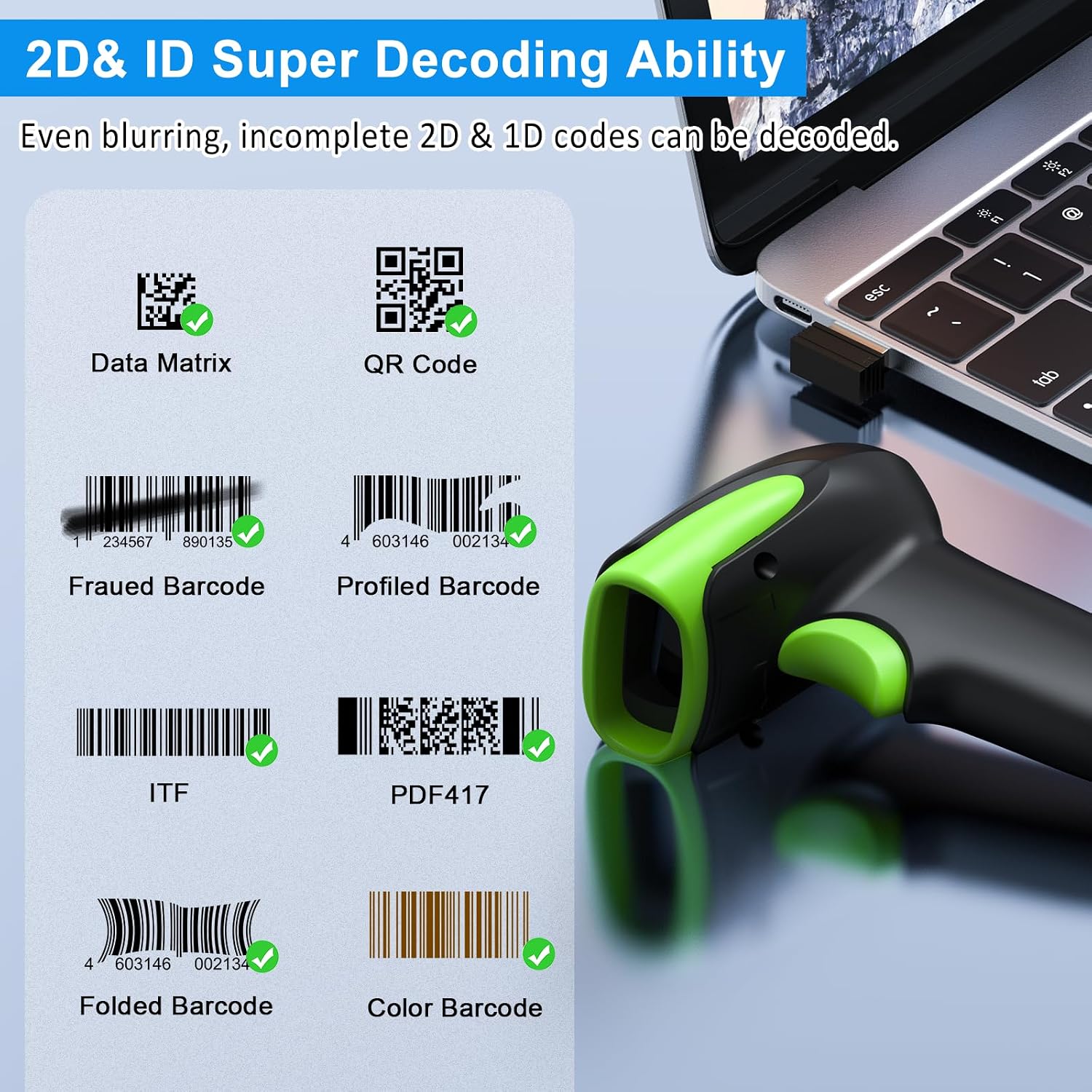
Immagine 6: Es.amples of decodable 1D and 2D barcodes.
6. Manutenzione
Per garantire prestazioni ottimali e longevità dello scanner:
- Pulizia: Utilizzare un panno morbido e asciutto per pulire l'esterno dello scanner. Per la finestra di scansione, utilizzare un panno per la pulizia delle lenti per evitare graffi. Non utilizzare detergenti abrasivi o solventi.
- Ricarica: Recharge the battery using the provided USB cable. Avoid overcharging or completely draining the battery for extended periods.
- Magazzinaggio: Conservare lo scanner in un luogo fresco e asciutto, lontano dalla luce solare diretta e da temperature estreme.
- Durata: While rugged, avoid intentional drops or impacts. The scanner is designed to withstand accidental drops up to 2.4 meters.

Image 7: The scanner's rugged design and drop resistance.
7. Risoluzione Dei Problemi
Se riscontri problemi con lo scanner, consulta i seguenti problemi comuni e le relative soluzioni:
- Lo scanner non si connette:
- Assicurarsi che lo scanner sia carico.
- Verify the correct connection mode (Bluetooth, 2.4G, USB) is selected and properly set up.
- For 2.4G, ensure the dongle is securely plugged in. For Bluetooth, ensure your device's Bluetooth is on and the scanner is paired.
- Provare a riavviare sia lo scanner sia il dispositivo host.
- Lo scanner non legge i codici a barre:
- Assicurarsi che il codice a barre non sia eccessivamente danneggiato, macchiato o stampato male.
- Controllare la distanza e l'angolazione dello scanner rispetto al codice a barre.
- Verificare che il tipo di codice a barre sia supportato dallo scanner.
- Pulire la finestra di scansione se è sporca.
- Data not transmitting:
- Verifica che lo scanner sia correttamente connesso al tuo dispositivo.
- Check if the scanner is in 'Offline Storage Mode' and needs to be manually uploaded.
- Ensure the application on your device is ready to receive input.
For further assistance, please refer to the comprehensive troubleshooting section in the full user manual or contact Symcode customer support.
8. Specifiche
| Caratteristica | Specificazione |
|---|---|
| Numero di modello | USA-6709DA-Green |
| Ingresso volumetage | DC5V±0.25v |
| Current (Work/Instantaneous) | 25 mA / 95 mA |
| Velocità di decodifica | 100 volte / sec |
| Portata wireless (2.4G) | Up to 200m (open air), 30m (indoors) |
| Tempo di ricarica | Circa 2.5 ore |
| Durata della batteria | Up to 30 Hours (continuous scanning) |
| Tipo di batteria | 1 batteria ai polimeri di litio (inclusa) |
| Connettività | Bluetooth 6.1, Wireless 2.4G, USB Cable |
| Dispositivi compatibili | Desktop, Laptop, Smartphone, POS systems |
| Sistemi operativi | Windows 11/10/8/7/XP, Mac OS, iOS, Android, Linux |
| Peso dell'articolo | 10.2 once |
| Dimensioni del pacco | 6.89 x 4.49 x 3.31 pollici |

Image 8: Wireless transmission range.
9. Garanzia e supporto
This Symcode product is manufactured by USA Scanner. For any product inquiries, technical support, or warranty claims, please contact USA Scanner directly. Refer to the contact information provided in your product packaging or visit the official Symcode brand store on Amazon for support resources.
Visitare il Symcode Store per ulteriori informazioni.
Ask a question about this manual
Ask about setup, troubleshooting, compatibility, parts, safety, or missing instructions. Manuals+ will review the question and use this page’s manual context to help answer it.