
HAMMER Ellypsis E3500 (Model 11001)
Manuale d'uso dell'ellittica HAMMER Ellypsis E3500
Model: Ellypsis E3500 (Model 11001)
1. Introduzione e oltreview
Welcome to the user manual for your new HAMMER Ellypsis E3500 Elliptical Trainer. This modern elliptical trainer, presented in Stealth Black, combines first-class design with optimized ergonomics to provide an effective and comfortable workout experience. It is designed to support various fitness goals, from cardiovascular health to muscle strengthening and fat burning.
The E3500 features a generous stride length of 52 cm and an ergonomic pedal distance of 13 cm, ensuring natural and fluid movement. Its user-friendly LCD computer provides all essential training data and functions at a glance, including heart rate monitoring via integrated sensors. The trainer is also compatible with popular fitness apps like Zwift and Kinomap, allowing you to immerse yourself in virtual training worlds and interactive routes.

Figure 1: The HAMMER Ellypsis E3500 Elliptical Trainer, a sleek black fitness machine designed for ergonomic and effective home workouts.
2. Informazioni sulla sicurezza
Please read all safety instructions carefully before assembling or using the HAMMER Ellypsis E3500. Failure to follow these instructions may result in injury or damage to the equipment.
- Consultare un medico: Before starting any new exercise program, especially if you have pre-existing health conditions, consult with a healthcare professional.
- Montaggio: Ensure all parts are correctly assembled and tightened according to the instructions. Do not use the machine if any parts are damaged or missing.
- Posizionamento: Place the elliptical trainer on a flat, stable surface. Ensure adequate clearance around the machine (at least 0.6 meters or 2 feet) for safe operation and movement.
- Limite di peso dell'utente: Non superare il peso massimo dell'utente di 150 kg (330 libbre).
- Bambini e animali domestici: Keep children and pets away from the machine during operation. This equipment is not a toy.
- Abbigliamento adeguato: Indossare abbigliamento sportivo e calzature adeguate. Evitare indumenti larghi che potrebbero impigliarsi nelle parti in movimento.
- Riscaldamento e defaticamento: Always perform a warm-up before your workout and a cool-down afterwards to prevent muscle strain.
- Stop if Unwell: If you experience dizziness, nausea, chest pain, or any other abnormal symptoms, stop your workout immediately and consult a doctor.
- Manutenzione: Regularly inspect the machine for wear and tear. Do not attempt to service the machine beyond the maintenance instructions provided in this manual.
3. Contenuto della confezione
Carefully unpack all components and verify that you have received all parts listed below. If any parts are missing or damaged, please contact customer support.
- Assemblaggio telaio principale
- Stabilizzatori anteriori e posteriori
- Pedal Arms and Pedals (2 sets)
- Manubrio (fisso e mobile)
- Unità console/display
- Kit hardware (bulloni, rondelle, dadi, utensili)
- Adattatore di alimentazione
- Manuale dell'utente (questo documento)
4. Istruzioni di montaggio
Assembly typically requires two people. Follow these steps carefully. Refer to the included assembly diagram for visual guidance.
- Disimballare e preparare: Remove all components from the packaging. Lay out all parts on a clean, flat surface. Ensure all packing materials are removed from the main frame.
- Fissare gli stabilizzatori: Fissare gli stabilizzatori anteriore e posteriore al telaio principale utilizzando i bulloni e le rondelle forniti. Assicurarsi che siano ben serrati per garantire la stabilità.
- Install Pedal Arms: Attach the pedal arms to the main drive mechanism. Pay attention to left and right markings. Secure with the appropriate hardware.
- Montaggio del manubrio: Connect the fixed handlebars to the main frame. Then, attach the moving handlebars to the pedal arms and the main frame's upper support. Ensure all pivot points are secure.
- Connetti la console: Carefully connect the sensor cables from the main frame to the console unit. Mount the console onto its designated bracket.
- Controlli finali: Double-check all bolts and connections to ensure they are secure. Plug in the power adapter.
5. Istruzioni per l'uso
5.1. Console and Display
The user-friendly LCD console provides real-time feedback on your workout.

Figure 2: The elliptical trainer's console displaying workout data, alongside key features such as the 20 kg flywheel, 11 training programs, and 52 cm stride length.
- Schermo LCD: Shows time, distance, speed, calories burned, and heart rate.
- Pulsanti: Navigate through menus, select programs, and adjust resistance. Refer to the console-specific section in the full manual for detailed button functions.
- Supporto per tablet: A convenient holder is integrated for your smartphone or tablet.
5.2. Programmi di formazione
The Ellypsis E3500 offers a variety of programs to suit your fitness needs:
- 11 Training Programs: Pre-set programs designed for different fitness levels and goals.
- 4 programmi di frequenza cardiaca: Target specific heart rate zones for effective cardiovascular training.
- 4 Utente Profiles: Save individual user data and progress.
- Programma manuale: Adjust resistance and workout parameters manually during your session.
5.3. App Connectivity (Kinomap & Zwift)
Enhance your training experience by connecting your elliptical trainer to Kinomap and Zwift via Bluetooth.

Figure 3: A user interacting with the elliptical trainer's console, which displays connectivity with fitness apps like Kinomap and Zwift for interactive and live-streamed workouts.
- Scarica le app: Download the Kinomap and/or Zwift apps from your device's app store.
- Abilita Bluetooth: Assicurati che il Bluetooth sia abilitato sul tuo smartphone o tablet.
- Collegare: Open the fitness app and follow the in-app instructions to connect to your HAMMER Ellypsis E3500. The app will typically detect the trainer automatically.
- Esplorare: Enjoy interactive routes, multiplayer functions, and live workouts.
5.4. Regolazione dell'inclinazione
The Ellypsis E3500 features a 3-fold height adjustment, allowing you to vary your workout and target different muscle groups.
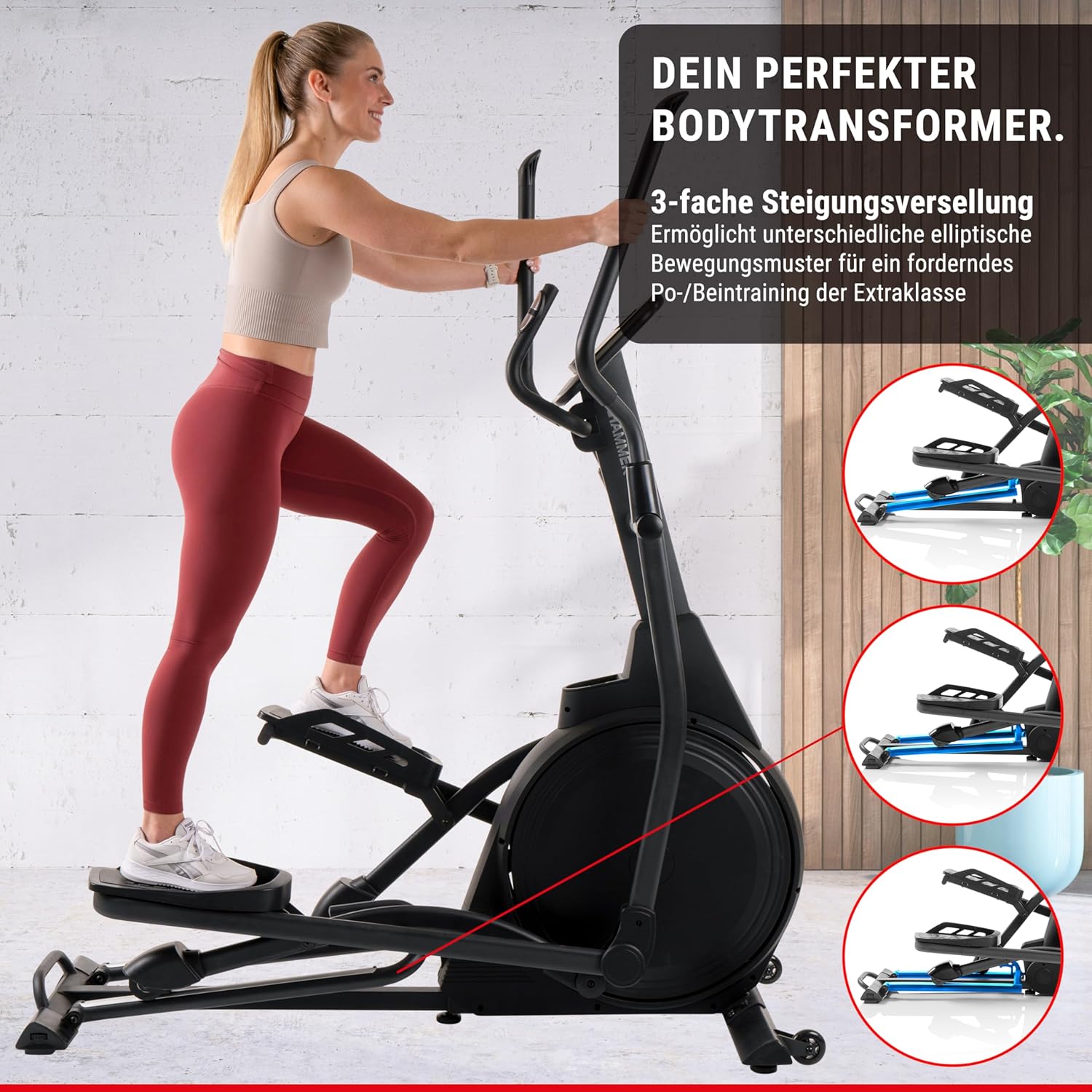
Figure 4: The elliptical trainer demonstrating its 3-fold incline adjustment capability, which allows for varied elliptical movement patterns to target different leg and glute muscles.
- Regolazione dell'inclinazione: The incline mechanism is located at the front of the machine. Consult the detailed manual for specific instructions on how to safely adjust the incline.
- Targeting muscolare: A higher incline focuses on glutes and hamstrings, while a lower incline emphasizes the front thigh muscles.
5.5. Monitoraggio della frequenza cardiaca
Integrated heart rate sensors on the handlebars allow you to monitor your pulse during your workout.
- Utilizzo: Grip the heart rate sensors firmly with both hands during your workout. Your heart rate will be displayed on the console.
- Precisione: For best accuracy, ensure your hands are clean and dry.
6. Manutenzione
Una manutenzione regolare garantisce la longevità e le prestazioni ottimali del tuo trainer ellittico.
- Pulizia: Pulisci la macchina con adamp Dopo ogni utilizzo, pulire con un panno per rimuovere sudore e polvere. Evitare detergenti abrasivi.
- Lubrificazione: Periodically check and lubricate moving parts as indicated in the detailed maintenance section of the full manual.
- Ispezione: Regularly inspect all bolts, nuts, and connections for tightness. Tighten any loose fasteners. Check for signs of wear on the aluminum rails and wheels.
- Funzionamento silenzioso: The E3500 features high-quality ball bearings for quiet operation. If you notice any unusual noises, refer to the troubleshooting section.
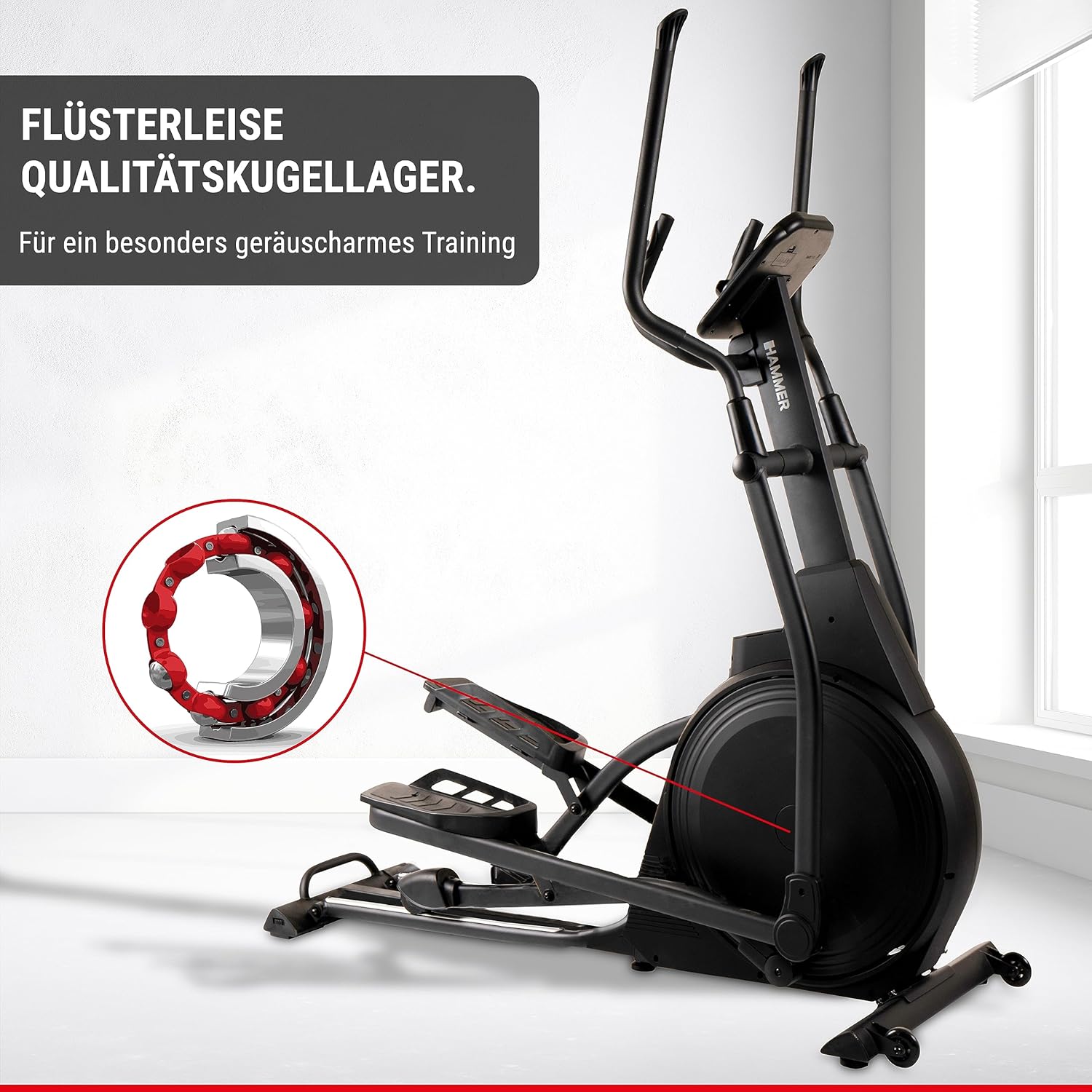
Figure 5: An illustration highlighting the high-quality ball bearings within the elliptical trainer, designed for exceptionally quiet training sessions.
7. Risoluzione Dei Problemi
If you encounter any issues with your elliptical trainer, refer to the table below for common problems and solutions.
| Problema | Possibile causa | Soluzione |
|---|---|---|
| Nessuna alimentazione alla console | Power adapter not connected; outlet issue; damaged cable. | Ensure power adapter is securely plugged into the machine and a working outlet. Check for cable damage. |
| Rumori insoliti durante il funzionamento | Bulloni allentati; mancanza di lubrificazione; parti usurate. | Check and tighten all assembly bolts. Lubricate moving parts as per maintenance instructions. If noise persists, contact customer support. |
| Lettura imprecisa della frequenza cardiaca | Mani non ben salde sui sensori; mani secche; interferenza. | Ensure firm and consistent grip on sensors. Lightly moisten hands if too dry. Avoid electronic interference. |
| La resistenza non cambia | Console connection issue; magnetic brake system malfunction. | Check console cable connections. Restart the machine. If the problem continues, contact customer support. |
8. Specifiche
| Caratteristica | Dettaglio |
|---|---|
| Nome del modello | Ellypsis E3500 |
| Numero di modello | 11001 |
| Marca | HAMMER |
| Colore | Nero |
| Dimensioni (L x P x A) | 158 x 65 x 185 cm (62.2 x 25.6 x 72.8 pollici) |
| Peso dell'articolo | 66 kg (145.5 libbre) |
| Massa del volano | 20 kg |
| Meccanismo di resistenza | Magnetico |
| Numero di livelli di resistenza | 20 |
| Lunghezza massima del passo | 52 centimetri |
| Pedal Distance | 13 centimetri |
| Peso massimo dell'utente | 150 kg |
| Programmi di formazione | 11 (inclusi 4 programmi di frequenza cardiaca) |
| Utente Profiles | 4 |
| Connettività | Compatible with Zwift & Kinomap |
| Fonte di alimentazione | Requires AA batteries (for console) |
9. Garanzia e supporto
For warranty information, technical support, or to order replacement parts, please contact HAMMER customer service.
- Assistenza clienti: Refer to the contact information provided on the HAMMER websito o la ricevuta di acquisto.
- Risorse online: Visit the official HAMMER websito per FAQ, materiale di supporto aggiuntivo e registrazione del prodotto.
Ask a question about this manual
Ask about setup, troubleshooting, compatibility, parts, safety, or missing instructions. Manuals+ will review the question and use this page’s manual context to help answer it.