
NXGKET 2AYV7YG-813
Manuale utente del walkie-talkie ricaricabile NXGKET
Model: 2AYV7YG-813
Introduzione
Thank you for choosing the NXGKET Rechargeable Walkie-Talkie. This manual provides detailed instructions for the safe and effective use of your new device. Designed for both children and adults, these walkie-talkies offer reliable communication with a long range, making them ideal for outdoor activities, camping, and general recreational use. Please read this manual thoroughly before operating the device and keep it for future reference.
Informazioni sulla sicurezza
Per garantire un funzionamento sicuro ed evitare danni, osservare le seguenti precauzioni:
- Do not disassemble or modify the walkie-talkie. Unauthorized modifications can void the warranty and pose safety risks.
- Keep the device away from water and moisture. It is water-resistant but not waterproof.
- Avoid exposing the walkie-talkie to extreme temperatures, direct sunlight, or open flames.
- Use only the provided USB Type-C charging cable and a compatible power adapter (not included) for charging.
- Sorvegliare i bambini durante l'uso per garantire un utilizzo corretto e sicuro.
- Do not operate the walkie-talkie near medical devices or in areas where radio communication is restricted (e.g., hospitals, aircraft).
- Smaltire le batterie e i componenti elettronici in modo responsabile, nel rispetto delle normative locali.
Contenuto della confezione
Dopo aver aperto la confezione, verificare che tutti gli articoli siano presenti e in buone condizioni:
- 2 x NXGKET Rechargeable Walkie-Talkies (Blue)
- 2 x Built-in 1200mAh Lithium Polymer Batteries
- 1 x USB Type-C Charging Cable (for dual charging)
- 1 x Manuale utente (questo documento)

Image: The NXGKET Walkie-Talkie package showing two blue walkie-talkies, a charging cable, and the product box, illustrating the typical contents.
Prodotto finitoview
Familiarize yourself with the various components and controls of your walkie-talkie:

Image: A detailed diagram labeling the key components of the NXGKET Walkie-Talkie, including the antenna, PTT button, LCD display, lamp button, menu/lock button, sound speaker, power/scan button, up/down buttons, call/ring button, Type-C charging port, and removable belt clip.
- Antenna: Per trasmettere e ricevere segnali.
- Pulsante PTT (premi per parlare): Tieni premuto per trasmettere la tua voce.
- Pulsante su: Consente di navigare nei menu verso l'alto o di aumentare i valori.
- Lamp Pulsante: Attiva la torcia LED integrata.
- Pulsante Menu/Blocco: Enters menu settings or locks/unlocks the keypad.
- Altoparlante: Le uscite hanno ricevuto l'audio.
- Pulsante di accensione/scansione: Turns the device on/off (long press) or initiates channel scanning (short press).
- Pulsante Giù: Consente di scorrere i menu verso il basso o di diminuire i valori.
- Call/Ring Button: Sends a call tone to other walkie-talkies on the same channel.
- Porta di ricarica di tipo C: Per collegare il cavo di ricarica USB Type-C.
- Remove Belt Clip: Point for attaching or detaching the belt clip.
- Schermo LCD: Mostra il canale, il volume, lo stato della batteria e altri indicatori.
Impostare
1. Ricarica iniziale
Your walkie-talkie comes with a built-in 1200mAh lithium polymer battery. For optimal performance, fully charge the device before first use.
- Connect the provided USB Type-C charging cable to the charging port on the side of the walkie-talkie.
- Collegare l'altra estremità del cavo USB a una fonte di alimentazione USB compatibile (ad esempio, adattatore da parete, porta USB del computer, power bank).
- L'indicatore della batteria sul display LCD mostrerà lo stato di carica. Una ricarica completa richiede in genere circa 2 ore.
- Once fully charged, the battery can provide up to 24 hours of work time and up to 3 days of standby time.

Image: An illustration demonstrating the 1200mAh lithium polymer battery and its charging time (2 hours for full charge) and work time (24 hours), alongside a diagram of the high-volume speaker.
2. Accensione/spegnimento
- To turn on the walkie-talkie, press and hold the Pulsante di accensione/scansione finché lo schermo LCD non si illumina.
- To turn off the walkie-talkie, press and hold the Pulsante di accensione/scansione finché lo schermo LCD non si spegne.
Istruzioni per l'uso
1. Setting Channels and Privacy Codes
For two or more walkie-talkies to communicate, they must be set to the same channel and privacy code (CTCSS/DCS).
- The NXGKET walkie-talkie has 16 main channels and 121 privacy codes (38 CTCSS codes and 83 DCS codes).
- Premere il tasto Pulsante Menu/Blocco once to enter channel selection mode. Use the Up or Pulsanti Giù to select your desired channel (1-16). Press PTT per confermare o Menu again to move to privacy code setting.
- Premere il tasto Pulsante Menu/Blocco twice to enter privacy code selection mode. Use the Up or Pulsanti Giù to select your desired privacy code (0-121). Code 0 means no privacy code.
- Premere il tasto Pulsante PTT to confirm your selection and exit the menu.
- Ensure all walkie-talkies intended for communication are set to the identical channel and privacy code.
2. Trasmissione e ricezione
- Per trasmettere la tua voce, tieni premuto il tasto Pulsante PTT. Speak clearly into the microphone (located near the speaker). Release the Pulsante PTT when you finish speaking to allow the other party to respond.
- Quando il Pulsante PTT is not pressed, the walkie-talkie is in receive mode. You will hear incoming transmissions through the speaker.
3. Regolazione del volume
Utilizzare il Up E Pulsanti Giù (when not in menu mode) to adjust the speaker volume. The volume level will be displayed on the LCD screen.
4. Tono di chiamata
Premere il tasto Call/Ring Button once to send an audible call tone to other walkie-talkies on the same channel and privacy code, alerting them to an incoming transmission.
5. Funzione VOX (Voice Operated Exchange)
VOX allows hands-free operation. When activated, the walkie-talkie will automatically transmit when it detects your voice.
- Premere il tasto Pulsante Menu/Blocco multiple times until "VOX" appears on the LCD display.
- Utilizzare il Up or Pulsanti Giù to select the VOX sensitivity level (e.g., 1-3, with 3 being most sensitive). Select "OFF" to disable VOX.
- Premere il tasto Pulsante PTT per confermare e uscire.
6. Scansione canali
The scan function allows you to automatically scan through channels to find active conversations.
- Premere brevemente il tasto Pulsante di accensione/scansione (when the device is on) to initiate channel scanning. The walkie-talkie will cycle through channels until it detects a signal.
- It will pause on an active channel. To stop scanning, press the Pulsante di accensione/scansione di nuovo o il Pulsante PTT.
7. Torcia a LED
The built-in LED flashlight can be used for illumination in low-light conditions.
- Premere il tasto Lamp Pulsante once to turn on the flashlight.
- Premere il tasto Lamp Pulsante di nuovo per spegnere la torcia.
8. Blocco tastiera
To prevent accidental button presses, you can lock the keypad.
- Premere e tenere premuto il tasto Pulsante Menu/Blocco for a few seconds until a lock icon appears on the LCD display.
- Per sbloccare, tenere premuto il pulsante Pulsante Menu/Blocco di nuovo finché l'icona del lucchetto non scompare.
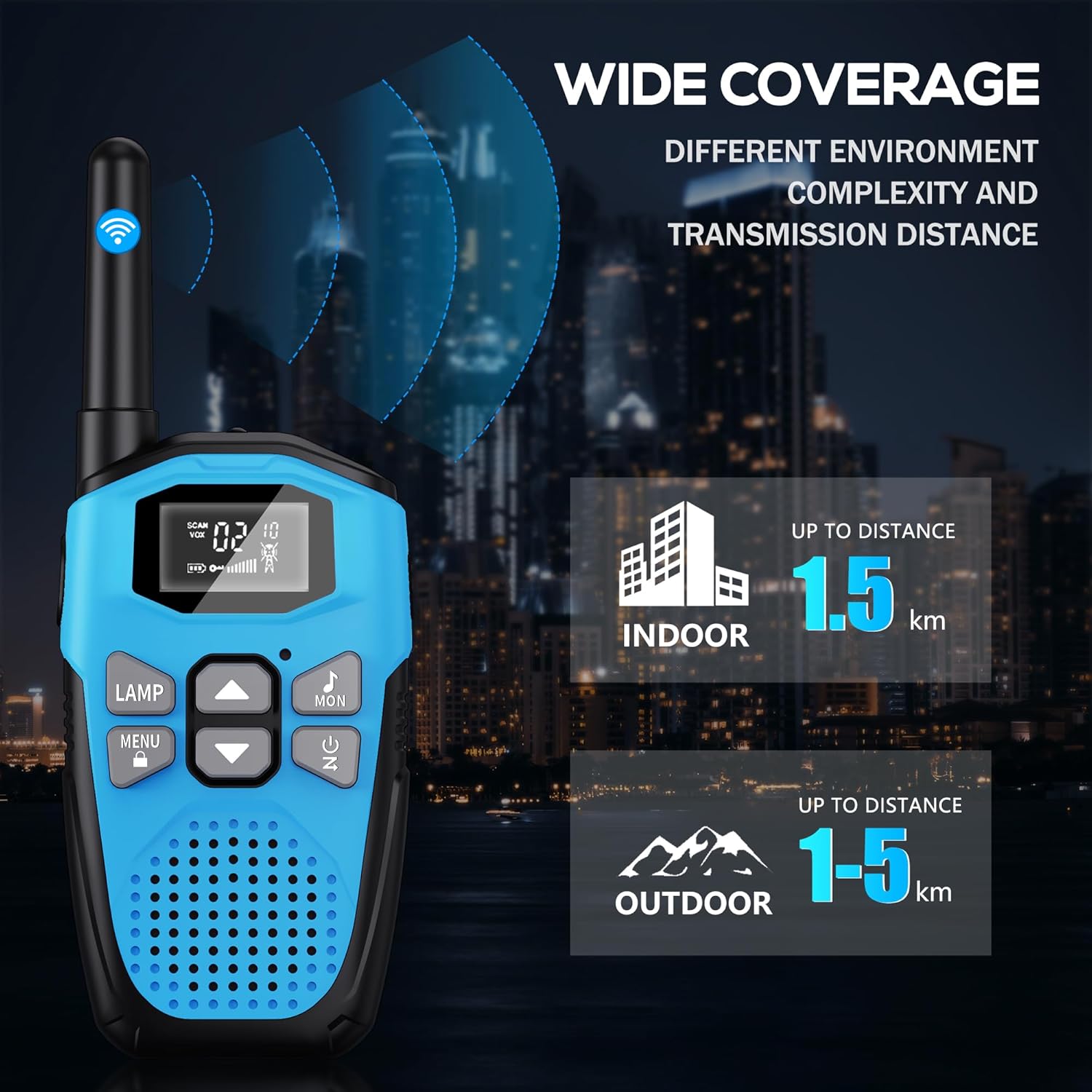
Image: An illustration showing the wide coverage capabilities of the walkie-talkie, indicating an indoor range of up to 1.5 km and an outdoor range of 1-5 km, depending on environmental complexity and transmission distance.
Manutenzione
- Pulizia: Pulisci il walkie-talkie con un panno morbido eamp stoffa. Non utilizzare prodotti chimici aggressivi o detergenti abrasivi.
- Magazzinaggio: Quando non in uso, conservare il dispositivo in un luogo fresco e asciutto, lontano dalla luce solare diretta e da temperature estreme.
- Cura della batteria: For long-term storage, it is recommended to charge the battery to about 50% every 3-6 months to maintain battery health.
- Protezione dalle cadute: The walkie-talkie features a hard shell and anti-drop design for environmental protection. However, avoid excessive drops or impacts to prevent damage.

Image: A visual representation highlighting the walkie-talkie's hard shell, anti-drop design, and key features such as VOX hands-free, keypad lock, clear sound, drop protection, noise reduction, and LED emergency light.
Risoluzione dei problemi
| Problema | Possibile causa | Soluzione |
|---|---|---|
| Nessun potere | La batteria è scarica. | Caricare completamente il walkie-talkie. |
| Non è possibile comunicare con altri walkie-talkie | Different channels or privacy codes. | Ensure all walkie-talkies are on the same channel and privacy code. |
| Scarsa qualità del suono o rumore statico | Fuori portata; batteria scarica; interferenza. | Move closer to the other unit; charge battery; move away from sources of interference. |
| Raggio di comunicazione breve | Obstacles (buildings, terrain); environmental factors. | Move to an open area; range is reduced in urban/dense environments. |
| La tastiera non risponde | La tastiera è bloccata. | Premere e tenere premuto il tasto Pulsante Menu/Blocco per sbloccare. |
Specifiche
| Caratteristica | Dettaglio |
|---|---|
| Marca | NXGKET |
| Numero di modello | 2AYV7YG-813 |
| Colore | Blu |
| Tipo di batteria | Built-in 1200mAh Lithium Polymer (rechargeable) |
| Porta di ricarica | USB di tipo C |
| Numero di canali | 16 |
| Codici sulla privacy | 121 (38 toni CTCSS, 83 toni DCS) |
| Gamma di frequenza | 446 MHz (UHF) |
| Portata massima (area aperta) | Up to 5 Kilometers (approx. 3.1 miles) |
| Maximum Range (Urban Area) | Up to 1.5 Kilometers (approx. 0.9 miles) |
| Voltage | 3.7 Volt |
| Livello di resistenza all'acqua | Resistente all'acqua (non impermeabile) |
| Caratteristiche speciali | Rechargeable Battery, Volume Control, Long Range, Lightweight, Noise Reduction, VOX, LCD Display with Backlight, LED Flashlight, Keypad Lock, Low Battery Alert, Drop Protection. |
Garanzia e supporto
The NXGKET walkie-talkie has been tested to meet CE certification standards.
- Garanzia: Questo prodotto viene fornito con una garanzia di 1 anni dalla data di acquisto.
- Assistenza clienti: For any questions, issues, or warranty claims, please contact NXGKET customer service via email. Refer to your purchase documentation for specific contact details or visit the official NXGKET websito.
Ask a question about this manual
Ask about setup, troubleshooting, compatibility, parts, safety, or missing instructions. Manuals+ will review the question and use this page’s manual context to help answer it.