
Mibro XPAW015
Manuale utente Mibro Watch A2
Modello: XPAW015
1. Prodotto finitoview
The Mibro Watch A2 is a versatile smartwatch designed to enhance your daily life with advanced features and robust performance. It integrates a dual-core 2-in-1 Bluetooth chip for seamless connectivity, allowing for direct Bluetooth calls from your wrist. Featuring a vibrant 1.39-inch HD display, it offers clear visuals and intuitive navigation. The watch is equipped with an updated 4 PD heart rate monitor for comprehensive health tracking, including SpO2 measurement and sleep monitoring. With 70 dedicated sport modes and 2 ATM water resistance, it is suitable for various activities. The long-lasting battery provides up to 10 days of usage on a single charge.
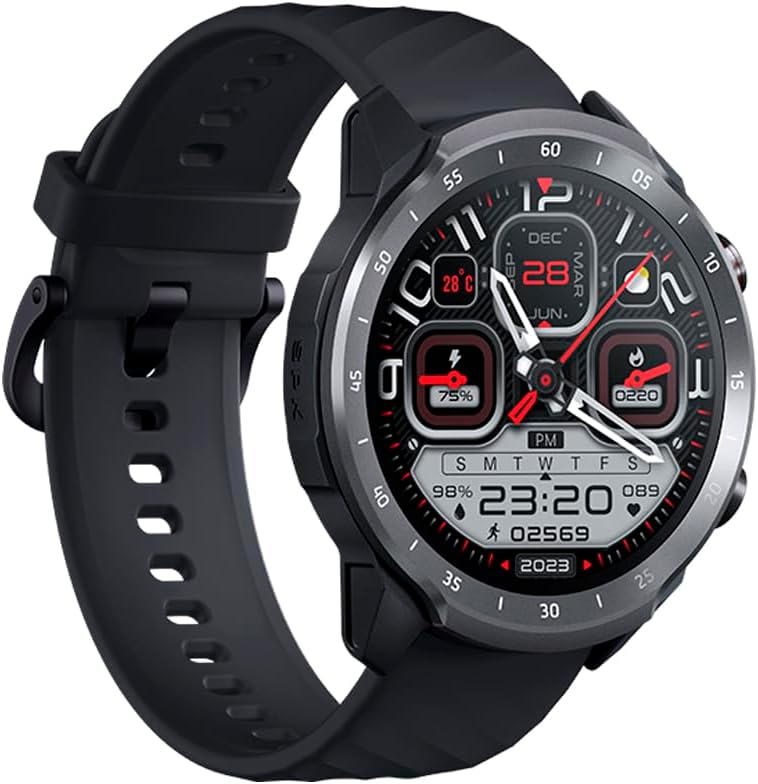
Figure 1.1: Mibro Watch A2, showcasinil suo design e il cinturino.
2. Informazioni sulla sicurezza
- Non tentare di smontare, riparare o modificare il dispositivo. Ciò potrebbe causare danni, incendi o scosse elettriche.
- Keep the device away from extreme temperatures (hot or cold), direct sunlight, and moisture.
- Evitare di esporre il dispositivo a forti urti o vibrazioni.
- Use only the provided charging cable and adapter. Using unauthorized accessories may damage the device or pose safety risks.
- Consult a medical professional before starting any new exercise regimen or if you have pre-existing health conditions, especially if relying on the watch for health monitoring.
- The device is 2 ATM water-resistant, suitable for splashes and brief immersion. Do not use it for diving, hot showers, or high-speed water sports.
3. Contenuto della confezione
Si prega di controllare il contenuto della confezione dopo averla disimballata:
- Mibro Watch A2 Smartwatch
- Cavo di ricarica magnetico
- Manuale d'uso
4. Layout e componenti del prodotto
Familiarize yourself with the main components of your Mibro Watch A2:

Figura 4.1: Fronte view of the Mibro Watch A2 display and physical buttons.
- Display: 1.39-inch HD touchscreen for interaction and information display.
- Pulsanti laterali: Typically used for power on/off, screen wake-up, and navigating menus.
- Sensore di frequenza cardiaca: Located on the back of the watch, used for heart rate and SpO2 monitoring.
- Contatti di ricarica: Contatti magnetici sul retro per il collegamento del cavo di ricarica.
- Cinghia: Adjustable and replaceable strap for comfortable wear.
5. Guida all'installazione
5.1. Carica del dispositivo
Before first use, fully charge your Mibro Watch A2.
- Connect the magnetic charging cable to the charging contacts on the back of the watch. Ensure the cable is securely attached.
- Collegare l'estremità USB del cavo di ricarica a un adattatore di alimentazione USB standard (consigliato 5 V/1 A) o alla porta USB di un computer.
- Il display dell'orologio mostrerà l'avanzamento della ricarica. Una ricarica completa richiede in genere circa 2 ore.
5.2. Installazione e associazione dell'app
To unlock the full potential of your Mibro Watch A2, download and install the official Mibro Fit application on your smartphone.
- Scarica l'App: Cercare "Mibro Fit" in the Apple App Store (for iOS) or Google Play Store (for Android) and install it.
- Registrati/Accedi: Open the Mibro Fit app and follow the on-screen instructions to register a new account or log in if you already have one.
- Abilita Bluetooth: Assicurati che il Bluetooth sia abilitato sul tuo smartphone.
- Accoppia il dispositivo: In the Mibro Fit app, navigate to the "Device" or "Add Device" section. Select "Mibro Watch A2" from the list of available devices.
- Conferma associazione: A pairing request will appear on both your watch and smartphone. Confirm the pairing on both devices.
- Configurazione completa: Follow any remaining prompts in the app to complete the initial setup, including personal information and notification permissions.
6. Istruzioni per l'uso
6.1. Navigazione di base
- Schermata di riattivazione: Premi il pulsante laterale o solleva il polso.
- Scorri verso l'alto/il basso: Scorri i menu e le notifiche.
- Scorri verso sinistra/destra: Access quick functions or different data screens (e.g., heart rate, weather).
- Rubinetto: Seleziona un elemento o conferma un'azione.
- Premere il pulsante laterale: Return to the watch face or access the app list.
6.2. Chiamate Bluetooth
The Mibro Watch A2 supports Bluetooth calling directly from your wrist.

Figure 6.1: Using the Mibro Watch A2 for Bluetooth calls.
- Ensure your watch is successfully paired with your smartphone via Bluetooth.
- Effettuare le chiamate: Accedi al tastierino numerico o all'elenco dei contatti sull'orologio per avviare una chiamata.
- Ricevere chiamate: Quando ricevi una chiamata, puoi rispondere o rifiutarla direttamente dallo schermo dell'orologio.
6.3. Monitoraggio della salute
L'orologio offre funzionalità di monitoraggio continuo della salute.
- Frequenza cardiaca: Swipe to the heart rate interface or select the heart rate app to view your current heart rate. The watch supports 24/7 heart rate monitoring.
- SpO2 (ossigeno nel sangue): Access the SpO2 measurement function to check your blood oxygen saturation. Ensure the watch is snug on your wrist for accurate readings.
- Monitoraggio del sonno: Indossa l'orologio a letto e monitorerà automaticamente i tuoi ritmi del sonno, inclusi sonno profondo, sonno leggero e orari di veglia. View detailed sleep data in the Mibro Fit app.

Figure 6.2: Blood oxygen measurement in progress on the Mibro Watch A2.
6.4. Modalità Sport
The Mibro Watch A2 offers 70 sport modes to track your workouts.
- From the watch face, navigate to the "Workout" or "Sport" app.
- Select your desired sport mode (e.g., Running, Cycling, Walking).
- Tocca per avviare l'attività. L'orologio inizierà a registrare dati come durata, calorie bruciate e frequenza cardiaca.
- To pause or end an activity, swipe or press the side button as prompted on the screen.

Figure 6.3: Mibro Watch A2 tracking an outdoor activity.
6.5. Notifiche e altre funzionalità
- Notifiche intelligenti: Receive call, message, and app notifications directly on your watch. Configure notification settings in the Mibro Fit app.
- Volti dell'orologio: Customize your watch face from a variety of options available in the Mibro Fit app or directly on the watch.
- Controllo della musica: Controlla la riproduzione musicale sul tuo smartphone dall'orologio.
- Tempo atmosferico: View aggiornamenti meteo in tempo reale.
- Allarmi e timer: Set alarms and use timer/stopwatch functions.
7. Manutenzione
- Pulizia: Pulisci regolarmente l'orologio e il cinturino con un panno morbido e asciutto.amp stoffa. Evitare l'uso di prodotti chimici aggressivi o materiali abrasivi.
- Resistenza all'acqua: The Mibro Watch A2 is 2 ATM water-resistant. This means it can withstand splashes, rain, and brief immersion in shallow water. It is not suitable for swimming, diving, hot showers, or saunas. Always dry the watch thoroughly after exposure to water.
- Cura della batteria: Per prolungare la durata della batteria, evitare di scaricarla completamente frequentemente. Caricare l'orologio quando il livello della batteria è basso. Conservare l'orologio in un luogo fresco e asciutto se non utilizzato per lunghi periodi.
- Aggiornamenti software: Regularly check for and install software updates via the Mibro Fit app to ensure optimal performance and access to new features.
8. Risoluzione Dei Problemi
| Problema | Possibile causa/soluzione |
|---|---|
| L'orologio non si accende. | Battery might be depleted. Connect the watch to the charger and allow it to charge for at least 10 minutes before attempting to turn it on. |
| Impossibile effettuare l'associazione con lo smartphone. |
|
| Letture imprecise della frequenza cardiaca/SpO2. |
|
| Le notifiche non vengono visualizzate. |
|
9. Specifiche
| Caratteristica | Descrizione |
|---|---|
| Nome del modello | Mibro Guarda A2 |
| Numero di modello | XPAW015 |
| Marca | Micro |
| Dimensioni dello schermo | 1.39 pollici |
| Connettività | Bluetooth |
| Caratteristiche speciali | Software available in 26 languages, Bluetooth Calling, Heart Rate Monitoring, SpO2 Measurement, Sleep Tracking, 70 Sport Modes |
| Dispositivi compatibili | Bluetooth-enabled smartphones, tablets, PCs, laptops |
| Composizione della batteria | Agli ioni di litio |
| Durata della batteria | Fino a 10 giorni (utilizzo tipico) |
| Resistenza all'acqua | 2 bancomat |
| GPS | GPS tramite smartphone |
| Capacità di archiviazione della memoria | 1 GB |
10. Garanzia e supporto
Mibro products typically come with a limited warranty. Please refer to the warranty card included in your product packaging or visit the official Mibro websito per termini e condizioni di garanzia dettagliati specifici per la tua regione.
For technical support, troubleshooting assistance, or service inquiries, please contact Mibro customer support through their official website or the contact information provided in the Mibro Fit application.
Official Mibro Store: Visit Mibro Store on Amazon
Ask a question about this manual
Ask about setup, troubleshooting, compatibility, parts, safety, or missing instructions. Manuals+ will review the question and use this page’s manual context to help answer it.