
BMC G3 A20
Manuale d'uso del dispositivo antirussamento BMC G3 A20
Model: G3 A20 | Brand: BMC
Introduzione
This user manual provides comprehensive instructions for the safe and effective operation, setup, and maintenance of your BMC G3 A20 Anti-Snoring Device. Please read this manual thoroughly before using the device and keep it for future reference.
Informazioni importanti sulla sicurezza
AVVERTIMENTO: Consult a healthcare professional before using this device. Do not use if you have difficulty breathing or are unable to remove the device yourself. Keep out of reach of children. Discontinue use if you experience discomfort or adverse reactions.
Always ensure the device is placed on a stable, flat surface during operation. Do not block the air inlet or outlet. Use only accessories and parts recommended by the manufacturer.
Prodotto finitoview e componenti
The BMC G3 A20 is an advanced anti-snoring device designed for comfortable and effective use. It features intelligent temperature control, automatic start/stop functions, and a low noise level for a peaceful sleep environment.

Figura 1: BMC G3 A20 device with its complete set of accessories, including the carrying case, air hose, power adapter, SD card for data storage, and replacement filters.

Figura 2: The BMC G3 A20 device with its integrated humidifier chamber opened, revealing the water reservoir for humidification.
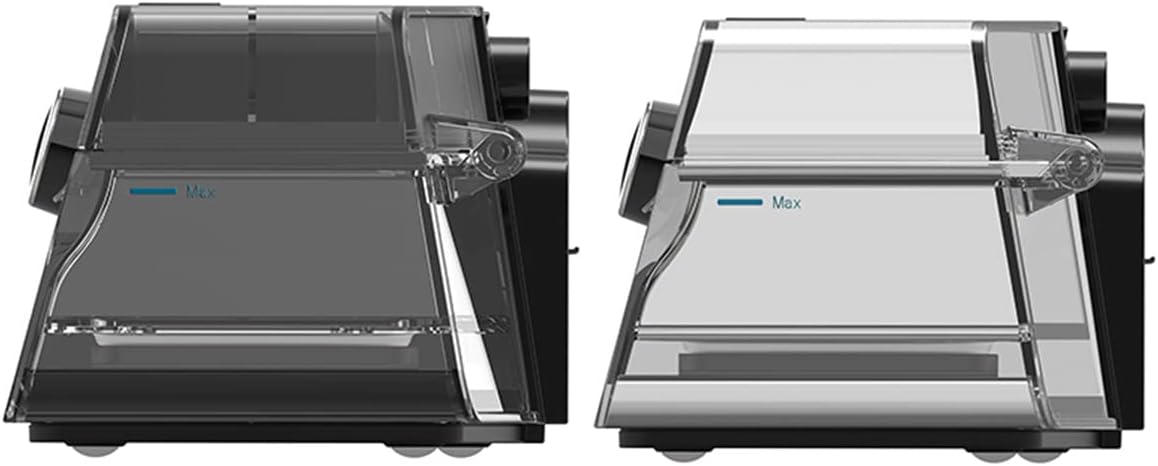
Figura 3: Lato view comparison of two humidifier chambers, illustrating the 'Max' fill line for proper water level.

Figura 4: Hands demonstrating the process of opening and removing the humidifier chamber from the BMC G3 A20 device for cleaning or refilling.

Figura 5: All individual components of the BMC G3 A20 system laid out, including the main device, carrying bag, air hose, power adapter, mask, and filters.
Istruzioni di installazione
- Disimballare il dispositivo: Carefully remove the BMC G3 A20 device and all accessories from the packaging.
- Collegamento elettrico: Collegare l'adattatore di alimentazione al dispositivo e inserirlo in una presa elettrica adatta.
- Humidifier Setup (Optional):
- Open the humidifier chamber as shown in Figure 2 and Figure 4.
- Fill the humidifier with distilled water up to the 'Max' line (refer to Figure 3). Do not overfill.
- Close the humidifier chamber securely.
- Giunzione di tubi: Connect the air hose to the device's air outlet.
- Mask Connection: Attach your compatible mask to the other end of the air hose.
- Impostazioni iniziali: Ensure the device is set to the default pressure range of 4-20 cm H2O. Adjust other settings as recommended by your healthcare professional.
Funzionamento del dispositivo
- Accensione: Turn on the device. The BMC G3 A20 features an automatic start function.
- Apply Mask: Place the mask comfortably and securely on your face, ensuring a proper seal.
- Impostazioni del monitor: Use the 3.5-inch color LCD screen to monitor important parameters in real-time, such as pressure, humidification status, and treatment data.
- Funzioni automatiche: The device will automatically adjust pressure and humidification based on its intelligent control system. It also features automatic stop when the mask is removed or the session ends.
- Accesso ai dati: For detailed treatment data, scan the QR code displayed on the device screen with your smartphone. This allows you to view data in iCode.
The device is designed for low energy consumption, maximizing humidification effect while reducing power usage through eco-intelligent heating technology.
Manutenzione e pulizia
Regular cleaning and maintenance are crucial for the optimal performance and longevity of your BMC G3 A20 device.
- Pulizia giornaliera:
- After each use, empty any remaining water from the humidifier chamber and rinse it with distilled water. Allow it to air dry completely.
- Pulire l'esterno del dispositivo con un panno morbido, damp stoffa. Non immergere il dispositivo in acqua.
- Pulizia settimanale:
- Wash the humidifier chamber, air hose, and mask components with mild soap and warm water. Rinse thoroughly and allow to air dry away from direct sunlight.
- Inspect the air filter for dust and debris. Replace if visibly dirty or as recommended by your healthcare professional.
- Sostituzione del filtro: Replace the air filter regularly, typically every 1-3 months, or more frequently in dusty environments.
- Magazzinaggio: When not in use for an extended period, ensure the device and all components are clean and dry. Store them in the provided carrying case in a cool, dry place.
Istruzioni per la cura: Hand wash components as needed. Do not use harsh chemicals or abrasive cleaners.
Risoluzione dei problemi
| Problema | Possibile causa | Soluzione |
|---|---|---|
| Il dispositivo non si accende | Cavo di alimentazione non collegato; problema con la presa di corrente | Controllare i collegamenti di alimentazione; provare una presa diversa |
| Nessun flusso d'aria o bassa pressione | Hose kinked or disconnected; Mask leak; Air filter blocked | Check hose for kinks and connections; Adjust mask for proper seal; Clean or replace air filter |
| Humidifier not producing moisture | Water reservoir empty; Humidifier chamber not properly closed | Refill water reservoir; Ensure humidifier chamber is securely closed |
| Rumore eccessivo | Air filter dirty; Device not on a stable surface | Clean or replace air filter; Place device on a firm, flat surface |
If the problem persists after attempting these solutions, please contact customer support or your healthcare provider.
Specifiche tecniche
- Modello: BMC G3 A20
- Livello di rumore: <30 dB
- Dimensioni (L x P x A): Dimensioni: 17 cm x 19 cm x 11.7 cm
- Peso: Circa 3.3 kg
- Default Pressure Setting: 4-20 cmH2O
- Umidificazione: Integrated, Eco-intelligent heating technology
- Breathing Relief: SÌ
- Compensazione dell'altitudine: Automatic, up to 1000 meters
- Avvio/Arresto automatico: SÌ
- Display: Schermo LCD a colori da 3.5 pollici
- Archiviazione dati: Via SD card, accessible via QR code (iCode)
- Materiale: Synthetic fabric (for mask/strap, if applicable), other components as per device construction.
- Colore: Nero
Garanzia e supporto
The BMC G3 A20 device comes with a Garanzia del produttore di 2 anni dalla data di acquisto. Questa garanzia copre difetti di materiali e lavorazione in condizioni di normale utilizzo.
For warranty claims, technical support, or any questions regarding your device, please contact your authorized BMC dealer or the customer support provided by the seller.
Si prega di conservare la prova d'acquisto ai fini della garanzia.
Ask a question about this manual
Ask about setup, troubleshooting, compatibility, parts, safety, or missing instructions. Manuals+ will review the question and use this page’s manual context to help answer it.