
1. Introduzione e oltreview
The Pyle PDA77BU is a versatile 4-channel home audio theater amplifier and stereo receiver designed to deliver a powerful 800-watt sound experience. It features Bluetooth wireless streaming, multiple input options including USB, SD, AUX, RCA, and FM radio, along with dual microphone inputs for karaoke and vocal applications. Independent controls for volume, bass, treble, reverb, and delay allow for precise audio customization, making it an ideal solution for home entertainment systems.

Figure 1: Pyle PDA77BU Home Audio Theater Amplifier and included remote control.
2. Cosa c'è nella scatola
Si prega di controllare attentamente il contenuto della confezione. Se qualche articolo risulta mancante o danneggiato, contattare immediatamente il rivenditore.
- Pyle PDA77BU Stereo Receiver
- Telecomando
- Antenna FM
- Cavo di alimentazione
- Guida rapida
- Batteries for Remote Control (AAA x2)

Figure 2: Diagram illustrating the amplifier's dimensions and the accessories included in the box.
3. Impostazione
3.1 Collegamento degli altoparlanti
The PDA77BU features 4-channel speaker outputs. Connect your passive speakers to the corresponding terminals on the rear panel. Ensure correct polarity (positive to positive, negative to negative) for optimal sound performance.

Figura 3: Oltreview of various audio input and output connections for the amplifier, including CD/DVD, speakers, iPod/MP3, and microphone.
3.2 Collegamento di alimentazione
Collegare il cavo di alimentazione fornito alla porta AC IN sul retro del amplifier and then to a standard wall outlet (110V/240V selectable).
3.3 Collegamento dell'antenna
For FM radio reception, connect the included FM antenna to the 'FM ANT' terminal on the rear panel. Extend the antenna for better signal reception.
4. Istruzioni per l'uso
4.1 Controlli del pannello frontale
The front panel provides intuitive controls for all ampfunzioni lifier:
- Pulsante di accensione: Accende/Spegne l'unità.
- CH. VOL (A/B/C/D): Independent volume controls for each of the four channels.
- VOLUME MUSICA: Controllo del volume principale per la riproduzione musicale.
- BASSI/ACUTI: Regola i livelli dei bassi e degli acuti dell'uscita audio.
- DELAY/REVERB: Controls the echo and reverb effects for microphone inputs.
- AUSILIARI: Ingresso ausiliario da 3.5 mm per il collegamento di dispositivi audio esterni.
- MIC1/MIC2: 1/4'' microphone input jacks.
- VOL MIC: Master volume control for microphone inputs.
- USB/SD: Ports for USB flash drives and SD memory cards for MP3 playback.
- DIREZIONI: Switches between input sources (Bluetooth, USB, SD, FM, AUX, RCA).
- EQ: Selects equalizer presets (Rock, Jazz, Classical, etc.).

Figura 4: Primo piano del amplifier's front panel, highlighting the blue illuminated knobs and individual channel volume controls.
4.2 Associazione Bluetooth
Per connettere un dispositivo Bluetooth:
- Accendi il PDA77BU amppiù vivace.
- Press the 'MODE' button on the front panel or remote until 'BLUE' appears on the digital LED display.
- Abilita il Bluetooth sul tuo smartphone, tablet o altro dispositivo.
- Cercare 'Pyle' or 'PDA77BU' in your device's Bluetooth settings.
- Seleziona il dispositivo da associare. Una volta connesso, sentirai un tono di conferma.
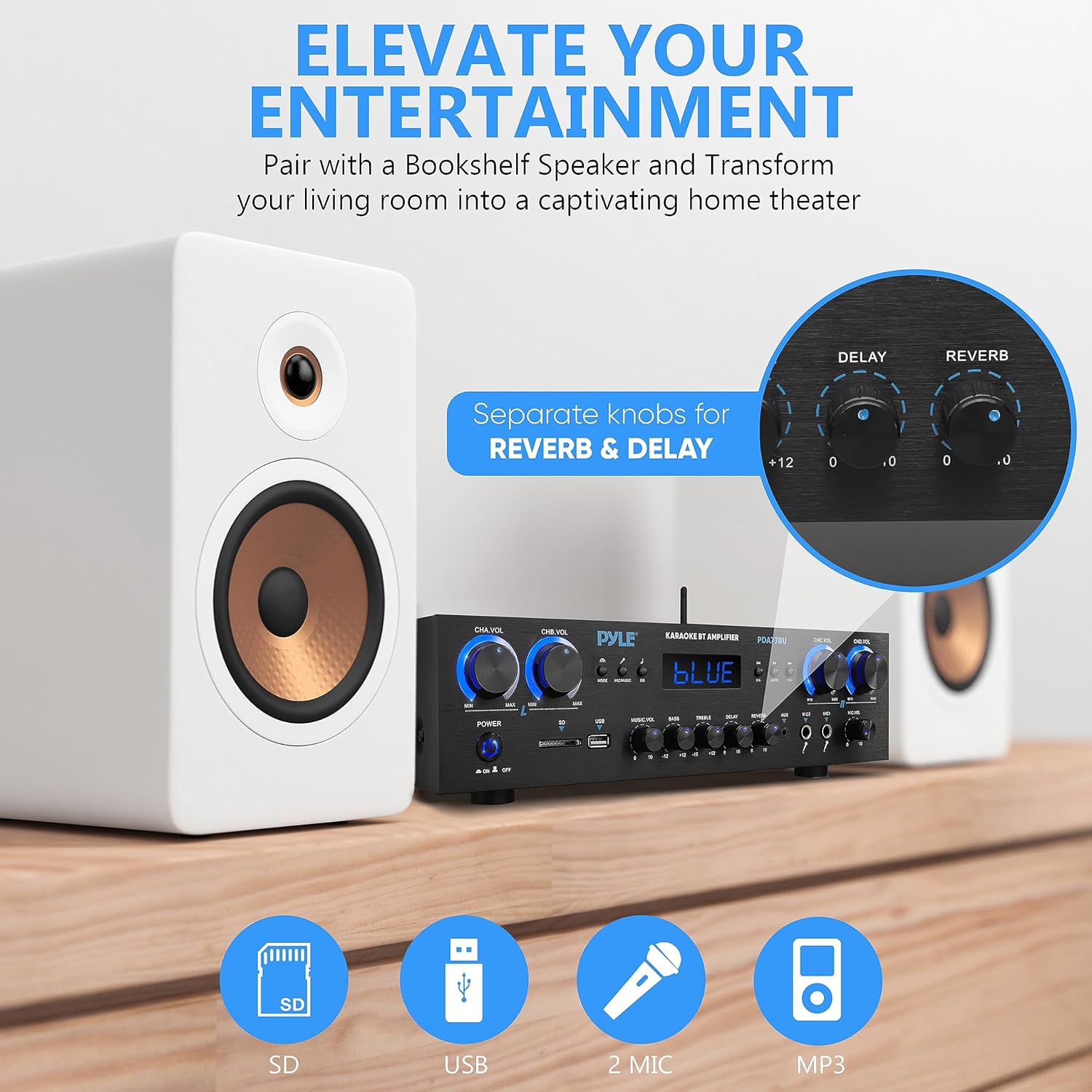
Figure 5: Visual representation of the Bluetooth pairing process with a smartphone, highlighting the amplifier's Bluetooth antenna and range.
4.3 Riproduzione USB/SD
Insert a USB flash drive or SD memory card into the respective slot on the front panel. The amplifier will automatically switch to USB/SD mode and begin playing compatible MP3 files. Use the front panel controls or remote to navigate tracks and adjust volume.

Figura 6: Il amplifier's front panel highlighting the USB and SD card reader, along with the dual microphone inputs.
4.4 Funzionamento della radio FM
Press the 'MODE' button to select FM radio. Use the 'CH+' and 'CH-' buttons to scan through available stations. The digital display will show the current frequency.
4.5 Utilizzo del microfono
Connect up to two microphones to the 1/4'' MIC input jacks. Adjust the 'MIC VOL' knob for overall microphone volume. Use the 'DELAY' and 'REVERB' knobs to add vocal effects for karaoke or public speaking.
4.6 telecomando
The included remote control allows for convenient operation from a distance, including power ON/OFF, input mode selection, volume adjustment, track navigation, and EQ settings.
5 Caratteristiche
- Exceptional 800W Peak Power: Delivers robust and dynamic sound for an immersive audio experience.
- Connettività Bluetooth 5.0 senza interruzioni: Wirelessly stream music from smartphones, tablets, and other Bluetooth-enabled devices with a range of up to 30 feet.
- Doppio ingresso microfono: Two 1/4'' microphone jacks with independent controls for Mic Delay, Reverb, and Volume, perfect for karaoke or announcements.
- Sorgenti audio versatili: Supports USB flash drives, SD memory cards, AUX input, RCA audio input, and FM radio for wide compatibility.
- Intuitive Front Panel Control Center: User-friendly interface with a digital LED display and blue illuminated knobs for easy adjustments, even in low light.
- 4-Channel Stereo Receiver: Supports up to 4 sets of speakers, allowing for flexible audio distribution in your home or studio.
Video 1: Prodotto finitoview Video. This video provides a brief visual demonstration of the Pyle PDA77BU amplifier's key features and functions.
6. Specifiche
| Caratteristica | Specificazione |
|---|---|
| Dimensioni del prodotto | 13.8 x 9.8 x 3.5 pollici |
| Peso dell'articolo | 11.14 libbre |
| Potenza di uscita | 800 Watt (picco) |
| Cosatage | 500 watt (RMS) |
| Numero di canali | 4 |
| Tecnologia di connettività | Bluetooth, Ausiliario, USB |
| Tipo di controllore | Mechanical button, Remote Control |
| Dispositivi compatibili | Smartphone, Tablet, Personal Computer, Altoparlante |
| Tipo di connettore | RCA, jack da 3.5 mm |
| Modalità di uscita audio | Circondare |
| Configurazione del canale audio surround | 2 |
| Versione Bluetooth | 5.0 |
| wireless Range | Fino a 30 piedi |
| Alimentazione elettrica | 110/240V (selectable) |
7. Manutenzione
To ensure the longevity and optimal performance of your Pyle PDA77BU amplifier, seguire queste linee guida per la manutenzione:
- Pulizia: Utilizzare un panno morbido e asciutto per pulire l'esterno dell'unità. Non utilizzare detergenti liquidi o spray aerosol, poiché potrebbero danneggiare la finitura o i componenti interni.
- Ventilazione: Assicurare una ventilazione adeguata attorno all' amplifier. Do not block the ventilation openings, especially the cooling fan on the rear panel. Overheating can lead to performance issues or damage.
- Posizionamento: Posizionare il amplifier on a stable, flat surface away from direct sunlight, heat sources, and excessive moisture. Avoid placing it near strong electromagnetic fields.
- Spegnimento quando non in uso: Se il ampSe il lifier non verrà utilizzato per un periodo prolungato, spegnerlo e scollegarlo dalla presa di corrente.
8. Risoluzione Dei Problemi
If you encounter any issues with your Pyle PDA77BU amplifier, fare riferimento ai seguenti problemi comuni e alle relative soluzioni:
| Problema | Possibile causa | Soluzione |
|---|---|---|
| Nessun potere | Power cable not securely connected; Power outlet not active; Power switch off. | Check power cable connection; Test outlet with another device; Ensure power switch is ON. |
| Nessuna uscita audio | Incorrect input source selected; Speaker wires loose or incorrectly connected; Volume levels too low; Mute function active. | Press MODE to select correct input; Check all speaker connections and polarity; Increase MUSIC VOL and channel volumes; Deactivate mute. |
| Bluetooth non si connette | Amplifier not in Bluetooth mode; Device too far from amplifier; Bluetooth not enabled on source device; Previous device still connected. | Select 'BLUE' mode; Move device closer (within 30ft); Enable Bluetooth on your device; Disconnect from other Bluetooth devices. |
| Suono distorto | Volume too high (clipping); Speaker impedance mismatch; Poor quality audio source. | Ridurre il volume; Assicurarsi che gli altoparlanti corrispondano amplifier's impedance; Use high-quality audio files/fonti. |
| Il microfono non funziona | Microfono non collegato correttamente; MIC VOL troppo basso; Microfono difettoso. | Ensure microphone is fully inserted; Increase MIC VOL; Test with another microphone. |
9. Garanzia e supporto
Pyle products are designed and manufactured to the highest quality standards. This product is covered by a manufacturer's warranty against defects in materials and workmanship. For specific warranty terms and conditions, please refer to the warranty card included with your product or visit the official Pyle USA websito.
For further assistance, technical support, or to download the full user manual in PDF format, please visit the Pyle USA website or contact their customer service department. You can also access the PDF user manual directly via this link: Pyle PDA77BU User Manual (PDF).